Wireless video receivers with HDMI make it easier to send content from a laptop, streaming device, camera, or media player to a display without running long video cables. The best options balance range, image quality, latency, connection stability, and setup simplicity.
This roundup compares 10 wireless HDMI transmitter-and-receiver kits, including models designed for presentations, multi-display installations, home entertainment, and longer-distance video distribution.
Best 10 Wireless Video Receivers with Hdmi Picks for 2026
Best Plug-and-Play Pick
Portable 1080p Wireless HDMI Kit

- No app or driver required
- Includes USB-C and mini-HDMI adapters
- Up to 165 feet in suitable conditions
Best For: Presentations, home entertainment, and portable device mirroring
Best for Filming
Wireless HDMI System with 7-Inch Monitor
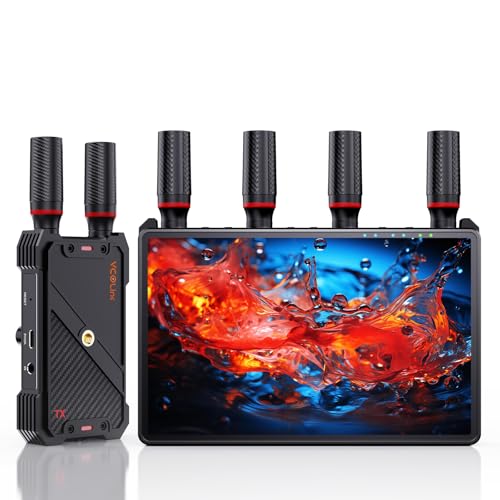
- Built-in 7-inch receiver monitor
- Supports up to five receivers
- Low-latency 1080p transmission
Best For: Filming, live production, and on-set collaboration
Best Multi-Display Option
VENTION Long-Range HDMI Extender

- Expands to multiple HDMI displays
- Real-time LED status indicators
- Up to 393 feet under suitable conditions
Best For: Multi-screen presentations, classrooms, and distributed displays
Best Budget Range Pick
Compact 1080p Wireless HDMI Extender

- No Wi-Fi, app, or Bluetooth required
- 1080p/60Hz output with 4K decoding
- Lightweight and includes HDMI adapters
Best For: Portable presentations, classrooms, and home entertainment
Best for Easy Setup
G9R Pro 1TX/4RX Wireless HDMI Kit

- Sends one source to up to four displays
- 1080p at 60Hz with pre-paired setup
- Dual-band transmission with USB-C adapter
Best For: Classrooms, conference rooms, events, and other multi-screen setups
Best Long-Range Option
Vrriis 1300FT Wireless HDMI System

- Claims up to 1300 feet in open areas
- 1080p/60Hz with stated 0.05s latency
- Adds loop-out, dual HDMI out, and IR support
Best For: Long-distance monitoring and flexible professional-style installations
Best Portable Pick
PWAYTEK Plug-and-Play Wireless HDMI Kit

- Wireless 1080p/60Hz video and audio transmission
- Supports mirroring, extension, and 4K decoding
- Includes mini-HDMI and micro-HDMI adapters
Best For: Everyday laptop, camera, presentation, and home-display use
Best Long-Range 4K-Decode Pick

- Up to 360 feet in open spaces
- 4K decoding with 1080p/60Hz output
- Supports mirror, extend, and multi-transmitter use
Best For: Large rooms, events, presentations, and home theaters
Best for Extended HDMI Distribution
820-Foot Wireless HDMI Extender

- Claims up to 820-foot open-field range
- Includes loop out and IR source control
- Supports up to four receivers
Best For: Large open spaces, offices, churches, and multi-display setups
Best Portable Setup
Compact 50-Meter Wireless HDMI Kit

- Pre-paired plug-and-play operation
- 4K decoding with 1080p/60Hz output
- Supports mirror and extended-display modes
Best For: Portable presentations, classrooms, and home entertainment
Best Plug-and-Play Pick – Portable 1080p Wireless HDMI Kit
This kit is a practical choice among wireless video receivers with HDMI for mirroring a laptop, phone, camera, or other source to a TV, projector, or monitor. It supports up to 1080p at 60Hz, requires no app or driver, and includes adapters for several USB-C and mini-HDMI devices.
Best For: Home entertainment, presentations, classrooms, and users who want broad device compatibility in a portable kit.
Pros:
- Plug-and-play setup without an app or driver
- Supports 1080p at 60Hz and 3D content
- Advertised transmission range reaches 165 feet in suitable conditions
- Includes USB-C, mini-HDMI, and HDMI accessories
Cons:
- Performance and range can drop substantially through cement walls or between floors
- Package does not include a 5V/2A charger
- Despite the product title, the supplied details emphasize 1080p output rather than 4K output
Its included adapters and simple pairing make this a flexible everyday option. Just plan for separate power and more limited range when walls or other obstructions are involved.
Best for Filming – Wireless HDMI System with 7-Inch Monitor
For production work, this is one of the more feature-rich wireless video receivers with HDMI. The receiver has a built-in 7-inch monitor, HDMI output for a larger display, loop-out on the transmitter, IR remote control, and support for up to five receivers.
Best For: Camera crews, live streaming, filming, and on-set monitoring where low latency and multi-viewer access matter.
Pros:
- Built-in 7-inch monitoring screen reduces the need for extra equipment
- 1080p at 60Hz transmission with claimed latency below 0.05 seconds
- Supports one transmitter broadcasting to up to five receivers
- Offers HDMI loop-out, IR control, and NP-F battery, power-bank, or USB-C power options
Cons:
- Advertised 1312-foot range is specified for line-of-sight use
- External HDMI cable is not included
- Smartphone and tablet use requires a Type-C-to-HDMI cable
This system is aimed at serious monitoring rather than casual living-room casting. Its integrated screen and expandable receiver setup can simplify a shoot, while the power and mounting options support mobile production.
Best Multi-Display Option – VENTION Long-Range HDMI Extender
VENTION’s kit stands out among wireless video receivers with HDMI for multi-screen distribution. The supplied 1-transmitter/2-receiver package supports expansion to multiple displays, provides real-time LED status indicators, and outputs 1080p at 60fps while decoding 4K content.
Best For: Presentations, classrooms, multi-TV setups, and installations that need several synchronized displays.
Pros:
- Supports expansion to multiple HDMI receivers and displays
- LED indicators show connection, signal, output, and power status
- Claims up to 393 feet of transmission in suitable conditions
- Includes thermal design with temperature control and heat vents
Cons:
- Each transmitter and receiver needs its own power source, with 5V/2A recommended
- Walls and other obstacles can reduce range and speed
- Smartphones and tablets must support HDMI output for direct use
This is a strong fit when one source must reach several screens without running long HDMI cables. Confirm power availability and the actual wall layout before relying on its maximum range.
Best Budget Range Pick – Compact 1080p Wireless HDMI Extender
This compact extender is a straightforward choice among wireless video receivers with HDMI for meetings, teaching, entertainment, and event use. It needs no Wi-Fi, app, or Bluetooth, supports 4K decoding with 1080p/60Hz output, and uses dual-band transmission for a claimed 328-foot outdoor range.
Best For: Presenters, teachers, home-theater users, event organizers, and anyone replacing a long HDMI cable.
Pros:
- Plug-and-play operation without Wi-Fi, an app, or Bluetooth
- Supports 1080p at 60Hz output with 4K decoding
- Claims up to 328 feet outdoors and 165 feet indoors
- Lightweight design includes micro-HDMI and mini-HDMI adapters
Cons:
- Both transmitter and receiver require power
- Walls and obstacles can reduce transmission range and speed
- Maximum range claims are environment-dependent
Its small size and broad source compatibility make it convenient for portable presentations and home setups. It offers useful reach on paper, but the indoor distance should be judged against the room layout and obstructions.
Best for Easy Setup – G9R Pro 1TX/4RX Wireless HDMI Kit
For buyers comparing wireless video receivers with HDMI, the YAOMAISI G9R Pro stands out for sending one source to as many as four displays at once. It supports 1080p at 60Hz, uses pre-paired components, and is designed for presentations, events, classrooms, and multi-screen installations.
Best For: Simultaneously expanding a laptop, TV box, or other HDMI-output source to multiple TVs or monitors.
Pros:
- Includes one transmitter and four receivers for simultaneous multi-screen output.
- Supports 1080p at 60Hz with low claimed latency and synchronized audio.
- Uses 2.4GHz/5.8GHz transmission and includes a USB-C-to-HDMI adapter.
- Pre-paired, plug-and-play setup requires no Wi-Fi, Bluetooth, or driver installation.
Cons:
- The transmitter must connect to an HDMI-output device, not directly to a TV.
- Transmission through walls or ceilings is limited compared with the open-area range.
- The transmitter supports 1080p output only, despite the receiver’s 4K decoding support.
The G9R Pro is a practical choice when one source needs to feed several screens without running long HDMI cables. Confirm that your source can output 1080p and plan for stable 5V/1A power for both transmitter and receivers.
Best Long-Range Option – Vrriis 1300FT Wireless HDMI System
Among wireless video receivers with HDMI, this Vrriis kit is aimed at long-distance point-to-point transmission. It combines 1080p at 60Hz, a claimed 0.05-second delay, transmitter loop-out, receiver-side dual HDMI output, and IR support for setups involving cameras, laptops, projectors, or set-top boxes.
Best For: Long-range monitoring and source-to-display setups that benefit from local viewing, dual outputs, or remote source control.
Pros:
- Claims transmission up to 1300 feet in an open field without interference.
- Supports 1080p at 60Hz with a stated 0.05-second latency.
- Transmitter loop-out and dual HDMI output on the receiver support multiple viewing points.
- Offers IR remote extension and several power options, including USB-C and NP-F batteries.
Cons:
- Walls, metal, brick, and glass can substantially reduce the stated range.
- Batteries are not included.
- Adding more receivers can reduce the wireless transmission distance.
This kit makes the most sense for buyers prioritizing range and monitoring flexibility over a compact, basic setup. Its loop-out, IR capability, and multiple power choices add useful versatility, but real-world coverage will depend heavily on the environment.
Best Portable Pick – PWAYTEK Plug-and-Play Wireless HDMI Kit
For a straightforward wireless video receiver with HDMI, the PWAYTEK DT269W-H is a compact transmitter-and-receiver pair for sending 1080p video and audio to a TV, projector, or monitor. It supports mirroring and extension modes, 4K decoding, and a claimed range of up to 328 feet.
Best For: Laptop, camera, or set-top-box users who want a simple wireless connection to one display.
Pros:
- Plug-and-play design connects the transmitter to the source and receiver to the display.
- Outputs 1080p at 60Hz and supports 4K decoding.
- Offers both screen mirroring and extension modes.
- Includes mini-HDMI and micro-HDMI adapters for added device compatibility.
Cons:
- The stated range can be affected by walls and other obstacles.
- Wireless performance may require following the recommended connection sequence and reset procedure.
- The transmitter’s cable-free power feature is limited to laptops manufactured after 2022.
The DT269W-H is a sensible option for everyday presentations, learning, and home viewing when a compact pair is more useful than a multi-receiver system. Check your source connector and laptop compatibility before relying on the transmitter’s power-saving feature.
Best Long-Range 4K-Decode Pick – 360-Foot Wireless HDMI Kit
This wireless video receiver with HDMI is designed for users who want extended-range streaming without Wi-Fi, apps, or software. It decodes up to 4K content while delivering 1080p at 60Hz, and its dual-band connection is suited to home theaters, offices, classrooms, and events.
Best For: Large rooms, presentations, live events, home entertainment, and users who need extended or mirrored displays.
Pros:
- Up to 360 feet in open spaces and up to 165 feet indoors, according to the supplied specifications.
- Supports 2.4GHz and 5.8GHz transmission for improved stability and interference resistance.
- Offers 4K decoding with 1080p/60Hz output, near-zero-latency operation, and mirror or extend modes.
- Supports one receiver with up to eight transmitters and includes Micro HDMI and Mini HDMI adapters.
Cons:
- The advertised range can be reduced by walls and other obstacles.
- Output is limited to 1080p at 60Hz even though the device supports 4K decoding.
- Its broader feature set may be more than needed for simple short-range setups.
Choose this model when range, flexible multi-transmitter use, and cooling-focused design matter more than native 4K output. It is especially practical for larger spaces and demanding presentation or entertainment setups.
Best for Extended HDMI Distribution – 820-Foot Wireless HDMI Extender
This wireless video receiver with HDMI stands out for its claimed long-distance transmission and useful monitoring features. It sends 1080p video at up to 60Hz, includes transmitter-side loop out, and supports IR control for managing the source from the receiver location.
Best For: Large open spaces, conference rooms, churches, offices, and setups that need local monitoring or remote source control.
Pros:
- Claims up to 820 feet of 1080p transmission in an open field without interference.
- Transmitter loop out allows a local display to monitor the source.
- IR support enables control of the HDMI source from the secondary display location.
- Supports up to four receivers, with stated range adjustments as receivers are added.
Cons:
- Walls, glass, and other obstructions can significantly reduce signal coverage.
- The system is limited to 1080p rather than 4K video output.
- Transmission distance decreases when using multiple receivers.
This is a strong choice when distribution flexibility is more important than 4K resolution. The loop-out and IR features make it particularly useful for professional installations where the source needs to be viewed or controlled from more than one location.
Best Portable Setup – Compact 50-Meter Wireless HDMI Kit
This wireless video receiver with HDMI offers a straightforward portable solution for sending video from a PC, TV box, console, or camera source to a TV, monitor, or projector. It arrives pre-paired, requires no app or network connection, and supports 4K decoding with 1080p/60Hz output.
Best For: Portable presentations, classrooms, home entertainment, conference rooms, and users who want a lightweight plug-and-play kit.
Pros:
- Pre-paired design requires no drivers, apps, or network connection.
- Offers up to 165 feet in open areas and up to 100 feet indoors, according to the supplied notes.
- Supports 4K decoding, 1080p/60Hz output, and both mirroring and extended-display modes.
- Lightweight 47-gram design includes Micro HDMI and Mini HDMI adapters for added compatibility.
Cons:
- Walls, floors, and ceilings can reduce the transmission range.
- It outputs at 1080p/60Hz rather than providing native 4K output.
- The supplied details identify compatibility broadly but do not list every supported source device.
This model is a sensible pick for buyers who prioritize easy setup and portability. Its 50-meter open-area range is suitable for many rooms, while mirror and extend modes add flexibility for presentations and multitasking.
How We Picked the Best Wireless Video Receivers with Hdmi
We focused on the features that matter most in everyday wireless video use: supported resolution, stated transmission range, operating-band flexibility, latency, loop-out functionality, multi-receiver support, included accessories, and plug-and-play setup. We also considered whether each kit is better suited to home entertainment, business presentations, classrooms, signage, or larger installations.
Wireless range claims are measured under ideal conditions and can decrease because of walls, interference, crowded Wi-Fi networks, and electrical equipment. Treat published distance as a comparison point rather than a guarantee.
Quick Comparison
- Best for simple setups: Choose a plug-and-play kit with a dedicated transmitter and receiver.
- Best for multiple displays: Look for support for several receivers or simultaneous expansion.
- Best for presentations: Prioritize stable 1080p output, low latency, and easy source switching.
- Best for longer distances: Consider dual-band 2.4GHz and 5GHz systems with strong line-of-sight performance.
- Best for monitoring: A model with loop-out can keep a local display connected while sending video wirelessly elsewhere.
Key Buying Factors for Wireless Video Receivers with Hdmi
Resolution and Compatibility
Many kits accept or decode a 4K source but output 1080p wirelessly. Confirm both the input and output specifications, especially if you need native 4K at the receiving display. Also check HDMI version compatibility, HDCP support, and whether the system works with your laptop, game console, camera, or streaming player.
Range, Frequency, and Interference
Long-range models often use 2.4GHz, 5GHz, or both. The 2.4GHz band may travel farther through obstacles, while 5GHz can offer faster performance with less congestion in some environments. For the most reliable results, keep the transmitter and receiver in clear line of sight whenever possible.
Latency and Signal Stability
Low latency matters for presentations, live cameras, and gaming. A small delay may be acceptable for movies or signage but distracting for interactive content. Look for clear latency claims and consider a wired connection when real-time response is critical.
Multi-Receiver Support and Loop Out
If one source must feed several screens, verify the maximum receiver count and whether all displays can show the same content simultaneously. Loop out is useful when you want to retain a nearby wired monitor while transmitting to another display.
Installation and Power
Check the required power adapters, USB power needs, antenna placement, remote controls, and mounting options. Plug-and-play systems are convenient, but larger installations may require careful channel selection and cable planning.
Who Should Buy Which Wireless Video Receivers with Hdmi?
Home users should favor compact kits with straightforward pairing and dependable 1080p output. Presenters and educators will benefit from low latency, stable connections, and quick source changes. Businesses and event venues should prioritize multi-receiver support, loop out, and longer practical range. Digital-signage and monitoring users should look for continuous-operation reliability, clear status indicators, and compatibility with the source devices they plan to leave connected.