A good Legion Go stand makes a big difference in comfort, stability, and desk organization. Whether you want a simple upright holder or a dock-style setup with charging and video output, the right pick can improve how you play, watch, and work.
Below, we focus on options that balance fit, sturdiness, portability, and useful extras so you can choose the best stand for your Legion Go setup.
Best 10 Legion Go Stand Picks for 2026
Clear Desk Stand
Acrylic Stand Base for Lenovo Legion GO

- Custom-fit for Legion GO 2023
- Open charging cutout for wired play
- 4mm acrylic with anti-slip pads
Best For: Minimal desktop charging and display
Modular Mount Kit
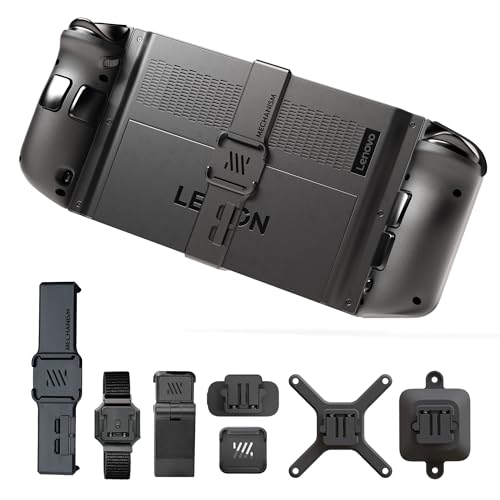
- Includes kickstand, VESA, wall, and battery mounting
- Supports accessories like hubs, SSDs, and power packs
- Case-friendly adapter for most hard cases
Best For: Custom mounting setups and accessory expansion
Portable Viewing Stand

- Made specifically for Legion Go S
- Compact, lightweight, and easy to carry
- Fixed ergonomic viewing angle
Best For: Travel-friendly support for Legion Go S
5-in-1 Docking Hub

- 4K@120Hz HDMI 2.1 output
- 100W PD charging with Ethernet
- Works with Legion Go, Legion Go S, and more
Best For: Desk docking with display and wired networking
Ergonomic Comfort Pick
Legion Go Grip for Better Control
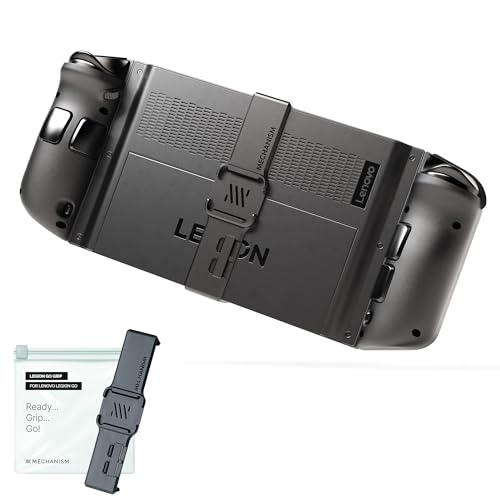
- Custom fit for Lenovo Legion Go
- Textured surface helps improve control
- Snap-on design makes installation easy
Best For: Gamers who want a more secure handheld feel
Connectivity Upgrade Pick
6-in-1 Legion Go USB-C Hub Dock

- Adds charging, video, and port expansion
- Supports Ethernet and 4K at 60Hz
- Slim design helps reduce cable clutter
Best For: Players building a desk-ready Legion Go setup
Desktop Stand Value Pick

- Works with Legion Go and other handhelds
- Metal build with non-slip base pads
- Open design helps with ventilation
Best For: Users who want a simple tabletop holder
6-in-1 Docking Hub
Legion Go stand with 4K dock and USB expansion

- HDMI 2.0 output up to 4K@60Hz
- Includes Gigabit Ethernet and 3 USB-A 3.0 ports
- Works with Legion Go, Steam Deck, and ROG Ally
Best For: Desk users who want a stand plus dock in one
Metal Desktop Base
Legion Go stand for stable tabletop charging

- Metal base with anti-slip silicone pad
- Rear cutout supports heat dissipation
- Lets you charge or connect without removing the device
Best For: Simple desk stand use with broad handheld compatibility
White Metal Desktop Base
Legion Go stand in white for a tidy desk

- White metal stand with anti-slip silicone pad
- Rear opening helps with heat dissipation
- Supports charging and cable access while seated
Best For: White desk setups that need a simple handheld holder
Clear Desk Stand – Acrylic Stand Base for Lenovo Legion GO
If you want a simple legion go stand for a clean desk setup, this acrylic base keeps the handheld upright without adding bulk or distracting from your space. It is made specifically for the Lenovo Legion GO 8.8-inch model, and the open charging cutout makes it easier to keep playing while plugged in.
Best For: Legion GO owners who want a minimal tabletop stand with charging access.
Pros:
- Custom-fit for the Lenovo Legion GO 2023 handheld
- Charging opening supports wired use while docked on the stand
- 4mm laser-cut acrylic gives it a sturdy, clean look
- Rubber pads help keep the stand from sliding on the table
Cons:
- Stand only; the handheld console is not included
- Fixed tabletop design is less versatile than multi-angle solutions
- Not intended for users who want accessory mounting options
This is a straightforward pick if you mainly want stability, a tidy footprint, and easy charging access. It fits the Legion GO with or without the protective case, so it works well as a dedicated desktop holder.
Modular Mount Kit – 7-in-1 Bundle for Legion Go
A modular legion go stand solution makes sense if you want more than a basic cradle, and this bundle is built around flexible mounting. It is designed to attach accessories, support a kickstand setup, and let you mount the Legion Go on a wall, desk, or VESA-compatible setup.
Best For: Players who want a customizable mounting system for accessories and multiple setup styles.
Pros:
- Bundle includes kickstand, battery, VESA, and wall mounting options
- Lets you attach accessories like battery packs, USB-C hubs, and SSDs
- Adhesive pucks can turn other gear into Legion Go accessories
- Case-friendly adapter works with most hard cases
Cons:
- More complex than a simple tabletop stand
- Best suited to users who want a modular ecosystem
- May be more than you need if you only want basic support
For a configurable setup, this bundle offers a lot of flexibility in one package. It is less about minimalism and more about building a personalized Legion Go station around your play style.
Portable Viewing Stand – Stand for Legion Go S
If you need a legion go stand for the Go S model specifically, this compact option focuses on stable viewing and simple everyday use. Its fixed angle and ergonomic shape are aimed at reducing neck and back strain during long gaming or media sessions, while staying easy to carry.
Best For: Legion Go S owners who want a lightweight stand for travel or desk use.
Pros:
- Designed specifically for Legion Go S
- Compact and portable for gaming on the go
- Ergonomic fixed angle supports more comfortable viewing
- Simple setup with no assembly required
Cons:
- Fixed angle only, with no adjustability mentioned
- Built for Legion Go S, so it is not the broadest fit option
- Basic design is less feature-rich than modular alternatives
This is a practical choice if you want a no-fuss stand that is easy to move and quick to use. It is best viewed as a simple support accessory rather than a full-featured dock or mount.
5-in-1 Docking Hub – JSAUX Dock for Legion Go S
A legion go stand can be useful, but if your priority is external display and charging, this JSAUX dock is built for a more complete desktop gaming setup. It adds 4K@120Hz HDMI output, 100W PD charging, Ethernet, and USB ports, making it a strong hub for connected play.
Best For: Users who want a docking station for TV, monitor, and wired network use.
Pros:
- HDMI 2.1 supports up to 4K@120Hz output
- 100W PD charging helps power handhelds in Turbo Mode
- Built-in Ethernet offers a stable wired connection
- Compatible with Steam Deck, ROG Ally, Legion Go, Legion Go S, and MSI Claw
Cons:
- Not for ROG XBOX Ally or XBOX Ally X
- More of a dock than a true handheld stand
- Best when paired with an external display and charger
If you want a dock that expands your handheld into a bigger setup, this is the most feature-packed option in the group. It is especially useful for players who care about smooth output, charging, and wired stability in one device.
Ergonomic Comfort Pick – Legion Go Grip for Better Control
If you want a legion go stand-style accessory that improves how the handheld feels in your hands, this ergonomic grip is built for comfort and control. It’s custom-fit for the Lenovo Legion Go, adds a high-traction texture, and is designed to make long sessions feel steadier and less tiring.
Best For: Players who want a more secure, comfortable hold for handheld gaming and quick snap-on use.
Pros:
- Custom-built fit for the Lenovo Legion Go
- Textured, high-traction surface for better grip
- Tool-free snap-on install for easy removal
- Lightweight yet durable construction
Cons:
- Focused on grip comfort rather than desk support
- Only relevant for Lenovo Legion Go owners
This is a practical pick if your priority is steadier handheld play and better ergonomics. It’s especially useful for users who switch between docked, handheld, and travel modes and want an accessory that can keep up.
Connectivity Upgrade Pick – 6-in-1 Legion Go USB-C Hub Dock
If you need a legion go stand alternative that expands your setup, this USB-C hub dock is built for charging, display output, and wired connectivity. It adds port expansion, supports Ethernet, and delivers up to 4K at 60Hz, making it a strong option for a more complete Legion Go desk setup.
Best For: Users who want one dock for charging, video output, Ethernet, and extra ports.
Pros:
- 6-in-1 design adds multiple connection options
- Supports 4K visuals at 60Hz
- Includes Ethernet support for stable connectivity
- Compact, space-saving dock format
Cons:
- Requires Windows 11
- More of a dock than a simple stand
This dock makes sense if you want to turn the Legion Go into a more stationary gaming setup. It focuses on practical expansion and cleaner cable management rather than just holding the device upright.
Desktop Stand Value Pick – Metal Handheld Console Stand
If you’re shopping for a legion go stand to keep the device upright on a desk, this metal holder is the most straightforward pick here. It’s compatible with the Legion Go and other handhelds, uses a sturdy metal frame with non-slip pads, and has an open design that helps ventilation during use.
Best For: Anyone who wants a simple desktop stand for charging, watching media, or hands-free play.
Pros:
- Compatible with Legion Go and other handheld consoles
- Metal build with non-slip silicone pads for stability
- Open structure supports airflow and cooling
- Compact and portable for home or travel use
Cons:
- Doesn’t add ports or charging features
- Generic design is less Legion Go-specific than dedicated accessories
For a basic stand, this one keeps things simple and functional. It’s a good fit if you mainly want a stable tabletop holder that can support different viewing and charging scenarios without taking up much space.
6-in-1 Docking Hub – Legion Go stand with 4K dock and USB expansion
If you want a legion go stand that does more than just hold the handheld, this 6-in-1 dock adds display output, wired networking, and multiple USB ports in one compact setup. It is made for desktop-style use, with HDMI 2.0 up to 4K@60Hz, Gigabit Ethernet, and three USB-A 3.0 ports for accessories.
Best For: Players who want a Legion Go stand and dock combo for TV play, desk charging, and accessory expansion.
Pros:
- 6-in-1 design combines stand support with HDMI, Ethernet, USB, and charging
- HDMI 2.0 supports up to 4K@60Hz for external display use
- Gigabit Ethernet and 3 USB-A 3.0 ports help connect wired peripherals
- Compatible with Legion Go, Steam Deck, ROG Ally, and MacBook Pro
Cons:
- Notes specify the HDMI connection order matters for display output
- Requires a 15V/3A power setup per the product instructions
- White finish may not match every gaming desk setup
For buyers who want one accessory to cover docking, charging, and connectivity, this is a practical Legion Go stand option. Its main strength is convenience: it keeps the handheld upright while also turning it into a more desktop-friendly station.
Metal Desktop Base – Legion Go stand for stable tabletop charging
This legion go stand is built as a simple desktop holder for keeping a handheld upright on a desk while it charges or connects to accessories. The metal base and anti-slip silicone pad are aimed at stable tabletop use, and the rear cutout helps with heat dissipation in desktop mode.
Best For: Users who want a straightforward Legion Go stand for tabletop storage, charging, and everyday desk use.
Pros:
- Universal fit supports Legion Go and many similar handheld consoles
- Metal construction with anti-slip silicone pad adds stability
- Back cutout design helps airflow and heat dissipation
- Allows charging or cable connection without removing the handheld
Cons:
- Does not add docking ports or display output
- Tabletop-only design is less versatile than a full dock
- Compatibility is described for similar-sized devices, so fit may vary
If you only need a clean, stable way to prop up your handheld, this is one of the most practical Legion Go stand choices. It keeps the focus on durability and convenience rather than extra features.
White Metal Desktop Base – Legion Go stand in white for a tidy desk
For buyers looking for a clean, compact legion go stand, this white desktop base offers the same universal handheld support in a lighter-looking finish. It is designed for tabletop use with a metal body, anti-slip silicone pad, and a rear opening that helps with heat dissipation while the device sits on the desk.
Best For: People who want a white Legion Go stand for a tidy desktop setup and easy charging access.
Pros:
- Universal desktop holder supports Legion Go and other similar handhelds
- Metal construction with anti-slip silicone pad improves stability
- Rear cutout design supports better airflow in desktop mode
- Lets you charge or connect accessories without removing the handheld
Cons:
- No dock functions such as HDMI or Ethernet
- Tabletop stand only, so it is not meant for travel protection
- White color may show dirt more easily than darker finishes
This version makes sense if you want the same basic stand benefits with a brighter look. It is a practical Legion Go stand for keeping your handheld accessible, upright, and ready to use on a desk.
How We Picked the Best Legion Go Stand Options
We looked for stands and dock-style accessories that offer dependable support, practical everyday use, and compatibility with the Legion Go form factor. Priority went to anti-slip designs, solid materials, adjustable or ergonomic positioning, and useful features such as charging, USB expansion, and video output where relevant.
Because buyers use a Legion Go Stand in different ways, we also considered portability, desk footprint, and whether the product is best for simple display support or a more complete gaming station.
Quick Comparison
Simple desktop stands are best for compact support, quick setup, and travel. Docking stations are better if you want one-cable charging, monitor output, Ethernet, and accessory ports. Grip-focused accessories are ideal if your main goal is improving handheld comfort rather than creating a desk setup.
Key Buying Factors for Legion Go Stand
Stability and Grip
Look for a wide base, anti-slip pads, and a shape that keeps the device centered. A stable stand matters most if you use the Legion Go on a crowded desk or frequently dock and undock it.
Compatibility and Fit
Not every stand fits every handheld equally well. Check whether the design supports the Legion Go securely, especially if it is also advertised for other devices. A proper fit helps reduce wobble and accidental tipping.
Charging and Connectivity
If you want more than basic support, a dock can add 100W USB-C charging, HDMI display output, Ethernet, and USB-A ports. That makes it easier to run a monitor, charge while playing, and connect peripherals.
Portability and Desk Space
Choose a lightweight stand if you travel or shift setups often. For a permanent desk or TV station, a larger dock or mount kit may be worth the extra space because it adds more functionality.
Build Material
Metal stands tend to feel more durable and stable, while acrylic or compact plastic options can be lighter and easier to move. The right material depends on whether you value strength, portability, or a low-profile look.
Who Should Buy Which Legion Go Stand?
If you want a clean, simple setup, choose a basic desktop stand. If you need external display support and wired accessories, go with a docking station. If comfort during handheld play matters more than desktop use, a grip accessory may be the smarter buy. And if you want the most flexible setup possible, a multi-use mounting kit offers the broadest range of placement options.
In short, the best Legion Go Stand depends on whether your priority is stability, docking convenience, portability, or ergonomic support.