A good Legion Go dock turns handheld play into a more flexible desktop-style setup, with easier charging, external display support, and room for your favorite peripherals.
Below, we focus on docks that balance video output, power delivery, ports, and compatibility so you can choose the right fit for your gaming habits.
Best 10 Legion Go Dock Picks for 2026
Premium Big-Screen Upgrade

- 4K@120Hz HDMI 2.1 output
- 100W PD charging support
- 3 USB 3.0 ports plus Gigabit Ethernet
Best For: High-refresh docking for Legion Go and other handhelds
Official Legion Go Pick
Lenovo Legion Go USB-C Hub Dock

- Made specifically for Legion Go
- 4K@60Hz video output
- 100W charging with Ethernet support
Best For: Legion Go users who want an official, simple dock
Budget-Friendly Station

- 4K@60Hz and 2K@120Hz HDMI output
- 100W PD charging support
- Raised base fits protruding-grip handhelds
Best For: Affordable, compact docking for Legion Go and similar handhelds
High-Refresh All-Rounder

- Up to 4K@120Hz HDMI 2.1 output
- 100W PD charging with protection
- USB-A, USB-C, and Gigabit Ethernet
Best For: Portable high-refresh docking across Legion Go and other devices
High-Refresh Docking Station
iVANKY 8-in-1 4K@144Hz Docking Station

- 4K@144Hz HDMI 2.1 output
- 100W PD with 1Gbps Ethernet
- 3 USB-A 3.0 ports for accessories
Best For: High-refresh gaming with wired networking and extra USB ports
Most Compatible Dock
JSAUX 6-in-1 Wide Compatibility Dock

- Fits Legion Go and many other handhelds
- 4K@120Hz HDMI with Ethernet
- 100W pass-through charging
Best For: Broad compatibility and simple desktop-style docking
All-in-One Expansion Dock
DOCKCASE & CHIZHA SSD Expansion Dock

- Adds up to 4TB NVMe SSD storage
- Includes optical audio and Ethernet
- Touchscreen monitor plus cooling fan
Best For: Storage expansion and premium desk or media setups
Compact Modular Dock

- 4K@120Hz HDMI and Gigabit Ethernet
- 100W charging support
- Modular dock-and-stand design
Best For: Users who want a compact, flexible dock for desk or travel use
Dock and Charger Bundle
JSAUX HB0609 Dock + 100W Charger

- Dock bundled with 100W PD charger
- 4K@120Hz HDMI and Gigabit Ethernet
- Supports Legion Go up to 65W input
Best For: People who want a complete docking and charging bundle in one box
White Finish Dock
JSAUX White HB0609 Legion Go Dock
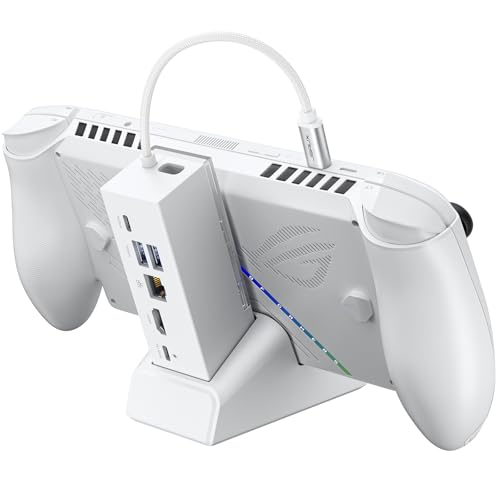
- White version of the HB0609 dock
- 4K@120Hz HDMI and Gigabit Ethernet
- Modular dock-or-stand design
Best For: Buyers who want the HB0609 feature set in a white finish
Premium Big-Screen Upgrade – JSAUX 6-in-1 Docking Station
If you want a versatile legion go dock that can also serve other handhelds, this JSAUX 6-in-1 is built for bigger displays, fast charging, and wired networking. Its HDMI 2.1 output, 100W PD support, and three USB-A 3.0 ports make it a practical choice for a clean desktop-style setup.
Best For: Players who want a high-refresh dock for Legion Go, Steam Deck, or Ally-class handhelds.
Pros:
- 4K@120Hz HDMI 2.1 output for smoother external display gaming
- 100W PD charging helps support Turbo Mode sessions
- Gigabit Ethernet for stable online play and faster downloads
- 3 USB 3.0 ports add room for controllers and accessories
Cons:
- Not compatible with ROG XBOX Ally / XBOX Ally X
- More feature-rich than a basic dock, so it may be more than some users need
Overall, this is a strong all-around legion go dock if you want high refresh output, wired internet, and broad handheld compatibility in one hub. It is especially appealing for users who regularly dock into a monitor and want more expansion than a minimal stand-style option.
Official Legion Go Pick – Lenovo Legion Go USB-C Hub Dock
This legion go dock is designed specifically for the Legion Go, so it is a straightforward choice if you want something made for that system without extra guesswork. It adds 4K video output, Ethernet, charging, and port expansion in a slim six-in-one layout.
Best For: Legion Go owners who want an official dock with simple, focused compatibility.
Pros:
- Built for Legion Go compatibility
- 4K@60Hz display output for external monitors or TVs
- 100W charging support for power delivery while gaming
- Ethernet and multiple ports reduce cable clutter
Cons:
- Only offers 4K@60Hz, not higher-refresh HDMI output
- Compatible device support is narrower than universal docks
If you primarily use a Legion Go and want a dock that keeps the setup simple, this Lenovo option is easy to recommend. It covers the essentials well and is a good fit for players who value official accessory support over extra features.
Budget-Friendly Station – JSAUX 4-in-1 Docking Station
For buyers looking for a practical legion go dock without extra bulk, this JSAUX 4-in-1 keeps the essentials in a compact form. It supports 4K@60Hz output, 100W charging, and a raised base design that works with handhelds that have protruding grips.
Best For: Budget-minded gamers who want a simple dock for a TV or monitor setup.
Pros:
- Raised base design supports a wide range of handhelds
- 4K@60Hz or 2K@120Hz HDMI output options
- 100W PD charging keeps supported handhelds powered
- Two USB 2.0 ports for basic peripherals
Cons:
- USB 2.0 ports are slower than USB 3.0 alternatives
- Fewer total ports than 6-in-1 docks
This is a sensible pick if you mainly need display output, charging, and a couple of accessory ports in a smaller package. It is less expansive than premium docks, but it covers the core docked-gaming essentials well.
High-Refresh All-Rounder – UGREEN 6-in-1 Steam Deck Dock
If you want a legion go dock with top-end display support and broad device compatibility, this UGREEN model is a strong all-round option. It combines HDMI 2.1 output, 100W PD charging, USB-A and USB-C data ports, and Gigabit Ethernet in a foldable stand design.
Best For: Users who want high-refresh output and a portable dock that works across multiple devices.
Pros:
- Supports up to 4K@120Hz over HDMI 2.1
- Includes VRR, FreeSync, and G-Sync support on compatible displays
- 100W PD 3.0 charging with built-in protection circuitry
- USB-A, USB-C, and Gigabit Ethernet for flexible connectivity
Cons:
- To get the full 4K@120Hz experience, your display must support it
- The broad compatibility may be more than Legion Go-only buyers need
As a dock for docked gaming, this UGREEN option stands out for its high-refresh output and strong feature mix. It is a practical choice if you want one hub that can move between a handheld, laptop, or other compatible device without sacrificing display performance.
High-Refresh Docking Station – iVANKY 8-in-1 4K@144Hz Docking Station
If you want a legion go dock that keeps up with big-screen play and everyday desk use, the iVANKY 8-in-1 is built around high refresh output, wired networking, and plenty of ports. It supports Legion Go along with other popular handhelds, and its HDMI 2.1 output is aimed at smooth external display gaming.
Best For: Players who want a feature-packed dock with 4K high-refresh support, Ethernet, and extra USB ports for a living-room or desk setup.
Pros:
- 4K@144Hz HDMI output for smooth external display gaming.
- 100W power delivery helps keep supported handhelds charged during play.
- Includes 1Gbps Ethernet plus three USB-A 3.0 ports for peripherals.
- Compatible with Legion Go, ROG Ally, MSI Claw, and Steam Deck models.
Cons:
- Requires firmware updates to avoid HDMI mirroring issues.
- Some features are tied to specific device or BIOS versions for best results.
Overall, this is a strong all-around option if you want a legion go dock that emphasizes display quality and flexible connectivity. It is especially appealing for users who want one dock for TV gaming, keyboard-and-mouse play, and charging at the same time.
Most Compatible Dock – JSAUX 6-in-1 Wide Compatibility Dock
The JSAUX 6-in-1 is a practical legion go dock choice if you want a simple plug-in setup with strong compatibility across handhelds. Its raised base is designed to fit devices with protruding grips, while the HDMI 2.1 output, Ethernet, and three USB 3.0 ports cover the basics for a tidy gaming station.
Best For: Buyers who want one straightforward dock that works across many handheld PCs and supports a full desktop-style setup.
Pros:
- Compatible with Legion Go, Legion Go 2, Go S, Steam Deck, Ally, and more.
- 4K@120Hz HDMI 2.1 output for smooth external display gaming.
- Gigabit Ethernet plus three USB 3.0 ports for stable networking and peripherals.
- Supports up to 100W pass-through charging for supported handhelds.
Cons:
- Focused on core docking features rather than premium extras.
- Best results depend on using a 100W charger.
This dock is a sensible pick if you want a legion go dock that works well without a complicated setup. It leans toward broad compatibility and dependable performance rather than specialized features, which makes it easy to recommend for mixed-device households.
All-in-One Expansion Dock – DOCKCASE & CHIZHA SSD Expansion Dock
If you want a legion go dock that goes beyond basic TV output, the DOCKCASE & CHIZHA model adds storage expansion, optical audio, and active cooling to the usual docking features. It supports Steam Deck, ROG Ally, and Legion Go, and it is designed for users who want a more complete home gaming and media setup.
Best For: Users who want docking, extra storage, optical audio, and cooling in one station.
Pros:
- Built-in NVMe SSD slot supports up to 4TB of extra storage.
- 4K@120Hz HDMI output and gigabit Ethernet for gaming and streaming.
- Optical audio output helps connect to soundbars or AV receivers.
- Touchscreen status display and adjustable cooling stand add convenience.
Cons:
- More specialized than a standard dock, so it may be overkill for basic setups.
- SSD expansion is only relevant if you need additional onboard storage.
This is the most feature-rich pick in the group and a strong option if you want a legion go dock that doubles as a storage and media hub. It makes the most sense for players who value expansion and cooling as much as they value external display support.
Compact Modular Dock – JSAUX HB0609 Legion Go Dock
If you want a Legion Go dock that covers the basics without taking up much space, this JSAUX 6-in-1 model is a practical pick. It adds HDMI, Ethernet, USB-A, USB-C, and up to 100W charging support in a compact modular design, making it easy to set up for desk play or travel.
Best For: Legion Go owners who want a compact, modular dock with wired networking and external display support.
Pros:
- Supports Legion Go along with several other handhelds, including Steam Deck and Legion Go S
- Offers 4K@120Hz HDMI output, Gigabit Ethernet, and multiple USB 3.2 Gen 1 ports
- Modular base can be used as a dock or detached as a stand
- Includes a silicone pad for stability and better support angles
Cons:
- Does not support VRR or ALLM
- May charge more slowly with a 65W or lower charger on some devices
- Custom card insert is not included
Overall, this is a straightforward legion go dock for users who value versatility and simple expansion. If you do not need VRR/ALLM, it covers the most important docking features well.
Dock and Charger Bundle – JSAUX HB0609 Dock + 100W Charger
This legion go dock bundle is a convenient all-in-one option if you do not already have a suitable charger. It pairs the JSAUX 6-in-1 dock with a 100W PD charger and cable, so you can set up external display output, wired internet, and charging in one purchase.
Best For: Buyers who want a dock plus power adapter bundle for an easy Legion Go setup.
Pros:
- Includes the dock, 100W PD charger, USB-C cable, and plug adapters
- Supports Legion Go charging up to its 65W input limit
- Provides 4K@120Hz or 1080@240Hz HDMI output and Gigabit Ethernet
- Modular design can be used as a dock or standalone stand
Cons:
- Legion Go still charges only up to its own 65W maximum input
- VRR and ALLM are not mentioned as supported for this model
- Custom card insert is not included
For buyers who want a one-box solution, this bundle removes the guesswork of sourcing a compatible charger. It is especially useful if you need both docking and power accessories at once.
White Finish Dock – JSAUX White HB0609 Legion Go Dock
If you prefer a lighter-looking legion go dock, this white version of the JSAUX HB0609 keeps the same core feature set as the black model. It offers HDMI display output, Ethernet, USB expansion, and 100W charging support in a compact modular dock.
Best For: Legion Go owners who want the same dock features in a white finish.
Pros:
- Same 6-in-1 layout with HDMI, Ethernet, USB-A, USB-C, and charging support
- Supports Legion Go, Steam Deck, ROG Ally, and other compatible handhelds
- Modular design works as a dock or detached stand
- White color option offers a cleaner desk-match aesthetic
Cons:
- Does not support VRR or ALLM
- May need a 100W charger for the best charging performance
- Custom card insert is not included
This is a simple color-variant choice rather than a different hardware package, so the buying decision mostly comes down to style. If you want the HB0609 feature set in white, it is an easy match.
How We Picked the Best Legion Go Dock Options
We prioritized docks that offer the features most Legion Go owners actually use: stable USB-C connection, strong power delivery, external display support, Ethernet, and enough USB ports for a controller, keyboard, mouse, or storage device. Compatibility matters too, so we favored models clearly designed for Legion Go and other popular handhelds.
We also looked for practical details that affect everyday use, such as raised-base designs for better device positioning, 4K-capable HDMI output, and charger support that can keep the handheld powered during longer gaming sessions.
Quick Comparison: What Matters Most in a Legion Go Dock
If you want the simplest desk setup, a compact 4K/60Hz dock may be enough. If you plan to play on a monitor or TV and want smoother output, look for 4K/120Hz support or better. For multitasking or competitive play, Ethernet and extra USB ports can be more valuable than flashy extras.
In many cases, the best choice comes down to your primary use: charging and play, wired networking, or turning the Legion Go into a near-PC replacement at your desk.
Key Buying Factors for a Legion Go Dock
Power Delivery
Choose a dock with enough USB-C PD output to charge the Legion Go while you play. Higher-wattage charging is especially important if you use demanding games or connect multiple accessories.
Video Output
Check whether the dock supports 4K@60Hz or 4K@120Hz. For most casual TV use, 60Hz is fine. For smoother performance on a compatible display, 120Hz support is a better long-term pick.
Ports and Expansion
A solid Legion Go Dock should include at least a few USB-A or USB-C ports plus Ethernet. That gives you room for a controller, headset dongle, external drive, or keyboard and mouse without constant swapping.
Form Factor and Build
Some docks double as stands, while others are more compact hubs. If your handheld stays on a desk often, a stand-style dock may feel more organized and secure. If portability matters, choose a lighter hub-based design.
Who Should Buy Which Legion Go Dock?
Buy a dock with 4K@120Hz and Ethernet if you want the most complete living-room or desk setup. Choose a simpler 4K@60Hz model if you mainly need charging and occasional monitor output. If you use multiple devices beyond the Legion Go, a more versatile multi-platform dock may give you better value over time.
For most buyers, the best Legion Go Dock is the one that matches your display, charging needs, and accessory count without adding features you will not use.