Taking a Legion Go on the road means protecting its screen and controls while keeping your charger and other essentials easy to reach. The right setup depends on whether you want a compact case, roomier storage, or a bag you can carry all day.
These 10 picks cover protection, packing, and connectivity. Check your exact Legion Go model before buying: accessories made for the original Legion Go, Go S, and Go 2 are not always interchangeable.
Best 10 Legion Go Travel Accessories Picks for 2026
Flexible Carry
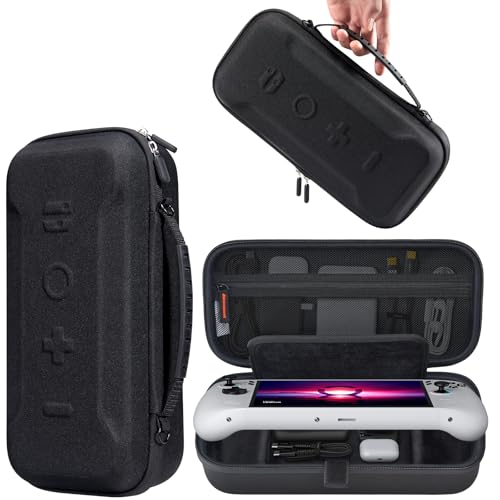
- Fits Legion Go, Go S, and Go 2
- EVA cushioning and screen lining
- Handle plus adjustable shoulder strap
Best For: Carrying a handheld with everyday small accessories
Controller Comfort

- Joins original Legion Go controllers
- Compact, 50 g inverted V-shaped grip
- USB-C charging needs external power
Best For: Using detached original Legion Go controllers together
Gen 2 Screen Care

- Only for 8.8-inch Legion Go Gen 2
- Two 9H glass protectors included
- Alignment frame aids installation
Best For: Gen 2 display protection with a spare sheet
Full-Setup Storage
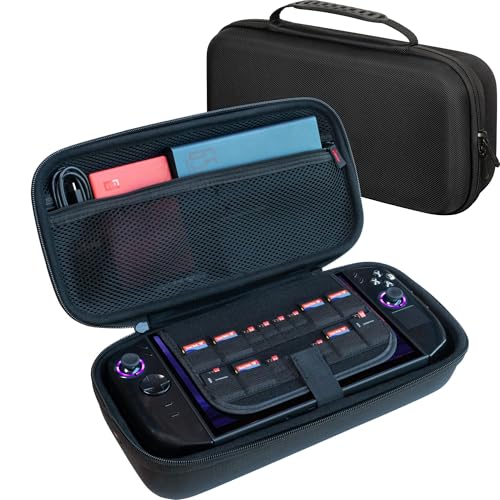
- Fits Legion Go, Go S, and Go 2
- Two compartments for larger accessories
- Divider and lift strap protect controls
Best For: Packing a handheld with a charger and larger gear
Portable Connectivity
Lenovo Legion Go 6-in-1 USB-C Dock

- Six-port USB-C expansion
- 4K output at 60Hz
- HDMI and Ethernet connectivity
Best For: External-display and wired-network setups
Protective Carry Case
Spigen Rugged Armor Pro for Legion Go

- Hard shell with reinforced corners
- Soft-lined screen cover
- Charger storage and tracker pouch
Best For: Protective handheld carry with accessory storage
Organized Sling Bag
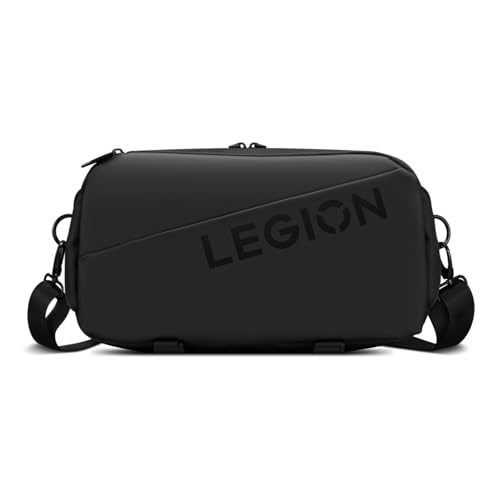
- 5-liter, three-compartment design
- Expandable accessory storage
- Adjustable strap and luggage pass-through
Best For: Hands-free carry for gaming and daily essentials
Screen Protection Pick
Spigen GlasTR EZ FIT for Legion Go

- 9H-rated tempered glass
- Alignment tray included
- Made for original Legion Go
Best For: Original Legion Go screen protection
Go S Carrying Pick

- Fitted Legion Go S interior
- Thickened EVA shell
- Pocket for cards and microSD
Best For: Carrying a Legion Go S and small accessories
Go 2 Bundle Pick
Hmgritto Hard Case Accessories Kit

- Hard shell with foam lining
- Two glass screen protectors
- Six silicone thumb grips
Best For: Bundled protection for a Legion Go 2
Flexible Carry – JSAUX Large Travel Case
For legion go travel accessories that need to stay together, this JSAUX case offers room for a console, charging cables, and wired earphones. It fits the Legion Go, Go S, and Go 2, with a handle and adjustable shoulder strap for different ways to carry it.
Best For: Travelers who want one case for their handheld and everyday small accessories.
Pros:
- Fits all three listed Legion Go models.
- Water-resistant Oxford exterior and shock-absorbing EVA interior.
- Velcro retention strap and soft screen-protection layer.
- Handle and adjustable shoulder strap offer two carrying options.
Cons:
- The listed storage examples focus on smaller accessories, so check dimensions before packing bulky gear.
The combination of retention, screen lining, and flexible carrying makes this a practical general-purpose case. If you need dedicated space for a keyboard or large power bank, consider a case with explicitly listed compartments for those items.
Among legion go travel accessories, this compact connector serves a specific purpose: it joins the original Legion Go’s detachable controllers into one gamepad. Its inverted V-shaped grip is designed for comfort, and it weighs just 50 g.
Best For: Original Legion Go owners who use their detached controllers as a single gamepad.
Pros:
- Custom fit for Lenovo Legion Go controllers.
- Inverted V-shaped design aims to reduce hand fatigue.
- USB-C connection can charge the controllers while you play when connected to an external power source.
- Lightweight, compact design is easy to pack.
Cons:
- No internal battery; charging requires an external power source and USB-C cable.
- Listed compatibility is for original Legion Go controllers, not Go S or Go 2 controllers.
Choose this for a unified controller grip rather than console protection or extra power. Its charging feature is useful near a power source, but it cannot charge controllers on its own.
If your legion go travel accessories include a case, this two-pack adds scratch protection directly to the Legion Go Gen 2’s 8.8-inch screen. The 0.33 mm tempered glass has an oleophobic coating, and the included alignment frame helps with placement.
Best For: Legion Go Gen 2 owners who want a spare screen protector and an installation guide.
Pros:
- Two 9H tempered-glass protectors provide a spare.
- Alignment frame and tool kits are included for installation.
- 99.9% stated light transmittance and 0.33 mm thickness preserve clear viewing and touch response.
- Oleophobic coating helps resist fingerprints and smudges.
Cons:
- Fits only the 8.8-inch Legion Go Gen 2; it is not compatible with other models.
- Protects the display from scratches and daily wear, not the rest of the handheld.
The precise model fit is the key buying check here. For a Gen 2, the second sheet and guided installation make this a sensible screen-protection add-on for travel.
For legion go travel accessories beyond a cable or two, the ButterFox case provides two accessory compartments for items such as the original charger, a large 65W power bank, folding keyboard, or USB hub. Its molded hard-shell design is listed for the Legion Go 2, Go S, and original Go.
Best For: Travelers packing a Legion Go handheld with a charger and several larger accessories.
Pros:
- Two spacious accessory compartments and storage for MicroSD and SD cards.
- Protective divider keeps stored accessories separate from the console.
- Molded interior leaves clearance around controls; lift strap helps with removal.
- Updated design is listed as compatible with Legion Go, Go S, and Go 2.
Cons:
- At 12.8 × 6.5 × 3.5 inches, it takes more bag space than a slim pouch.
- Fit with protective covers is stated for many slim covers on Go 2 and Go S, not every cover.
This is the more storage-focused case of the group, with separation that helps keep chargers and other gear off the handheld. Check your available luggage space and any installed cover before choosing it.
Portable Connectivity – Lenovo Legion Go 6-in-1 USB-C Dock
For legion go travel accessories that help turn a temporary desk into a gaming setup, this Lenovo dock adds charging, display output, Ethernet, and USB connectivity in a compact unit.
Best For: Legion Go owners who connect to an external display and wired network while away from home.
Pros:
- Six-port design includes HDMI and Ethernet connectivity.
- Supports 4K video output at 60Hz.
- Slim body measures 6.3 x 2.89 x 1.21 inches.
Cons:
- Specified for Windows 11 and the Legion Go.
- At 11.2 ounces, it adds weight to a travel kit.
This is a practical pick when your destination has a monitor and you want fewer separate adapters. Check that its Windows 11 requirement matches your setup.
Among legion go travel accessories, the Spigen Rugged Armor Pro is the protective case option: its PU and EVA hard shell, foam, reinforced corners, and lined screen cover help guard the handheld in transit.
Best For: Travelers who prioritize a dedicated protective case with room for a charger and small accessories.
Pros:
- Hard shell and corner protection add structure around the device.
- Soft-lined screen cover helps prevent scratches while carried.
- Includes a carrying strap, accessory storage, and a hidden tracker pouch.
Cons:
- Not water-resistant.
- Its 14.01 x 6.76 x 4.09-inch dimensions take up bag space.
Choose this when protection matters more than a slim footprint. The storage is useful for gaming essentials, but it is not a substitute for rain protection.
If you want legion go travel accessories and everyday items in one carry bag, the Lenovo Legion Sling Bag offers a 5-liter capacity, three compartments, and an expandable design. It is listed for the Legion Go, Go 2, and Go S.
Best For: Commuters and travelers who want a crossbody bag for their handheld, accessories, and daily essentials.
Pros:
- Three compartments and an expandable design help organize changing loads.
- Adjustable shoulder strap and luggage pass-through suit travel.
- Water-resistant exterior helps with light rain and spills.
Cons:
- Soft-shell construction is less rigid than a hard carrying case.
- Water resistance should not be mistaken for full waterproof protection.
This sling makes sense when you need hands-free organization rather than a dedicated hard case. Its expandable profile gives you flexibility without requiring a larger everyday bag.
Screen Protection Pick – Spigen GlasTR EZ FIT for Legion Go
Among legion go travel accessories, this tempered-glass protector is a practical way to guard the original Legion Go’s 8.8-inch display against everyday scratches. Its included EZ FIT tray helps with alignment before your next trip.
Best For: Original Legion Go owners who want screen protection without noticeably changing display clarity or touch response.
Pros:
- 9H-rated glass resists everyday scratches.
- Clear finish and responsive touch preserve the screen experience.
- Includes an alignment tray and cleaning supplies for installation.
- Edge-inset design accommodates Spigen and most third-party cases.
Cons:
- Includes only one protector, so there is no spare for a second attempt.
- Not rated as water resistant.
Choose this for display protection rather than storage or impact protection for the whole handheld. Check your device model before ordering: the stated fit is for the original Legion Go.
Go S Carrying Pick – ivoler Hard Carrying Case
If you’re shopping for legion go travel accessories for the Legion Go S, this ivoler case gives the handheld a fitted space inside a thickened EVA shell. A handle and double zipper make it straightforward to carry and access on a trip.
Best For: Legion Go S owners who want a dedicated case with room for small gaming essentials.
Pros:
- Interior groove and retaining strap help keep the handheld in place.
- Separate storage accommodates items such as earphones, a small power bank, or a charger dock.
- Detachable pocket holds eight microSD cards and two credit-sized cards.
Cons:
- Designed for the Legion Go S; fit for the original Legion Go is not stated.
- Handheld and pictured accessories are not included.
This is the storage-focused option for Go S travelers. Its separate compartments help keep accessories off the handheld, but confirm the fit of any larger charger or dock you plan to pack.
Go 2 Bundle Pick – Hmgritto Hard Case Accessories Kit
For Legion Go 2 owners comparing legion go travel accessories, this kit combines a hard carrying case with two tempered-glass protectors and six silicone thumb grips. The case has a foam-lined device cutout and a lower compartment for a charger and smaller items.
Best For: Legion Go 2 owners who want a case, screen protectors, and thumb grips in one purchase.
Pros:
- Rigid PP shell and foam lining help protect the handheld during transport.
- Lower compartment organizes a charger adapter and small accessories.
- Includes two 9H-rated screen protectors and six textured thumb grips.
Cons:
- At 13.8 × 7.8 × 4 inches and 1.1 kg, the kit is relatively bulky to pack.
- Although the details also list Legion Go compatibility, the kit description specifically says it is designed for Legion Go 2; verify fit before buying for another model.
The all-in-one contents make this appealing if you need several accessories at once. Its size and model-specific fit matter more if you travel light or own the original Legion Go.
How We Picked These Legion Go Travel Accessories
We focused on accessories that solve common travel problems: protecting the handheld, organizing a charger and cables, guarding the screen, and connecting to a larger display or wired network. The selection includes compact and larger cases, a sling bag, model-specific screen protectors, a controller grip connector, and a USB-C dock. We also looked for meaningful differences in carrying style and storage rather than treating every case as the same purchase.
Product names and compatibility claims are a starting point, not a guarantee of fit. Before ordering, verify the exact device model on the listing and check recent buyer feedback for fit and clearance. That matters especially for fitted cases and glass protectors.
Quick Comparison: What Belongs in Your Bag?
For basic protection, start with a fitted hard carrying case and a screen protector made for your model. Choose a larger JSAUX or ButterFox-style travel case if you want to keep a charger and accessories together; consider the Spigen case if you prefer a dedicated shell-style option. The Lenovo sling bag serves a different purpose: carrying your handheld alongside other daily essentials.
A controller grip connector is useful if you frequently play with detached controllers. The 6-in-1 USB-C dock makes more sense if your trips involve a monitor, Ethernet, or other peripherals. Neither replaces a protective case.
Key Buying Factors for Legion Go Travel Accessories
Model Fit Comes First
Do not assume an accessory labeled “Legion Go” fits the Go S or Go 2. Compare the listing with your exact model, particularly for screen dimensions, device contours, controller space, and cutouts. A protector made for the Go 2 should not be treated as an automatic match for the original Go.
Protection Versus Packing Space
A snug case limits movement but may leave little room for a bulky charger. A larger travel bag can consolidate gear, but check whether it separates hard accessories from the screen and controls. If you plan to carry the handheld inside a backpack, measure the case’s exterior dimensions as well as its storage space.
Ports and Power on the Road
For a USB-C dock, confirm that its video output, Ethernet connection, and charging support match the equipment you will actually use. Check the power requirements of your handheld and charger rather than assuming that any USB-C power adapter will keep up during play.
Who Should Buy Which Legion Go Travel Accessories?
If you travel light, prioritize a model-matched case and screen protector. If you pack a charger, cables, and extras, choose a roomier case or the sling bag based on how you prefer to carry them. Add the grip connector for regular detached-controller play; add the dock only when you expect to use external displays or wired connections. The best Legion Go Travel Accessories are the ones that fit your specific handheld and solve a packing problem you actually have.