If your thumbs slip during long sessions or fast-paced action, the right accessory can make the ROG Ally feel noticeably easier to control. Good thumb grips can improve traction, add comfort, and help fine-tune stick movement without changing the handheld’s core feel.
Below, we’ve rounded up the best options for different play styles, from low-profile control to extra texture and playful designs. Whether you want better aim, more comfort, or a simple grip upgrade, this guide will help you choose wisely.
Best 10 Rog Ally Thumb Grips Picks for 2026
Adjustable Control Set
Skull & Co. Precision Grip Set for ROG Ally

- Three grip profiles in one 6-pack
- Ultra-thin design keeps stock feel
- TPE material adds stick protection
Best For: Gamers who want adjustable grip height and feel
Cute Silicone Fit
PlayVital Cute Silicone Caps for ROG Ally
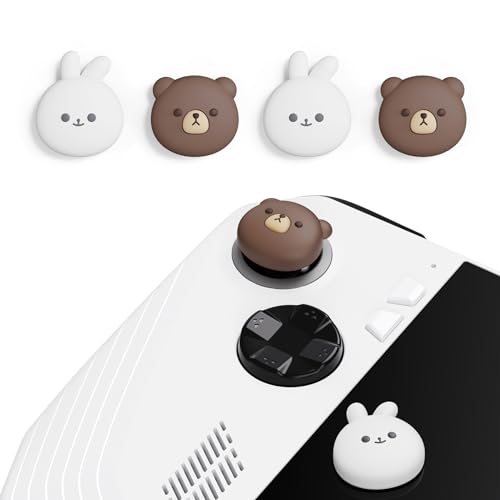
- Made specifically for ROG Ally
- Soft silicone is non-slip and sweat-resistant
- Cute themed design with a secure fit
Best For: Players who want comfort and a playful console look
Universal Multi-Device Pick
KontrolFreek Universal Grip Pack 8-Pack
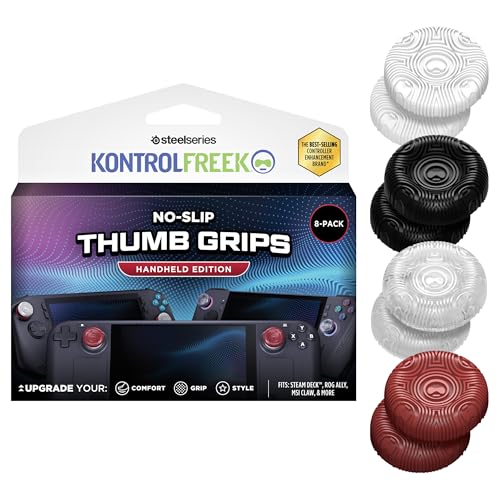
- Fits ROG Ally and other handhelds
- Extra-grippy rubber boosts control
- 8-pack allows mixing and replacements
Best For: Players who use more than one handheld device
Textured Ally Caps
PlayVital Textured Black Caps for ROG Ally

- Ally-specific silicone thumb caps
- Textured Diamond Grain and Crack Bomb design
- Snug fit helps keep caps secure
Best For: Users who want a textured, blacked-out ROG Ally cap
Dual-Design Precision Set
Skull & Co. Convex Thumb Grips for ROG Ally

- Two grip styles in one 4-piece set
- Grippy material improves control accuracy
- Helps protect joystick caps from wear
Best For: Players who want two thumb grip designs in one pack for better control and joystick protection.
Cute Grip Protection
PlayVital Cutie Kitty Thumb Caps for ROG Ally

- Made specifically for ROG Ally
- Silicone design is non-slip and sweat-resistant
- Protects sticks from scratches and dirt
Best For: ROG Ally owners who want themed thumb caps with a snug silicone fit and added protection.
Multi-Size Control Kit
JSAUX Thumb Grips for ROG Xbox Ally X

- Three sizes for custom fit and feel
- Textured surface helps reduce slippage
- Different heights support aim or speed
Best For: Players who want multiple sizes and a more customizable grip setup for Ally or Steam Controller use.
Precision Silicone Caps
PlayVital Black Raised Dots & Studded Design

- Console-specific fit for the ROG Ally
- Non-slip, sweat-resistant silicone
- Protects sticks from scratches and dirt
Best For: ROG Ally players who want textured, secure thumb caps
Transparent Comfort Caps
Luck&Link Clear Thumb Grips for Ally X

- Made for ROG Ally X and ROG Xbox Ally/X
- Liquid silicone resists yellowing and is washable
- Soft ergonomic feel with easy press-on install
Best For: Players who want clear, comfort-focused caps for Ally X models
Full-Grip Texture Kit
PlayVital Handle Grips with Thumb Caps

- Includes thumb caps plus handle and button grips
- Soft PU material with anti-slip diamond texture
- Precision cut for the ROG Ally only
Best For: ROG Ally users who want a full console grip upgrade
Adjustable Control Set – Skull & Co. Precision Grip Set for ROG Ally
If you want more control from your rog ally thumb grips without losing the stock feel, this Skull & Co. set is built around that balance. The pack includes three styles, so you can choose between a low-profile grip, a height boost for tighter control, or a taller option for more aggressive aiming support.
Best For: Players who want multiple grip profiles in one set for different game types and sensitivity preferences.
Pros:
- Three grip styles let you pick between Skin, CQC Elite, and FPS Master options.
- Ultra-thin design helps preserve the original feel while adding protection.
- Extra height and active radius changes can improve aiming precision.
- TPE material adds protection against abrasion and corrosion.
Cons:
- Black-only styling is more functional than decorative.
- Best suited to users who want to experiment with different cap heights.
This is the most flexible pick in the group if you care about tuning feel rather than just adding a simple cover. It combines protection, grip, and multiple control profiles in a single set for the ROG Ally.
Cute Silicone Fit – PlayVital Cute Silicone Caps for ROG Ally
These rog ally thumb grips are aimed at players who want a softer feel and a more playful look. The silicone construction is designed to be non-slip and sweat-resistant, while the snug fit helps keep the caps secure during play.
Best For: ROG Ally owners who want cute, themed caps with a soft silicone grip.
Pros:
- Made specifically for the ROG Ally handheld.
- Non-slip, sweat-resistant silicone can improve comfort.
- Snug fit is designed to stay on during gaming.
- Protects thumbsticks from scratches and dirt buildup.
Cons:
- Compatibility is limited to the ROG Ally.
- Style-first design may not appeal to users wanting a plain look.
If you want thumb caps that are both practical and expressive, this set delivers a secure silicone fit with a distinctive themed design. It is a simple choice for comfort-focused ROG Ally users who also care about appearance.
Universal Multi-Device Pick – KontrolFreek Universal Grip Pack 8-Pack
For anyone comparing rog ally thumb grips across multiple handhelds, this KontrolFreek pack stands out for its universal approach. The no-slip rubber material is designed to add grip and comfort, and the 8-pack gives you plenty of pieces to mix, match, or replace over time.
Best For: Multi-device players who want a single grip pack that works across several handheld consoles.
Pros:
- Universal fit supports ROG Ally and several other handheld devices.
- Extra-grippy rubber material is aimed at better aiming and movement control.
- 8-pack format offers color mixing and spares.
- Lightweight design keeps the add-on minimal.
Cons:
- Universal design may not feel as tailored as device-specific caps.
- Thin, simple style may not suit users looking for themed designs.
This is the most versatile option here if you switch between handhelds and want one grip set to cover them. It focuses on straightforward comfort and control rather than a custom ROG Ally-only fit.
Textured Ally Caps – PlayVital Textured Black Caps for ROG Ally
If you want rog ally thumb grips with a more textured feel, this PlayVital set adds a distinct surface pattern while keeping the same silicone-based comfort. Like the brand’s other Ally-specific caps, it focuses on a secure fit, easy installation, and basic protection from daily wear.
Best For: ROG Ally users who want a textured black grip cap with a more aggressive look.
Pros:
- Designed specifically for the ROG Ally handheld.
- Non-slip, sweat-resistant silicone supports comfortable play.
- Diamond Grain and Crack Bomb styling gives a textured appearance.
- Snug fit helps prevent the caps from falling off easily.
Cons:
- Only works with the ROG Ally.
- Black finish may be too plain if you want brighter colors.
This is a good choice if you want a more tactile-looking cap without moving away from a simple silicone design. It offers the same Ally-specific convenience, but with a tougher visual style.
Dual-Design Precision Set – Skull & Co. Convex Thumb Grips for ROG Ally
If you want rog ally thumb grips that change the feel of the sticks without overcomplicating the setup, this Skull & Co. set is built around two distinct cap styles. The mix of Skin Grip and CQC Elite caps gives you options for a more controlled, grippier thumbstick feel while also helping protect the original joystick caps from wear.
Best For: Players who want two thumb grip designs in one pack for better control and joystick protection.
Pros:
- Includes two different designs: Skin Grip and CQC Elite thumb grips
- Grippy material adds friction for improved control accuracy and sensitivity
- Helps protect original joystick caps from corrosion and spalling
- Compact 4-piece set for easy swapping and testing
Cons:
- Made for specific controller compatibility, so fit should be checked carefully
- Does not add multiple height options like some larger grip kits
Overall, this is a practical choice if you want a straightforward grip upgrade with a protection benefit. The dual-design approach makes it easier to find a feel that matches your play style without needing a larger accessory pack.
Cute Grip Protection – PlayVital Cutie Kitty Thumb Caps for ROG Ally
These rog ally thumb grips are aimed at players who want a soft, secure upgrade with a bit of personality. The PlayVital Cutie Kitty caps use silicone for a non-slip feel, and they are designed specifically for the ROG Ally, so the fit and look are centered on that handheld.
Best For: ROG Ally owners who want themed thumb caps with a snug silicone fit and added protection.
Pros:
- Specially designed for the ROG Ally handheld gaming console
- Top-grade silicone is sweat-resistant and non-slip for comfort
- Helps protect thumbsticks from scratches and dirt buildup
- Snug fit is designed to stay on securely during play
Cons:
- Not compatible with other controllers or consoles
- The themed style may not suit players who prefer a plain look
This is a good pick if you want a simple, comfortable cap that also adds character to the console. It leans more toward fit, protection, and style than toward adjustable performance features.
Multi-Size Control Kit – JSAUX Thumb Grips for ROG Xbox Ally X
For rog ally thumb grips that focus on adjustability, this JSAUX kit stands out with three sizes and a textured anti-slip finish. It is compatible with the ROG Xbox Ally and ROG Xbox Ally X, and the different cap heights let you choose between quicker movement and more precise aiming.
Best For: Players who want multiple sizes and a more customizable grip setup for Ally or Steam Controller use.
Pros:
- Includes three sizes for different hand sizes and grip styles
- High-friction textured material helps reduce slippage
- Ergonomic shape and soft-touch finish aim to reduce finger fatigue
- Different cap heights support faster response or improved aiming precision
Cons:
- Compatibility list is broad, so buyers should verify their exact device
- Better suited to users who want customization rather than a simple single-style cap
If you want more tuning options from your thumb caps, this set offers the most flexibility of the three. The height variety makes it easier to match the grips to your preferred game type and control style.
Precision Silicone Caps – PlayVital Black Raised Dots & Studded Design
If you want rog ally thumb grips that are built specifically for the original ROG Ally, these PlayVital silicone caps are a straightforward way to add traction and help reduce finger fatigue. The raised-dots, studded surface is aimed at players who want a more secure thumb feel without adding much bulk.
Best For: ROG Ally owners who want simple, snug-fitting joystick caps with a textured feel and console-specific fit.
Pros:
- Designed only for the ROG Ally for a precise fit
- Non-slip, sweat-resistant silicone helps improve control
- Helps protect thumbsticks from scratches and dirt buildup
- Easy to install and remove while staying secure in use
Cons:
- Not compatible with other controllers or consoles
- Textured raised-dot design may not suit everyone’s preference
Overall, this is a practical pick if you want a durable, low-fuss thumb cap set that prioritizes grip and protection over flashy styling.
Transparent Comfort Caps – Luck&Link Clear Thumb Grips for Ally X
For rog ally thumb grips on the ROG Ally X or ROG Xbox Ally/X, these transparent Luck&Link caps focus on a clean fit and a softer feel for longer sessions. The liquid silicone build is meant to stay comfortable, resist yellowing, and keep the joystick operation feeling smooth.
Best For: ROG Ally X and ROG Xbox Ally/X owners who want simple, clear thumb grips with a soft feel.
Pros:
- Made specifically for ROG Xbox Ally/X and ROG Ally X
- Liquid silicone material is durable and washable
- Soft ergonomic feel helps reduce finger fatigue
- Easy to apply with a simple press-on installation
Cons:
- Only includes 2 thumb grips
- Compatibility is limited to the listed Ally X models
This is a clean, no-frills option if you want comfort-focused thumb caps that are easy to install and specifically matched to the newer Ally X line.
Full-Grip Texture Kit – PlayVital Handle Grips with Thumb Caps
If you want rog ally thumb grips plus extra hand contact points, this PlayVital kit goes beyond simple joystick caps and adds handle, trigger, and back-button grip stickers. It is built for the ROG Ally only, with a soft PU texture and a hexagonal diamond pattern intended to improve hold and airflow during longer play sessions.
Best For: ROG Ally owners who want a complete grip upgrade that includes thumb caps and additional anti-slip surfaces.
Pros:
- Includes handle grips, thumb caps, and shoulder/back button grips
- Soft PU material offers a comfortable palm feel
- Hexagonal diamond texture improves slip resistance
- Precise cutting is designed not to interfere with button functions
Cons:
- Only designed for the ROG Ally handheld console
- More involved than a simple thumb-cap-only accessory
For players who want more than joystick coverage, this is the most complete grip package here and a strong choice for improving overall handling as well as thumb control.
How We Picked the Best Rog Ally Thumb Grips
We focused on fit, material quality, texture, and real-world comfort. The best Rog Ally Thumb Grips should stay secure during play, feel natural under the thumb, and avoid interfering with stick travel or button use. We also looked at whether each option suits different hand sizes, games, and grip preferences.
Because some accessories bundle stick covers with extra grip tape or handle grips, we favored products that offer clear value and practical use rather than gimmicks. Compatibility with ROG Ally and ROG Ally X models was also a priority.
Quick Comparison
Think in terms of control style. Low-profile caps are better for players who want a close-to-stock feel and quick transitions. Taller or textured caps can help with precision and reduce slip in shooters and action games. Silicone options often prioritize comfort and easy installation, while harder caps may feel more stable and less squishy.
If you play a mix of genres, a universal or multi-style set can be the safest pick. If you mainly play competitive titles, prioritize traction and stick-top shape. If comfort matters most, look for soft silicone and designs that reduce thumb fatigue over time.
Key Buying Factors for Rog Ally Thumb Grips
Fit and Compatibility
Check that the caps are designed for the ROG Ally, ROG Ally X, or ROG Xbox Ally/X as needed. A proper fit matters for security and for avoiding wobble or slipping during intense gameplay.
Height and Profile
Low-profile grips preserve the handheld’s original feel, while taller grips can improve micro-adjustments. For FPS and precision-heavy games, the shape of the cap can matter as much as the texture.
Texture and Material
Silicone usually feels softer and more forgiving, while textured finishes, raised dots, or studded surfaces increase traction. If your hands run sweaty, prioritize grip over aesthetics.
Comfort and Ease of Use
The best accessory should feel good in short and long sessions. It should also be easy to install, remove, and clean without stretching or tearing.
Who Should Buy Which Rog Ally Thumb Grips?
Competitive players should lean toward textured or precision-focused caps that improve control. Casual players may prefer softer, more comfortable covers that are easy to install. If you want a cleaner, less noticeable upgrade, transparent or black low-profile styles are a smart choice. If you value a more customized look, themed designs can add personality without sacrificing basic function.
In short, choose the set that matches how you actually play. The best Rog Ally Thumb Grips are the ones that improve comfort and control without getting in the way of your game.