Choosing one of the best hard drive docking stations under 100 can make backups, drive cloning, and data recovery much faster and simpler.
Whether you need a single-bay dock for occasional use or a dual-bay model for heavier workflows, the right pick should balance speed, compatibility, and convenience.
Best 10 Hard Drive Docking Stations Under 100 Picks for 2026
Editor’s Pick

- Single-bay SATA dock for 2.5" and 3.5" drives
- Includes 12V power adapter and tool-free design
- USB 3.0 with UASP and hot-swap support
Best For: A simple single-drive SATA dock with reliable everyday use
Cloning Pick
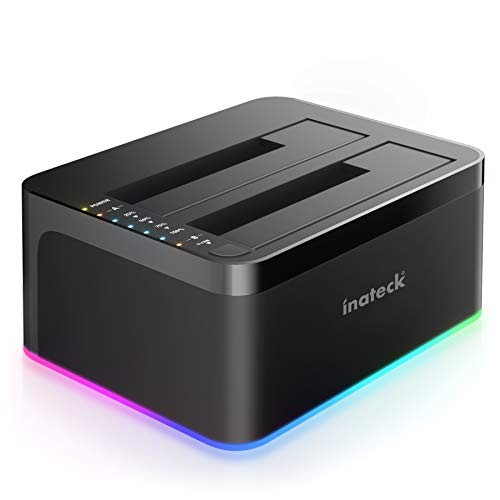
- Offline cloning works without a PC connection
- Supports two SATA HDDs or SSDs
- Includes 12V/3A adapter and UASP support
Best For: People who want offline drive-to-drive cloning in a dual-bay dock
Best USB-C Option
WAVLINK Dual-Bay USB-C Clone Dock
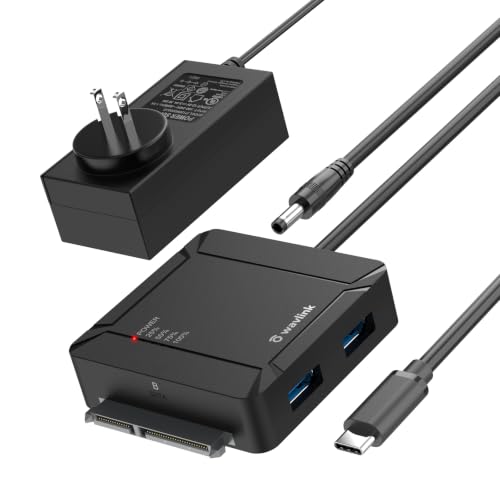
- USB-C dual-bay dock with offline A-to-B cloning
- Built-in 2-port USB 3.0 hub for accessories
- Supports up to 36TB total across two drives
Best For: USB-C shoppers who want cloning and dual-drive support
Best Dual-Bay Cloner

- Dual-bay dock for two 2.5"/3.5" HDDs or SSDs
- One-button offline cloning without a PC
- USB-C, UASP support, and up to 5Gbps transfer speeds
Best For: Users who want easy two-drive cloning and transfer management
Reliable Budget Dual-Bay

- Dual-bay dock for two SATA HDDs or SSDs
- Offline cloning without a computer
- USB 3.0 with up to 5Gbps transfer speeds
Best For: Budget-friendly dual-bay storage tasks and cloning
Top Pick for Fast Two-Drive Access

- Supports 2.5-inch and 3.5-inch SATA SSDs/HDDs
- Tool-free setup with plug-and-play convenience
- USB 3.0 UASP and offline cloning support
Best For: Mixed-drive backups and frequent drive swapping
Best Metal-Build Clone Station

- Metal enclosure with built-in power switch
- Supports 2.5-inch and 3.5-inch SATA drives
- Offline cloning and UASP transfer support
Best For: Users who want a sturdy cloning dock for routine backups
Best Cooling-Focused Dock

- Dual-bay support for 2.5-inch and 3.5-inch SATA drives
- 360-degree cooling with dust cover and anti-slip pads
- Offline cloning plus USB-C cable included
Best For: Buyers who want cooling-friendly design and simple cloning
Editor’s Pick – Sabrent Single-Bay SATA Dock
If you want a straightforward option in hard drive docking stations under 100, this SABRENT dock is built for bare SATA 2.5-inch and 3.5-inch drives. It’s a simple lay-flat design with USB 3.0, UASP support, and included external power, so it works well as a practical everyday dock for backups, drive swaps, and general storage access.
Best For: Users who want a simple single-bay SATA dock for 2.5-inch or 3.5-inch drives.
Pros:
- Supports SATA I/II/III HDDs and SSDs up to 20TB
- Includes a 12V/2A power adapter for stable 3.5-inch drive use
- Tool-free, hot-swap design with plug-and-play operation
- USB 3.0 with UASP support for solid real-world transfer speeds
Cons:
- Does not support IDE/PATA, M.2, SAS, or drives already in an enclosure
- Uses a USB Type-A host cable, not USB-C
- S.M.A.R.T. diagnostics are not passed through the USB bridge
For buyers who only need one SATA drive at a time, this is an easy, no-frills dock with the essential features most people actually use. Just be sure your drive is bare SATA and that your computer has a compatible USB-A port.
Cloning Pick – Inateck Dual-Drive Clone Dock
Among hard drive docking stations under 100, this Inateck model stands out if offline cloning matters. It supports up to two 2.5-inch or 3.5-inch HDDs and SSDs, uses USB 3.0 with UASP, and adds an RGB status light that helps show when a drive is active or asleep.
Best For: Users who want an affordable dock with offline clone support for two SATA drives.
Pros:
- Offline cloning works without connecting to a computer
- Supports two drives at once, including 2.5-inch and 3.5-inch HDDs/SSDs
- USB 3.0 plus UASP support for faster transfers
- Includes a 12V/3A power adapter and USB 3.0 cable
Cons:
- Only supports up to two drives
- Plastic enclosure may not appeal to everyone
- No mention of USB-C host connection
If you need cloning more than just basic drive access, this is a strong value pick. The combination of dual-bay support, offline copy mode, and standard SATA compatibility makes it especially useful for backup and upgrade workflows.
Runner-Up – Sabrent Auto-Sleep SATA Dock
This SABRENT option is another practical choice in hard drive docking stations under 100 if you need a single-bay dock for bare SATA drives. It supports 2.5-inch and 3.5-inch HDDs and SSDs, includes its own power adapter, and adds auto-sleep behavior after 30 minutes of inactivity.
Best For: Buyers who want a simple SATA dock with auto-sleep and clear status indicators.
Pros:
- Works with 2.5-inch and 3.5-inch SATA HDDs and SSDs up to 22TB
- Includes AC adapter and USB 3.0 cable
- Auto-sleeps after 30 minutes of idle time
- USB 3.0 with UASP and hot-swap support
Cons:
- SATA only; no SAS or M.2 NVMe support
- New or blank drives need to be initialized first
- Single-bay design only
It’s a good fit if you want an uncomplicated dock with predictable behavior and easy status feedback. The auto-sleep feature is useful for reducing unnecessary wear, though first-time drive setup still needs manual initialization in your operating system.
Best USB-C Option – WAVLINK Dual-Bay USB-C Clone Dock
If you’re shopping hard drive docking stations under 100 and prefer USB-C, this WAVLINK dock is the most flexible of the group. It supports two SATA drives, offers one-button offline cloning from drive A to drive B, and even adds two USB 3.0 hub ports for accessories or quick device connections.
Best For: USB-C users who want a dual-bay SATA dock with offline cloning and extra hub ports.
Pros:
- USB-C connection with 5Gbps UASP support
- Offline cloning works without a PC connection
- Dual-bay design supports up to 36TB total
- Built-in 2-port USB 3.0 hub adds convenient connectivity
Cons:
- Cloning is only A-to-B, not bidirectional
- Requires a 12V/3A power supply
- Larger footprint than a single-bay dock
This is the best fit if you want a modern USB-C dock and expect to work with two drives regularly. The extra hub ports and cloning feature make it more versatile than a basic dock, especially for backup and transfer tasks.
Compact Single-Bay Pick – ORICO 2.5/3.5" SATA Dock
If you want one of the more practical hard drive docking stations under 100, this ORICO model keeps things simple: drop in a 2.5-inch or 3.5-inch SATA drive, connect over USB 3.0, and start moving files. It supports UASP and Trim for faster handling, and the tool-less, hot-swappable design makes it easy to use for backups, imaging, or quick transfers.
Best For: Users who want a straightforward single-bay SATA dock for everyday backups and drive access.
Pros:
- Supports 2.5-inch and 3.5-inch SATA I/II/III HDDs and SSDs
- UASP and Trim support with up to 5Gbps transfer speeds
- Tool-less hot-swapping and LED indicators
- Includes a 12V/2A power supply and 1m USB-A cable
Cons:
- Single-drive design, so it is not built for direct drive-to-drive cloning
- Does not support IDE or SAS drives
- Brand-new or unallocated disks must be initialized in Disk Management first
Overall, this is a compact and versatile dock for users who mainly need reliable SATA access rather than advanced dual-bay features. Its broad device support and small footprint make it an easy fit for home or general workstation use.
Best Dual-Bay Cloner – BENFEI USB-C Dual Bay Dock
For shoppers comparing hard drive docking stations under 100, this BENFEI dual-bay unit stands out because it handles two drives at once and includes offline cloning. It supports 2.5-inch and 3.5-inch HDDs and SSDs, connects over USB-C, and offers up to 5Gbps speeds with UASP to keep backups and transfers moving efficiently.
Best For: Anyone who wants a dual-bay dock with simple one-button offline cloning.
Pros:
- Dual-bay design lets you read, write, and transfer between two drives simultaneously
- One-button offline clone function works without a PC
- USB 3.1 Gen 1 with UASP support and up to 5Gbps speeds
- Includes a 12V/2.5A power adapter and built-in power switch
Cons:
- For cloning, the target drive must be equal to or larger than the source drive
- Requires careful power switching before plugging or unplugging drives
- May be more dock than needed if you only use one drive at a time
This is a strong choice if you want a practical two-bay dock for backups, migration, or capacity expansion. The offline clone feature adds convenience, while the USB-C connection and stable power setup make it well suited to regular use.
Reliable Budget Dual-Bay – FIDECO SATA Dock with Clone
If you need hard drive docking stations under 100 with dual-bay flexibility, this FIDECO model covers the basics well. It supports 2.5-inch and 3.5-inch SATA HDDs and SSDs, connects via USB 3.0 up to 5Gbps, and includes offline clone support so you can duplicate drives without using a computer.
Best For: Budget-minded users who want dual-bay SATA support and offline cloning.
Pros:
- Supports two 2.5-inch/3.5-inch SATA HDDs or SSDs simultaneously
- Offline clone function works with no computer needed
- USB 3.0 speeds up to 5Gbps with plug-and-play use
- Broad compatibility with Windows, Mac OS, and Linux
Cons:
- Only supports SATA HDDs and SSDs, not other drive types
- New drives must be initialized before the system will recognize them
- Hardware platform is listed as PC, so compatibility details are narrower than some rivals
As a dual-bay dock, this FIDECO unit offers a useful mix of cloning, data transfer, and general drive access. It is a sensible fit if you want a practical dock for routine storage tasks without paying for more advanced features.
Top Pick for Fast Two-Drive Access – ICY BOX Dual-Bay SATA Dock
If you want hard drive docking stations under 100 that can handle both SSDs and HDDs, this dual-bay ICY BOX model is built for flexible everyday use. It supports 2.5-inch and 3.5-inch SATA drives, runs over USB 3.0 with UASP support, and is tool-free for quick swaps when you need frequent access or backups.
Best For: Users who want a straightforward dual-bay dock for mixed-drive backups, file transfers, and routine drive access.
Pros:
- Works with both 2.5-inch and 3.5-inch SATA SSDs/HDDs
- Tool-free, plug-and-play design makes drive changes simple
- USB 3.0 with UASP support helps improve transfer performance
- Supports offline cloning and large-capacity drives up to 30TB
Cons:
- Plastic enclosure may feel less rugged than metal alternatives
- Capacity support is described as up to about 30TB despite broader listing claims
Overall, this is a practical dual-bay dock for users who want convenience and broad SATA compatibility without extra adapters. Its speed, cloning support, and driver-free setup make it a strong everyday choice.
Best Metal-Build Clone Station – WAVLINK Dual-Bay Dock
Among hard drive docking stations under 100, this WAVLINK dual-bay dock stands out for its metal build, offline cloning support, and wide SATA compatibility. It works with 2.5-inch and 3.5-inch HDDs and SSDs, adds UASP for faster transfers, and includes a power switch plus automatic sleep mode for easier day-to-day use.
Best For: Buyers who want a sturdy dual-bay dock with cloning features and simple plug-and-play operation.
Pros:
- Supports 2.5-inch and 3.5-inch SATA HDDs/SSDs
- Metal enclosure adds a more durable feel
- Offline cloning is built in for drive-to-drive duplication
- UASP support and power control switch improve convenience
Cons:
- Not compatible with M1/M2-based Macs according to the notes
- Offline cloning is limited to source-to-target use, not online cloning
- Listed capacity rating is lower than some competing dual-bay options
This is a solid pick if you value physical durability and cloning support over extra bells and whistles. It stays practical for backups, transfers, and general dock usage on supported systems.
Best Cooling-Focused Dock – UGREEN Dual-Bay SATA Dock
If you are comparing hard drive docking stations under 100 and want a model with added cooling and protective details, this UGREEN dual-bay dock is worth a look. It supports two SATA drives at once, offers USB 3.0 transfer speeds, and includes a dust cover, anti-slip pads, and 360-degree cooling to help keep the setup stable during use.
Best For: Users who want a dual-bay dock with cooling-minded design features and easy offline cloning.
Pros:
- Supports two 2.5-inch or 3.5-inch SATA drives at once
- Offline cloning works without a computer connection
- 360-degree cooling and dust cover add protection
- Includes a 1-meter USB-C cable for more flexible placement
Cons:
- USB 3.0 transfer speed tops out at 5Gbps
- Plastic and silicone build is less premium than metal docks
- Cloning requires the target drive to be equal or larger than the source
This dock makes sense for users who want simple, frequent drive access with a few thoughtful safety features built in. Its cooling-focused design and cloning support make it especially useful for backup workflows.
How We Picked These Hard Drive Docking Stations Under 100
We focused on value-first docks that stay within budget while still covering the essentials: SATA compatibility, tool-free loading, stable USB performance, and support for both 2.5-inch and 3.5-inch drives. Where available, we also looked for UASP support, offline cloning, dual-bay flexibility, and power delivery strong enough for desktop hard drives.
Quick Comparison: Which Type Fits Your Needs?
Single-bay docks are best for simple file access, drive testing, and occasional backups. Dual-bay models are better if you clone drives often, manage multiple disks, or want a more efficient workflow. USB-C models add convenience on newer laptops, while USB 3.0 versions remain widely compatible and often cost less.
Key Buying Factors for Hard Drive Docking Stations Under 100
Drive Support and Capacity
Make sure the dock supports the drive sizes you own now and may use later. Most buyers should look for support for 2.5-inch and 3.5-inch SATA HDDs and SSDs. If you work with larger archives or backups, check the maximum supported capacity before buying.
Speed and Protocol Support
For everyday use, USB 3.0 or USB-C with UASP is a strong baseline. UASP can improve responsiveness with SSDs and modern systems, especially when transferring many small files.
Cloning and Dual-Bay Features
If you need to duplicate drives without a computer, offline clone support is a major convenience. Dual-bay docks are also useful for comparing disks, migrating systems, and working with source and target drives side by side.
Power and Stability
3.5-inch hard drives need external power, so look for a dock with a properly rated adapter and a design that keeps the drive stable during long transfers. This matters more than flashy extras if reliability is your priority.
Who Should Buy Which Hard Drive Docking Stations Under 100?
If you only need occasional access to one drive, a single-bay dock is usually the simplest and most affordable choice. If you back up data regularly, clone disks, or manage multiple drives, a dual-bay unit is worth the extra space and flexibility. Buyers using newer laptops may prefer USB-C, while anyone focused on compatibility and savings can still do well with a solid USB 3.0 model. For most shoppers comparing Hard Drive Docking Stations Under 100, the best option is the one that matches their workflow more than their spec sheet.