If you want smoother online matches, the right router can make a real difference. A great gaming router for low ping helps prioritize traffic, cut congestion, and keep your connection steady when the network gets busy.
In this roundup, we focus on models that balance speed, latency features, and modern port options so you can pick the best fit for your setup and budget.
Best 10 Gaming Router for Low Ping Picks for 2026
Low-Ping Control
NETGEAR Nighthawk Pro Gaming XR300
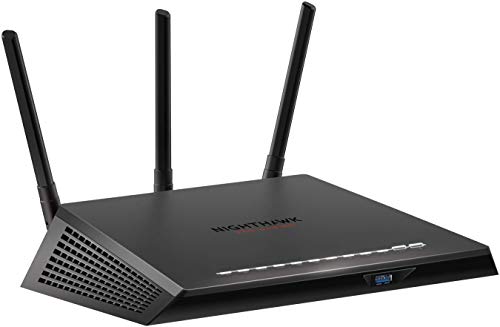
- QoS and geo-filtering target lower latency.
- Four Gigabit Ethernet ports support wired gaming.
- Real-time ping monitoring helps spot bandwidth hogs.
Best For: Competitive gamers who want low-ping tools and wired stability.
Tri-Band Speed Boost
TP-Link Archer AXE75 WiFi 6E Router

- 6 GHz WiFi 6E is built for more responsive gaming.
- 2.5Gbps WAN port supports faster wired service.
- OFDMA and tri-band design improve multi-device capacity.
Best For: Gamers who want low-latency WiFi 6E and strong all-around value.
OpenWrt Performance Pick

- Dual 2.5G ports and WiFi 6 support fast connectivity.
- Pre-installed OpenWrt suits advanced network tuning.
- WireGuard and OpenVPN speeds are built for flexible use.
Best For: Power users wanting a low-ping router with multi-gig hardware and OpenWrt.
Elite Gaming Mesh

- Triple-level game acceleration targets lower ping.
- 2.5G port and tri-band WiFi 6 support demanding use.
- AiMesh compatibility suits larger home gaming networks.
Best For: Serious gamers who want premium low-ping performance and mesh expansion.
Low-Lag DumaOS Pick
NETGEAR XR1000 WiFi 6 Gaming Router

- DumaOS 3.0 targets lower ping and lag-free connections.
- AX5400 WiFi 6 supports more devices than AC routers.
- 4 x 1G Ethernet ports plus built-in security features.
Best For: Gamers who want DumaOS optimization and wired console/PC support.
Wi-Fi 7 Speed Demon
TP-Link Archer GE650 Tri-Band Gaming Router

- Wi-Fi 7 tri-band design reaches up to 11 Gbps.
- Dedicated gaming band and MLO support stable play.
- WTFast and multi-gig ports boost game traffic handling.
Best For: Competitive gamers who want Wi-Fi 7 speed and dedicated acceleration tools.
Compact Wi-Fi 7 Option
NETGEAR RS200 Dual-Band WiFi 7 Router

- Wi-Fi 7 speeds up to 6.5 Gbps for gaming and streaming.
- 2.5 Gig internet port supports multi-gig service plans.
- Covers up to 2,500 sq. ft. and up to 80 devices.
Best For: Families and gamers who want Wi‑Fi 7 coverage with a simpler setup.
Low-Lag 6E-Like Feel for Wi-Fi 6 Gamers

- Mobile Game Mode helps reduce lag and latency.
- Wi-Fi 6 with up to 5400 Mbps and 160MHz channels.
- AiMesh support makes future network expansion easier.
Best For: Gamers who want a Wi-Fi 6 router with one-tap mobile lag reduction.
Future-Ready Low-Latency Multi-Gig Choice

- Wi-Fi 7 with MLO, Multi-RUs, and 4K-QAM.
- Dual 2.5Gbps ports support multi-gig wired setups.
- MLO is designed to improve latency and reliability.
Best For: Gamers and households that want Wi-Fi 7 speed and multi-gig ports.
Tri-Band Performance for Serious Players

- Wi-Fi 6E tri-band adds a 6GHz band.
- AI QoS prioritizes packets for gaming traffic.
- 1.8GHz quad-core CPU supports fast, stable performance.
Best For: Players who want tri-band Wi-Fi 6E and gaming-focused traffic prioritization.
Low-Ping Control – NETGEAR Nighthawk Pro Gaming XR300
If you want a gaming router for low ping, the NETGEAR Nighthawk Pro Gaming XR300 is built around traffic control and connection stability. It combines AC1750 dual-band WiFi with four 1-Gigabit Ethernet ports, plus gaming-focused tools like QoS, geo-filtering, and real-time ping monitoring to help reduce lag spikes and jitter.
Best For: Gamers who want wired stability and advanced ping-lowering controls for competitive play.
Pros:
- Advanced QoS helps prioritize game traffic and bypass congestion.
- Geo-filtering can connect you to closer servers and players.
- Four Gigabit Ethernet ports support lag-free wired devices.
- Real-time network and ping monitoring adds useful visibility.
Cons:
- Dual-band AC1750 is less cutting-edge than newer WiFi 6/6E routers.
- Optimized for gaming features more than whole-home performance claims.
This is a strong fit if your priority is control over latency rather than the latest wireless standard. The XR300 leans into practical gaming tools that can make a real difference in competitive sessions.
Tri-Band Speed Boost – TP-Link Archer AXE75 WiFi 6E Router
For buyers shopping for a gaming router for low ping, the TP-Link Archer AXE75 stands out because it adds a 6 GHz band and WiFi 6E features designed for more responsive connections. Its tri-band design, 160MHz support, OFDMA capacity, and 2.5Gbps WAN port make it a practical choice for gaming, streaming, and busy homes.
Best For: Players who want WiFi 6E responsiveness plus strong capacity for multiple devices.
Pros:
- 6 GHz band is designed for more bandwidth and near-zero latency.
- Tri-band WiFi 6E and OFDMA improve capacity for many devices.
- 2.5Gbps WAN port helps support faster wired internet service.
- Includes QoS, WPA3, VPN support, and OneMesh compatibility.
Cons:
- Needs a modem for most internet providers.
- Best latency benefits depend on 6 GHz device support and local conditions.
The AXE75 is a balanced pick if you want modern wireless tech without moving into high-end gaming-router pricing. It focuses on responsiveness, device capacity, and security in one package.
OpenWrt Performance Pick – GL.iNet Flint 2 MT6000
The GL.iNet Flint 2 is a gaming router for low ping if you want multi-gig hardware and more advanced control than a basic home router. It pairs WiFi 6 up to 6 Gbps with dual 2.5G ports, a 1GB RAM/8GB storage setup, and pre-installed OpenWrt, making it a strong choice for gamers who also like tuning their network.
Best For: Power users and gamers who want multi-gig speeds, OpenWrt, and VPN flexibility.
Pros:
- Dual 2.5G ports and WiFi 6 support high-speed networking.
- OpenWrt gives advanced users more customization options.
- WireGuard and OpenVPN speeds are rated up to 900Mbps and 880Mbps.
- Supports AdGuard Home and over a hundred devices.
Cons:
- Initial firmware update is recommended for best performance.
- More advanced feature set may be more than casual users need.
This router makes the most sense if you want gaming performance plus flexibility for VPNs, DNS filtering, and DIY networking. It is a capable step up for users who want more than plug-and-play basics.
Elite Gaming Mesh – ASUS ROG Rapture GT-AX11000
If you want a premium gaming router for low ping, the ASUS ROG Rapture GT-AX11000 is built for aggressive traffic prioritization and heavy-duty performance. Its tri-band WiFi 6 design, 1.8GHz quad-core CPU, 2.5G gaming port, and WTFast support are aimed at reducing game traffic bottlenecks while handling large home networks.
Best For: Serious gamers with large homes who want top-tier acceleration and mesh expansion.
Pros:
- Triple-level game acceleration prioritizes device, packet, and server traffic.
- Tri-band WiFi 6 plus 10-gigabit class throughput supports demanding networks.
- AiMesh compatibility helps build a whole-home gaming mesh.
- ASUSWRT monitoring and AiProtection add control and security.
Cons:
- Large, high-end design may be more router than casual gamers need.
- Premium feature set is aimed at advanced users and bigger setups.
This model is best viewed as a no-compromise option for users who want both gaming features and network scale. It is one of the most feature-rich choices here for latency-focused performance.
Low-Lag DumaOS Pick – NETGEAR XR1000 WiFi 6 Gaming Router
If you want a gaming router for low ping and prefer a straightforward setup with gamer-focused tools, the NETGEAR XR1000 is built around DumaOS 3.0 to help optimize server connections and reduce lag. Its AX5400 WiFi 6 performance also gives you modern wireless capacity for gaming, streaming, and other connected devices.
Best For: Gamers who want DumaOS controls, low-lag optimization, and a router with solid wired ports.
Pros:
- DumaOS 3.0 is designed to optimize lag-free server connections and reduce ping rates.
- AX5400 WiFi 6 supports up to 4x more device capacity than AC routers.
- Includes 4 x 1G Ethernet ports for wired consoles and PCs.
- NETGEAR Armor and automatic firmware updates add security features out of the box.
Cons:
- Only offers 1 G Ethernet ports, so it is not a multi-gig wired option.
- Made for use in the US only.
This is a strong fit if your priority is gaming-focused software rather than cutting-edge WiFi 7 hardware. It balances lag reduction features, wired connectivity, and everyday security in a package aimed squarely at online play.
Wi-Fi 7 Speed Demon – TP-Link Archer GE650 Tri-Band Gaming Router
The TP-Link Archer GE650 is a gaming router for low ping buyers who want Wi‑Fi 7 speed, a dedicated gaming band, and traffic acceleration tools in one package. With tri-band support, MLO, and WTFast game acceleration, it is aimed at keeping game traffic stable even when the rest of the house is online.
Best For: Gamers who want Wi‑Fi 7, a dedicated gaming band, and advanced acceleration features.
Pros:
- Tri-band Wi-Fi 7 delivers up to 11 Gbps combined speeds with 320 MHz support.
- Dedicated 5 GHz gaming band helps keep gameplay away from heavy streaming traffic.
- WTFast game acceleration is included to optimize game devices, servers, and apps.
- Multi-gig ports include 2 x 5G and 3 x 2.5G for fast wired connections.
Cons:
- More advanced than basic needs require if you only want simple home networking.
- RGB lighting and game-focused extras may not matter to every buyer.
If you want the most feature-rich gaming router in this group, the GE650 stands out for raw bandwidth and traffic prioritization. It is built for players who care about both speed and game-specific optimization.
Compact Wi-Fi 7 Option – NETGEAR RS200 Dual-Band WiFi 7 Router
The NETGEAR RS200 is a practical gaming router for low ping if you want Wi‑Fi 7 performance without moving to a tri-band gaming model. It offers up to 6.5 Gbps wireless speed, a 2.5 Gig internet port, and coverage rated up to 2,500 sq. ft., making it a strong fit for fast everyday gaming and streaming.
Best For: Buyers who want a simpler Wi‑Fi 7 router with multi-gig internet support and broad home coverage.
Pros:
- Wi-Fi 7 delivers up to 6.5 Gbps and is rated 2.4x faster than Wi-Fi 6.
- 2.5 Gig internet port supports modern multi-gig service plans.
- Covers up to 2,500 sq. ft. and supports up to 80 devices.
- Smaller footprint makes it easier to place in the home.
Cons:
- Dual-band design lacks the extra band found on tri-band gaming routers.
- This is router-only, so you still need a separate cable modem for cable internet.
The RS200 is a good middle-ground choice if you want newer Wi‑Fi 7 hardware and multi-gig capability without paying for a more complex gaming router. It is especially appealing for households that need strong coverage as well as low-lag gaming support.
Low-Lag 6E-Like Feel for Wi-Fi 6 Gamers – ASUS RT-AX82U
If you want a gaming router for low ping without overcomplicating setup, the ASUS RT-AX82U is built around fast Wi-Fi 6 performance and a Mobile Game Mode that helps minimize lag and latency with a tap in the ASUS Router app. It also adds 160MHz channels, a tri-core processor, and gaming-focused controls for smoother play on consoles and mobile devices.
Best For: Gamers who want a Wi-Fi 6 router with one-tap mobile lag reduction and easy mesh expansion.
Pros:
- Mobile Game Mode is designed to reduce lag and latency for mobile gaming.
- Wi-Fi 6 with up to 5400 Mbps and 160MHz channels supports fast, responsive networking.
- AiMesh compatibility makes it easier to expand coverage later.
- Includes AiProtection Pro security and Instant Guard VPN features.
Cons:
- It is dual-band, so it lacks the extra 6GHz band found on Wi-Fi 6E/7 models.
- RGB lighting may be unnecessary if you prefer a more understated router.
Overall, the RT-AX82U is a solid fit if low-latency gaming is the priority and you want strong performance plus useful app-based controls. Its feature set leans practical for players who want speed, security, and room to grow.
Future-Ready Low-Latency Multi-Gig Choice – TP-Link BE400 Wi-Fi 7 Router
The TP-Link BE400 is a gaming router for low ping if you want newer Wi-Fi 7 technology, multi-gig wired ports, and MLO for better performance across bands. Its dual-band design, strong processor, and support for lower latency and improved reliability make it a practical pick for fast-paced gaming and busy homes.
Best For: Gamers and households that want Wi-Fi 7 speed, multi-gig ports, and lower-latency connectivity.
Pros:
- Wi-Fi 7 features like MLO, Multi-RUs, and 4K-QAM are built for modern devices.
- Dual 2.5Gbps ports support faster wired connections and multi-gig internet.
- MLO is designed to improve throughput, reliability, and lower latency.
- EasyMesh support helps extend coverage with compatible gear.
Cons:
- It is dual-band, so it does not include a dedicated 6GHz band.
- Best results depend on having Wi-Fi 7 clients or a multi-gig internet setup.
For buyers who want a router that feels ready for the next generation of gaming and networking, the BE400 stands out on features that matter for responsiveness. It blends modern wireless tech with practical ports and home-network extras.
Tri-Band Performance for Serious Players – MSI Radix AXE6600
The MSI Radix AXE6600 is aimed at gamers who want a gaming router for low ping with Wi-Fi 6E tri-band performance and AI QoS that automatically prioritizes data packets. With a 1.8GHz quad-core processor and 8-stream support, it is built to keep connections fast and reliable during demanding gameplay.
Best For: Players who want tri-band Wi-Fi 6E, AI QoS, and a router focused on uninterrupted gaming.
Pros:
- Tri-band Wi-Fi 6E adds a 6GHz band for more flexible wireless performance.
- AI QoS prioritizes data packets to support smoother gaming traffic.
- 1.8GHz quad-core processor and 8-stream design are built for speed.
- Includes game accelerator features for uninterrupted gaming sessions.
Cons:
- It is focused on gaming and does not emphasize broad smart-home extras.
- Details list only one port, so wired expansion appears more limited than some rivals.
If your priority is keeping gameplay responsive and traffic intelligently prioritized, the Radix AXE6600 makes a strong case. Its tri-band layout and gaming-first tuning make it especially appealing for performance-minded buyers.
How We Picked the Best Gaming Router for Low Ping
We prioritized routers with features that matter most for competitive play: strong QoS controls, low-latency software tools, multi-gig or fast WAN/LAN ports, modern Wi-Fi standards, and hardware capable of handling heavy traffic without choking. We also looked at ease of setup, device capacity, and whether the router is a good fit for wired or wireless gaming.
Quick Comparison
The best option for you depends on how you play. Wi-Fi 7 models are the newest and often offer the best headroom for busy homes, while Wi-Fi 6 and 6E routers can still deliver excellent performance for a lower price. If you game on PC or console near your router, wired multi-gig ports may matter more than peak wireless speed. If you play across a larger home, coverage and band management become just as important as raw throughput.
Key Buying Factors for a Gaming Router for Low Ping
Latency and QoS
Look for adaptive QoS or gaming-focused traffic prioritization. These tools help the router give game traffic first access to bandwidth, which can reduce spikes in ping when others are streaming, downloading, or video calling.
Wired Vs. Wireless Performance
Ethernet is still the most reliable way to minimize latency, but a strong Wi-Fi router can get close when the signal is clean. Check for at least one fast WAN/LAN port, and consider 2.5G or higher if you have a fast internet plan or a gaming PC with multi-gig networking.
Band Support and Spectrum
Tri-band and Wi-Fi 6E or Wi-Fi 7 routers can reduce congestion by spreading devices across more channels. That extra headroom is especially helpful in apartment buildings or homes with many connected devices.
CPU and Memory
A capable processor matters because the router has to manage traffic intelligently. Stronger hardware usually means better responsiveness under load, which is important for a Gaming Router for Low Ping.
Coverage and Device Load
Choose a router that matches your home size and the number of devices on the network. Overbuying for a small space is unnecessary, but underbuying can lead to weak signals and inconsistent performance.
Who Should Buy Which Gaming Router for Low Ping?
Competitive players who want the lowest-latency setup should favor models with advanced QoS, gaming dashboards, and wired multi-gig ports. Households with lots of devices should lean toward Wi-Fi 6E or Wi-Fi 7 for better congestion handling. Budget-conscious buyers can still get excellent results from a well-tuned Wi-Fi 6 router, especially if they game mostly on Ethernet. If you want the simplest path to stable play, choose the router that best matches your internet speed, device count, and home layout rather than chasing the biggest spec sheet.