When it comes to enhancing your gaming experience, choosing a monitor with built-in speakers can make a significant difference. You want a display that not only delivers stunning visuals but also provides quality audio without the clutter of external speakers. In this guide, we’ll explore ten of the best gaming monitors that combine these features seamlessly, ensuring you get the most immersive experience possible. Let’s take a closer look at what each option has to offer.
LG 34G630A-B 34-Inch Ultragear Curved Gaming Monitor

The LG 34G630A-B 34-Inch Ultragear Curved Gaming Monitor stands out as an excellent choice for gamers who crave an immersive experience without cluttering their setup with extra speakers. With its 3440 x 1440 resolution and 21:9 aspect ratio, you’ll enjoy stunning visuals that pull you into the action. The 240Hz refresh rate and 1ms response time guarantee smooth gameplay, while FreeSync Premium eliminates screen tearing. Plus, features like Black Stabilizer brighten dark scenes, making it easier to spot enemies. The adjustable stand and built-in speakers make it a versatile addition to your gaming rig, enhancing your overall experience.
Best For: Gamers seeking an immersive experience with high-resolution visuals and fast response times.
Pros:
- High Refresh Rate: The 240Hz refresh rate ensures smooth and fluid gameplay.
- Adaptive Sync Technology: FreeSync Premium provides tear-free visuals for a more enjoyable gaming experience.
- Versatile Design: Adjustable stand and built-in speakers reduce desk clutter while enhancing functionality.
Cons:
- Weight: At 16.1 lbs, it may be cumbersome for some users to mount or adjust.
- Limited Contrast Ratio Information: The lack of specified contrast ratio may be a concern for users focused on deep blacks and vibrant colors.
- Warranty Duration: A 1-year manufacturer warranty may be shorter than what some users expect for gaming monitors.
ASUS TUF 32 Inch Curved Gaming Monitor (VG32VQ1B)

For gamers seeking an immersive experience without cluttering their setup with external speakers, the ASUS TUF 32 Inch Curved Gaming Monitor (VG32VQ1B) stands out as an excellent choice. With its QHD resolution and 165Hz refresh rate, you’ll enjoy smooth, vibrant gameplay. The 1500R curvature enhances your field of view, while features like Extreme Low Motion Blur and FreeSync Premium minimize tearing and motion blur. Built-in speakers offer convenience, and TÜV Flicker-free technology protects your eyes during long sessions. Weighing in at 16 pounds, it’s also VESA mount compatible, making it a versatile addition to any gaming setup.
Best For: Gamers looking for a high-performance monitor that provides an immersive experience with built-in speakers and eye protection features.
Pros:
- High Refresh Rate: 165Hz refresh rate ensures smooth gameplay with minimal lag.
- Curved Screen: The 1500R curvature enhances immersion and expands the field of view.
- Eye Care Technologies: TÜV Flicker-free and Low Blue Light technologies reduce eye strain during extended gaming sessions.
Cons:
- Brightness Level: At 250 nits, the brightness may be lower compared to some competing monitors.
- Weight: Weighing 16 pounds, it may be less portable for users who frequently move their setup.
- No USB Ports: The lack of USB connectivity may limit peripheral connection options directly to the monitor.
MSI PRO MP251W E2 24.5-inch FHD Gaming Office Monitor

Looking for a versatile monitor that excels in both gaming and office tasks? The MSI PRO MP251W E2 is your perfect match with its 24.5-inch FHD display, offering a crisp 1920 x 1080 resolution and a swift 120Hz refresh rate. Its 1ms response time guarantees smooth gameplay, while the IPS panel provides stunning visuals from any angle. With three HDMI ports, a VGA port, and DisplayPort, connectivity is a breeze. Plus, built-in speakers enhance your audio experience. TÜV certification means your eyes are protected during long hours. Weighing just 10.1 pounds, it’s easy to set up and use anywhere.
Best For: Gamers and office professionals seeking a versatile monitor that delivers high performance and eye protection during extended use.
Pros:
- High Refresh Rate: 120Hz refresh rate and 1ms response time ensure smooth visuals for gaming.
- Wide Viewing Angles: IPS panel technology offers stunning visuals from any angle.
- Multiple Connectivity Options: Three HDMI ports, a VGA port, and DisplayPort provide versatile connectivity for various devices.
Cons:
- Weight: At 10.1 pounds, it may be heavier than some portable alternatives.
- Built-in Speakers: The audio quality may not meet the expectations of audiophiles or gamers seeking superior sound.
- Limited Height Adjustment: The monitor features tilt functionality but lacks height adjustment options.
Acer Nitro 27 Inch QHD Gaming Monitor (KG271U N3bmiipx)

Experience gaming like never before with the Acer Nitro 27 Inch QHD Gaming Monitor (KG271U N3bmiipx), designed specifically for enthusiasts seeking high-performance visuals. With a stunning QHD resolution of 2560 x 1440 and a refresh rate of up to 180Hz, you’ll enjoy ultra-smooth gameplay. The built-in speakers deliver decent audio without the need for extra equipment, while AMD FreeSync technology eliminates screen tearing. Its zero-frame design maximizes your viewing space, and with a 178-degree viewing angle, every detail pops. Plus, tilt adjustment guarantees you find the perfect ergonomic position for those extended gaming sessions.
Best For: Gamers and creative professionals seeking high-performance visuals and smooth gameplay experiences.
Pros:
- High Refresh Rate: With up to 180Hz, the monitor enhances frame rendering for ultra-smooth motion.
- Wide Viewing Angle: The 178-degree viewing angle ensures that colors and details remain consistent from various positions.
- AMD FreeSync Technology: Eliminates screen tearing for a seamless gaming experience.
Cons:
- Brightness Limitation: The 250 cd/m² brightness may not be adequate for very bright environments.
- Built-In Speakers Quality: While they provide audio output, the quality may not satisfy audiophiles.
- Limited Connectivity Options: Only one DisplayPort and two HDMI ports may restrict multi-device setups.
ViewSonic 32 Inch FHD 1080p IPS Computer Monitor
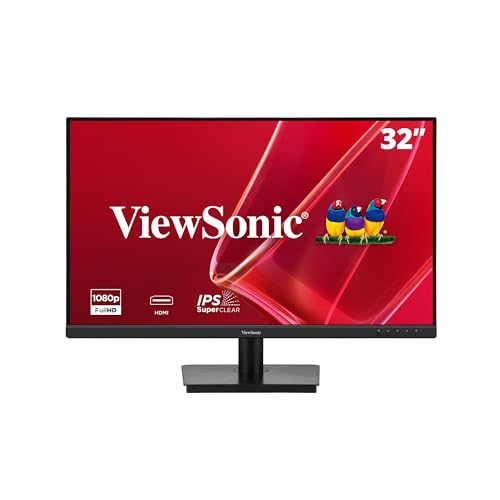
The ViewSonic 32 Inch FHD 1080p IPS Computer Monitor stands out with its impressive 178-degree viewing angle, making it an ideal choice for gamers who want a vibrant and immersive experience from any position in the room. With a resolution of 1920×1080 pixels and a refresh rate of 75Hz, you’ll enjoy smooth visuals. Its built-in speakers deliver quality audio without needing extra equipment. The flicker-free technology and blue light filter reduce eye strain during long gaming sessions. Plus, the frameless design makes it perfect for multi-monitor setups. Compatible with various devices, it’s a fantastic addition to your gaming space.
Best For: Gamers seeking an immersive experience with smooth visuals and reduced eye strain.
Pros:
- Enhanced viewing experience with a 178-degree viewing angle and vibrant colors.
- Built-in speakers eliminate the need for additional audio equipment.
- Flicker-free technology and blue light filter significantly reduce eye strain during extended use.
Cons:
- Limited connectivity options with only one HDMI and VGA port.
- Brightness level of 250 nits may not be sufficient for brightly lit environments.
- The resolution of 1080p may not meet the needs of users seeking higher-definition displays.
Samsung 27″ Odyssey G5 Gaming Monitor (G51F)

For gamers seeking an immersive experience without the clutter of external speakers, the Samsung 27″ Odyssey G5 Gaming Monitor (G51F) stands out with its stunning QHD resolution and impressive 180Hz refresh rate. You’ll enjoy ultra-smooth gameplay thanks to the 1ms response time and AMD FreeSync technology, which minimizes lag and tearing. The ergonomic stand allows for tilt, pivot, and height adjustments, ensuring comfort during long gaming sessions. With HDR10 and a 3000:1 contrast ratio, expect vibrant visuals and enhanced detail. Plus, its versatile connectivity options make it easy to connect all your devices.
Best For: Gamers looking for a high-performance monitor that delivers immersive visuals and responsive gameplay without the hassle of external speakers.
Pros:
- High Refresh Rate: With a 180Hz refresh rate, the monitor offers ultra-smooth gameplay, ideal for fast-paced gaming.
- Quick Response Time: A 1ms response time allows for real-time capture of gaming moves, enhancing performance during competitive play.
- Ergonomic Design: The adjustable stand ensures comfort during extended gaming sessions, allowing users to tilt, pivot, and change the height of the monitor.
Cons:
- Limited Built-in Speakers: The absence of robust external speakers may require additional purchases for enhanced audio experience.
- Weight: At 10.12 pounds, the monitor may be cumbersome for some users to move or adjust frequently.
- Size Limitation: Some users may find 27 inches too large or too small depending on their desk setup and personal preference.
Sceptre 22-Inch Gaming Monitor (E225W-FW144 Series)

With a lightning-fast 1 millisecond response time, the Sceptre 22-Inch Gaming Monitor (E225W-FW144 Series) is an ideal choice for gamers seeking an immersive experience without the clutter of external speakers. Featuring a stunning FHD 1080p resolution and a refresh rate of up to 144Hz, you’ll enjoy crisp visuals and smooth gameplay. The built-in speakers deliver rich audio, while the blue-light shift technology helps reduce eye strain during long sessions. Weighing just 7 pounds, its minimal bezel design makes it perfect for dual monitor setups. Plus, with a solid 4.6-star rating, you can trust its performance.
Best For: Gamers seeking a compact and high-performance monitor for an immersive gaming experience.
Pros:
- High Refresh Rate: Up to 144Hz for smooth gameplay and reduced motion blur.
- Fast Response Time: 1 millisecond response time minimizes ghosting during fast action scenes.
- Eye Care Technology: Blue-light shift technology reduces eye strain, making it suitable for long gaming sessions.
Cons:
- Limited HDMI Ports: Only one HDMI port may restrict connectivity options.
- Weight: At 7 pounds, it might be heavier compared to some ultra-lightweight monitors.
- Built-in Speakers: While adequate, built-in speakers may not match the quality of dedicated external speakers.
ASUS TUF Gaming 27″ 2K HDR Gaming Monitor (VG27AQ)

ASUS TUF Gaming 27″ 2K HDR Gaming Monitor (VG27AQ) stands out as an excellent choice for gamers who crave a balance between vibrant visuals and immersive audio. With a stunning WQHD display and a 165Hz refresh rate, you’ll enjoy smooth gameplay and lifelike detail. The built-in speakers enhance your gaming experience, while G-SYNC compatibility and ELMB Sync technology minimize screen tearing. Plus, the ergonomic stand allows for easy adjustments to suit your comfort. Connectivity options are versatile, ensuring you can connect multiple devices effortlessly. With a 3-year warranty, this monitor offers both performance and peace of mind for your gaming setup.
Best For: Gamers seeking a high-performance monitor that offers exceptional visuals and audio for an immersive gaming experience.
Pros:
- 165Hz refresh rate ensures smooth gameplay with minimal motion blur.
- G-SYNC compatibility helps eliminate screen tearing for a seamless gaming experience.
- Ergonomic stand allows for full height, tilt, swivel, and pivot adjustments for personalized comfort.
Cons:
- Built-in speakers may not provide the best audio quality compared to dedicated speakers or headphones.
- Limited to HDMI 2.0 and DisplayPort 1.2, which may restrict some advanced features or higher refresh rates on certain devices.
- The matte screen finish might not appeal to users who prefer glossy displays for vibrant colors.
Sceptre Curved 24.5-inch Gaming Monitor (C255B-FWT240 Series)

The Sceptre Curved 24.5-inch Gaming Monitor (C255B-FWT240 Series) stands out for gamers who crave an immersive experience without the hassle of external speakers. With a Full HD 1920 x 1080 resolution and a stunning 240Hz refresh rate, your gameplay feels smooth and responsive. The 1ms response time eliminates ghosting, ensuring crisp visuals during intense action. Its 1500R curvature enhances your viewing experience, making you feel enveloped in the game. Built-in speakers deliver solid audio, while multiple connectivity options, including DisplayPort and HDMI, make setup easy. Rated 4.5 stars by users, this monitor is a fantastic choice for serious gamers.
Best For: Gamers seeking an immersive experience with high refresh rates and low response times.
Pros:
- 240Hz refresh rate provides smooth gameplay with instant frame transitions.
- 1ms response time eliminates ghosting, ensuring clear visuals during fast-paced action.
- Built-in speakers offer convenient audio without the need for external sound systems.
Cons:
- Limited to a Full HD resolution of 1920 x 1080, which may not satisfy users looking for higher resolutions.
- Curvature may not appeal to everyone, as some users prefer flat screens.
- Power consumption of 32 Watts could be higher compared to other monitors in its category.
Acer Nitro 27″ WQHD Gaming Monitor (XV272U W2bmiiprx)

For gamers seeking an immersive experience, the Acer Nitro 27″ WQHD Gaming Monitor (XV272U W2bmiiprx) stands out with its impressive refresh rate of up to 240Hz, guaranteeing smooth gameplay during fast-paced action. The 2560 x 1440 resolution and IPS display deliver vibrant visuals, while AMD FreeSync Premium technology eliminates screen tearing. With a rapid 0.5ms response time, you won’t miss a beat. Built-in 2-watt speakers provide decent audio, enhancing your gaming experience without needing extra speakers. Plus, ergonomic features like tilt, swivel, and height adjustment assure a comfortable setup for those long gaming sessions.
Best For: Gamers looking for a high-performance monitor that delivers smooth visuals and an immersive experience during fast-paced gameplay.
Pros:
- High Refresh Rate: Offers up to 240Hz refresh rate for ultra-smooth gameplay.
- Vibrant Display: WQHD resolution with IPS technology provides excellent color accuracy and viewing angles.
- Ergonomic Design: Features adjustable height, tilt, and swivel for comfortable long gaming sessions.
Cons:
- Built-in Speakers: The 2-watt speakers may not provide sufficient audio quality for more serious gamers.
- Price Point: Higher-end specifications may come at a premium price compared to basic monitors.
- Limited Port Options: Only one Display Port and two HDMI ports may be insufficient for users with multiple devices.
Factors to Consider When Choosing a Gaming Monitor With Built-In Speakers
When you’re picking a gaming monitor with built-in speakers, there are several key factors to keep in mind. You’ll want to take into account screen size and resolution, refresh rates, and response times to guarantee an ideal gaming experience. Don’t forget to check the connectivity options and panel technology, as these can greatly affect performance.
Screen Size and Resolution
Finding the right screen size and resolution for your gaming monitor can greatly enhance your overall experience. Monitors typically range from 22 inches to over 34 inches, giving you options for immersive visuals. Aim for a resolution that suits your needs, like Full HD (1920 x 1080), QHD (2560 x 1440), or WQHD (3440 x 1440); higher resolutions provide sharper images. Larger screens often feature wider aspect ratios, such as 21:9 or 16:9, improving your field of view for a cinematic feel. Remember, the ideal combination depends on your viewing distance; larger screens need higher resolutions to avoid pixelation. Balancing screen size and resolution guarantees you enjoy stunning graphics without sacrificing performance.
Refresh Rate Importance
While selecting a gaming monitor with built-in speakers, the refresh rate plays an essential role in your overall experience. Measured in hertz (Hz), the refresh rate indicates how many frames per second the monitor can display. For competitive gaming, a refresh rate of 240Hz or higher is ideal, ensuring ultra-smooth motion and reducing motion blur. Even refresh rates of 165Hz or 180Hz provide significant improvements over standard 60Hz displays, catering to both casual and competitive gamers. Remember, the refresh rate works best with a capable graphics card; if your card outputs high frame rates, a higher refresh rate monitor will maximize performance. Additionally, features like FreeSync or G-SYNC can enhance fluidity and prevent screen tearing, enriching your gaming experience.
Response Time Considerations
As you explore gaming monitors with built-in speakers, response time becomes a key factor in your decision-making process. This metric measures how quickly a pixel changes from one color to another, typically expressed in milliseconds (ms). For gaming, a response time of 1ms or less is ideal, as it eliminates ghosting and motion blur in fast-paced gameplay. Monitors with response times of 5ms or higher may introduce noticeable lag and blurred images during rapid movements, hindering your performance. Different panel technologies, like TN, IPS, and VA, affect response times, with TN panels usually offering the fastest changes. Choosing a monitor with a quick response time enhances your gaming experience, providing smoother visuals and more precise control during intense action.
Connectivity Options Available
When selecting a gaming monitor with built-in speakers, the connectivity options available can significantly impact your overall experience. Make sure to take into account the number and type of ports, like HDMI, DisplayPort, and USB, as these will affect compatibility with your devices. Opt for monitors with multiple HDMI ports to connect different gaming consoles or PCs at once, giving you more flexibility. It’s also essential that the monitor supports audio output through its ports; some may only transmit video. Look for USB Type-C ports for both display and power delivery, reducing cable clutter. Finally, check for audio output ports, such as 3.5mm jacks, to connect external audio systems or headphones if the built-in speakers don’t meet your expectations.
Panel Technology Differences
Choosing the right panel technology is essential for maximizing your gaming monitor’s performance, especially if you want built-in speakers. IPS panels offer superior color accuracy and wide viewing angles, making them great for immersive experiences. VA panels, on the other hand, provide higher contrast ratios, delivering deeper blacks that enhance dark scenes during gameplay. If you’re into competitive gaming, TN panels boast fast response times, although they lack in color reproduction and viewing angles. OLED technology offers vibrant colors and perfect blacks, but it can be pricier and susceptible to burn-in. Finally, consider the panel’s refresh rate—monitors with up to 240Hz provide smoother motion for fast-paced games, ensuring you don’t miss any action.
Ergonomics and Design Features
Finding a gaming monitor that combines performance and comfort can greatly enhance your gaming experience, especially with built-in speakers. Look for ergonomic stands that offer height adjustment, tilt, swivel, and pivot features. These allow you to customize your viewing angles, making long gaming sessions much more comfortable. A matte screen finish is also key, as it reduces glare and reflections, improving visibility in bright environments. Slim bezels provide a more immersive feel and are perfect for multi-monitor setups. Additionally, built-in speakers simplify your setup by cutting down on clutter while still delivering decent sound quality. Finally, consider the monitor’s weight and dimensions to guarantee stability and the right fit for your gaming space.