Finding a capable PC case does not require a premium budget. The best computer cases under $200 combine strong airflow, practical component support, modern front-panel connectivity, and attractive designs for gaming and everyday builds.
This roundup compares 10 affordable ATX and Micro-ATX cases, including models with pre-installed ARGB or PWM fans, panoramic tempered glass, mesh front panels, and Type-C support.
Best 10 Computer Cases Under 200 Picks for 2026
Panoramic Cooling Pick

- Seven PWM ARGB fans included
- 270-degree dual-glass showcase
- 400 mm GPU and 360 mm radiator support
Best For: RGB-focused gaming builds and component displays
Showcase Build Pick
MONTECH TG3 Panoramic ATX PC Case

- Tiered interior for figures and accents
- 430 mm GPU and 180 mm cooler clearance
- Back-connect motherboard support
Best For: Custom showcase systems and rear-connector builds
Quiet Airflow Pick
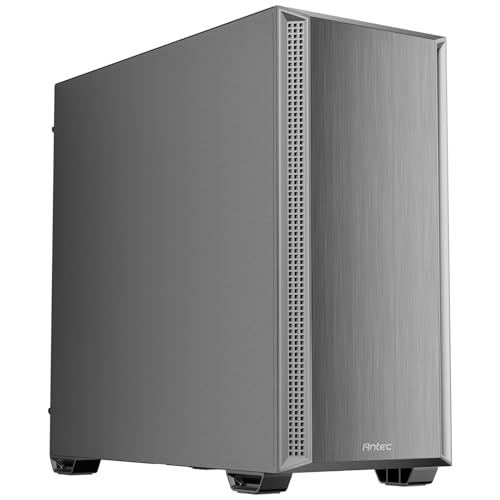
- Four PWM fans included
- Dual side-mesh intake design
- Sound-dampening side panels
Best For: Quiet-leaning ATX gaming and productivity builds
Large-Fan Value Pick

- Two 180 mm ARGB PWM fans included
- Offset PSU improves side airflow
- Type-C and magnetic front filter
Best For: Large-fan airflow builds with ATX or smaller boards
Best Expandable Airflow Case

- Mesh front with magnetic dust filters
- Supports up to eight 120 mm fans and a 360 mm radiator
- Fits GPUs up to 340 mm and PSUs up to 200 mm
Best For: Upgrade-friendly gaming builds
Best Panoramic Compact Build

- 270-degree panoramic tempered-glass design
- Three pre-installed fans
- Supports Micro-ATX and Mini-ITX motherboards
Best For: Compact showcase gaming PCs
Best Ready-to-Use ARGB Case

- Four built-in 120 mm ARGB fans
- Mesh front and tempered-glass side panel
- Supports a 360 mm radiator and 340 mm GPU
Best For: Airflow-focused RGB gaming builds
Best Visual-First ATX Case

- 270° dual tempered-glass viewing area
- Four pre-installed non-LED fans
- Supports GPUs up to 410mm and radiators up to 360mm
Best For: Showcase ATX builds with large graphics cards
Best Budget RGB Airflow Case
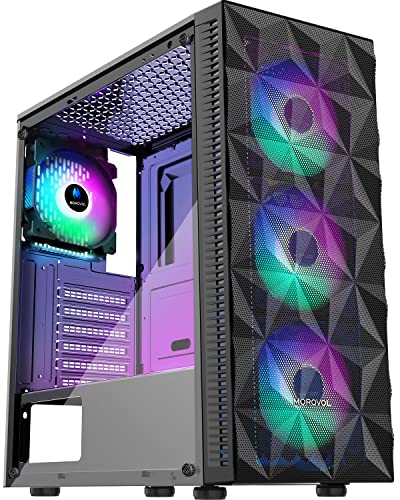
- Four included 120mm fixed-RGB fans
- Diamond-mesh front panel for airflow
- Removable tempered-glass side panel
Best For: Affordable RGB gaming builds with moderate-size components
Best Feature-Rich RGB Case

- Six pre-installed PWM ARGB fans
- Opening tempered-glass side door
- Supports top-mounted 280mm liquid cooling
Best For: Customizable RGB gaming builds with frequent hardware access
Panoramic Cooling Pick – MUSETEX K2 ATX PC Case
For shoppers comparing computer cases under 200, the MUSETEX K2 stands out with a panoramic dual-tempered-glass layout and seven pre-installed PWM ARGB fans. It supports ATX, Micro-ATX, and Mini-ITX motherboards while leaving room for large graphics cards and top-mounted liquid cooling.
Best For: RGB-focused gaming builds and users who want to display internal components.
Pros:
- Includes seven adjustable-speed PWM ARGB fans, expandable to 10 total.
- 270-degree dual-tempered-glass design provides a wide hardware showcase.
- Supports graphics cards up to 400 mm and top radiators up to 360 mm.
- Includes a front Type-C port, two USB 3.0 ports, and dust filtration.
Cons:
- The power-supply length limit is tighter with the hard-drive cage installed.
- Its glass-heavy showcase design may appeal less to users seeking a subdued case.
The K2 offers strong out-of-the-box cooling and generous component clearance, making it a practical choice when airflow and visual presentation matter equally.
Showcase Build Pick – MONTECH TG3 Panoramic ATX PC Case
Among computer cases under 200, the MONTECH TG3 is a display-oriented mid-tower with a tiered interior platform and panoramic styling. Its back-connect motherboard support, four pre-installed ARGB fans, and clearance for large components make it suited to modern showcase builds.
Best For: Custom gaming systems featuring collectibles, back-connect motherboards, or oversized graphics cards.
Pros:
- Tiered interior creates dedicated space for figures and custom accents.
- Supports up to nine fan positions and includes four ARGB fans.
- Fits graphics cards up to 430 mm, CPU coolers up to 180 mm, and ATX PSUs up to 250 mm.
- Supports ASUS BTF, MSI Project Zero, and GIGABYTE Project STEALTH back-connect layouts.
Cons:
- Its display-focused interior may not suit minimalist or compact-build preferences.
- The supplied details identify cooling as air cooling, although 360 mm radiator support is highlighted.
The TG3 is a flexible choice for builders who want hardware and decorative elements to remain visible, with especially useful support for rear-connector motherboard designs.
Quiet Airflow Pick – Antec P7 S Mid-Tower PC Case
The Antec P7 S is a sensible option among computer cases under 200 for builders prioritizing airflow without giving up noise control. It combines dual side-mesh intake panels, four pre-installed PWM fans, sound-dampening side panels, and support for a top-mounted 360 mm radiator.
Best For: ATX gaming or productivity systems where balanced cooling and reduced panel noise are priorities.
Pros:
- Includes three 120 mm front PWM fans and one 120 mm rear PWM fan.
- Dual side-mesh intake and a 30 mm bottom intake help support GPU cooling.
- Sound-dampening foam on both side panels helps reduce operating noise.
- Supports graphics cards up to 405 mm and top radiators up to 360 mm.
Cons:
- Only four internal bays are listed, which may limit storage expansion for some builds.
- The supplied details list one USB 3.0 port, despite also highlighting USB Type-C 3.2 Gen 2.
The P7 S is well suited to a straightforward, quiet-leaning ATX build, offering useful clearance and included fans without requiring an immediate cooling upgrade.
Large-Fan Value Pick – COUGAR Airface 180 ES PC Case
For shoppers seeking computer cases under 200, the COUGAR Airface 180 ES takes a different approach with two pre-installed 180 mm ARGB PWM fans. Its offset power-supply cabin, magnetic front filter, and modern Type-C I/O make it a practical mid-tower option for compatible ATX and smaller motherboard builds.
Best For: Builders who want large-fan airflow and ARGB lighting without installing several smaller fans.
Pros:
- Includes two 180 mm ARGB PWM fans and an ARGB fan controller.
- Offset PSU placement leaves more room for airflow through the side vent.
- Magnetic front filter is designed for quick removal and cleaning.
- Supports Reverse Connector, CEB, ATX, Micro-ATX, and Mini-ITX motherboards.
Cons:
- Graphics-card clearance is limited to 340 mm.
- Only two fans are included, so additional cooling may be needed for some configurations.
- It lists three internal bays, which may be limiting for storage-heavy systems.
The Airface 180 ES is a focused choice for users who value the airflow potential and visual impact of large front fans, provided their graphics card and storage needs fit its layout.
Best Expandable Airflow Case – DARKROCK EC2 ATX Mid Tower
If you need a flexible option among computer cases under 200, the DARKROCK EC2 combines an airflow-focused mesh front with broad component support. It accommodates ATX, Micro-ATX, and Mini-ITX motherboards, graphics cards up to 340 mm, and up to eight 120 mm fans.
Best For: Builders who want upgrade room, modern Type-C readiness, and support for large cooling hardware.
Pros:
- Mesh front panel supports efficient airflow.
- Supports up to eight 120 mm fans and a 360 mm front radiator.
- Tempered-glass side panels showcase the build.
- Magnetic top and bottom dust filters simplify maintenance.
Cons:
- Only one fan is pre-installed.
- Its mid-tower footprint may be larger than compact-build shoppers need.
The EC2 is a practical choice when expansion and cooling flexibility matter more than having a fully populated fan setup out of the box. Its 340 mm GPU clearance and 200 mm PSU clearance also give it useful room for substantial components.
Best Panoramic Compact Build – MOROVOL V3 Micro-ATX Case
For shoppers comparing computer cases under 200, the MOROVOL V3 offers a compact Micro-ATX platform with a distinctive 270-degree panoramic tempered-glass design. It also includes three pre-installed fans, helping provide airflow without requiring an immediate fan upgrade.
Best For: Micro-ATX and Mini-ITX builders who want a compact, showcase-style gaming case.
Pros:
- Three-sided panoramic tempered glass provides an unobstructed view of the build.
- Three fans are pre-installed for out-of-box airflow.
- Supports Micro-ATX and Mini-ITX motherboards.
- Includes front-panel USB 3.0 connectivity.
Cons:
- It does not support full-size ATX motherboards.
- Its cooling specification is air cooling rather than water cooling.
- Four expansion slots offer less expansion room than the ATX cases here.
The V3 prioritizes visual presentation and a smaller footprint. Its included fans make it convenient for a straightforward compact build, while the Micro-ATX-only design is the key compatibility point to verify before buying.
Best Ready-to-Use ARGB Case – GAMDIAS AURA GC1 ELITE
The GAMDIAS AURA GC1 ELITE is a strong contender among computer cases under 200 for builders who want airflow, lighting, and included cooling in one package. Its mesh front is paired with four built-in 120 mm ARGB fans, while the case supports ATX, Micro-ATX, and Mini-ITX motherboards.
Best For: Gaming builds that need included ARGB fans, tempered-glass presentation, and broad motherboard compatibility.
Pros:
- Four pre-installed 120 mm ARGB fans provide immediate airflow and lighting.
- Mesh front panel is designed for air intake.
- Supports up to six 120 mm fans and a 360 mm radiator.
- Fits GPUs up to 340 mm and CPU coolers up to 160 mm.
Cons:
- Its included lighting may not suit understated builds.
- The case has only one USB 3.0 port on the front panel.
With four fans already installed, the AURA GC1 ELITE reduces the need for immediate cooling additions while delivering a clear component view through its tempered-glass side panel. It is especially compelling for a gaming-focused build where airflow and ARGB presentation are both priorities.
Best Visual-First ATX Case – MUSETEX Y6
For shoppers comparing computer cases under 200, the MUSETEX Y6 stands out with a 270° dual tempered-glass view, four included fans, and generous component clearance. Its ATX mid-tower layout supports mainstream motherboard sizes while adding Type-C connectivity and dust filters.
Best For: Builders who want a clean showcase case with broad component compatibility and pre-installed airflow.
Pros:
- 270° full-view tempered-glass panels showcase internal hardware.
- Includes four 120mm non-LED fans, with a dual-chamber layout for airflow management.
- Supports ATX, Micro-ATX, and Mini-ITX motherboards, GPUs up to 410mm, and top-mounted radiators up to 360mm.
- Includes a USB-C port, magnetic dust filters, and a 10-year warranty.
Cons:
- The included fans do not provide RGB lighting.
- CPU cooler clearance is limited to 160mm, so check cooler dimensions before buying.
The Y6 is a strong choice when appearance, long GPU support, and a flexible cooling layout matter more than built-in lighting. Its four fans and spacious compatibility range make it a practical foundation for a showcase ATX build.
Best Budget RGB Airflow Case – MOROVOL 621
Among computer cases under 200, the MOROVOL 621 is a straightforward budget option for an RGB gaming build. It combines four fixed-RGB fans, a diamond-mesh front panel, and a tempered-glass side panel, while supporting ATX, Micro-ATX, and Mini-ITX systems.
Best For: Budget-conscious gamers who want included RGB fans and a mesh front for airflow.
Pros:
- Four pre-installed 120mm RGB fans provide airflow and lighting.
- Diamond-shaped mesh front panel is designed for ventilation.
- Supports up to two 2.5-inch SSDs and two 3.5-inch HDDs.
- Removable tempered-glass side panel simplifies component installation and display.
Cons:
- The RGB lighting is fixed rather than addressable.
- GPU clearance is limited to 300mm, and PSU clearance to 160mm.
- Only one USB 3.0 port is provided.
The 621 delivers the essentials for an affordable gaming tower, especially if you want lighting and airflow without adding separate case fans. Verify your graphics-card and power-supply dimensions before committing.
Best Feature-Rich RGB Case – MUSETEX NN8
For builders browsing computer cases under 200, the MUSETEX NN8 offers an unusually complete starting package with six PWM ARGB fans and an opening tempered-glass side door. Its mesh front, dual USB 3.0 ports, and water-cooling support suit a customizable gaming system.
Best For: RGB-focused builders who prioritize adjustable fan control, easy access, and expanded storage options.
Pros:
- Six pre-installed PWM ARGB fans support adjustable speed and customizable lighting through a compatible 3-pin RGB connection.
- Magnetic opening glass side door provides quick access for cleaning and upgrades.
- Supports ATX, Micro-ATX, and Mini-ITX motherboards, with top-mounted 280mm liquid-cooling support.
- Offers stated storage capacity of up to five SSDs and one HDD, or four SSDs and two HDDs.
Cons:
- Motherboard compatibility with a 3-pin RGB header is needed for lighting control.
- GPU and CPU-cooler clearance details are not fully specified in the supplied information.
- The case does not include a power supply, radiator, motherboard, or graphics card.
The NN8 is a compelling all-in-one case for an RGB-heavy build, particularly if frequent access to the interior matters. Its six PWM fans and storage flexibility are strong advantages, but confirm your component clearances before installation.
How We Picked the Best Computer Cases Under 200
We focused on case features that have the greatest effect on a real-world build: airflow, included fans, motherboard compatibility, graphics card clearance, radiator support, front-panel ports, and ease of installation. We also considered whether each case offers useful value out of the box, such as pre-installed PWM or ARGB fans, rather than judging appearance alone.
The selection includes full-size ATX mid towers as well as a Micro-ATX option. Because specifications can vary by revision, check the manufacturer’s listing for exact clearance measurements before buying large graphics cards, tower coolers, or liquid-cooling radiators.
Quick Comparison
| What to Compare | Best Choice For | Why It Matters |
|---|---|---|
| ATX support | Most gaming and workstation builds | Provides broader motherboard and expansion compatibility. |
| Micro-ATX format | Compact, lower-cost systems | Saves space but limits motherboard and expansion options. |
| Mesh airflow design | High-performance components | Helps move cool air toward the CPU and GPU. |
| Panoramic glass | Showcase builds | Improves component visibility but may require careful fan planning. |
| Pre-installed fans | Value-focused builders | Reduces the need to buy additional case fans immediately. |
| Type-C front I/O | Modern peripherals and storage | Offers convenient access to newer USB devices. |
Key Buying Factors for Computer Cases Under 200
Airflow and Included Fans
A mesh front panel and multiple intake fans are generally preferable for gaming PCs with power-hungry processors or graphics cards. Confirm whether included fans are PWM-controlled, fixed-speed, ARGB-equipped, or simply basic three-pin models. More fans are not automatically better if the front panel restricts intake.
Size and Component Clearance
ATX mid towers are the safest choice for standard ATX, Micro-ATX, and Mini-ITX motherboards. Check maximum GPU length, CPU cooler height, power supply length, and radiator positions. Panoramic cases can have different internal layouts, so do not assume a large exterior means unrestricted clearance.
Cooling, Noise, and Cable Management
Look for removable dust filters, sensible cable-routing channels, a PSU shroud, and enough space behind the motherboard tray. A case with fan control or PWM support can balance cooling and noise more effectively than one with only fixed-speed fans.
Front-Panel Connectivity
USB 3.0 is useful for common accessories, while USB Type-C is increasingly valuable for newer phones, drives, and peripherals. Also verify the location of the ports and whether the case includes the appropriate motherboard header cable.
Who Should Buy Which Computer Cases Under 200?
- Choose an ATX airflow case if you are building a mainstream gaming PC or upgrading later with additional storage, cooling, or expansion cards.
- Choose a panoramic tempered-glass case if component visibility and showcase styling matter more than the smallest possible footprint.
- Choose a case with pre-installed ARGB fans if you want coordinated lighting and lower initial accessory costs.
- Choose a PWM-fan model if you prioritize adjustable cooling and better noise control.
- Choose the Micro-ATX option for a compact build using a compatible motherboard and modest expansion requirements.
- Choose a mesh-focused design for hotter CPUs, larger GPUs, or rooms where sustained airflow is more important than a fully enclosed front panel.
Before ordering, verify the latest dimensions, included fan count, connector types, and clearance limits. Those details determine whether a case is merely attractive or genuinely suitable for your planned build.