A compact gaming soundbar can make a small desk feel instantly more complete. It keeps your setup tidy while improving game audio, chat clarity, and everyday media listening.
Below, we’ve rounded up 10 strong options that balance size, sound quality, connectivity, and features like RGB lighting, Bluetooth, and USB power.
Best 10 Compact Gaming Soundbar Picks for 2026
RGB Compact Performer
Creative GS3 Compact RGB Gaming Soundbar

- Up to 24W peak power
- USB-C, AUX, and Bluetooth 5.4
- Multiple RGB lighting presets
Best For: PC gamers who want RGB style and flexible connectivity
Stereo Desk Value

- Four speaker units plus two bass diaphragms
- Bluetooth 5.0 and 3.5mm AUX
- USB powered with one-knob control
Best For: Users who want an affordable, easy-to-use desktop soundbar
Ultra-Compact RGB Pick

- Very compact under-monitor design
- USB-C for power and audio
- 14-zone Chroma RGB lighting
Best For: Gamers who want a tiny RGB soundbar with Razer software control
Space-Saving Power
Saiyin 11.7-inch Compact Sound Bar
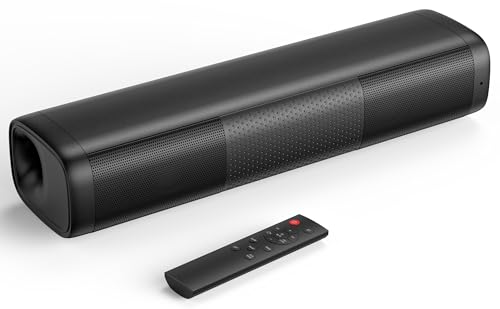
- 11.7-inch compact footprint
- 48W peak power with balanced tuning
- Bluetooth, optical, AUX, and sub out
Best For: Small desks and tight setups needing flexible connectivity
Desk-Friendly RGB Pick
Tylubio Computer Speakers for Desktop

- Dual drivers with passive radiators for clear stereo sound
- USB and Type-C plug-and-play connection
- Slim under-monitor design with adjustable RGB lighting
Best For: Users who want a compact wired soundbar with RGB and easy setup
Wireless RGB Upgrade
Creative Sound Blaster GS3 Compact RGB Gaming Soundbar

- Up to 24W peak power with immersive superwide sound
- Bluetooth 5.4 plus USB-C, AUX-in, and headphone-out
- Multiple RGB presets for gaming-focused setups
Best For: Shoppers who want a compact soundbar with wireless connectivity and stronger audio
Budget Lightshow Choice
Redragon GS560 RGB Desktop Soundbar

- 16-inch compact shape fits under a monitor
- USB powered with 3.5mm input for broad compatibility
- Touch controls and music-sync RGB lighting
Best For: Budget shoppers who want a small RGB soundbar for a desk setup
Wireless Desk Space Saver
Bluedee Rechargeable Computer Soundbar

- Rechargeable with up to 13 hours of cordless playback
- Bluetooth 5.3 plus AUX, USB, and TF support
- Slim 16.5-inch design fits under most monitors
Best For: Gamers and desk users wanting a tidy, rechargeable soundbar
LED Atmosphere Pick
SOULION R50 Bluetooth Soundbar

- Four LED modes add desk-friendly visual effects
- Bluetooth and USB/AUX connections for flexibility
- Compact slanted body sits under a monitor
Best For: Budget shoppers who want lighting and simple desktop audio
Wired-and-Wireless Minimalist

- Bluetooth 5.0 and 3.5mm inputs cover common devices
- USB-powered plug-and-play setup is simple
- Slim 16.4-inch body saves monitor space
Best For: Buyers wanting a slim, easy-to-connect desktop soundbar
RGB Compact Performer – Creative GS3 Compact RGB Gaming Soundbar
If you want a compact gaming soundbar that adds both color and convenience, the Creative Sound Blaster GS3 is built for clean desktop setups. It fits neatly under a monitor, offers USB-C, AUX, and Bluetooth 5.4 connectivity, and brings up to 24W peak power with Superwide sound shaping for a more immersive feel.
Best For: PC gamers who want an under-monitor soundbar with RGB lighting and flexible wired/wireless connections.
Pros:
- Multiple RGB presets, including Chasers, Aurora, Peak Meter, Glowing, Wave, and Cycle.
- Up to 24W peak power from full-range racetrack drivers and a built-in port tube.
- Superwide technology aims to widen the soundstage and add punchy bass.
- USB-C, AUX-in, Bluetooth 5.4, and a direct headphone-out port.
Cons:
- Designed for compact setups, so it is not a room-filling speaker solution.
- RGB lighting may be unnecessary if you prefer a plain desktop look.
As a compact gaming soundbar, the GS3 stands out for users who value desk-friendly size, modern connectivity, and customizable lighting. It is a practical pick if you want a simple upgrade over basic monitor speakers without adding clutter.
Stereo Desk Value – Nylavee 4-Driver PC Sound Bar
The Nylavee is a compact gaming soundbar-style desktop speaker for buyers who want straightforward stereo output and easy setup. It uses four speaker units plus two bass diaphragms, supports Bluetooth 5.0 or 3.5mm AUX, and runs from USB power with one-knob control.
Best For: Budget-conscious users who want a simple desktop soundbar for PC, laptop, or console use.
Pros:
- Four speaker units and two bass diaphragms for fuller stereo sound.
- Bluetooth 5.0 and 3.5mm AUX connection options.
- USB powered, so it can be plugged into a PC or other power source.
- Built-in mic and headphone jack add everyday convenience.
Cons:
- No built-in battery, so it is not portable on its own.
- Sound emphasis is on general desktop use rather than gaming-specific effects.
This model makes sense if you want a compact gaming soundbar alternative that focuses on value, simple controls, and broad device compatibility. It is especially appealing for office or bedroom desks where plug-and-play convenience matters more than flashy features.
Ultra-Compact RGB Pick – Razer Leviathan V2 X Soundbar
The Razer Leviathan V2 X is a compact gaming soundbar built for minimal desktop clutter and quick setup. It uses two full-range drivers and two passive radiators, powers audio through a single USB-C cable, and adds Bluetooth 5.0 plus Chroma RGB lighting for a more customized gaming desk.
Best For: Gamers who want Razer styling, RGB effects, and a very compact under-monitor form factor.
Pros:
- Very compact design fits neatly beneath a monitor.
- USB-C handles both power and audio through a single cable.
- Bluetooth 5.0 supports switching between PC and mobile devices.
- 14-zone Chroma RGB with software control through Razer Audio App and Synapse.
Cons:
- Output is focused on desktop convenience rather than big-room sound.
- Requires Razer software for the full customization experience.
If you want the smallest, cleanest-looking compact gaming soundbar in this group, the Leviathan V2 X is an easy fit. It prioritizes desk space, simple cabling, and RGB integration for users already invested in the Razer ecosystem.
Space-Saving Power – Saiyin 11.7-inch Compact Sound Bar
The Saiyin 11.7-inch model is a compact gaming soundbar option that balances small size with practical output. It offers 48W peak power, Bluetooth 5.3, optical and AUX inputs, and a dedicated sub out for users who want to expand bass later.
Best For: Small setups that need a compact soundbar with multiple TV, PC, and audio inputs.
Pros:
- Very small footprint at 11.7 x 3.5 x 2.5 inches.
- 48W peak power with tuned bass and treble for balanced sound.
- Bluetooth, optical, and AUX inputs provide flexible connectivity.
- Dedicated sub out supports an upgrade to deeper bass.
Cons:
- Requires PCM/stereo/non-surround output to avoid cracking or silence.
- LED indicators are subtle, but the design is more practical than flashy.
This Saiyin sound bar is a strong fit if you want compact dimensions without giving up useful input options. It is especially practical for desks or entertainment setups where space is tight and a simple, balanced sound upgrade is the priority.
Desk-Friendly RGB Pick – Tylubio Computer Speakers for Desktop
If you want a compact gaming soundbar that keeps your desk clean while still adding a bit of flair, the Tylubio Computer Speakers are built for simple plug-and-play use. It combines stereo sound, a slim under-monitor shape, and RGB lighting that can be adjusted or turned off when you need a more focused setup.
Best For: Gamers and office users who want a small, easy-to-use soundbar with RGB lighting and basic wired convenience.
Pros:
- Dual drivers and passive radiators for crisp highs and balanced bass
- Hybrid Type-C and USB connection works with Windows, macOS, and Chrome OS
- One-knob control makes power and volume adjustments quick
- Slim 15.9-inch design fits neatly under a monitor
Cons:
- Wired-only design may not suit those wanting wireless audio
- 90-day warranty is shorter than many alternatives
- 10-watt maximum output is modest for larger rooms
Overall, this is a practical compact gaming soundbar if you value simplicity, small size, and adjustable lighting over advanced audio features. It is best suited to desktop setups where easy placement and quick setup matter more than big-room volume.
Wireless RGB Upgrade – Creative Sound Blaster GS3 Compact RGB Gaming Soundbar
The Creative Sound Blaster GS3 is a compact gaming soundbar aimed at users who want more connectivity flexibility without sacrificing desk space. Its superwide technology, RGB presets, and Bluetooth 5.4 support make it a strong fit for a modern PC or console setup.
Best For: Buyers who want a small soundbar with wireless Bluetooth, USB-C, and more powerful output than typical budget desk speakers.
Pros:
- Up to 24W peak power with full-range racetrack drivers and built-in port tube
- Superwide technology adds a more immersive soundstage with pronounced bass
- Bluetooth 5.4, USB-C, AUX-in, and headphone-out provide flexible connections
- Multiple RGB lighting presets help match a gaming setup
Cons:
- Uses corded power, so it still needs a power outlet
- App control may be less appealing than physical onboard controls for some users
- White finish may not blend with every setup
If you want a compact gaming soundbar that feels more feature-rich than basic monitor speakers, the GS3 stands out for its wireless support and stronger output. It is especially appealing if you switch between PC, console, and mobile devices.
Budget Lightshow Choice – Redragon GS560 RGB Desktop Soundbar
The Redragon GS560 is a straightforward compact gaming soundbar for users who want an easy desk upgrade with lighting and basic stereo sound. Its 16-inch size, USB power, and 3.5mm input make it simple to place under a monitor and connect to common devices.
Best For: Budget-minded buyers who want a compact RGB soundbar for gaming, casual listening, or a small desktop setup.
Pros:
- Compact 16-inch design fits easily under most displays
- USB power and 3.5mm cable support broad device compatibility
- Touch controls with a volume knob make adjustments convenient
- RGB backlighting includes dynamic and static modes with music sync
Cons:
- 4-watt maximum output is relatively low
- No wireless connectivity options
- Best suited for near-field listening rather than larger spaces
For a simple compact gaming soundbar, the GS560 focuses on ease of use and visual appeal more than raw power. It is a practical pick if you mainly want clearer desktop audio and a lighting effect without adding clutter.
Wireless Desk Space Saver – Bluedee Rechargeable Computer Soundbar
If you want a compact gaming soundbar that keeps your desk clean while still sounding fuller than basic monitor speakers, this Bluedee model is a practical pick. Its slim soundbar shape, rechargeable battery, and Bluetooth 5.3 support make it easy to use for gaming, streaming, or everyday PC audio.
Best For: Gamers and home office users who want a tidy, rechargeable desktop soundbar with flexible wired and wireless input options.
Pros:
- Dual full-range drivers and tweeters aim for clear vocals, crisp highs, and balanced bass.
- Rechargeable design offers up to 13 hours of cordless playback at moderate volume.
- Bluetooth 5.3, 3.5mm AUX, USB, and TF card playback cover multiple setup styles.
- Compact 16.5-inch soundbar profile fits neatly under most monitors.
Cons:
- Maximum output power is 20 watts, so it is better for desk listening than room-filling volume.
- USB port is for flash drive playback only, not general USB audio input.
Overall, this is a flexible monitor speaker option if space matters and you want easy switching between wireless and wired use. It is especially appealing for smaller gaming setups where a slim, rechargeable soundbar makes more sense than larger speakers.
LED Atmosphere Pick – SOULION R50 Bluetooth Soundbar
This compact gaming soundbar is built for buyers who want a simple under-monitor speaker with a little extra desk flair. The SOULION R50 combines Bluetooth or USB/AUX connectivity with colorful LED modes, making it a straightforward choice for casual gaming and everyday computer use.
Best For: Users who want a budget-friendly desktop soundbar with lighting effects and easy switchable connections.
Pros:
- Four LED lighting modes add customizable visual appeal.
- Bluetooth and USB/AUX modes give you flexible connection choices.
- Compact 30-degree slanted design fits neatly under a monitor.
- Two diaphragms and boosters are designed to deliver crisp, rich sound.
Cons:
- Maximum output is 10 watts, so it is not aimed at high-volume listening.
- Requires USB power, so it is not fully wireless.
The R50 is a good fit if you value easy setup, compact sizing, and a more colorful look on your desk. It is less about premium output and more about adding convenient sound and style to a small gaming or work space.
Wired-and-Wireless Minimalist – Bluedee Slim PC Soundbar
For a compact gaming soundbar that keeps things simple, this Bluedee model focuses on plug-and-play convenience and a slim footprint. It uses Bluetooth 5.0 or a 3.5mm connection, and its USB-powered design makes it easy to add to a monitor, laptop, or desktop without extra setup.
Best For: Users who want a slim under-monitor soundbar with both Bluetooth and wired connectivity.
Pros:
- Dual drivers and dual diaphragms are designed for clearer highs and deeper bass.
- Bluetooth 5.0 and 3.5mm input support both wireless and wired use.
- USB-powered plug-and-play setup requires no drivers or software.
- Compact 16.4 x 2.6 x 2.6-inch profile helps save desk space.
Cons:
- It relies on USB power, so it is not battery operated.
- The light strips are decorative rather than a core performance feature.
This is a clean, straightforward desktop soundbar for buyers who want dependable compatibility and a minimal footprint. Its biggest strengths are simplicity, a tidy cable setup, and enough connectivity to work across common PC and laptop builds.
How We Picked the Best Compact Gaming Soundbar
We focused on Compact Gaming Soundbar models that make sense for cramped desks, monitor setups, and budget-conscious gaming spaces. Priority went to products with practical connectivity, straightforward power options, and a form factor that can sit neatly under a monitor without crowding your keyboard or mouse area.
We also looked for features that matter in real use: clear stereo output for games and voice chat, simple controls, stable Bluetooth or wired input options, and extras like RGB lighting or dedicated volume knobs when they improved day-to-day convenience.
Quick Comparison
The best picks in this category usually fall into a few groups. Some are best for plug-and-play PC use through USB and Bluetooth. Others add broader input support such as AUX or optical, which can help if you want one speaker for a PC, console, or laptop. RGB-focused models appeal to builders who want matching desk aesthetics, while more understated options fit cleaner setups.
Key Buying Factors for a Compact Gaming Soundbar
Size and Fit
Measure the space under your monitor before buying. A truly Compact Gaming Soundbar should leave room for your display stand and not block ports, cables, or wrist space.
Connectivity
USB power, USB-C, Bluetooth, AUX, and optical inputs each serve different needs. For simple PC use, USB and AUX are often enough. If you want flexibility across multiple devices, look for more than one input.
Sound Profile
For gaming, clarity matters as much as volume. Look for models that emphasize voice chat, footsteps, and balanced stereo separation rather than just bass.
Controls and Convenience
Physical volume knobs, touch controls, and easy-access power buttons can make a big difference in daily use. If you switch between games, calls, and music often, convenience features are worth prioritizing.
Lighting and Design
RGB is optional, but it can be a nice bonus if you want your audio gear to match the rest of your setup. If you prefer a minimalist desk, choose a low-profile design with subtle styling.
Who Should Buy Which Compact Gaming Soundbar?
If you want the simplest desk upgrade, choose a Compact Gaming Soundbar with USB power and Bluetooth for easy setup. If you game on multiple devices, prioritize models with AUX and optical support. If aesthetics matter, RGB-equipped picks are ideal for a coordinated battlestation. And if desk space is extremely limited, go for the slimmest model that still offers the inputs and controls you actually use.
In short, the best choice depends on your desk size, device mix, and whether you value sound quality, simplicity, or style most.