Choosing a soldering microscope under $300 can make small components, trace damage, and tight joints much easier to see without committing to professional lab equipment.
This roundup compares digital scopes with HDMI output, autofocus, dual-lens designs, flexible arms, and different screen sizes so you can match magnification and workspace needs to your repair projects.
Best 10 Soldering Microscopes Under 300 Picks for 2026
Best All-Purpose Station

- Three lenses for soldering, coins, and slides
- 2160P HDMI output with Windows software
- Expanded station with helping hands and storage
Best For: Versatile electronics repair and inspection work
Best Large-Screen Value

- 10.1-inch IPS display with wide viewing angle
- Adjustable stand for soldering and coins
- Top, side, and bottom LED lighting
Best For: General-purpose home inspection and electronics repair
Best Premium Display

- 10.1-inch display with 2160P HDMI output
- Three lenses up to a stated 2040x
- Expanded station with storage and helping hands
Best For: Dedicated, high-resolution electronics workbenches
Best Autofocus Coin-and-Repair Scope

- Autofocus with P1/P2 preset focus memory
- 3K, 38MP imaging and 10.1-inch IPS display
- Flexible arm, dual lights, mat, and remote included
Best For: Soldering, coin inspection, and jewelry work needing a large screen
Best Multi-Lens Starter Kit

- Three lenses for repair, coins, and slides
- 2160P recording with HDMI output
- Boom arm, remote, software support, and accessories
Best For: Multi-purpose inspection and beginner soldering setups
Best 4K Autofocus Flex-Arm Scope

- 4K video and 52MP image capture
- TOF autofocus with P1/P2 focus presets
- 360-degree arm and adjustable dual spotlights
Best For: Detailed PCB repair and inspection with flexible positioning
Compact C-Clamp Pick

- 5-inch IPS display for standalone viewing
- C-clamp and flexible arm support hands-free PCB work
- Manual focus; Micro SD card required for saved media
Best For: PCB repair and soldering checks in tight workspaces
Advanced 3D Viewing Pick
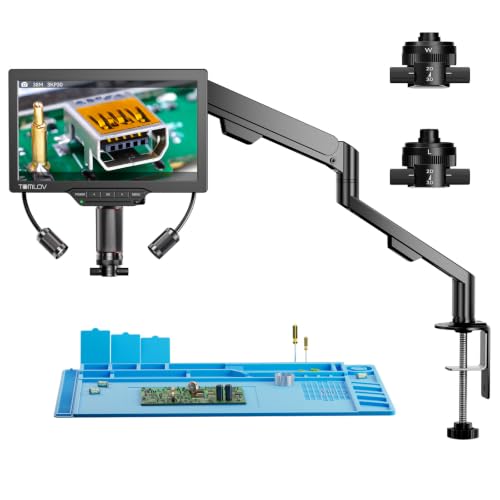
- 3D side-viewing with 360-degree rotation
- Magnetic long-distance and wide-angle lenses
- 3K display with HDMI and USB connectivity
Best For: Detailed PCB, watch, jewelry, and multi-angle inspection
Coin-and-Repair Value Pick
TOMLOV DM9 7" Digital Microscope

- Stable metal base with adjustable 8.5-inch stand
- 7-inch screen and adjustable multi-angle lighting
- Includes 16GB card, 12MP photos, and 1080P video
Best For: Coin collecting plus light PCB and hobby inspection
Best All-Purpose Station – Andonstar AD246S-M Plus
For shoppers comparing soldering microscopes under 300, the Andonstar AD246S-M Plus stands out as a complete workstation rather than just a digital magnifier. It combines a 7-inch monitor, 2160P HDMI output, three interchangeable lenses, helping hands, a tool holder, an anti-static mat, and an expanded work area.
Best For: Electronics repairers who want one microscope for soldering, coin viewing, and biological slides.
Pros:
- Three lenses cover soldering, general inspection, and biological slides.
- 2160P video, HDMI output, Windows measurement software, and a 32GB SD card support documentation.
- Extension base, storage boxes, tool holder, and rotatable helping hands create a practical soldering station.
- Adjustable LED lighting offers eight intensity levels.
Cons:
- The many included components may take time to set up.
- The highest magnification depends on the digital zoom and selected output configuration.
The AD246S-M Plus is a strong value when workspace organization and broad versatility matter as much as image capture. Its bundled accessories make it especially appealing for a dedicated repair bench.
Best 3D Viewing – TOMLOV TM3K-3D Max
Among soldering microscopes under 300, the TOMLOV TM3K-3D Max is a distinctive option for users who need to inspect components from the side as well as from above. Its 3K display, magnetic dual lenses, articulating arm, and 360-degree 3D viewing are designed around detailed repair and inspection.
Best For: PCB repair, watchmaking, jewelry inspection, and other work where multiple viewing angles are useful.
Pros:
- 3D side-viewing and 360-degree rotation help reveal component details from multiple perspectives.
- Magnetic L and W lenses switch without tools.
- 10.1-inch 3K IPS screen provides a large, detailed viewing area.
- Supports the built-in screen, HDMI display, and USB computer connection.
Cons:
- Its specialized 3D design may be more capability than needed for straightforward soldering.
- The notes do not specify a bundled memory-card capacity beyond the listed 16G highlight.
The TM3K-3D Max is best judged by its viewing flexibility rather than maximum magnification claims. If side inspection and adjustable lighting can improve your workflow, its unusual design may justify choosing it over a conventional microscope.
Best Large-Screen Value – Andonstar AD210
The Andonstar AD210 is a practical contender among soldering microscopes under 300 for buyers who prefer a large built-in display and a straightforward all-purpose setup. Its 10.1-inch IPS screen, adjustable stand, multiple light types, and 1080p video capture cover electronics work, coins, and slides.
Best For: Hobbyists who want a large-screen microscope for soldering, coin inspection, and occasional slide viewing.
Pros:
- 10.1-inch IPS display supports a 178-degree viewing angle.
- Adjustable working distance and a strong stand accommodate soldering and larger coins.
- Top, side, and bottom LED illumination suit different inspection tasks.
- Includes 12MP photo capture, 1080p video, remote control, and a 32GB card.
Cons:
- It does not include the three-lens arrangement of Andonstar’s higher-spec models.
- 1080p video output is lower resolution than the 2160P models in this roundup.
The AD210 makes sense when ease of viewing and working distance are more important than maximum stated magnification. Its broad lighting setup and included slide accessories also make it a flexible choice for general home use.
Best Premium Display – Andonstar AD249S-M Plus
For buyers seeking soldering microscopes under 300 with a larger display, the Andonstar AD249S-M Plus pairs a 10.1-inch monitor with 2160P HDMI output and a dedicated soldering-station setup. Its three lenses and included workholding accessories make it suitable for both precision repair and general observation.
Best For: Dedicated electronics workbenches that need a large screen, high-resolution output, and broad lens coverage.
Pros:
- Three lenses provide ranges for soldering, general objects, and biological slides.
- 10.1-inch monitor and 2160P HDMI output support detailed viewing on larger screens.
- Extension base expands the soldering area and includes component storage.
- Helping hands, tool holder, anti-static mat, adjustable LEDs, and 32GB storage are included.
Cons:
- The full station footprint may require substantial bench space.
- Changing between the three screw-mounted lenses is less immediate than magnetic lens switching.
The AD249S-M Plus is a well-equipped choice for users who want a larger on-device display without giving up the flexibility of multiple lenses. It is particularly compelling for a permanent soldering and repair station.
Best Autofocus Coin-and-Repair Scope – TOMLOV TM3K-AF Max
For shoppers comparing soldering microscopes under 300, the TOMLOV TM3K-AF Max stands out for hands-free autofocus, a large display, and a flexible workbench setup. Its 3K imaging, adjustable lighting, and included heat-resistant mat make it suited to detailed electronics repair as well as coin and jewelry inspection.
Best For: Soldering and repair work where autofocus, a large screen, and full-coin viewing are priorities.
Pros:
- Autofocus with two preset focus positions for repeatable viewing.
- 3K imaging with a 38MP sensor and a 10.1-inch IPS display.
- Flexible arm, dual gooseneck LEDs, remote control, and soldering mat are included.
- Supports HDMI and USB output to multiple screens.
Cons:
- The larger 10.1-inch setup may take more bench space than a compact scope.
- It is a corded 5V device rather than a portable, battery-powered microscope.
The TM3K-AF Max is a feature-rich choice for users who want to move between solder joints, coins, and reflective objects without constantly refocusing. Its flexible stand and lighting controls add practical value for extended bench sessions.
Best Multi-Lens Starter Kit – Andonstar AD246S-M
Among soldering microscopes under 300, the Andonstar AD246S-M is a versatile option for users who want one digital microscope for electronics, coins, and basic biological viewing. Its three interchangeable lenses, 2160P video, boom arm, and included accessories give it broad utility beyond soldering.
Best For: Beginners, families, and hobbyists who want a multi-purpose microscope with dedicated soldering and observation lenses.
Pros:
- Three lenses cover circuit-board repair, whole-coin viewing, and biological slides.
- Records in 2160P and supports HDMI output to a larger display.
- Adjustable metal boom arm provides a larger work envelope for soldering.
- Includes measurement software support, remote control, lighting adjustment, and a microSD card.
Cons:
- Changing lenses requires removing and installing screws.
- Manual focusing and stand adjustment require more setup than an autofocus model.
The AD246S-M makes the most sense when versatility matters more than streamlined soldering-only operation. The dedicated Lens L, adjustable stand, and broad accessory package provide a practical starting point for varied inspection tasks.
Best 4K Autofocus Flex-Arm Scope – TOMLOV TM4K-AF Flex
For shoppers seeking soldering microscopes under 300 with high-resolution output, the TOMLOV TM4K-AF Flex combines 4K video, autofocus, and a 360-degree articulating arm. Its preset focus points, adjustable spotlights, and large 8-inch screen are designed for detailed electronics repair and inspection.
Best For: Electronics repairers who want 4K detail, hands-free focusing, and flexible positioning around a PCB.
Pros:
- TOF-assisted autofocus is designed to maintain clear images with minimal manual adjustment.
- 4K video, 52MP images, 100% sRGB, and 99% NTSC color accuracy are specified.
- Preset P1/P2 focus points help with uneven surfaces and repeated observations.
- Includes a 360-degree flex arm, dual adjustable spotlights, 64GB card, and remote control.
Cons:
- The 8-inch display is smaller than the 10.1-inch screen on the other TOMLOV model here.
- The extensive autofocus, recording, and display features may be more than needed for basic soldering.
The TM4K-AF Flex is the strongest fit for detail-focused users who value image quality and quick focus changes. Its flex arm and twin spotlights also give you more control over viewing angles and illumination during repair work.
Compact C-Clamp Pick – 5" LCD Soldering Microscope
For shoppers comparing soldering microscopes under 300, this Aikokkl model is a compact option with a built-in 5-inch IPS display, flexible arm, and C-clamp. It is designed for viewing solder joints and other small electronics details without requiring a computer.
Best For: PCB repair, soldering checks, and hobbyists who want a hands-free setup in a tight workspace.
Pros:
- C-clamp helps keep both hands free during repair work.
- 5-inch IPS screen supports comfortable standalone viewing.
- Flexible arm allows the lens distance and viewing angle to be adjusted.
- Connects to Windows or Mac using the built-in camera apps without third-party software.
Cons:
- Focus and magnification require manual distance and focus-wheel adjustments.
- Micro SD card is required for saving photos and 1080P videos but is not included.
- The compact design is intended for micro-details rather than full views of large objects.
This is a practical choice when workspace efficiency matters more than advanced imaging features. Its straightforward display and clamp-mounted flexible arm suit routine electronics inspection, while users who plan to record frequently should budget for a compatible card.
Advanced 3D Viewing Pick – TOMLOV TM3K-3D 7" Microscope
Among soldering microscopes under 300, the TOMLOV TM3K-3D stands out for its side-viewing design, dual magnetic lenses, and 7-inch IPS display. Its articulating arm and multiple connection options make it suited to detailed inspection from different angles.
Best For: PCB repairers, watchmakers, jewelers, and hobbyists who need side views, a longer working distance, or flexible display options.
Pros:
- 3D side-viewing and 360-degree rotation help inspect components from multiple perspectives.
- Magnetic L and W lenses switch without tools for different viewing tasks.
- 3K resolution is shown on a 7-inch IPS screen.
- Supports built-in, HDMI, and USB viewing, with an adjustable LED gooseneck spotlight.
Cons:
- Its broad feature set may be more than needed for basic soldering inspection.
- The supplied notes do not specify the full dimensions or complete accessory list.
This is the most feature-oriented option in the group. The long-distance lens, side-view capability, and targeted lighting can make intricate work easier, especially when a conventional straight-on microscope limits access around a component.
Coin-and-Repair Value Pick – TOMLOV DM9 7" Digital Microscope
For buyers seeking soldering microscopes under 300 that also work well for collecting, the TOMLOV DM9 combines a 7-inch screen with a stable metal stand and adjustable lighting. It is primarily designed for coin details but also supports small PCB inspection and light soldering tasks.
Best For: Coin collectors, hobby electronics users, and anyone who wants one microscope for surface inspection, documentation, and occasional soldering.
Pros:
- Stable metal base and adjustable 8.5-inch stand help reduce shaking.
- 7-inch screen provides a comfortable shared view of small details.
- Includes a 16GB memory card for saving inspection photos and records.
- 12MP imaging, 1080P video, PC connectivity, and adjustable LED/gooseneck lighting add versatility.
Cons:
- Its coin-focused design may be less specialized for demanding micro-soldering than a long-distance repair microscope.
- The stated 1200X magnification depends on adjusting the stand height and focus.
The DM9 is a sensible multipurpose choice when coin examination is as important as electronics work. Its metal base, large screen, included storage, and flexible lighting make it convenient for documenting collections and handling small inspection projects.
How We Picked the Best Soldering Microscopes Under 300
We focused on features that directly affect electronics work: image clarity, working distance, screen usability, camera resolution, lighting control, mounting stability, and connectivity. We also considered whether each design is practical for soldering rather than merely suitable for viewing coins or objects. Models with HDMI output, adjustable stands, flexible arms, or stereo-style 3D viewing received extra attention because they can improve positioning and reduce workspace frustration.
Specifications such as “4K,” “2160P,” and high digital magnification can be useful, but they do not guarantee a better soldering experience. Lens quality, illumination, latency, and the room available beneath the camera matter just as much.
Quick Comparison
| Feature | What to look for | Why it matters |
|---|---|---|
| Display | 7 to 10.1 inches | Larger screens make prolonged inspection easier. |
| Output | HDMI or USB | HDMI is useful for a low-latency external monitor. |
| Focus | Manual or autofocus | Autofocus is convenient; manual focus can be more predictable. |
| Mount | Stand, clamp, or flexible arm | A stable mount helps keep fine work centered. |
| Lighting | Adjustable LED illumination | Reduces shadows and highlights solder joints. |
Key Buying Factors for Soldering Microscopes Under 300
Working Distance and Mount Stability
Prioritize enough clearance for an iron, tweezers, and component leads. A compact stand may fit a small bench, while a C-clamp or flexible arm can provide better positioning. Stability is especially important at high magnification, where small vibrations become distracting.
Focus, Magnification, and Image Quality
Ignore inflated maximum-magnification figures unless you know how they are achieved. For soldering, a sharp image at a comfortable working distance is more useful than extreme digital zoom. Autofocus helps when moving between boards, but manual focus may offer steadier control during detailed repairs.
Screen, Camera, and Connectivity
A 7-inch display is compact, while 8- and 10.1-inch screens are easier to share and view for longer sessions. HDMI output is valuable if you want a larger monitor, recording setup, or reduced display lag. Check whether the microscope supports the resolution and connection type your workspace uses.
Lighting and Viewing Angle
Adjustable LEDs are essential for controlling glare on solder and metal surfaces. Dual-lens or 3D-style systems may provide a more natural sense of depth, but they can require more setup space and may not suit every bench.
Who Should Buy Which Soldering Microscopes Under 300?
Choose a compact 5- or 7-inch model if you have limited bench space or mainly inspect circuit boards and small parts. A 10.1-inch microscope is a better fit for frequent repairs, shared workspaces, or users who prefer a larger viewing area. Pick autofocus when convenience matters most, and choose a manual-focus model when you want direct, repeatable control.
For advanced hobbyists handling varied board sizes, a flexible arm or multi-lens system can provide more positioning freedom. Beginners should prioritize a stable stand, bright adjustable lighting, and a clear display over headline magnification. Before buying, confirm the included mount, power requirements, HDMI or USB support, and the amount of clearance beneath the lens.