Live MIDI setups need dependable connections, predictable timing, and controls that remain easy to reach when the performance starts. The right interface can simplify everything from triggering software instruments to routing several hardware devices on stage.
These 10 picks cover USB audio interfaces with MIDI, dedicated MIDI routing hardware, controllers, sequencers, splitters, and wireless transmission systems. Use the guide below to match features, connectivity, and portability to your rig.
Best 10 Midi Interfaces for Live Performances Picks for 2026
Best All-Rounder

- 5-pin MIDI input and output
- Two combo inputs with phantom power
- Compact design with five-year warranty
Best For: Performers needing audio and MIDI in one portable interface
Best Dedicated MIDI Router

- Standalone 3-in/3-out MIDI routing
- Supports clock, SysEx, MPE, and timecode
- Works across major desktop and mobile OS
Best For: Hardware-heavy live rigs requiring flexible MIDI routing
Best Studio-Ready Hub
Focusrite Scarlett 4i4 4th Gen

- Four line inputs and four line outputs
- MIDI I/O with mic and instrument inputs
- Auto Gain, Clip Safe, and Air mode
Best For: Live performers combining MIDI with multiple audio sources
Best for Hands-On Control
Arturia BeatStep Controller & Sequencer
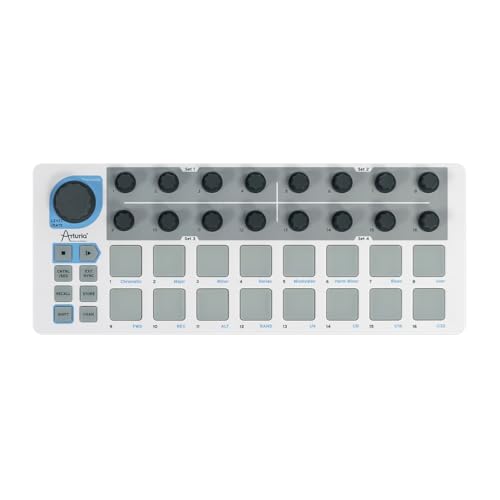
- 16 velocity- and pressure-sensitive pads
- 16 encoders and 16 pattern memories
- MIDI, USB, and CV connectivity
Best For: Performers needing tactile sequencing and real-time control
Compact Recording Hub
Focusrite Scarlett Solo 3rd Gen

- 24-bit/192kHz recording
- Air mode for added clarity
- One mic and one instrument input
Best For: Solo vocalists and instrumentalists
Portable Pad Control
Akai Professional LPD8 USB MIDI Pad Controller

- Eight RGB-backlit MPC pads
- Eight assignable control knobs
- Four programmable presets
Best For: Portable sample triggering and DAW control
Flexible Live Recording
Focusrite Scarlett 2i2 4th Gen

- Two mic and instrument inputs
- Auto Gain and Clip Safe
- 120dB dynamic range
Best For: Two-source live recording and monitoring
Best MIDI Splitter

- 1 MIDI input and 6 MIDI outputs
- Supports standard 16-channel MIDI
- USB-powered, battery-free operation
Best For: Routing one controller to multiple MIDI devices
Best Recording Interface
Focusrite Scarlett Solo 4th Gen

- One XLR mic preamp and Hi-Z input
- 24-bit/192kHz audio with 120dB dynamic range
- Includes recording software and plugins
Best For: Capturing vocals and instruments in a live or studio workflow
Best Wireless Option

- Wireless 5-pin DIN MIDI connectivity
- Advertised ultra-low latency and stable transmission
- Up to 48 hours of rechargeable use
Best For: Reducing MIDI cables on stage with compatible devices
Best All-Rounder – Arturia MiniFuse 2
The Arturia MiniFuse 2 is a compact audio and MIDI interface for live performances, rehearsals, and mobile setups. It combines two combo inputs, balanced outputs, headphone monitoring, USB connectivity, and 5-pin MIDI I/O in a beginner-friendly package.
Best For: Performers who need audio recording, microphone or instrument inputs, and straightforward MIDI connectivity in one portable interface.
Pros:
- Includes 5-pin MIDI input and output for synths, controllers, and drum machines.
- Two combo mic/instrument/line inputs with 48V phantom power.
- Compact design, loopback support, and a five-year warranty.
- Includes Ableton Live Lite, Analog Lab Intro, and other creative software.
Cons:
- Only two audio input channels are provided.
- Its USB hub supplies up to 250mA, which may limit bus-powered accessories.
The MiniFuse 2 is a practical choice when your live rig needs both audio and traditional MIDI without a complicated setup. Its software bundle and long warranty add value for newer performers.
Best Dedicated MIDI Router – CME U6MIDI Pro
The CME U6MIDI Pro is a dedicated MIDI interface for live performances that require dependable routing between multiple hardware devices. Its 3-in/3-out design supports standalone operation, USB-C computer connections, and configurable MIDI split, merge, thru, and filtering.
Best For: Hardware-focused performers managing several keyboards, synths, drum machines, or other standard 5-pin MIDI devices.
Pros:
- Standalone 3-in/3-out MIDI operation with router and filter functions.
- Supports MIDI channels and messages including clock, SysEx, MIDI timecode, and MPE.
- Compatible with macOS, iOS, Windows, Android, Linux, and Chrome OS.
- Compact, lightweight design with lifetime software updates through UxMIDI Tools.
Cons:
- Handles MIDI only and does not provide audio inputs or outputs.
- Advanced routing configuration requires the UxMIDI Tools software.
For a rig centered on hardware MIDI, the U6MIDI Pro offers more routing flexibility than a basic computer adapter. Its standalone mode is particularly useful when you want to coordinate devices without relying on a DAW.
Best Studio-Ready Hub – Focusrite Scarlett 4i4 4th Gen
The Focusrite Scarlett 4i4 4th Gen is a versatile audio interface for live performances that also involve microphones, instruments, synths, and drum machines. It provides MIDI I/O alongside four line inputs, four line outputs, two mic preamps, and two Hi-Z inputs.
Best For: Performers who need multiple audio connections and MIDI in a flexible interface that can also serve as a studio hub.
Pros:
- Offers four line inputs, four line outputs, and MIDI input/output.
- Includes two mic preamps and two Hi-Z instrument inputs.
- 120dB dynamic range, 24-bit/192kHz operation, and Air mode.
- Auto Gain and Clip Safe help simplify level management.
Cons:
- Larger and heavier than a dedicated MIDI interface.
- Its broad feature set may be more than needed for MIDI-only performances.
The Scarlett 4i4 is a strong fit for performers whose live setup blends MIDI hardware with several audio sources. Its generous I/O makes it easier to leave instruments and monitors connected between rehearsals and recording sessions.
Best for Hands-On Control – Arturia BeatStep Controller & Sequencer
The Arturia BeatStep is a compact MIDI controller and sequencer for live performances, offering hands-on control rather than audio interfacing. Its 16 velocity- and pressure-sensitive pads, 16 encoders, MIDI, USB, and CV connectivity support clips, beats, software instruments, and hardware synths.
Best For: Performers who want tactile sequencing, clip triggering, real-time parameter control, and connections to both software and hardware instruments.
Pros:
- Combines controller and step-sequencer modes, which can run simultaneously.
- Provides 16 pads, 16 encoders, and 16 pattern memories.
- Includes MIDI, USB, and CV connectivity for varied live setups.
- Can act as MIDI clock master or slave and includes Ableton Live Lite.
Cons:
- It is a MIDI controller and sequencer, not an audio interface.
- Its compact control surface may require setup through MIDI Control Center for advanced configurations.
The BeatStep is an excellent choice when the performance itself depends on immediate physical control. It is especially useful for combining software clip launching with sequencing and manipulation of external analog or MIDI gear.
Compact Recording Hub – Focusrite Scarlett Solo 3rd Gen
The Focusrite Scarlett Solo 3rd Gen is a compact USB interface for performers who need dependable vocal and instrument recording alongside their live setup. Its XLR mic input, Hi-Z instrument input, Air mode, and low-noise outputs make it a practical option among midi interfaces for live performances when simple, high-quality audio capture is also important.
Best For: Solo performers recording vocals, guitar, or bass with a laptop or iPad.
Pros:
- 24-bit/192kHz converters support detailed recordings.
- Air mode adds clarity to acoustic instruments.
- Compact design includes headphone and balanced monitor outputs.
- Includes Ableton Live Lite, Pro Tools Intro+, Cubase LE, and Hitmaker Expansion.
Cons:
- Provides one XLR mic preamp and one instrument input.
- It is an audio interface rather than a dedicated MIDI controller.
The Solo is best when your performance rig centers on one microphone and one instrument. Choose it for straightforward computer-based recording and monitoring rather than hands-on MIDI pad or knob control.
Portable Pad Control – Akai Professional LPD8 USB MIDI Pad Controller
The Akai Professional LPD8 is a compact USB MIDI pad controller designed for triggering samples, loops, and virtual instruments during computer-based performances. With eight RGB-backlit pads, eight assignable knobs, and programmable presets, it offers hands-on control that suits musicians comparing midi interfaces for live performances.
Best For: Producers, DJs, and performers who need portable pad and parameter control.
Pros:
- Eight responsive RGB MPC pads trigger samples, loops, and instruments.
- Eight assignable Q-Link knobs provide tactile DAW control.
- Four programmable presets allow quick mapping recall.
- USB-powered plug-and-play operation requires no AC adapter.
Cons:
- It connects by USB and does not provide traditional audio inputs or outputs.
- Its compact eight-pad layout may be limiting for larger performance setups.
The LPD8 is a strong choice when your priority is triggering and parameter control rather than recording microphones or instruments. Its lightweight build and USB operation make it easy to add to a laptop-based live rig.
Flexible Live Recording – Focusrite Scarlett 2i2 4th Gen
The Focusrite Scarlett 2i2 4th Gen gives live performers two mic or instrument inputs in a compact USB-C audio interface. Its 120dB dynamic range, Auto Gain, Clip Safe, and Air modes make it a practical audio foundation for performance rigs that need reliable recording and monitoring alongside midi interfaces for live performances.
Best For: Vocalists, instrumentalists, and small ensembles needing two simultaneous inputs.
Pros:
- Two mic preamps and two Hi-Z instrument inputs support flexible setups.
- Auto Gain helps set levels quickly.
- Clip Safe helps prevent unwanted clipping during takes.
- Includes Ableton Live Lite, Pro Tools Intro+, Cubase LE, and Hitmaker Expansion.
Cons:
- It is an audio interface, not a dedicated MIDI pad controller.
- Its two-channel design may not suit larger bands or multi-microphone setups.
The 2i2 4th Gen is the most flexible audio option here for performers who need two inputs and extra level protection. It is especially useful when a live rig must capture vocals and instruments without adding a larger interface.
Best MIDI Splitter – MIDI Thru 6 Box
For setups that need to send one controller’s MIDI data to several instruments, this MIDI Thru 6 Box is a practical choice among MIDI interfaces for live performances. Its 1-in/6-out design distributes incoming MIDI messages to multiple devices without batteries.
Best For: Performers and creators connecting one MIDI controller to up to six synths or other MIDI devices.
Pros:
- One MIDI input feeds six MIDI Thru outputs.
- Supports standard MIDI commands across 16 channels.
- Uses 5V DC USB power and requires no batteries.
- Compact, plug-and-play design works with Windows, macOS, and Linux.
Cons:
- It distributes MIDI data but does not provide audio inputs or outputs.
- Requires a separate 5V USB power source.
This is a focused hardware splitter rather than a full recording interface. Choose it when reliable multi-device MIDI routing is the priority in a live rig.
Best Recording Interface – Focusrite Scarlett Solo 4th Gen
Musicians who need both MIDI-connected instruments and high-quality audio capture may find the Scarlett Solo 4th Gen a useful part of a live setup. As one of the MIDI interfaces for live performances considered here, it is best understood as a two-channel USB audio interface for vocals, guitar, and monitoring.
Best For: Songwriters and performers recording a microphone and instrument into a computer, iPad, or compatible DAW.
Pros:
- Includes one XLR microphone preamp and one Hi-Z instrument input.
- Offers 24-bit/192kHz recording and a 120dB dynamic range.
- Air mode adds presence and harmonic drive to vocals and guitars.
- Includes Ableton Live Lite, Pro Tools Intro+, Cubase LE, and additional software.
Cons:
- Provides two audio channels rather than dedicated multi-device MIDI routing.
- Its main focus is audio recording, not a multi-output MIDI distribution system.
The Scarlett Solo is the stronger choice when your performance workflow centers on microphone and instrument audio. For routing MIDI hardware to several destinations, a dedicated MIDI Thru box will be more suitable.
Best Wireless Option – M-VAVE Wireless MIDI System
For performers who want fewer cables on stage, the M-VAVE Wireless MIDI Transmission System offers a portable alternative among MIDI interfaces for live performances. It connects compatible 5-pin DIN MIDI instruments with computers, mobile devices, and other MIDI equipment using wireless transmission.
Best For: Stage performers and arrangers seeking wireless MIDI connections between instruments and compatible computers or mobile devices.
Pros:
- Designed to reduce cable connections during performances.
- Advertises ultra-low-latency transmission and a stable connection.
- Supports 5-pin DIN MIDI devices plus iOS, macOS, Windows, and Android workflows.
- The rechargeable MIDI A unit can operate for up to 48 hours after a full charge.
Cons:
- Windows 10 use requires the Korg BLE MIDI Driver.
- Compatibility depends on supported Bluetooth MIDI apps, devices, and pairing methods.
- Wireless operation introduces charging requirements.
This system is a good fit when stage mobility matters more than a traditional wired connection. Check your device compatibility and required drivers before relying on it for a performance.
How We Picked the Best Midi Interfaces for Live Performances
We focused on products that solve common live-performance needs: stable MIDI communication, practical input and output options, low-latency operation, easy setup, and a form factor suitable for transport. Because live rigs vary widely, this roundup includes both traditional MIDI interfaces and related tools such as audio interfaces with MIDI ports, controllers, sequencers, splitters, and wireless adapters.
We also considered whether each product fits a compact laptop rig, a hardware-heavy setup, or a hybrid system. USB compatibility, five-pin DIN support, power requirements, routing flexibility, and hands-on control all matter when reliability is more important than studio-only features.
Quick Comparison
| Best For | Look For |
|---|---|
| Compact computer-based rigs | USB-C connectivity, bus power, and low-latency drivers |
| Multiple hardware instruments | Several MIDI outputs, routing control, and dependable DIN connections |
| Live sequencing and triggering | Pattern memory, pads, knobs, and accessible performance controls |
| Expanding one MIDI source | Dedicated MIDI thru outputs and electrically isolated signal paths |
| Minimal-cable setups | Wireless transmission, broad device compatibility, and low latency |
Key Buying Factors for Midi Interfaces for Live Performances
Connection Type and Port Count
Check whether your equipment uses USB, five-pin DIN, Bluetooth, or a combination. Count MIDI inputs and outputs rather than assuming an audio interface will control every device. A single-output interface may suit one keyboard, while several synthesizers and drum machines benefit from multiple independent outputs or a MIDI thru box.
Latency and Reliability
Low latency helps notes, clock signals, and automation feel synchronized. Wired USB and DIN connections are generally the safest choices for demanding performances. Wireless systems can reduce cable clutter, but verify operating-system support, range, power needs, and whether the setup adds noticeable delay.
Audio Requirements
If you also record microphones or instruments, an audio interface with built-in MIDI may be the most efficient purchase. Compare microphone preamps, line inputs, headphone monitoring, USB-C support, and driver stability. If audio is already handled elsewhere, a dedicated MIDI interface may offer simpler routing and fewer unnecessary controls.
Power, Portability, and Controls
Bus-powered hardware is convenient for mobile rigs, but confirm that your computer, tablet, or hub can supply sufficient power. For stage use, favor sturdy construction, clear status indicators, and controls you can operate quickly. A compact controller or sequencer can be valuable when software menus are difficult to reach during a set.
Who Should Buy Which Midi Interfaces for Live Performances?
Choose an Audio Interface with MIDI
Pick a Scarlett or MiniFuse-style audio interface if you need microphone or instrument inputs alongside MIDI. This is often the best choice for singer-instrumentalists, laptop performers, and hybrid rigs that send audio to a PA while controlling virtual instruments.
Choose a Dedicated MIDI Router or Splitter
A dedicated multi-output interface suits performers running several hardware instruments, external clock sources, or separate MIDI chains. A MIDI thru splitter is especially useful when one controller must feed multiple devices simultaneously.
Choose a Controller, Sequencer, or Wireless Adapter
Choose a pad controller or compact sequencer when hands-on triggering and pattern control are priorities. A wireless transmission system makes sense when short-range cable reduction is valuable and your devices support the required connections. Before buying, map every device in your signal chain and leave room for one spare port or cable path for future expansion.