Choosing among the best MIDI interfaces under $300 is less about finding the most ports and more about matching the interface to your setup. Some models focus on multi-port computer connectivity, while others split, merge, filter, or transmit MIDI without a computer.
This roundup covers practical options for home studios, live rigs, hardware sequencing, and wireless controller setups. Use the buying guide below to compare connectivity, routing, compatibility, and expansion potential before you choose.
Best 10 Midi Interfaces Under 300 Picks for 2026
Flexible Studio Hub

- Eight adaptable MIDI ports
- Built-in three-port USB hub
- Standalone routing and merging
Best For: Large studio and live MIDI setups
16-Way MIDI Distribution
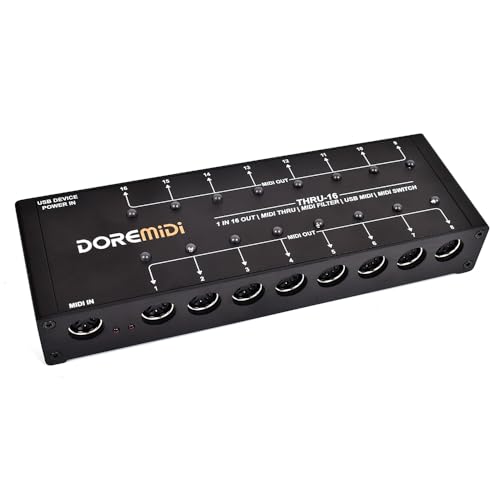
- One input to 16 outputs
- Editable filter per output
- Output switches and indicators
Best For: Large hardware MIDI distribution systems
Portable MIDI Router

- Hosts up to eight USB MIDI devices
- Advanced routing and filtering
- USB or 9V standalone power
Best For: Hybrid studio, stage, and pedalboard rigs
Compact MIDI Merger

- Three MIDI inputs
- Direct hardware MIDI merging
- Durable aluminum enclosure
Best For: Simple multi-device hardware MIDI merging
Pedalboard MIDI Hub

- 2-in/2-out MIDI with zero-latency transmission
- USB-C support for major computer and mobile operating systems
- Routing, SysEx, and standalone power features
Best For: Guitarists and pedalboard-based MIDI setups
Wireless MIDI Freedom
M-VAVE MS1 Wireless MIDI System

- Wireless connection for compatible MIDI instruments and devices
- Advertised ultra-low latency and stable pairing
- Rechargeable battery with up to 48 hours of use
Best For: Cable-conscious performers and mobile MIDI setups
Multi-Device MIDI Router
XMSJSIY 4x4 USB MIDI Interface Box
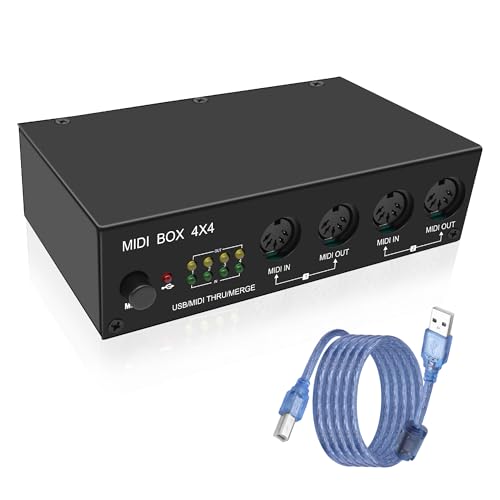
- Four MIDI inputs and four outputs
- Router, merge, splitter, thru, and USB hub modes
- Metal housing with LED activity indicators
Best For: Multi-instrument studios and complex MIDI routing
Best Wireless Pick
FORE K1 Wireless MIDI Interface

- Wireless Bluetooth and PC connection modes
- Up to 32 feet of transmission range
- Works with 5-pin DIN MIDI equipment
Best For: Cable-free studio and performance setups
Best for MIDI Splitting
MIDI Thru-6 USB MIDI Interface

- One MIDI input and six outputs
- Routes messages to all six outputs
- USB-powered with standard 16-channel MIDI
Best For: Expanding one controller across multiple MIDI devices
Best Simple Wired Option

- One MIDI in and one MIDI out
- Plug-and-play USB Type-A connection
- Compatible with major desktop and mobile systems
Best For: Basic recording and editing with one MIDI device
Flexible Studio Hub – ESI M4U eX
For musicians comparing MIDI interfaces under 300, the ESI M4U eX stands out as an adaptable eight-port option for computer-based and standalone setups. Its class-compliant USB 3.0 connection, automatic port configuration, and built-in USB hub make it useful when you need extensive routing without a complicated installation.
Best For: Home studios, professional MIDI rigs, and live setups requiring multiple adaptable ports and standalone routing.
Pros:
- Provides eight automatically configurable MIDI inputs or outputs.
- Includes a three-port USB 3.0 hub for connecting additional devices.
- Supports standalone MIDI routing and merging with low-latency operation.
- Works with Windows and macOS and major DAWs.
Cons:
- Its larger port count may be more than a simple controller setup needs.
- Advanced Windows multi-client use may require the optional ESI MIDI Port driver.
The M4U eX is a strong choice when flexibility and expansion matter more than minimal size. Colored LEDs and automatic configuration help make its extensive connectivity easier to manage.
16-Way MIDI Distribution – THRU-16 MIDI Splitter
Among MIDI interfaces under 300, the THRU-16 is a specialized choice for distributing one MIDI source across a large hardware setup. It converts one MIDI input into 16 outputs and adds per-output filtering, switching, and indicator lights for hands-on control.
Best For: Rigs that need to send MIDI notes, clock, SysEx, and other standard commands to many instruments at once.
Pros:
- Converts one MIDI input into 16 MIDI outputs.
- Provides editable MIDI filters for each output.
- Individual switches and indicator lights make outputs easy to control.
- Supports standard MIDI commands and firmware upgrades.
Cons:
- It is primarily a hardware splitter rather than a general-purpose computer MIDI interface.
- The one-input design may not suit setups requiring MIDI merging.
The THRU-16 makes sense when distribution is the main challenge. Its output-level switching and filtering provide more control than a basic passive MIDI thru solution.
Portable MIDI Router – CME H4MIDI WC
For shoppers seeking MIDI interfaces under 300 that can work without a computer, the CME H4MIDI WC combines USB host connectivity, traditional DIN MIDI, and computer client operation in a compact enclosure. Its routing, filtering, mapping, and preset features make it especially versatile for mobile rigs and pedalboards.
Best For: Guitarists, producers, and performers connecting USB MIDI gear, DIN hardware, and computers across changing setups.
Pros:
- Supports up to eight USB MIDI devices through a standard USB hub.
- Offers standalone MIDI thru, split, merge, mapper, and filter functions.
- Works with macOS, Windows, iOS, Android, Linux, and ChromeOS.
- Supports USB or 9V DC standalone power and four stored presets.
Cons:
- Optional WIDI Bluetooth MIDI requires the separate WIDI Core module.
- Its advanced configuration features may be unnecessary for basic MIDI connections.
The H4MIDI WC is one of the more flexible options in this group, particularly for hybrid USB-and-DIN systems. Its compact size and standalone power options also suit stage and pedalboard use.
Compact MIDI Merger – MERGE-3 MIDI Merger
For straightforward MIDI interfaces under 300, the MERGE-3 focuses on combining multiple hardware sources without relying on a computer. It offers three MIDI inputs, a direct MIDI output, and USB power in a compact metal enclosure.
Best For: Hardware setups that need to merge signals from three MIDI inputs into a dependable MIDI output.
Pros:
- Provides three MIDI inputs for combining multiple controllers or instruments.
- Uses direct hardware processing for operation without stated interference or delay.
- Supports standard MIDI commands, including clock, time code, and SysEx.
- Features a durable aluminum-alloy enclosure and nonslip silicone feet.
Cons:
- It has one direct MIDI output, limiting larger routing configurations.
- USB power is required for operation.
The MERGE-3 is a focused solution rather than an all-purpose computer interface. Choose it when reliable three-source MIDI merging is the priority and you do not need extensive output expansion.
Pedalboard MIDI Hub – CME U4MIDI WC
For shoppers comparing midi interfaces under 300, the CME U4MIDI WC is a compact 2-in/2-out option built for reliable, low-latency MIDI communication. It supports major computer and mobile operating systems, while its routing tools and standalone power options make it practical for flexible rigs.
Best For: Guitarists, pedalboards, and musicians who need configurable MIDI routing with or without a computer.
Pros:
- 2-in/2-out MIDI with zero-latency and jitter-free transmission.
- Works with macOS, Windows, iOS, Android, Linux, and Chrome OS via USB-C.
- Supports MIDI thru, split, merge, mapping, filtering, and unlimited SysEx transmission.
- Compact pedalboard-friendly design with USB or 9V DC standalone power.
Cons:
- Optional Bluetooth MIDI requires the separate WIDI Core.
- Its advanced routing features may be more than a basic MIDI setup needs.
The U4MIDI WC stands out when a small interface needs to handle both straightforward connections and more advanced MIDI processing. Its broad compatibility and standalone operation add flexibility for studio, stage, and pedalboard use.
Wireless MIDI Freedom – M-VAVE MS1 Wireless MIDI System
Among midi interfaces under 300, the M-VAVE MS1 focuses on freeing instruments from traditional MIDI cables. Its paired wireless system is designed for low-latency connections to compatible computers, mobile devices, and MIDI instruments, with a rechargeable battery in one unit.
Best For: Performers and arrangers who want a portable wireless MIDI connection for compatible gear.
Pros:
- Wireless MIDI design helps reduce cable clutter on stage or in compact setups.
- Supports pairing with iOS, macOS, Windows, Android MIDI apps, and compatible MIDI devices.
- Built-in rechargeable battery provides up to 48 hours of continuous use after charging.
- Advertised ultra-low latency and stable connections when paired.
Cons:
- Windows 10 use requires the Korg BLE MIDI Driver.
- Android compatibility depends on apps with integrated Bluetooth MIDI support.
- It is a wireless transmission system rather than a conventional multi-port MIDI interface.
The MS1 is best suited to users prioritizing mobility and fewer cables over extensive routing or multiple physical MIDI ports. Check device and operating-system compatibility before buying, especially for Windows and Android setups.
Multi-Device MIDI Router – XMSJSIY 4×4 USB MIDI Interface Box
For buyers exploring midi interfaces under 300 with more connections, the XMSJSIY USB MIDI Interface Box provides four inputs and four outputs. It can split and merge MIDI signals, connect multiple USB MIDI devices through a hub, and switch between USB and MIDI-thru operating modes.
Best For: Home studios and production setups that need multiple MIDI inputs, outputs, routing, or thru connections.
Pros:
- 4-in/4-out configuration supports larger MIDI setups.
- Offers router, merge, splitter, thru, and USB hub functionality.
- Compatible with common DAWs including Ableton Live, FL Studio, Logic Pro, Pro Tools, and Cubase.
- Metal housing, silicone feet, and LED status indicators support practical desktop use.
Cons:
- The listing provides limited detail about supported operating systems beyond an Android specification.
- Its larger routing feature set may be unnecessary for simple one-device MIDI connections.
- The supplied details list XLR as the connectivity technology, so buyers should verify the physical connection requirements.
The XMSJSIY is the most connection-heavy choice in this group, making it a sensible candidate for multi-instrument MIDI work. Its mode switching and visible status LEDs can also make complex signal paths easier to monitor.
Best Wireless Pick – FORE K1 Wireless MIDI Interface
For musicians comparing midi interfaces under 300, the FORE K1 is a flexible wireless option for connecting 5-pin DIN MIDI equipment to iOS, Android, macOS, and Windows setups. Its paired adapters support plug-and-play operation, multiple connection modes, and claimed latency of 3ms.
Best For: Reducing cable clutter around keyboards, synthesizers, electronic drums, and other 5-pin MIDI devices.
Pros:
- Supports wireless Bluetooth and PC connections with several operating modes.
- Works with 5-pin DIN MIDI devices and common MIDI software platforms.
- Offers up to 32 feet of wireless transmission distance and claimed 3ms latency.
- No complicated setup or driver installation is required for supported connections.
Cons:
- Direct Bluetooth connection to iOS devices is not supported; an app-based setup is required.
- The wireless system is designed around the included paired MIDI components and may require careful port matching.
The FORE K1 stands out when a clean, cable-light studio matters more than a conventional wired connection. Check the app and device requirements before buying, especially for iOS use.
Best for MIDI Splitting – MIDI Thru-6 USB MIDI Interface
Among midi interfaces under 300, the MIDI Thru-6 is aimed at setups that need to distribute one MIDI input to multiple devices. It provides one MIDI input and six outputs, with standard 16-channel MIDI communication and USB-powered operation.
Best For: Connecting one MIDI controller or synthesizer to as many as six MIDI devices at once.
Pros:
- Provides one MIDI input and six MIDI Thru outputs.
- Sends incoming MIDI messages to all six outputs.
- Uses a 5V DC USB power supply and requires no batteries.
- Supports standard MIDI commands and 16 MIDI channels.
Cons:
- It is a MIDI splitter rather than a general-purpose audio interface.
- Its wired design does not provide the cable-free convenience of a wireless adapter.
The MIDI Thru-6 is a practical choice for hardware-heavy rigs where reliable signal distribution is the priority. Choose it when multiple downstream MIDI devices matter more than bidirectional computer interfacing.
Best Simple Wired Option – FORE MIDI USB Interface
For shoppers seeking midi interfaces under 300 with a straightforward wired setup, this FORE interface combines one MIDI input and one MIDI output with a built-in USB Type-A cable. It is bus-powered, supports major desktop and mobile operating systems, and is designed for recording and editing MIDI tracks.
Best For: Connecting a single keyboard, synthesizer, drum machine, or other 5-pin MIDI device to a computer.
Pros:
- Offers one MIDI input and one MIDI output with 16 MIDI channels.
- Plug-and-play design includes built-in drivers and LED status indicators.
- Compatible with Windows, macOS, iOS, and Android setups.
- Includes an integrated 6.5-foot USB cable and uses USB bus power.
Cons:
- The USB A-C adapter needed for some USB-C devices is not included.
- Its USB Type-A connection may require an adapter with newer computers and mobile devices.
This FORE model is a sensible entry-level bridge for a basic computer-to-MIDI connection. Its fixed cable keeps the setup simple, but confirm your host device has a compatible port or obtain the required adapter separately.
How We Picked the Best Midi Interfaces Under 300
We selected products that address distinct MIDI workflow needs rather than treating every interface as interchangeable. The lineup includes multi-port USB interfaces, MIDI thru boxes, splitters, mergers, filters, wireless adapters, and USB host devices. We prioritized useful port configurations, broad computer or device compatibility, straightforward operation, and features that solve common routing problems.
Because MIDI setups vary widely, the best choice depends on whether you need computer integration, standalone hardware routing, wireless transmission, or a combination of those functions. Confirm the required connectors and operating modes before buying.
Quick Comparison
| Best For | What to Look For | Relevant Options |
|---|---|---|
| Computer-based studios | Multiple USB MIDI ports and class-compliant operation | ESI M4U eX, CME U4MIDI WC |
| Large hardware rigs | One-to-many routing and reliable MIDI thru connections | THRU-16, MIDI Thru 6 Box, XMSJSIY 4-in/4-out |
| Combining MIDI sources | Multiple inputs merged to one or more outputs | MIDI Merge-3 |
| Wireless controllers | Low-latency wireless transmission and device compatibility | M-VAVE, FORE K1 |
| USB host applications | Host functionality for connecting USB MIDI devices | CME H4MIDI WC |
Key Buying Factors for MIDI Interfaces Under $300
Port Count and Routing
Count both MIDI inputs and outputs, then map where each keyboard, synth, drum machine, and computer will connect. A thru box is useful for sending one source to many devices, while a multi-port interface is better when several instruments must communicate independently.
USB, DIN, and Host Compatibility
Traditional five-pin DIN MIDI remains common on hardware, but USB connectivity matters for computers and modern controllers. A USB host interface can bridge USB MIDI devices that cannot connect directly to one another. Check whether the product is class-compliant and whether your computer, tablet, or phone needs an adapter.
Standalone Operation and Power
For live or hardware-only setups, standalone operation can be more valuable than software features. Review how the interface is powered, whether it needs a computer, and whether USB power is sufficient for your connected devices.
Filtering, Merging, and Latency
Filtering can prevent unwanted channels or messages from reaching downstream instruments. Merging combines multiple MIDI sources, while wireless systems should be evaluated for range, pairing reliability, and latency in performance situations.
Who Should Buy Which Midi Interfaces Under 300?
Choose a Multi-Port Interface for a Computer Studio
If your workflow centers on a DAW and several hardware instruments, choose a multi-port USB model such as the ESI M4U eX or CME U4MIDI WC. These are better suited to independent connections than a simple splitter.
Choose a Thru Box for Expanding One MIDI Source
A THRU-16 or MIDI Thru 6 Box makes sense when one controller, sequencer, or interface must feed many devices. This is often the simplest solution for synchronized live rigs.
Choose Merge or Filtering When Routing Is the Problem
Pick MIDI Merge-3 when multiple inputs need to be combined. Choose a filtering-capable splitter when channel-specific routing or cleaner distribution is more important than computer integration.
Choose Wireless for Convenience
M-VAVE and FORE wireless options are suitable when cable reduction matters for a controller or compact mobile setup. Verify operating-system support, connector requirements, and power needs before relying on wireless for a critical live performance.