A DJ controller with screens can make mixing more direct by putting track information, waveforms, effects, and performance controls within easy reach. The right model depends on whether you prioritize standalone operation, portability, scratching, streaming, or software-based performance.
We compared 10 options across professional and entry-level categories to help you choose a controller that fits your setup, workflow, and budget.
Best 10 Dj Controller with Screens Picks for 2026
Best All-in-One Setup

- 7-inch touchscreen with standalone Engine DJ operation
- Four-deck control with streaming and media inputs
- Built-in speakers and professional audio connectivity
Best For: Laptop-free performances, mobile DJs, and streaming
Best for Scratch Performance

- On-jog displays show playback position
- Battle-style layout with full-size jog wheels
- Includes rekordbox and Serato DJ Pro
Best For: Scratch DJs and open-format laptop performers
Best Value Standalone Choice

- 7-inch touchscreen and laptop-free Engine DJ
- Built-in speakers with six-inch jog wheels
- Wi-Fi streaming, USB, and SD support
Best For: Beginners, home practice, and mobile DJing
Best Portable Battery-Powered Option
- Battery-powered standalone Engine DJ performance
- Wi-Fi streaming with SD and USB media support
- Extensive effects and professional wired outputs
Best For: Traveling, mobile, and location-flexible DJs
Pro Performance Pick

- Four-channel layout with club-style workflow
- Jog displays show waveforms and track artwork
- Supports rekordbox, Serato, and DMX lighting
Best For: Serious hobbyists, mobile DJs, and professionals
Best Portable Standalone Pick

- Battery-powered with built-in speakers
- 7-inch touchscreen and wireless connectivity
- Supports streaming, USB, SD, and Dropbox libraries
Best For: Mobile DJs and laptop-free performances
Best Beginner-Friendly Pick

- Smart Fader helps simplify beatmatching
- Two-channel layout with 16 performance pads
- Works with major software and mobile devices
Best For: Beginners, home practice, and livestreaming
Beginner Party Pick

- Built-in beat-synchronized LED light show
- Visual beat guidance and automatic Fade FX
- Compact USB-powered design with Serato DJ Lite access
Best For: First-time DJs and casual party mixing
Standalone Screen Controller

- Dual high-contrast screens show waveforms and track data
- USB standalone playback plus VirtualDJ LE control
- XLR/RCA outputs and touch-sensitive jog wheels
Best For: DJs needing onboard displays and flexible connectivity
Stage Lighting Control Pick
- Controls 192 DMX channels across 12 devices
- Programmable scenes, scenarios, and chases
- LED display with sliders for manual lighting control
Best For: Small events needing programmable DMX lighting
Best All-in-One Setup – Denon DJ SC LIVE 4
The Denon DJ SC LIVE 4 is a strong choice if you want a dj controller with screens that can handle full performances without a laptop. Its 7-inch touchscreen supports library browsing, while Engine DJ, built-in speakers, wireless streaming, and four-deck control make it versatile for home, mobile, and club use.
Best For: DJs who want a feature-rich, laptop-free controller with streaming, speakers, and multiple connectivity options.
Pros:
- Standalone Engine DJ operation with SD and dual USB media inputs
- 7-inch touchscreen for browsing and performance control
- Four-deck layout with Serato DJ Pro and VirtualDJ compatibility
- Built-in speakers, Bluetooth audio, Wi-Fi, and professional outputs
Cons:
- Its 28.3-inch width may require substantial setup space
- At 13.6 pounds, it is less portable than compact battery-powered options
The SC LIVE 4 is one of the most complete options here for DJs who want screens, standalone control, and an integrated sound system in one unit.
Best for Scratch Performance – Pioneer DJ DDJ-REV5
The Pioneer DJ DDJ-REV5 is a laptop-based dj controller with screens designed around scratch and battle-style performance. Its on-jog displays show playback position directly on the full-size jog wheels, while the two-channel layout, performance pads, and included rekordbox and Serato DJ Pro support suit hands-on mixing.
Best For: Scratch DJs and open-format performers who prefer a two-channel battle layout with visual feedback on the jog wheels.
Pros:
- On-jog displays show playback position while performing
- Full-size jog wheels and scratch-style layout
- Includes rekordbox and Serato DJ Pro support
- Performance pads provide access to samples and Hot Cues
Cons:
- Requires a compatible laptop or PC/Mac setup
- Only two channels are provided
The DDJ-REV5 prioritizes tactile scratch control over standalone operation, making its on-jog displays especially useful for performers focused on precision and movement.
Best Value Standalone Choice – Numark Mixstream Pro+
The Numark Mixstream Pro+ is a practical dj controller with screens for DJs who want standalone mixing and a compact footprint. Its 7-inch touchscreen works with Engine DJ, Wi-Fi streaming, USB and SD media, and built-in speakers, while six-inch jog wheels keep the control layout approachable for mobile and home use.
Best For: Beginners, casual performers, and mobile DJs seeking an accessible standalone controller with streaming and integrated speakers.
Pros:
- 7-inch touchscreen with laptop-free Engine DJ operation
- Built-in speakers and dedicated speaker volume control
- Wi-Fi streaming plus USB, SD, and Dropbox library support
- Wireless control for Philips Hue, Nanoleaf, and DMX lighting
Cons:
- Two-deck operation may limit more advanced setups
- Standalone stems require pre-rendering with Engine DJ Desktop
The Mixstream Pro+ balances useful screen-based control with portability and straightforward connectivity, making it a friendly entry point into standalone DJing.
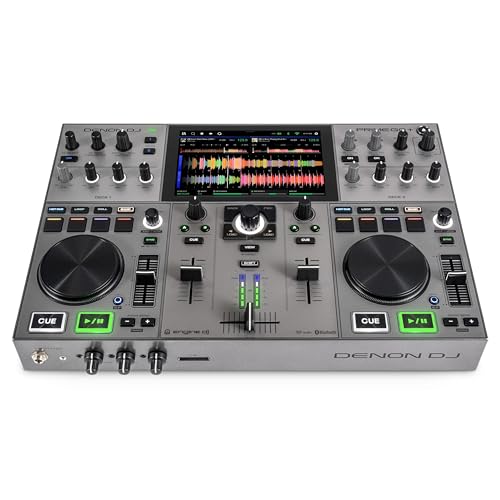
Best Portable Battery-Powered Option – Denon DJ PRIME GO+
The Denon DJ PRIME GO+ is a portable dj controller with screens built for performances away from a fixed booth. Running Engine DJ on battery power, it combines Wi-Fi streaming, a compact design, SD and USB media support, onboard effects, and a screen-based workflow for DJs who need mobility.
Best For: Mobile and traveling DJs who need standalone performance capability, streaming, and battery-powered operation.
Pros:
- Battery-powered standalone operation in a compact 8.11-pound design
- Wi-Fi access to more than 100 million tracks across supported services
- 26 main FX, Sweep FX, Fader Echo, and Touch FX controls
- Balanced XLR, booth, RCA, AUX, and microphone connectivity
Cons:
- Its compact format provides less physical control space than larger controllers
- Standalone stems require pre-rendering with Engine DJ Desktop
The PRIME GO+ stands out when portability matters most, offering a screen-centered standalone workflow without tying the DJ to a laptop or wall power.
Pro Performance Pick – Pioneer DJ DDJ-FLX10
The Pioneer DJ DDJ-FLX10 is a strong choice for shoppers seeking a dj controller with screens for serious home practice, mobile work, or professional open-format sets. Its four-channel layout, multicolor jog displays, and support for rekordbox and Serato DJ Pro provide a workflow that can translate well to club-style equipment.
Best For: Serious hobbyists, mobile DJs, and working DJs who want four-channel control and advanced performance features.
Pros:
- Track Separation can split songs into vocals, drums, and instruments for live mashups.
- Four-channel layout and professional FX support a club-standard workflow.
- Multicolor on-jog displays show waveforms, artwork, and active song parts.
- Works with rekordbox and Serato DJ Pro and includes built-in DMX lighting output.
Cons:
- At 14.8 pounds, it is less convenient to transport than lightweight beginner controllers.
- Its advanced feature set may be more than a new DJ needs.
The DDJ-FLX10 stands out when screen feedback, four-deck flexibility, and expandable performance control matter more than compact size. It is a future-focused option for DJs who expect their setup and skills to grow.
Best Portable Standalone Pick – Numark Mixstream Pro Go
The Numark Mixstream Pro Go is a versatile dj controller with screens for laptop-free performances, travel, and casual events. Its adjustable 7-inch touchscreen, battery power, built-in speakers, Wi-Fi, and streaming support make it especially practical when portability and standalone operation are priorities.
Best For: Mobile DJs and performers who want a battery-powered controller with built-in speakers and streaming access.
Pros:
- Runs on a rechargeable battery and includes built-in speakers for self-contained performances.
- 7-inch adjustable-brightness touchscreen provides direct track and mix control.
- Supports music from streaming services, SD cards, USB drives, Dropbox, and other sources.
- Offers wireless lighting control plus balanced XLR, RCA, microphone, and headphone outputs.
Cons:
- Standalone Stems require pre-rendering with Engine DJ Desktop and a one-time software license purchase.
- Its 9.24-pound weight is portable but not as lightweight as a basic two-channel controller.
The Mixstream Pro Go is a particularly flexible choice for DJs who do not want to depend on a laptop. Battery operation, onboard audio, touchscreen control, and multiple music sources make it well suited to pop-up sets and mobile use.
Best Beginner-Friendly Pick – Pioneer DJ DDJ-FLX4
The Pioneer DJ DDJ-FLX4 is a practical entry point for shoppers who want a dj controller with screens while keeping the layout approachable. Its two-channel design, Smart Fader, performance pads, built-in sound card, and broad device compatibility make it suitable for learning at home or building a streaming setup.
Best For: Beginners and developing DJs who want simple controls, streaming support, and room to learn two-deck mixing.
Pros:
- Smart Fader automatically adjusts volume, bass, and BPM to simplify transitions.
- Sixteen performance pads support Hot Cues, Pad FX, Beat Jump, and Sampler functions.
- Works with rekordbox, Serato DJ Pro, and djay across PC, Mac, iOS, and Android devices.
- Supports music streaming and includes a built-in sound card for speaker connections.
Cons:
- Its two-channel, two-deck layout offers less expansion than a four-channel controller.
- It does not provide the standalone battery operation or built-in speakers found on some portable controllers.
The DDJ-FLX4 focuses on accessible learning without abandoning useful performance tools. It is a sensible pick for new DJs who want a lightweight controller that can support practice, streaming, and gradual skill development.
Beginner Party Pick – Numark Party Mix III
If you want a compact dj controller with screens alternative for casual mixing, the Numark Party Mix III focuses on approachable controls, visual beat guidance, and built-in party lighting. It includes Serato DJ Lite access for Mac and Windows, Algoriddim djay access, USB-C connectivity, and Bluetooth MIDI support for compatible iOS and Android setups.
Best For: First-time and casual DJs who want a portable, USB-powered controller with an integrated light show.
Pros:
- Beat-synchronized LED lights add a ready-made party atmosphere.
- Visual Beat Align indicators and automatic Fade FX support beginner-friendly mixing.
- Eight performance pads per deck support hot cues, loops, samples, effects, and stems control.
- Compact 2.42-pound design includes a built-in audio interface, RCA output, and headphone output.
Cons:
- It is a 2-deck beginner-oriented controller rather than a larger club-style setup.
- Bluetooth MIDI depends on compatible mobile devices and software.
- The built-in lights may be unnecessary if you already have a separate lighting system.
The Party Mix III is a practical starting point when portability and immediate fun matter more than onboard screens. Its software access, guided mixing tools, and lighting make it especially suitable for home sessions and small gatherings.
Standalone Screen Controller – Gemini GMX
The Gemini GMX is the strongest fit here for shoppers specifically seeking a dj controller with screens. Its dual high-contrast displays show waveforms and track information, while USB standalone playback, VirtualDJ LE support, touch-sensitive jog wheels, and professional outputs give it flexibility for home, mobile, and venue use.
Best For: DJs who want dual onboard screens, USB media playback, and software control in a compact 2-channel system.
Pros:
- Dual screens provide waveforms and track information without relying entirely on a computer display.
- Supports standalone play from USB drives as well as control of DJ software.
- Touch-sensitive jog wheels, hot cues, auto loop, and filter effects offer hands-on performance control.
- 24-bit audio interface with XLR and RCA master outputs plus booth and headphone connections.
Cons:
- It has two channels, which may limit larger multi-deck workflows.
- The unit uses corded electric power rather than a portable USB-powered design.
- Its listed operating frequency is 44.1 kHz, with no confirmed software-update date supplied.
For the keyword-focused use case, the GMX is the most direct match because its dual screens are central to the design. It is a versatile choice for DJs who want a compact controller that can work with USB media or VirtualDJ LE and connect to professional sound systems.
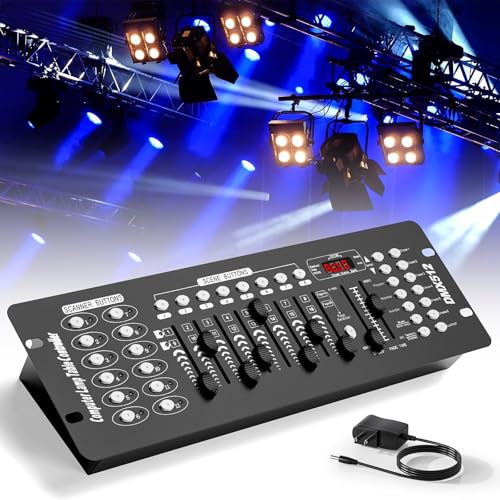
Stage Lighting Control Pick – 192-Channel DMX Console
This 192-channel DMX console is not a music-mixing controller, so it is not a conventional dj controller with screens. Instead, it is designed to program and operate stage lighting, with an LED display, manual channel sliders, programmable scenes, and support for connected 3-pin DMX equipment.
Best For: Small parties, concerts, festivals, and holiday displays that need basic programmable stage-light control.
Pros:
- Controls up to 12 devices with 16 channels each, totaling 192 channels.
- Offers 240 scenes, 23 programmable scenario sets, and six programmable chases.
- LED display and dedicated control sections are intended to make operation approachable for beginners.
- Includes a 3-pin cable for connecting compatible lights and effects equipment.
Cons:
- It controls DMX lighting rather than DJ audio, tracks, or mixing.
- It does not provide the music-focused screens or deck controls expected from a DJ controller.
- Warranty information is inconsistent in the supplied notes, listing both 360-day repair support and a 90-day manufacturer warranty.
Choose this console only if your priority is lighting control alongside a DJ setup. Its channel count and programmable scenes suit small productions, but shoppers seeking screens for browsing tracks or viewing waveforms should consider a dedicated DJ controller instead.
How We Picked the Best Dj Controller with Screens
We evaluated these controllers by looking at display usefulness, mixing layout, standalone capability, software compatibility, portability, connectivity, performance features, and overall suitability for different experience levels. We also separated true DJ-focused displays from basic jog-wheel indicators and entry-level visual features, since they serve different purposes.
Our selection includes four-channel systems for advanced sets, compact battery-friendly units for mobile DJs, software controllers for laptop workflows, and affordable models for learning. The stage-lighting DMX controller is included as a specialist option for readers whose main goal is lighting control rather than conventional audio mixing.
Quick Comparison
| Best For | Recommended Type | What to Prioritize |
|---|---|---|
| Standalone performance | All-in-one controller | Built-in screens, storage access, streaming, and reliable outputs |
| Scratch and battle mixing | Two-channel performance controller | Large jogs, crossfader feel, pad layout, and deck controls |
| Four-deck mixing | Four-channel controller | Track separation, flexible routing, and detailed performance controls |
| Mobile DJing | Portable standalone controller | Battery life, weight, screen readability, and connectivity |
| Learning or casual use | Compact software controller | Simple controls, included software, and low setup complexity |
Key Buying Factors for a Dj Controller with Screens
Screen Type and Workflow
Check whether the display is a full touchscreen, a built-in track display, or a small jog-wheel screen. Full displays are more useful for browsing libraries and adjusting settings without a laptop, while jog displays are helpful for monitoring position and track information during performance.
Standalone Versus Laptop Operation
Standalone controllers can play music from supported storage or online services without a computer, making them useful for mobile work and quick setup. Laptop-based models can offer deeper software integration and more flexible library management, but they require a compatible computer and cables.
Channels, Jog Wheels, and Performance Controls
Two-channel models are usually easier to learn and can be ideal for traditional mixing or scratching. Four-channel controllers provide more room for layered transitions, stems, and multiple sources. Look closely at jog-wheel size, pad modes, fader quality, effects controls, and whether the layout matches your preferred DJ software.
Connectivity and Portability
Review the available outputs, microphone inputs, USB ports, Bluetooth support, headphone connections, and wireless or wired networking features. For mobile DJs, also consider dimensions, weight, power options, and how quickly the controller can be packed and deployed.
Software, Music Sources, and Expansion
Confirm support for your preferred application, including rekordbox, Serato DJ, VirtualDJ, or a manufacturer-specific platform. If you use streaming services, verify current service compatibility. Professional users should also check firmware support, external-device connections, and the availability of replacement accessories.
Who Should Buy Which Dj Controller with Screens?
Choose a standalone all-in-one model if you want the cleanest laptop-free setup and quick access to music libraries. Scratch-focused users should favor a two-channel controller with responsive jog wheels, performance pads, and a battle-style layout. DJs who mix stems, multiple decks, or complex sets will benefit most from a four-channel model.
For travel, rehearsals, and small mobile gigs, a compact portable controller is usually the best balance of features and convenience. Beginners should choose a straightforward software controller with clear controls and included software rather than paying for advanced features they may not use. Finally, buy the DMX unit only if lighting programming is your priority; it is not a substitute for an audio DJ controller.