For photo editors, extra screen space can make a real difference. A good laptop screen extender helps keep your image large while leaving room for toolbars, layers, and reference shots.
In this roundup, we focus on portable, plug-and-play options that are practical for editing on the go, working at a desk, or building a compact dual- or triple-screen setup.
Best 10 Laptop Screen Extenders for Photo Editing Picks for 2026
Flexible Detachable Option
FLYTOCCA 15.6" Detachable Extender

- Detachable 15.6-inch 1080p IPS screen
- Supports vertical mounting
- Single-cable Type-C with USB-A/HDMI backup
Best For: Editors who want a versatile screen that can switch between horizontal and vertical use
Lightest Travel Setup
14.2" Ultra-Portable Dual Extender

- Only 1.87 pounds and 0.27 inches thin
- 14.2-inch FHD IPS with 300 nits brightness
- No-driver plug-and-play setup
Best For: Frequent travelers who prioritize the lightest, easiest-to-carry dual-screen option
Triple-Display Mobile Editing
15.6'' Triple Laptop Screen Extender
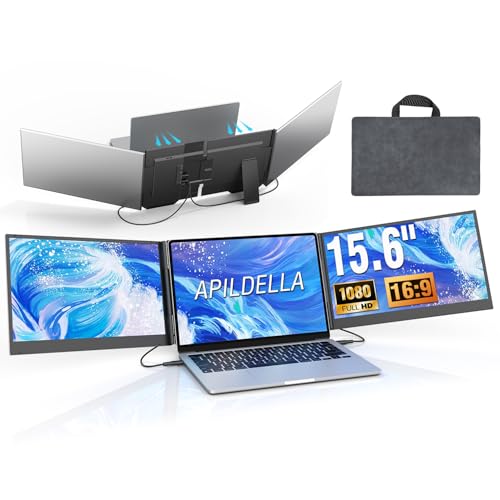
- Triple-screen setup for more editing space
- 15.6-inch 1080P IPS with 120% sRGB and HDR
- Two-cable monitor connection and travel bag included
Best For: Mobile creators who need a wide, color-aware triple-monitor layout
Flexible Dual-Screen Editing
15.6" FHD Laptop Screen Extender

- FHD IPS panel with 100% sRGB and 280 nits
- Extend, mirror, and portrait viewing modes
- 100W PD charging support for longer work sessions
Best For: Portable editors who want flexible dual-screen use with good color coverage
Compact Dual-Screen Workflow
ROYY 14" 1080P FHD IPS Portable Monitor

- 14-inch IPS panel with 1080p resolution
- 300 nits brightness and 72% NTSC coverage
- USB-C or HDMI plug-and-play setup
Best For: Lightweight dual-screen photo editing and everyday multitasking
Triple-Screen Creative Desk Setup
15.6" Triple Portable Monitor Extender

- Two 15.6-inch 1080p displays
- Triple-screen layout for more workspace
- Aluminum shell with included case
Best For: Photo editors who want three screens for tools, references, and multitasking
Clean Cable Triple Display
ZUMWALT P7 15.6" Travel Monitor

- Two 15.6-inch 1080p screens
- Clean USB-C setup on supported laptops
- Ultra-slim build with carry bag
Best For: Mobile photo editing with a triple-screen layout and minimal cable clutter
Triple Screen Workhorse – KEFEYA 15.6" Triple Monitor Extender
If you want laptop screen extenders for photo editing that give you more room for tool palettes, reference images, and timeline panels, this KEFEYA setup is built around a large 15.6-inch FHD IPS pair of displays. The 100% sRGB claim, adjustable picture settings, and 300-nit brightness make it a strong fit for color-aware work, while the foldable design helps when you need to move between desk and travel use.
Best For: Editors who want a triple-screen setup with vibrant 1080p panels and portable fold-up convenience.
Pros:
- Two 15.6-inch FHD IPS screens with 100% sRGB support
- Independent brightness, contrast, and backlight adjustments
- Foldable build with included leather bag for travel
- Plug-and-play connection with USB-C or HDMI-to-USB-C options
Cons:
- Not compatible with Mac M1/M2/M3 chips without a separate adapter
- Heavier than some ultra-light single-screen options at about 3.9 to 4 pounds
For photo editing, this is the most workstation-like option in the group, especially if you value multiple panels and display tuning over absolute minimal weight. It suits users who want a bigger mobile setup rather than the lightest travel accessory.
Simple One-Cable Choice – KYY 15.6" Dual Screen Extender
For laptop screen extenders for photo editing, the KYY model focuses on a simpler setup with two 15.6-inch FHD IPS screens and a single USB-C-to-USB-C connection. That makes it a practical choice if you want extra space for editing panels, file browsing, and image comparison without dealing with a cluttered cable routine.
Best For: Editors who want an easier one-cable setup and a sturdy, portable dual-screen design.
Pros:
- Two 15.6-inch FHD IPS panels with 178-degree viewing angle
- Single USB-C-to-USB-C connection for simpler setup
- Built-in stand adjustable up to 90 degrees
- Each screen rotates 0 to 360 degrees for flexible viewing
Cons:
- Requires drivers to be downloaded first
- Not compatible with PS5, Xbox Series X, and other gaming consoles
This is a sensible pick if you care most about convenience and portability, especially when moving between home, office, and client meetings. The strong dual-screen layout should suit many editing workflows, though it leans more toward practical productivity than premium color-focused positioning.
Flexible Detachable Option – FLYTOCCA 15.6" Detachable Extender
If your photo editing setup benefits from a secondary screen that can switch tasks easily, this FLYTOCCA extender brings a detachable 15.6-inch 1080p IPS display with vertical mounting support. That makes it useful not only for editing panels and reference images, but also for long file lists, color notes, and other side-by-side work.
Best For: Editors who want detachable portability and the option to use a vertical secondary display.
Pros:
- 15.6-inch FHD 1080p IPS display with 198-degree viewing angle
- Detachable screen with vertical mounting support
- Works with laptops from 13 inches to 17.3 inches
- Single Type-C connection with USB-A and HDMI fallback options
Cons:
- Only one HDMI port listed in the specs
- At 1.5 pounds, the detachable screen is portable, but the full setup is still a larger accessory
This model stands out when your workflow changes often and you want a screen that can adapt. For photo editing, the detachable design and vertical option are the main advantages, especially if you like keeping tools and references organized in a narrow layout.
Lightest Travel Setup – 14.2" Ultra-Portable Dual Extender
Among laptop screen extenders for photo editing, this 14.2-inch dual-monitor model is the most travel-friendly option here, weighing just 1.87 pounds and measuring only 0.27 inches thin. It still offers FHD IPS resolution, 300 nits of brightness, and extend, mirror, and portrait modes, so you can add workspace for editing tools, previews, and reference material without carrying a bulky accessory.
Best For: Frequent travelers and remote editors who want the lightest possible dual-screen setup.
Pros:
- Very light at 1.87 pounds and just 0.27 inches thin
- 14.2-inch FHD IPS panel with 300 nits brightness
- Supports extend, mirror, and portrait modes
- Plug-and-play setup with included cables and no driver required
Cons:
- Smaller 14.2-inch screens than the 15.6-inch alternatives
- Less expansive workspace than larger dual- or triple-screen models
If portability is your top priority, this is the easiest model to carry and deploy quickly. It is especially attractive for editors who want a light secondary display for on-the-go work rather than the biggest possible screen area.
Triple-Display Mobile Editing – 15.6'' Triple Laptop Screen Extender
If you want laptop screen extenders for photo editing, this triple-screen model is built for a more spacious color-checking and tool-heavy workflow. The 15.6-inch 1080P IPS panels support 120% sRGB, HDR, and a 60Hz refresh rate, giving you a practical setup for keeping your image, layers, and editing tools visible at once. It also keeps the connection process relatively simple with a two-cable design for the monitors, which is helpful when you’re moving between locations.
Best For: Mobile creators who want a triple-screen setup for editing, color review, and multitasking on the go.
Pros:
- Triple-display design adds a lot of usable workspace for editing layouts.
- 15.6-inch IPS panels with 1080P resolution, HDR, and 120% sRGB.
- Two-cable connection for the monitors helps reduce setup clutter.
- Lightweight 4 lb aluminum shell and included travel bag suit portable use.
Cons:
- Requires compatible laptop ports, including 2 USB-C DisplayPort connections or 1 USB-C plus 1 HDMI.
- M1–M4 MacBook support needs the separate H5-T adapter mentioned in the notes.
- At 4 lb, it is portable but not as minimal as a single-screen extender.
For photo editing, this is the most expansive option in the group if you need to keep multiple panels open at once. It’s better suited to users who prioritize workspace and color-capable screens over the simplest possible setup.
Flexible Dual-Screen Editing – 15.6" FHD Laptop Screen ExtenderFor laptop screen extenders for photo editing, this dual-monitor unit is a strong pick if you want a balance of clarity, comfort, and portability. The 15.6-inch FHD IPS display offers 100% sRGB, 280 nits brightness, and wide viewing angles, which makes it suitable for reviewing photos, managing palettes, and comparing versions side by side. It also supports extend, mirror, and portrait modes, so you can shape the workspace around your editing style.
Best For: Creators who want a portable dual-screen setup with flexible modes and solid color coverage.
Pros:
- 15.6-inch 1080P IPS panel with 100% sRGB and 280 nits brightness.
- Extend, mirror, and portrait modes give you flexible editing layouts.
- 100W PD charging support can reduce battery drain during long sessions.
- Lightweight 2.75 lb design is easier to carry than bulkier setups.
Cons:
- Requires compatible USB-C or HDMI + USB-A connections to work properly.
- The notes warn that power setup matters if you see a “No Signal” message.
- It’s a dual-screen extender, so it offers less workspace than triple-screen options.
This model is a practical middle ground for photo editing on the move. It gives you a useful amount of screen space without adding as much bulk as larger multi-panel setups, while the color and brightness specs are a nice fit for everyday visual work.
Compact Color Companion – 14'' FHD Laptop Screen Extender
If you’re comparing laptop screen extenders for photo editing, this 14-inch model stands out as the most compact option here. It uses a FHD 1080P IPS panel with anti-glare and blue-light filtering, which is helpful for long editing sessions when you want a comfortable viewing experience. The smaller size also makes it easier to carry in a bag, and the included protective case adds a layer of convenience for travel.
Best For: Editors who want a smaller, portable second screen for travel and everyday photo review.
Pros:
- 14-inch FHD 1080P IPS display with good color rendering.
- Blue-light filtering and anti-glare tech support longer viewing comfort.
- Ultra-slim 0.24-inch body with a protective case for portability.
- Plug-and-play setup with dual/mirror display support.
Cons:
- Not compatible with MacBook M1, M2, or M3 chips, per the notes.
- Smaller 14-inch screen gives you less workspace than 15.6-inch models.
- Compatibility depends on having the right full-featured USB-C and/or HDMI ports.
This is a smart choice if portability matters more than maximum screen size. It keeps the setup simple and the screen comfortable to use, but it is best viewed as a compact companion rather than the most expansive editing station.
Compact Dual-Screen Workflow – ROYY 14" 1080P FHD IPS Portable Monitor
If you want laptop screen extenders for photo editing, this ROYY 14-inch model is a practical way to add a second color-managed workspace without making your setup bulky. Its 1080p IPS panel, 300 nits brightness, and 72% NTSC color coverage give you a crisp canvas for palettes, reference images, and side-by-side edits.
Best For: Editors who want a lightweight dual-screen setup for culling, retouching, and keeping tools open beside the main image.
Pros:
- 14-inch 1920 x 1080 IPS display with 300 nits brightness for clear visuals.
- 72% NTSC color coverage and 1000:1 contrast for more vibrant image viewing.
- Driver-free plug-and-play setup with USB-C or HDMI options.
- 180-degree rotation and support for extend, mirror, landscape, and portrait modes.
Cons:
- Smaller 14-inch screen may feel tight for detailed multi-panel editing.
- Older devices may not support the required ports without checking compatibility first.
Overall, this is a straightforward portable extender for editors who value quick setup and a compact footprint over a larger panel. It gives you useful extra workspace for photo editing tasks without adding much complexity.
Triple-Screen Creative Desk Setup – 15.6" Triple Portable Monitor Extender
For photo editing on laptop screen extenders, this triple-monitor design is aimed at users who want a much larger workspace for tools, timelines, and reference images. Each 15.6-inch FHD screen offers 280 nits brightness and a wide viewing angle, so you can spread out editing panels while keeping visuals consistent across displays.
Best For: Photo editors who want three screens for a more organized and spacious editing workflow.
Pros:
- Triple-screen layout gives you three work zones for editing, references, and communication.
- Two 15.6-inch 1080p displays with 280 nits brightness and wide viewing angles.
- Aluminum shell, clipless design, and included protective case for portability.
- Plug-and-play setup with included cables and broad Windows, macOS, and Chrome OS support.
Cons:
- At 4 lbs, it is less travel-friendly than smaller single-screen options.
- Some laptops may need compatibility checks for video output and power delivery before purchase.
This is a strong choice if your editing work regularly benefits from keeping multiple panels visible at once. It’s best when productivity matters more than ultra-light portability.
Clean Cable Triple Display – ZUMWALT P7 15.6" Travel Monitor
If you’re comparing laptop screen extenders for photo editing and want a cleaner desk, this ZUMWALT P7 stands out for its simplified connection approach. It turns a laptop into a triple-screen setup with two 15.6-inch 1080p displays, giving you more room for editing panels, image previews, and side-by-side comparisons.
Best For: Mobile editors who want triple-screen productivity with a streamlined cable setup.
Pros:
- Two 15.6-inch FHD displays for a larger editing workspace.
- Only two USB-C to USB-C cables are needed when the laptop supports full functionality.
- Ultra-slim aluminum shell and included leather carry bag improve portability.
- Supports extend, mirror, and portrait modes for flexible workflows.
Cons:
- Some setups require the H5-T cable plus HDMI and USB-A, which adds complexity.
- Driver installation is required in certain compatibility cases.
For editors who want more screen space without a messy setup, this model is built around convenience and portability. Just be sure to confirm your laptop’s USB-C support before buying.
How We Picked These Laptop Screen Extenders for Photo Editing
We prioritized displays that make editing easier rather than just adding another panel. That means strong resolution, useful screen size, stable mounting, and broad compatibility with common laptop setups. We also looked for models that suit real editing workflows, where color visibility, workspace organization, and portability matter.
Because these are Laptop Screen Extenders for Photo Editing, we favored units that are simple to set up, travel-friendly, and flexible enough for Lightroom, Photoshop, and general content review.
Quick Comparison
If you want the simplest workflow, a 15.6-inch FHD extender is usually the best all-around choice. It gives enough room for a full image preview plus tools without feeling cramped. If portability is the top concern, a 14-inch model is easier to carry and lighter on a compact laptop bag. Triple-screen designs are best for users who keep reference images, folders, and editing panels open at the same time.
Key Buying Factors for Laptop Screen Extenders for Photo Editing
Screen Size and Resolution
For editing, 1080p is the baseline you should expect, and larger 15.6-inch panels usually offer the most comfortable balance of clarity and workspace. Smaller screens can still work well, but they are better for travel than for long, detail-heavy editing sessions.
Panel Type and Viewing Comfort
IPS panels are generally preferred because they maintain more consistent color and contrast from different angles. That matters when you are comparing tones, checking retouching work, or adjusting images beside your main laptop display.
Mounting Style and Portability
Detachable or foldable designs are easier to pack and can be more versatile at a desk. If you move between locations often, weight and thickness become just as important as screen size. A slim extender can be far easier to use than a bulkier setup.
Connectivity and Compatibility
Look for HDMI and USB-C support where possible. That gives you more flexibility across newer and older laptops. Plug-and-play convenience is especially valuable if you edit in different spaces and do not want to spend time on complicated drivers or adapters.
Power and Workflow Needs
Photo editors should also think about how many windows they keep open at once. A dual-screen setup is often enough for image work, but a triple-screen design can help when you need a dedicated preview area, a tool workspace, and a file browser side by side.
Who Should Buy Which Laptop Screen Extenders for Photo Editing?
If you edit mostly at a desk and want the most comfortable setup, choose a 15.6-inch extender with IPS and FHD resolution. If you travel often, a lighter 14-inch option makes more sense. If you handle larger projects, batch editing, or reference-heavy workflows, a triple-screen model can save time and reduce window switching. In short, the best Laptop Screen Extenders for Photo Editing are the ones that match your screen space needs, portability demands, and connection setup.