Wireless drawing tablets make sketching, photo editing, and digital note-taking feel cleaner and more flexible by cutting the cord without sacrificing control.
In this roundup, we focus on the best options for different hand sizes, desk setups, and skill levels so you can choose a tablet that fits how you create.
Best 10 Wireless Drawing Tablets Picks for 2026
Wireless Pick
Wacom Intuos Medium Bluetooth Graphic Drawing Tablet

- Bluetooth plus USB-A connectivity
- Battery-free Wacom Pen 4K
- 4 ExpressKeys and included software
Best For: Students, teachers, and creators needing a medium wireless tablet
Travel-Friendly Choice
XPPen Deco mini7W V2 Wireless Drawing Tablet
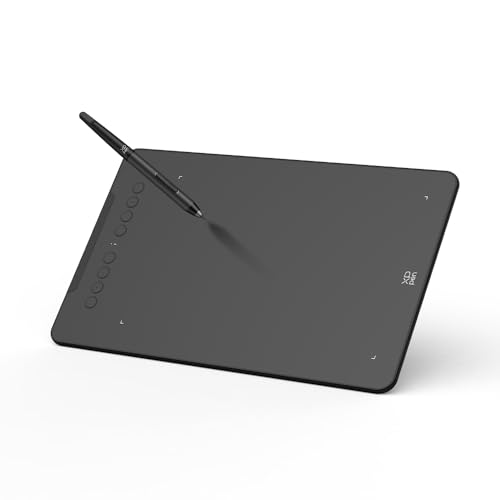
- Bluetooth 5.0 with long battery life
- 16,384 pressure levels and 60° tilt
- 8 shortcut keys and wide OS support
Best For: Portable creative work, students, and Android users
Compact Starter
Wacom Intuos Small Bluetooth Graphic Drawing Tablet

- Bluetooth and USB-A connectivity
- Battery-free pen with 4,096 levels
- Compact size for desk or travel use
Best For: Beginners and students needing a small wireless tablet
Large Workspace Pick
XPPen Deco 01 V3 10x6 Drawing Tablet

- Large 10 x 6.25-inch drawing area
- 16,384 pressure levels with tilt support
- 8 keys and broad platform compatibility
Best For: Beginners who prioritize a large drawing surface
Minimalist Wireless Sketching
HUION Inspiroy Frego Medium 10x6.25

- Bluetooth or USB-C connection
- Up to 24 hours of battery life
- 8192-level battery-free pen with tilt support
Best For: Portable artists who want a clean, wireless workspace
Shortcut-Heavy Bluetooth Tablet

- Bluetooth 5.0 cable-free connection
- 8 customizable shortcut keys
- 8192-pressure X3 stylus with tilt
Best For: Creators who want a compact wireless tablet with fast controls
Compact Everyday Pen Tablet

- Ultra-compact 6 x 4 inch active area
- Six customizable shortcut keys
- Battery-free pen with 8192 pressure levels
Best For: Beginners and mobile users who want a small, lightweight tablet
Wireless Studio Pick
XPPen Deco LW Wireless Drawing Tablet
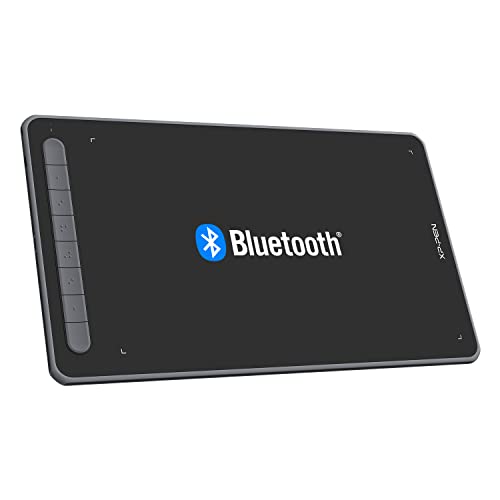
- Bluetooth 5.0 wireless plus wired backup
- 10 x 6 inch area with shortcut keys
- 8,192 pressure levels and 60° tilt
Best For: Artists and students who want a portable wireless tablet with broad OS support
Shortcut-Heavy Value Pick
HUION Inspiroy H1060P Graphics Drawing Tablet

- Large 10 x 6.25 inch working area
- 12 press keys plus 16 soft keys
- Battery-free pen with 60° tilt
Best For: Artists who want a spacious wired tablet with lots of customizable controls
High-Sensitivity Control Pick
GAOMON WH851 Bluetooth Graphics Drawing Tablet

- Bluetooth 5.0 and USB-C wired support
- 16,384 pressure levels with tilt
- Dial plus 8 customizable keys
Best For: Users who want a compact wireless tablet with advanced pressure response and quick controls
Wireless Pick – Wacom Intuos Medium Bluetooth Graphic Drawing Tablet
If you want wireless drawing tablets with a trusted pen feel, the Wacom Intuos Medium is built around Wacom’s battery-free EMR technology and Bluetooth connectivity. It works with USB-A as well, so you can switch between a clean desk setup and a wired connection when needed. It’s a practical choice for drawing, photo editing, document markup, and creative work across Mac, Windows, and Chromebook.
Best For: Students, teachers, and creators who want a medium-size tablet with reliable wireless flexibility.
Pros:
- Bluetooth and USB-A connectivity for wireless or wired use
- Battery-free Wacom Pen 4K with 4,096 pressure levels
- 4 ExpressKeys for shortcuts and faster workflow control
- Includes software access and online training after registration
Cons:
- Pressure sensitivity is lower than some newer pen tablets
- Medium size may be more than some users need for basic note-taking
Overall, this Intuos model stands out as a balanced pick for everyday creative tasks and learning. It favors dependable performance, simple wireless use, and a familiar pen-on-paper feel over flashy extras.
Travel-Friendly Choice – XPPen Deco mini7W V2 Wireless Drawing Tablet
Among wireless drawing tablets, the XPPen Deco mini7W V2 is a compact option that focuses on portability, shortcut control, and broad system support. It uses Bluetooth 5.0 for cable-free work and can also run via its L-shaped USB-C cable when you need a wired connection. The tablet is aimed at digital illustration, online teaching, remote work, and mobile creation.
Best For: Artists and students who want a small wireless tablet for portable creative work and Android use.
Pros:
- Bluetooth 5.0 wireless support with up to 13 hours of use
- 16,384 pressure levels and 60° tilt support
- 8 customizable shortcut keys for faster workflow
- Wide compatibility with Windows, macOS, Android, ChromeOS, and Linux
Cons:
- Smaller 7 x 4.37-inch size limits drawing space
- Best mobile mapping features are centered on Android use
This model makes sense if portability matters more than a large active area. It brings strong pen specs and wireless convenience into a lightweight format that is easy to carry and easy to set up.
Compact Starter – Wacom Intuos Small Bluetooth Graphic Drawing Tablet
If you’re comparing wireless drawing tablets for a smaller workspace, the Wacom Intuos Small keeps the setup simple with Bluetooth and USB-A connectivity. It uses Wacom’s battery-free EMR pen technology and is positioned for digital art, photo editing, online education, writing, designing, note-taking, and remote work. The smaller footprint makes it a natural fit for tight desks or easy carry.
Best For: Beginners, students, and note-takers who want a compact wireless tablet for everyday tasks.
Pros:
- Bluetooth wireless support plus USB-A wired option
- Battery-free Wacom Pen 4K with 4,096 pressure levels
- 4 ExpressKeys for quick shortcuts
- Works with Mac, Windows, and Chromebook
Cons:
- Small active area may feel restrictive for larger drawing motions
- Lower pressure sensitivity than some newer competitors
As a starter-friendly tablet, this model leans into convenience and portability. It’s a straightforward pick for users who want Wacom reliability without committing to a larger tablet size.
Large Workspace Pick – XPPen Deco 01 V3 10×6 Drawing Tablet
For buyers who want a larger active area in wireless drawing tablets, the XPPen Deco 01 V3 offers a roomy 10 x 6.25-inch surface and a battery-free stylus with 16,384 pressure levels. While this model is focused on wired USB-C connectivity rather than Bluetooth, it’s still a strong choice for beginner-friendly digital art, note-taking, and Android tablet use. The slim design and glowing edge lights make it practical for regular creative sessions.
Best For: Beginners who want a large, easy-to-learn drawing tablet with a spacious work area.
Pros:
- Large 10 x 6.25-inch drawing area
- 16,384 pressure levels and 60° tilt support
- 8 customizable keys for right- and left-handed users
- Wide compatibility, including Windows, macOS, Android, ChromeOS, and Linux
Cons:
- Does not include Bluetooth wireless connectivity
- Larger size is less pocket-friendly than compact tablets
This tablet is best viewed as a spacious, beginner-ready drawing pad rather than a true wireless model. If you value room to draw and simple setup over cable-free use, it delivers a lot of usable surface for the price.
Minimalist Wireless Sketching – HUION Inspiroy Frego Medium 10×6.25
If you want wireless drawing tablets with a clean, uncluttered feel, the HUION Inspiroy Frego focuses on portability and flexibility. Its 10 x 6.25 inch workspace is easy to carry, and you can connect by Bluetooth or USB-C depending on how you like to work. The battery is also built for long sessions, with up to 24 hours of use after a 2.5 hour charge.
Best For: Artists who want a minimalist wireless tablet with Bluetooth, mobile support, and a portable medium-sized surface.
Pros:
- Minimalist design with no physical shortcut keys for a clean drawing area
- Bluetooth or USB-C connectivity, plus up to 24 hours of battery life
- Battery-free PW550S pen with 8192 pressure levels and two programmable side keys
- Works with Android devices and iPhone/iPad through supported apps
Cons:
- No onboard shortcut keys on the tablet itself
- Wireless compatibility is more limited on some desktop operating systems
- Not a screen tablet, so you draw on the surface rather than directly on display
The Frego is a strong pick if you value a tidy workspace, solid pen response, and easy carrying over extra controls. It fits artists who want a straightforward wireless tablet that travels well and supports both desktop and mobile setups.
Shortcut-Heavy Bluetooth Tablet – XP-Pen Deco MW 8×5
Among wireless drawing tablets, the XP-Pen Deco MW is built for artists who want quick access and a compact workspace. It uses Bluetooth 5.0 for cable-free drawing, and the 8 shortcut keys can be customized to match your most-used commands. The included X3-Smart-Chip stylus adds 8192 levels of pressure sensitivity and 60-degree tilt support for detailed line control.
Best For: Users who want a compact wireless tablet with programmable keys and broad software compatibility.
Pros:
- Bluetooth 5.0 wireless connection keeps the desk clear
- Eight customizable shortcut keys can replace many keyboard actions
- X3 stylus offers 8192 pressure levels and 60-degree tilt support
- Compatible with Windows, Mac, Chrome OS, Linux, Android, and major art apps
Cons:
- Smaller 8 x 5 inch working area may feel tight for broad strokes
- Wireless setup depends on supported systems and drivers
- Compact size is less suited to users who want a larger canvas
The Deco MW stands out if speed and shortcuts matter as much as drawing feel. It is a practical choice for students, online teaching, and creators who want a small wireless tablet with a lot of control built in.
Compact Everyday Pen Tablet – HUION H640P 6×4
If you are comparing wireless drawing tablets but also want a compact everyday pen tablet, the HUION H640P is aimed at portability and simple setup. It has a 6 x 4 inch active area, six customizable express keys, and a battery-free stylus with 8192 pressure levels. The design is especially useful if you need a lightweight tablet for drawing, note-taking, or editing on the go.
Best For: Beginners and mobile users who want a small, lightweight pen tablet for drawing, notes, and general creative work.
Pros:
- Very compact and lightweight for travel or small desks
- Six customizable keys help speed up common actions
- Battery-free stylus with 8192 pressure levels and pen side buttons
- Works with Mac, Windows, Linux, and Android devices
Cons:
- No wireless connection feature is listed in the supplied product details
- 6 x 4 inch surface is small for users who prefer more drawing room
- Does not support iPhone or iPad
The H640P is a straightforward option if you want a portable pen tablet for everyday use without extra complexity. It is best viewed as an efficient, compact tool for sketching and productivity rather than a feature-heavy wireless model.
Wireless Studio Pick – XPPen Deco LW Wireless Drawing Tablet
If you’re shopping for wireless drawing tablets that balance portability with a roomy work area, the XPPen Deco LW is built for a flexible, everyday workflow. Its 10 x 6 inch surface, Bluetooth 5.0 support, and battery-free X3 stylus make it a practical fit for sketching, note-taking, and digital art across multiple devices.
Best For: Artists, students, and creators who want a wireless tablet with broad compatibility and a comfortable 10 x 6 active area.
Pros:
- Bluetooth 5.0 wireless connection plus wired use for backup reliability
- Battery-free X3 stylus with 8,192 pressure levels and 60° tilt support
- Wide compatibility with Windows, Mac, Linux, Chrome OS, and Android
- Customizable shortcut keys to streamline common tasks
Cons:
- Smaller than some larger-format drawing tablets
- Best used with supported software and compatible operating systems
The Deco LW stands out if you want a wireless tablet that still works like a dependable wired pen display alternative for non-display drawing. It offers a strong mix of portability, shortcut customization, and cross-platform support for users who move between home, school, and studio setups.
Shortcut-Heavy Value Pick – HUION Inspiroy H1060P Graphics Drawing Tablet
Among wireless drawing tablets alternatives, the HUION Inspiroy H1060P is a strong wired option for buyers who prioritize a larger work area and lots of shortcut control. The 10 x 6.25 inch surface, battery-free stylus, and 12 programmable press keys plus 16 soft keys make it well suited to longer illustration sessions and productivity-focused workflows.
Best For: Artists and hobbyists who want a spacious, dependable pen tablet with extensive shortcut customization.
Pros:
- Large 10 x 6.25 inch working area with slim, minimalist design
- Battery-free stylus with 60° tilt support for continuous use
- 12 programmable press keys plus 16 soft keys for workflow control
- Broad compatibility with Windows, Mac, Android, and Linux Ubuntu
Cons:
- Uses USB connectivity rather than wireless
- Mac connection requires a USB adapter
- Ubuntu compatibility requires Xorg, not Wayland
This model makes sense if you want a larger tablet surface and don’t need Bluetooth. It is especially appealing for users who value shortcut density and a battery-free pen over wireless convenience.
High-Sensitivity Control Pick – GAOMON WH851 Bluetooth Graphics Drawing Tablet
If you’re comparing wireless drawing tablets and want a model with a more feature-rich control layout, the GAOMON WH851 brings Bluetooth 5.0, a dial, and 8 customizable keys into a compact 8 x 5 design. Its battery-free AP519 pen supports 16,384 pressure levels and tilt detection, making it a strong option for detailed line work and everyday creative tasks.
Best For: Students, teachers, and creators who want a wireless tablet with high pressure sensitivity and a dial for quick adjustments.
Pros:
- Bluetooth 5.0 wireless mode plus USB Type-C wired connection
- 16,384 pressure levels with battery-free stylus and tilt support
- Center dial and 8 customizable keys for faster workflow control
- 18-hour battery capacity for long drawing sessions
Cons:
- Smaller 8 x 5 active area than larger tablets
- Wired operating system support is listed separately for Mac and Windows versions
The WH851 is a practical pick if you want wireless convenience with more advanced pressure sensitivity and tactile controls. Its compact size and long battery life make it especially useful for portable sketching and annotation work.
How We Picked the Best Wireless Drawing Tablets
We focused on tablets that balance pen accuracy, reliable wireless connectivity, comfortable active area size, and practical shortcut controls. We also looked for models that are easy to set up, widely compatible, and suitable for both beginners and more experienced artists.
Quick Comparison: What Matters Most
When comparing Wireless Drawing Tablets, size is often the first decision. Smaller tablets are more portable and desk-friendly, while medium and larger formats usually give you more room for expressive strokes and smoother arm movement. Pen technology matters too, especially if you want a natural feel with low latency and consistent pressure response.
Key Buying Factors for Wireless Drawing Tablets
Active area: Choose a smaller surface if you travel often or have limited space. Pick a larger area if you prefer broad, confident strokes or do detailed illustration work.
Pen performance: Look for good pressure sensitivity, battery-free styluses when possible, and stable tracking across the surface.
Wireless stability: Bluetooth convenience should not come at the cost of lag or dropped connections. If you plan to work wirelessly often, prioritize dependable pairing and strong battery life.
Shortcut controls: Express keys and dials can speed up zooming, undoing, rotating canvas, and switching brushes. They are especially helpful for workflow-heavy users.
Compatibility: Confirm support for your operating system and creative apps before buying, especially if you use multiple devices or rely on a laptop.
Who Should Buy Which Wireless Drawing Tablets?
Beginners: A compact or medium tablet is usually the safest choice. It is easier to learn on, takes up less space, and keeps the cost more approachable.
Students and commuters: Smaller Wireless Drawing Tablets are easier to carry and set up quickly between classes, studios, or shared workspaces.
Hobbyists and digital illustrators: Medium-size models with a battery-free stylus and multiple shortcut keys tend to offer the best balance of comfort and efficiency.
Photo editors and productivity users: Tablets with extra shortcuts or a dial can make repetitive actions faster, even if you are not drawing full-time.
Overall, the best choice depends on how much space you have, how often you work wirelessly, and how important speed controls are in your workflow. If you match those needs first, it is much easier to find a tablet that feels natural from day one.