If you want a display tablet that makes sketching, painting, and retouching feel more natural, drawing tablets with 4K display offer a major step up in clarity and workspace.
From compact options to large pro-grade screens, the best picks in 2026 balance sharp resolution, accurate color, and responsive pens for different creative workflows.
Best 10 Drawing Tablets with 4K Display Picks for 2026
Editor's Pick
Wacom Cintiq Pro 27 4K 120Hz ProPen 3

- 27-inch 4K UHD panel with 120 Hz refresh rate
- 99% Adobe RGB and 98% DCI-P3 color coverage
- Pro Pen 3 with 8,192 pressure levels and custom fit
Best For: Professional artists and studios needing a large, color-accurate 4K display
Most Ergonomic
Xencelabs Pen Display 24 4K Monitor

- 23.8-inch 4K UHD IPS screen with anti-glare finish
- Two battery-free pens and 8,192 pressure levels
- 40 programmable quick keys plus a dial control
Best For: Artists who want a comfortable, shortcut-rich 4K pen display
Best Mid-Size Pro
Wacom Cintiq Pro 22 4K Touchscreen

- 21.5-inch 4K Ultra HD screen with 120 Hz refresh rate
- Pro Pen 3 with 8,192 pressure levels and custom grips
- 10-point multi-touch and 8 ExpressKeys for workflow control
Best For: Creators who want a smaller pro-grade 4K pen display with touch support
Best Color Accuracy

- 23.8-inch 4K UHD panel with Quantum Dot color
- 99% Adobe RGB and factory calibration with ΔE<1
- PenTech 4.0 with 16,384 pressure levels and 2g activation
Best For: Artists who need a calibrated, wide-gamut 4K display for precise color work
Pro-Grade Compact 4K Pen Display

- 17-inch 4K UHD display with 120 Hz refresh
- Pro Pen 3 with 8,192 pressure levels and custom grips
- 8 ExpressKeys plus multi-touch gestures
Best For: Pros who want a compact 4K pen display for animation, VFX, and 3D work
Large Color-Accurate 4K Workhorse

- 23.8-inch 4K UHD display with roomy workspace
- 140% sRGB Quantum Dot panel with HDR support
- Full lamination, anti-glare glass, and Keydial Mini
Best For: Artists and editors who want a large, color-rich 4K pen display
Big-Screen High-Refresh Creator Display
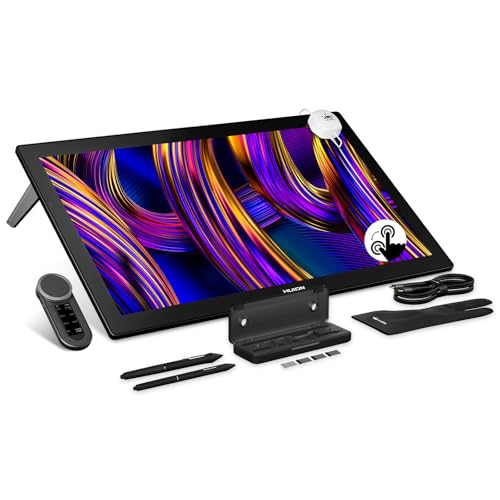
- 27-inch 4K UHD display with 144 Hz refresh
- PenTech 4.0 stylus with 16,384 pressure levels
- Wide color coverage with hardware calibration
Best For: Pros who want a large, smooth 4K touchscreen pen display
Pro Pick
GAOMON Pro 19 18.4" 4K UHD Drawing Tablet

- 18.4-inch fully laminated 4K UHD screen
- 99% sRGB with factory-calibrated ΔE<1.5 color
- 16,384-level battery-free pen with tilt support
Best For: Artists who want a large, accurate 4K pen display in a compact footprint
Studio Choice
HUION KAMVAS Pro 27 4K UHD Drawing Tablet

- Expansive 27-inch 4K display for a large working canvas
- Switchable sRGB, Adobe RGB, and DCI-P3 color spaces
- 3D LUT calibration with ΔE<1.5 and multi-touch gestures
Best For: Studio workflows that need a giant 4K canvas, touch control, and color flexibility
Best Compact 4K
HUION KAMVAS Pro 16 Plus 4K UHD Drawing Tablet
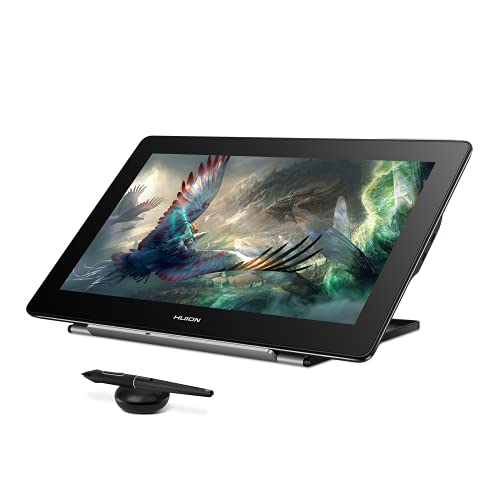
- 15.6-inch 4K UHD panel with full lamination
- 145% sRGB color gamut for rich, accurate color
- Battery-free pen with 8,192 pressure levels and tilt
Best For: Creators who want a compact 4K display tablet with wide color and simple connectivity
Editor's Pick – Wacom Cintiq Pro 27 4K 120Hz ProPen 3
If you want a premium drawing tablets with 4k display option for high-end illustration, animation, or 3D work, the Wacom Cintiq Pro 27 is built around display quality and creative control. Its 27-inch 4K UHD screen, 10-bit color, 99% Adobe RGB, 98% DCI-P3, and 120 Hz refresh rate make it a strong fit for artists who want smooth pen movement and accurate color.
Best For: Professional studios and advanced creators who want a large, color-accurate 4K pen display with deep customization.
Pros:
- 27-inch 4K UHD display with 120 Hz refresh rate for smooth, responsive drawing
- 10-bit color with 99% Adobe RGB and 98% DCI-P3 for color-critical work
- Pro Pen 3 offers 8,192 pressure levels and customizable grips, weight, and balance
- 8 ExpressKeys plus multi-touch and pen gestures for workflow control
Cons:
- Designed for Windows and macOS setups, so it is not a standalone device
- Large 27-inch footprint may be more than casual users need
- Premium feature set is aimed at pro-level workflows rather than budget buyers
This is the most fully featured option in the group if you care about screen size, color accuracy, and a highly adjustable pen. It is especially compelling for pros who will actually use the customizable controls and wide connectivity options.
Most Ergonomic – Xencelabs Pen Display 24 4K Monitor
The Xencelabs Pen Display 24 is a well-rounded choice if you want drawing tablets with 4k display quality plus an unusually thoughtful control layout. Its 23.8-inch 4K IPS screen, anti-glare Super-AG etching, and validated wide-gamut color make it a practical match for long drawing sessions in bright spaces.
Best For: Artists and illustrators who want a comfortable 4K pen display with lots of shortcuts and strong color performance.
Pros:
- 4K UHD IPS display with 99.43% Adobe RGB coverage and 1.07 billion colors
- Includes two battery-free pens with 8,192 pressure levels and tilt recognition
- 40 programmable quick keys plus a dial for common creative actions
- Anti-glare Super-AG screen and fan-less design help with comfort during long sessions
Cons:
- At 23.8 inches, it is smaller than some other pro-level 4K pen displays
- Best experience depends on a connected computer; it is not a standalone tablet
- Feature-rich accessory setup may feel more complex than simpler displays
For buyers who value ergonomics and shortcut control as much as screen sharpness, this model stands out. It balances a high-quality 4K panel with practical workflow tools that can genuinely speed up repetitive tasks.
Best Mid-Size Pro – Wacom Cintiq Pro 22 4K Touchscreen
The Wacom Cintiq Pro 22 is a strong middle-ground pick if you want drawing tablets with 4k display detail without moving up to the largest, most space-hungry models. Its 21.5-inch Ultra HD screen, 120 Hz refresh rate, 10-point multi-touch, and Pro Pen 3 make it aimed squarely at serious creative work.
Best For: Professional and advanced hobbyist creators who want a compact-ish 4K pen display with touch and Wacom pen customization.
Pros:
- 4K Ultra HD display with 120 Hz refresh rate for smooth pen tracking
- Pro Pen 3 includes 8,192 pressure levels and customizable grips and balance
- 10-point multi-touch plus 8 ExpressKeys and adjustable on-screen menus
- Comes with extra grips, button plates, nibs, and a pen tray for setup flexibility
Cons:
- Smaller display than the 27-inch model if you want more canvas space
- Requires a connected Windows or macOS computer
- Fixed-angle stand is less flexible than fully adjustable setups
This is the practical Wacom choice for creators who want premium performance but do not need the biggest screen in the room. It still brings the same pro-focused pen and touch features in a more manageable size.
Best Color Accuracy – HUION Kamvas Pro 24 Gen 3 4K
The HUION Kamvas Pro 24 (Gen 3) is a compelling option if your priority in drawing tablets with 4k display performance is color accuracy, surface quality, and a roomy workspace. Its 23.8-inch 4K UHD panel, Quantum Dot color, and factory calibration report make it especially appealing for artists who need reliable visual output.
Best For: Color-focused artists and designers who want a calibrated 4K pen display with a large canvas and strong pen sensitivity.
Pros:
- 23.8-inch 4K UHD display with 1 billion colors and Quantum Dot technology
- Covers 99% sRGB, 99% Adobe RGB, 98% DCI-P3, and 98% Display P3
- PenTech 4.0 supports 16,384 pressure levels and 2g activation force
- Factory calibration with a 3D LUT and ΔE<1, plus multi-touch support
Cons:
- Not a standalone product and must connect to a computer or compatible device
- No included stand details in the supplied notes, so setup preferences may vary
- Large feature set is oriented toward serious creative work rather than simple sketching
This model is especially attractive for buyers who want color confidence right out of the box. Between the wide gamut, calibration report, and refined pen behavior, it is built for creators who care about visual consistency.
Pro-Grade Compact 4K Pen Display – Wacom Cintiq Pro 17
If you want drawing tablets with 4k display performance in a more compact studio-friendly size, the Wacom Cintiq Pro 17 is built for precision work. Its 17-inch Ultra HD panel, 120 Hz refresh rate, and Pro Pen 3 make it a strong fit for artists who value responsiveness, color accuracy, and customizable control.
Best For: Animation, VFX, game art, 3D projects, and professional illustration where a smaller 4K pen display is preferred.
Pros:
- 4K UHD 17-inch display with 120 Hz refresh for smooth, low-latency pen input
- Pro Pen 3 offers 8,192 pressure levels, 3 side switches, and customizable grips
- 8 ExpressKeys plus on-screen menus and multi-touch gestures for workflow control
- Easy Stand and included accessories help you personalize the setup
Cons:
- Smaller screen than many other 4K pen displays, which may limit multitasking space
- Designed as a connected display rather than a standalone tablet
This model stands out if you want premium pen feel and a high-refresh 4K panel in a size that can fit tighter desks. It is aimed squarely at professional creative work rather than casual sketching.
Large Color-Accurate 4K Workhorse – HUION Kamvas Pro 24 4K
Among drawing tablets with 4k display panels, the HUION Kamvas Pro 24 4K is the pick for artists who want more screen room to spread out their workflow. The 23.8-inch laminated display, 140% sRGB coverage, and included Keydial Mini make it well suited to detailed creative work that benefits from both color and space.
Best For: Artists, designers, and editors who want a large 4K pen display with strong color and multitasking space.
Pros:
- Large 23.8-inch 4K UHD screen gives you plenty of room for timelines, palettes, and canvas space
- Quantum Dot panel with 140% sRGB, HDR support, and 1.07 billion colors for vivid color reproduction
- Full lamination and anti-glare glass help with pen accuracy and reduce reflections
- Keydial Mini and built-in connectivity options add useful workflow flexibility
Cons:
- Not a standalone tablet; it needs a computer or compatible device to work
- Larger footprint may be less convenient for small desks
This is a practical choice if you want a spacious 4K drawing display that can also act like a second-monitor-style creative workspace. It focuses on comfort, accuracy, and efficient control rather than portability.
Big-Screen High-Refresh Creator Display – HUION Kamvas Pro 27
If you are comparing drawing tablets with 4k display quality and want the biggest, smoothest option here, the HUION Kamvas Pro 27 is built for that role. Its 27-inch 4K screen, 144 Hz refresh rate, and PenTech 4.0 stylus are aimed at artists who want fluid pen response, wide color coverage, and a more immersive workspace.
Best For: Professional creators who want a large 4K touchscreen pen display with very smooth motion and advanced color accuracy.
Pros:
- 27-inch 4K UHD panel with 144 Hz refresh for very smooth visuals and fast stroke display
- Wide color coverage with 99% sRGB, 98% Adobe RGB, 98% DCI-P3, and hardware calibration
- PenTech 4.0 stylus offers 16,384 pressure levels, tilt support, and low initial activation force
- Canvas Glass 3.0 reduces glare and grain while the multi-touch gestures add convenience
Cons:
- Large 27-inch size will take up significant desk space
- Best suited to users who already have a computer to pair with it
This model is the most premium-feeling option in the group for artists who want a big, fluid canvas and calibration-focused color performance. It is especially compelling for users who work long hours and value screen smoothness as much as accuracy.
Pro Pick – GAOMON Pro 19 18.4" 4K UHD Drawing Tablet
If you want drawing tablets with 4k display performance in a desk-friendly size, the GAOMON Pro 19 is built for detailed digital art, design, and animation. Its 18.4-inch fully laminated 4K UHD screen, anti-glare surface, and factory-calibrated color make it a practical choice when you need clarity and consistency without a huge footprint.
Best For: Art students, creators, and illustrators who want a large 4K pen display with strong color accuracy and a manageable desktop size.
Pros:
- 18.4-inch 4K UHD display with full lamination and anti-glare surface
- 99% sRGB, 98% DCI-P3, and factory calibration to ΔE<1.5
- Battery-free pen with 16,384 pressure levels, tilt support, and two buttons
- Includes adjustable stand and multiple connection options
Cons:
- Not a standalone device and must connect to a computer or compatible device
- USB-C to USB-C single-cable setup requires a separate cable
The GAOMON Pro 19 stands out as a value-focused 4K display tablet for artists who care about image quality and workspace comfort. If you want a balanced screen size with professional color and a responsive pen, it covers the essentials well.
Studio Choice – HUION KAMVAS Pro 27 4K UHD Drawing Tablet
For creators comparing drawing tablets with 4k display panels, the HUION KAMVAS Pro 27 is the most expansive option here. Its 27-inch 4K screen gives you a wide canvas for concept art, photo work, and motion design, while the laminated anti-glare glass and color-calibrated panel are aimed at long, professional sessions.
Best For: Studio artists, designers, and content creators who want a huge 4K pen display with strong color control and multi-touch navigation.
Pros:
- Large 27-inch 4K display reduces the need for constant zooming and panning
- Wide color support with sRGB, Adobe RGB, and DCI-P3 switching
- 3D LUT hardware calibration with ΔE<1.5 and factory calibration report
- Multi-touch gestures and two included pens for flexible workflow
Cons:
- Not a standalone product and requires a connected computer or compatible device
- Large size may be more demanding on desk space than smaller pen displays
The KAMVAS Pro 27 is clearly aimed at serious creative work where screen space and color accuracy matter most. If your workflow benefits from a big canvas and touch gestures, this model offers a lot to work with.
Best Compact 4K – HUION KAMVAS Pro 16 Plus 4K UHD Drawing Tablet
If you want drawing tablets with 4k display quality in a smaller package, the HUION KAMVAS Pro 16 Plus is a strong compact option. Its 15.6-inch 4K UHD screen, full lamination, and anti-glare glass are designed for clear, detailed work, while the wide 145% sRGB color gamut makes it appealing for color-sensitive creative tasks.
Best For: Artists, students, and editors who want a compact 4K pen display with rich color and easy connectivity.
Pros:
- 15.6-inch 4K UHD display with full lamination and anti-glare glass
- 145% sRGB wide color gamut and 1200:1 contrast ratio
- Battery-free PW517 pen with 8,192 pressure levels and tilt recognition
- Dual USB-C options plus included cables for flexible setup
Cons:
- Not a standalone device and needs connection to a computer, laptop, or supported Android device
- Pressure sensitivity is lower than some newer 16K pen displays
The KAMVAS Pro 16 Plus focuses on portability without dropping into basic territory. For users who want a smaller 4K screen with strong color and a proven pen experience, it is an easy model to shortlist.
How We Picked the Best Drawing Tablets with 4K Display
We focused on Drawing Tablets with 4K Display that offer strong visual fidelity, reliable pen performance, and practical features for real creative work. Priority went to models with accurate color coverage, low-latency input, useful stand or shortcut support, and screen sizes that match different desk setups and budgets.
Quick Comparison
In this group, larger models are best for full-time illustration, concept art, and multitasking, while smaller displays are easier to fit on compact desks or carry between workspaces. Refresh rate, pen technology, and color gamut also matter: faster panels feel smoother for motion-heavy work, while wider gamut screens are better for print-minded artists and photo editors.
Key Buying Factors for Drawing Tablets with 4K Display
Screen Size and Workspace
A 16- to 24-inch display suits most artists, but 27-inch options are better if you want more room for large canvases, UI panels, or side-by-side reference images. If portability or desk space matters more, a smaller tablet can still deliver excellent 4K sharpness.
Color Accuracy and Gamut
For illustration, animation, and retouching, look at color coverage such as Adobe RGB or sRGB percentages. Higher coverage generally helps when you need predictable color for client work or print output.
Pen Feel and Responsiveness
Pressure sensitivity, tilt support, and line stabilization can affect how natural the tablet feels. Pro-level pens and newer pen technologies usually improve tracking, cursor control, and overall confidence during detailed strokes.
Refresh Rate and Touch Support
Higher refresh rates can make pen movement feel smoother, especially on larger canvases. Touch support is useful for navigation, but some artists prefer non-touch models to avoid accidental inputs.
Shortcut Controls and Ergonomics
Custom keys, dials, and remote accessories can speed up workflow if you rely on hotkeys. Also check stand adjustability, cable management, and weight if you plan to spend long sessions at the screen.
Who Should Buy Which Drawing Tablets with 4K Display?
Choose a large premium model if you want the closest experience to a desktop monitor plus pen input. Pick a mid-size 4K display tablet if you need a balance of accuracy, comfort, and price. Go smaller if you value portability, a tighter budget, or a cleaner home studio setup. For most buyers, the best choice is the tablet that fits your workspace first, then your color needs and pen preferences.