Choosing the right yoke can make a flight sim setup feel far more authentic, with smoother inputs and better control on takeoff, landing, and cruise.
Below, we’ve rounded up 10 standout options for different platforms, budgets, and realism goals so you can find the best fit faster.
Best 10 Adjustable Flight Simulator Yokes Picks for 2026
Premium General-Aviation Pick
Honeycomb Alpha Flight Controls Yoke & Switch Panel

- 180° rotation with smooth self-centering action
- Built-in switch panel with ignition and lighting controls
- Clamp or micro-suction mounting options
Best For: PC sim pilots wanting a durable, realistic yoke with extra cockpit controls
Boeing-Inspired Flight Pack
Thrustmaster TCA Yoke & Quadrant Boeing Edition Flight Pack

- Boeing 787-inspired 1:1 scale yoke and quadrant
- Pendular motion with adjustable spring tension
- 35 buttons plus extra axes for more control
Best For: Boeing-style simmers who want a licensed yoke bundle for PC or Xbox
Classic PC Sim Choice
Honeycomb Aeronautical Alpha Flight Controls Yoke & Switch Panel

- 180° rotation with dual linear ball bearings
- Built-in switch panel with ignition controls
- Clamp or micro-suction mounting support
Best For: PC and Mac sim users who want a realistic, easy-to-mount yoke
All-in-One Yoke Bundle
Logitech G Pro Flight Yoke System + Rudder Pedals Bundle

- Bundle includes yoke and rudder pedals
- 14 buttons, POV hat, and 3-position switch
- Pedals add toe brakes and adjustable foot rests
Best For: Windows users who want a simple starter bundle with yoke and pedals
Premium Force-Feedback Yoke Base
MOZA AY210 Flight Simulator FFB Controls

- Dual servo motors with smooth force feedback
- 150mm travel for finer control and precision
- 13 mappable switches and customizable feedback
Best For: PC sim pilots wanting advanced force-feedback realism
All-in-One HOTAS Bundle
Thrustmaster T-Flight Full Kit with Rudder Pedals

- HOTAS setup with included rudder pedals
- Official Xbox integration plus PC support
- 14 buttons, five axes, detachable throttle
Best For: Players wanting a complete PC/Xbox flight control bundle
Professional Yoke System
Logitech G PRO Flight Yoke System

- Realistic desktop yoke with stainless steel shaft
- Up to 54 programmable controls
- Includes throttle quadrant and desk clamps
Best For: Desktop pilots seeking a realistic, highly programmable yoke
Force-Feedback Precision Pick
MOZA AY90 FFB Yoke Base for PC

- 4.2 Nm roll torque with up to 90 N push-pull force
- 180° roll rotation and 95 mm pitch travel
- PC-only yoke base with 4 onboard buttons
Best For: PC users seeking force feedback and realistic yoke movement
All-in-One Setup Pick
Turtle Beach VelocityOne Flight System

- Includes yoke, throttle quadrant, trim wheel, and rudder controls
- 180° yoke rotation with hall effect sensor
- Works with Xbox and Windows flight titles
Best For: Xbox and Windows users who want a full control bundle
Compact Custom Control Pick
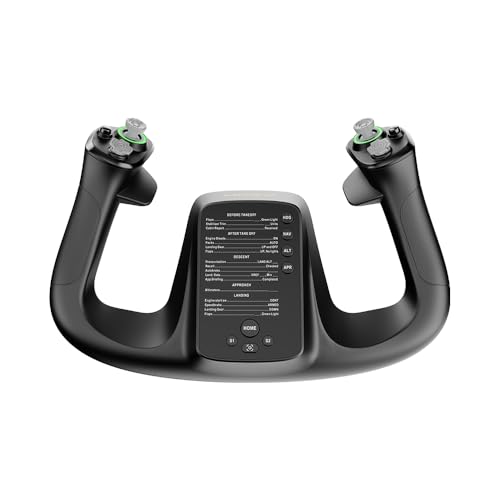
- 34 configurable inputs with customizable RGB lighting
- PA66 composite and aluminum alloy ergonomic build
- Lightweight 1.3 kg yoke-style controller for PC
Best For: PC pilots who want a compact, highly configurable controller
Premium General-Aviation Pick – Honeycomb Alpha Flight Controls Yoke & Switch Panel
If you want adjustable flight simulator yokes that feel built for serious desktop flying, the Honeycomb Alpha is an easy benchmark to consider. It pairs 180° rotation with a steel shaft and dual linear ball bearings, giving you smooth input and a dampened self-centering feel that suits everything from pattern work to longer practice sessions.
Best For: Sim pilots who want a durable, realistic PC yoke with an integrated switch panel and strong desk mounting options.
Pros:
- 180° yoke rotation with a smooth, self-centering mechanism and minimal deadzone
- Integrated switch panel with master, alternator, avionics, light, and ignition controls
- Dual mounting setup includes heavy-duty clamps and a micro-suction pad
- Built with a solid steel shaft and durable materials for long-term use
Cons:
- PC-focused design may not suit console users
- Large, feature-rich base takes more desk space than simpler yokes
Overall, the Alpha stands out if you want a more complete cockpit feel without stepping into a full modular setup. Its combination of precise motion, extra cockpit controls, and flexible mounting makes it one of the stronger all-around choices in this category.
Boeing-Inspired Flight Pack – Thrustmaster TCA Yoke & Quadrant Boeing Edition Flight Pack
For buyers comparing adjustable flight simulator yokes with a more airliner-style feel, this Thrustmaster Boeing Edition bundle brings a strong point of difference. The 1:1 Boeing 787-inspired yoke uses a pendular mechanism with an 8.3-inch range and adjustable spring tension, while the included quadrant adds extra control for a more complete home cockpit.
Best For: Boeing fans and simmers who want a PC/Xbox-ready yoke bundle with realistic pendular motion.
Pros:
- Officially licensed Boeing 787-inspired 1:1 scale yoke design
- Pendular mechanism with smooth motion and adjustable spring tension
- Throttle quadrant included with autopilot functions and extra axes
- 35 action buttons for a highly featured setup
Cons:
- Bulkier bundle than a standalone yoke
- Rudder pedals are sold separately
This is a strong choice if you want airliner-style controls rather than a generic flight yoke. The combination of motion, button count, and the included quadrant makes it especially appealing for Microsoft Flight Simulator and other compatible setups.
Classic PC Sim Choice – Honeycomb Aeronautical Alpha Flight Controls Yoke & Switch Panel
If you’re shopping for adjustable flight simulator yokes and want a proven PC-friendly option, this Honeycomb Alpha version is built around the same core realism many simmers look for. It offers full 180° rotation, a steel shaft with dual linear ball bearings, and a dampened self-centering feel designed to keep control inputs smooth and consistent.
Best For: PC and Mac sim users who want a realistic yoke with a built-in switch panel and clamp-free mounting option.
Pros:
- Full 180° rotation with smooth, realistic control feel
- Switch panel includes master, alternator, avionics, light, and ignition switches
- Dual mounting solution with steel clamps and a 3M micro-suction pad
- Designed in California by pilots and aerospace engineers
Cons:
- Fewer buttons than some competitors in this roundup
- Primarily aimed at PC and Mac users
For desktop sim pilots who want a dependable yoke with sensible extras, this Honeycomb package remains a very practical buy. It balances realistic handling with a useful switch panel and flexible mounting, making it easy to fit into a home cockpit.
All-in-One Yoke Bundle – Logitech G Pro Flight Yoke System + Rudder Pedals Bundle
For buyers who want adjustable flight simulator yokes plus pedal control in one purchase, this Logitech bundle is a straightforward way to build out a sim setup. The yoke offers realistic controls and a 3-position mode switch, while the included rudder pedals add self-centering action, toe brakes, and adjustable foot rests for a more complete flying experience.
Best For: Sim beginners or upgraders who want a bundled yoke-and-pedals setup for Windows.
Pros:
- Includes both the PRO Flight Yoke System and PRO Flight Rudder Pedals
- Yoke offers 14 buttons, a POV hat, and a 3-position mode switch
- Pedals feature self-centering action, differential toe brakes, and adjustable foot rests
- Bundle provides a simple path to a more complete cockpit layout
Cons:
- Windows-only compatibility
- Fewer listed controls on the yoke than some higher-end rivals
This bundle makes sense if you want a practical, coordinated setup instead of piecing together separate parts. It is especially appealing for users who value convenience and want core flight controls covered from the start.
Premium Force-Feedback Yoke Base – MOZA AY210 Flight Simulator FFB Controls
If you want adjustable flight simulator yokes with a more advanced, tactile feel, the MOZA AY210 is built around serious force feedback and a long 150mm travel range. Its dual servo motors, 9Nm torque, and 210N push force are aimed at giving sim pilots detailed, responsive control that better reflects aircraft handling.
Best For: PC flight sim users who want high-end force feedback and highly customizable yoke control.
Pros:
- Dual high-torque servo motors provide smooth force feedback.
- 150mm travel distance supports finer control and precision.
- 15-bit magnetic encoder and 280 MHz processor suggest precise input handling.
- 13 mappable switches and intelligent force feedback add customization.
Cons:
- Designed for PC, so it is not a broad multi-platform option.
- It is a yoke base, so setup may require a compatible cockpit or rig.
The AY210 stands out if you are prioritizing realism and tunability over simplicity. For pilots who want a more adjustable and immersive yoke setup, this one is clearly aimed at the enthusiast end of the market.
All-in-One HOTAS Bundle – Thrustmaster T-Flight Full Kit with Rudder Pedals
For buyers comparing adjustable flight simulator yokes and broader flight control setups, this Thrustmaster full kit is a versatile pick because it combines a stick, throttle, and included rudder pedals. It is a practical option if you want a complete entry-to-midrange sim setup for PC and Xbox without piecing together separate components.
Best For: Players who want a complete flight control bundle for PC and Xbox with rudder pedals included.
Pros:
- Includes HOTAS controls plus TFRP rudder pedals in one package.
- Official Xbox integration adds convenient console navigation support.
- Five axes, 14 programmable buttons, and a detachable throttle offer strong control coverage.
- Heel rests and full-foot pedal design are made for longer sessions.
Cons:
- Uses a flight stick rather than a traditional yoke.
- It is a corded setup with multiple components to arrange on the desk.
This kit makes sense if your priority is value and completeness rather than a dedicated yoke-only cockpit feel. It gives you a lot of simulator control in one box, which can be especially useful for mixed flight genres.
Professional Yoke System – Logitech G PRO Flight Yoke System
If you are shopping for adjustable flight simulator yokes with a more traditional desktop yoke layout, the Logitech G PRO Flight Yoke System is built for realism and strong control mapping. The stainless steel yoke shaft, desk clamps, and included throttle quadrant make it a well-rounded choice for pilots who want a more authentic sim setup.
Best For: Desktop sim pilots who want a realistic yoke system with extensive programmable controls.
Pros:
- Realistic yoke controls help new and experienced pilots build muscle memory.
- Stainless steel yoke shaft offers robust, smooth, accurate control.
- Up to 54 programmable controls provide broad function access.
- Two desk clamps add mounting flexibility and secure placement.
Cons:
- Requires Windows and is not a console-focused option.
- Some software setup may be needed for supported simulators.
This is a strong pick if you want a conventional yoke experience with plenty of programmable functions. It leans more toward practical sim fidelity than flashy features, which can be exactly what desktop flyers want.
Force-Feedback Precision Pick – MOZA AY90 FFB Yoke Base for PC
If you’re shopping for adjustable flight simulator yokes with a more realistic control feel, the MOZA AY90 is built around force feedback and broad travel. It offers 4.2 Nm of roll torque, up to 90 N of push-pull force, 180° of roll rotation, and 95 mm of pitch travel, making it a strong fit for sim pilots who want more physical resistance and motion than a basic yoke base.
Best For: PC sim pilots who want force feedback and realistic pitch/roll motion in a yoke base.
Pros:
- 4.2 Nm of roll torque and up to 90 N of push-pull force for stronger control feedback
- 180° of roll rotation plus 95 mm of pitch travel for more realistic aircraft inputs
- Ergonomic corded USB design for PC use
- Compact 6-pound base with four buttons for essential controls
Cons:
- PC-only compatibility limits console use
- Only 4 buttons, so most pilots will likely want additional peripherals
The AY90 is a focused choice if you care most about force feedback and movement range rather than an all-in-one control panel. It looks best as the foundation of a more advanced desktop flight sim setup.
All-in-One Setup Pick – Turtle Beach VelocityOne Flight System
For buyers comparing adjustable flight simulator yokes that bundle multiple controls into one unit, the Turtle Beach VelocityOne Flight stands out. It combines a 180° yoke handle, modular throttle quadrant, trim wheel, rudder and brake controls, plus a full color flight management display, giving you a broad feature set for Xbox and Windows flight sims.
Best For: Xbox and Windows sim pilots who want an all-in-one yoke, throttle, and trim solution.
Pros:
- All-in-one design includes yoke handle, throttle quadrant, trim wheel, and rudder controls
- 180° yoke rotation with a non-contact hall effect sensor for smooth input
- 12 analog axes, two POV switches, and two 4-way HAT switches for broad control coverage
- Designed for Xbox and Windows titles, with secure clamping for home setups
Cons:
- Larger and heavier at 10 pounds, so it needs more desk space
- Feature-rich design may be more than casual users need
This is the most complete plug-and-play style option in the group if you want fewer separate accessories on your desk. Its strength is convenience and control variety rather than a minimalist footprint.
Compact Custom Control Pick – MOZA MFY Yoke Stick for PC
If you want adjustable flight simulator yokes with a lighter, more customizable design, the MOZA MFY is built around configurability. It uses PA66 composite materials and an aluminum alloy quick-release ergonomic build, while offering 34 configurable inputs and customizable RGB lighting for a personalized PC cockpit setup.
Best For: PC sim pilots who want a compact, configurable yoke-style controller with lots of inputs.
Pros:
- 34 configurable inputs for broad control customization
- PA66 composite and aluminum alloy construction for durability and comfort
- Drift-free control for precision and accuracy
- Lightweight 1.3 kg design with customizable RGB lighting
Cons:
- PC-only support limits compatibility
- Wireless power source may not suit every desk setup preference
The MFY is a strong pick if you care more about flexibility and input count than a large integrated system. It fits best in a PC sim rig where compact size and customization matter.
How We Picked These Adjustable Flight Simulator Yokes
We focused on build quality, control precision, platform compatibility, included throttles or switch panels, and overall value for different types of sim pilots. We also considered whether each option suits casual flying, study-level practice, or a more immersive home cockpit.
Quick Comparison
If you want the most realistic feel, look closely at force feedback and a more substantial yoke base. If you want an easier all-in-one setup, bundled controls and broader console support may matter more. For PC-only builders, software support and mapping flexibility can be just as important as hardware features.
Key Buying Factors for Adjustable Flight Simulator Yokes
Compatibility
Make sure the yoke works with your platform first. Some models are PC-only, while others support Xbox and PC. If you fly across multiple systems, cross-platform support can simplify your setup.
Adjustment and Ergonomics
Look for adjustable tension, mounting options, and a grip position that feels natural during longer sessions. A good yoke should match your desk or cockpit frame without forcing awkward wrist or shoulder angles.
Realism and Feedback
Basic yokes are fine for casual flying, but more advanced Adjustable Flight Simulator Yokes with force feedback or smoother centering can improve handling cues during approach and landing. That extra detail is especially useful if you practice procedures often.
Included Controls
Some yokes include throttle quadrants, switches, or rudder pedals, which can save money and space. Others are sold as standalone controls, which may be better if you want to customize each part of your setup separately.
Build Quality and Longevity
Metal reinforcement, solid clamping, and durable switches matter if you fly frequently. A sturdy yoke tends to stay stable under heavy use and gives more confidence when making fine inputs.
Who Should Buy Which Adjustable Flight Simulator Yokes?
Choose a bundled kit if you want the simplest path to a complete sim setup. Pick a premium yoke base if realism and responsiveness are your top priorities. If you are building on a budget, a dependable midrange model can still deliver a big upgrade over keyboard or controller flying.
For most buyers, the best Adjustable Flight Simulator Yokes are the ones that match your platform, fit your desk or cockpit, and give you the right balance of realism and convenience for the way you actually fly.