Choosing the right rudder pedals can make a bigger difference than most cockpit add-ons. The best flight simulator pedals with toe brakes improve ground handling, taxi control, and landing precision.
Below, you’ll find a focused roundup of 10 options across PC, Xbox, and multi-platform setups, from entry-level picks to premium hardware.
Best 10 Flight Simulator Pedals with Toe Brakes Picks for 2026
Premium PC Rudder Control
Logitech G Pro Flight Rudder Pedals

- Self-centering rudder pedals for realistic control
- Adjustable tension dial changes pedal resistance
- Differential toe brakes help with runway stopping
Best For: PC sim pilots who want adjustable rudder resistance and toe brakes
Value Flight Control Starter
Thrustmaster T16000M FCS Flight Pack

- Precision joystick with H.E.A.R.T technology
- Ambidextrous layout with removable components
- Twist rudder replaces separate pedal hardware
Best For: PC flyers who want a precise joystick setup with twist rudder
Cross-Platform Rudder Upgrade
Turtle Beach VelocityOne Rudder Pedals
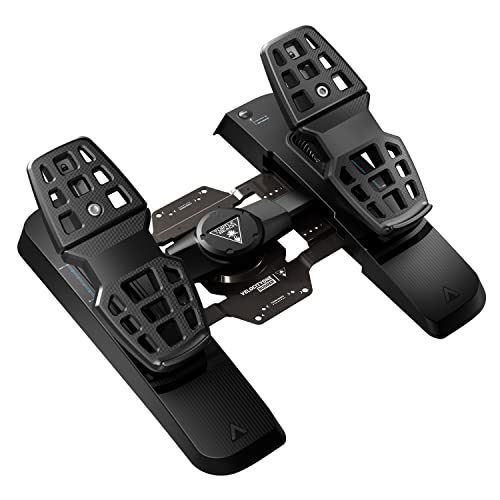
- Ultra-smooth rudder axis with swappable springs
- Differential brakes and adjustable pedal width
- Hall Effect sensors in all axes for consistent input
Best For: PC and Xbox sim users who want adjustable pedals with modern sensors
Complete Desk Setup Bundle
Logitech G Pro Yoke + Rudder Pedals Bundle

- Includes rudder pedals with differential toe brakes
- Adds a realistic yoke with 54 programmable controls
- Adjustable foot rests with non-slip materials
Best For: Windows sim pilots who want a yoke-and-pedal bundle
Precision Pick
Thrustmaster TFRP Rudder Pedals

- Long travel for smooth, accurate rudder control
- Self-centering axis with friction-free sliding rails
- Compatible with PS5, Xbox Series X|S, and PC
Best For: Sim pilots wanting stable rudder control across multiple platforms
Control Combo
Logitech Pro Rudder Pedals & Switch Panel
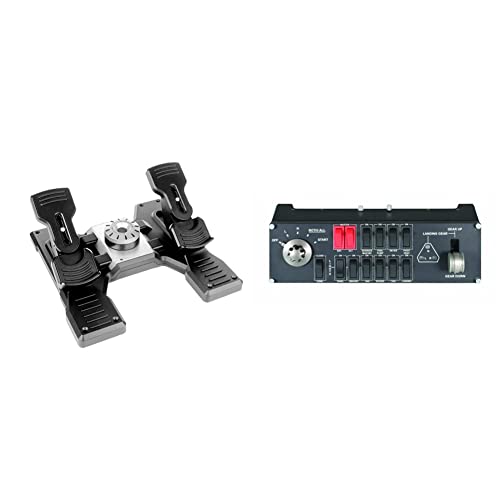
- Differential toe brakes for runway control
- Adjustable tension dial changes pedal feel
- Includes a switch panel for extra cockpit functions
Best For: Windows users building a more complete flight sim cockpit
Premium Aero Choice
Honeycomb Charlie Rudder Pedals

- Left and right toe brake axes included
- Hall Effect sensors for precise control
- Adjustable feet angles with anti-slip stability
Best For: PC and Mac sim pilots who want precise toe-brake pedals
Budget-Friendly Rudder Starter Kit

- S.M.A.R.T slide rail system for smooth steering
- Two large differential brake pedals for toe braking
- Ergonomic design with removable heel rests
Best For: PC sim pilots building an affordable rudder pedal setup
Premium Precision Pedals
Thrustmaster TPR Rudder Pedals

- Pendular suspended mechanism for realistic motion
- H.E.A.R.T HallEffect sensors for precise input
- Adjustable spring resistance for custom feel
Best For: PC flight sim enthusiasts wanting high-end precision
All-in-One Xbox and PC Flight Pack

- Includes TFRP pedals with S.M.A.R.T slide rails
- Full-foot ergonomic pedal design with heel rests
- Bundled HOTAS for Xbox and PC flight sims
Best For: Xbox and PC players wanting a complete flight control bundle
Premium PC Rudder Control – Logitech G Pro Flight Rudder Pedals
If you want flight simulator pedals with toe brakes that focus on smooth, accurate rudder input, the Logitech G Pro Flight Rudder Pedals are built for a more realistic cockpit feel on PC. The adjustable tension dial lets you tune the response from lighter aircraft handling to a firmer jet-like feel, while the differential toe brakes add more precise runway control.
Best For: PC sim pilots who want adjustable rudder resistance and dependable toe brakes.
Pros:
- Smooth, self-centering rudder action for realistic control
- Adjustable tension dial to change pedal feel
- Differential toe brakes for runway stopping control
- USB 2.0-compliant and PC compatible
Cons:
- Windows-only compatibility
- Toe brake axis is listed at 7-bit
This is a strong pick if you value adjustable feel and authentic pedal handling over extra platform flexibility. It fits well into a dedicated Windows flight sim setup focused on control precision.
Value Flight Control Starter – Thrustmaster T16000M FCS Flight Pack
The Thrustmaster T16000M FCS Flight Pack is a PC-focused flight control option that centers on a precision joystick rather than dedicated flight simulator pedals with toe brakes. Its twist rudder input, H.E.A.R.T technology, and ambidextrous design make it a practical choice if you want flexible control in a compact setup.
Best For: PC flyers who want a precise joystick setup with twist rudder control.
Pros:
- H.E.A.R.T technology for precision that won’t decrease over time
- Fully ambidextrous design with removable components
- 16 action buttons plus an 8-way POV hat switch
- Twist rudder control adds yaw input without separate pedals
Cons:
- No dedicated rudder pedals or toe brakes included
- PC-only via USB
If you are building a lower-footprint control setup, this pack gives you a lot of input options without moving to a pedal system. It is better for joystick-first users than simmers specifically shopping for toe-brake pedals.
Cross-Platform Rudder Upgrade – Turtle Beach VelocityOne Rudder Pedals
For flight simulator pedals with toe brakes on both PC and supported Xbox setups, the Turtle Beach VelocityOne Universal Rudder Pedals bring a feature-heavy design. You get an ultra-smooth rudder axis, differential brakes, adjustable pedal width, and non-contact Hall Effect sensors in all axes, plus swappable springs and pedal sets for tuning the feel.
Best For: PC and Xbox sim users who want adjustable pedals with modern sensor tech.
Pros:
- Ultra-smooth rudder axis with swappable springs
- Differential brakes for more complete flight control
- Adjustable pedal width and two sets of swappable pedals
- Hall Effect sensors in all axes plus a stable non-slip base
Cons:
- Xbox use requires the VelocityOne Flight Control System
- Heavier at 13.3 pounds
This is a versatile pick if you want modern sensor hardware and adjustable fit in one package. It makes the most sense for simmers who may switch between PC and Xbox-supported use.
Complete Desk Setup Bundle – Logitech G Pro Yoke + Rudder Pedals Bundle
If you want flight simulator pedals with toe brakes as part of a more complete cockpit package, this Logitech bundle pairs the PRO Flight Yoke System with the Pro Flight Rudder Pedals. The pedals add smooth self-centering control and differential toe brakes, while the yoke adds realistic handling and a large set of programmable inputs.
Best For: Windows sim pilots who want a yoke-and-pedal bundle with toe brakes included.
Pros:
- Includes Logitech G Pro Flight Rudder Pedals with differential toe brakes
- Yoke system adds realistic primary flight control
- POV hat, 14 buttons, and 3-position mode switch for many inputs
- Adjustable foot rests with non-slip materials
Cons:
- Windows-only compatibility
- Bundle may be more than needed if you only want pedals
This bundle is a good fit when you are upgrading an entire sim desk at once rather than buying pedals alone. It is especially practical if you want toe brakes and yoke controls from the same product family.
Precision Pick – Thrustmaster TFRP Rudder Pedals
If you want flight simulator pedals with toe brakes-style control feel for more precise rudder work, the Thrustmaster TFRP is built around smooth, accurate foot input. It focuses on long pedal travel, self-centering action, and friction-free sliding to help make turns, taxiing, and coordinated flight feel more controlled on PC, PS5, and Xbox setups.
Best For: Sim pilots who want a comfortable, stable rudder pedal set with broad platform compatibility.
Pros:
- Long rudder axis travel supports smoother, more accurate control inputs.
- Self-centering axis helps the pedals return cleanly after each maneuver.
- Advanced S.M.A.R.T. rail system uses four aluminum rails for smooth sliding motion.
- Ergonomic, sturdy design is aimed at comfort and stability during long sessions.
Cons:
- Toe brake functionality is not listed in the supplied product notes.
- Battery powered spec may be less straightforward than a purely USB-only setup.
- Bulkier footprint may require a dedicated cockpit or floor space.
This is a solid choice if your priority is predictable rudder handling and a smoother foot-pedal feel rather than extra controls. Its main strength is the combination of long travel, self-centering response, and easy platform support.
Control Combo – Logitech Pro Rudder Pedals & Switch Panel
For buyers comparing flight simulator pedals with toe brakes, this Logitech bundle stands out because the rudder pedals include differential toe brakes for runway handling, and the switch panel adds cockpit-style control. It is geared toward Windows-based sim setups and focuses on smooth self-centering operation with an adjustable tension dial for a more tailored feel.
Best For: Windows sim pilots who want rudder pedals plus an extra cockpit control panel in one bundle.
Pros:
- Differential toe brakes provide added control for taxiing and stopping on the runway.
- Adjustable tension dial lets you tune the pedal feel for lighter or heavier aircraft.
- Self-centering rudder pedals aim for smooth and accurate input.
- Included switch panel adds landing gear and cockpit-function control.
Cons:
- Compatibility is listed for Windows, so it is not the best fit for console users.
- The bundle may be more than some buyers need if they only want pedals.
- Software compatibility details are more specific to older simulator titles and Windows versions.
If you want a more complete desktop cockpit setup, this bundle makes sense because it combines toe-brake pedals with an additional switch panel. The result is a practical upgrade for simmers who want more control without piecing together separate accessories.
Premium Aero Choice – Honeycomb Charlie Rudder Pedals
If you want flight simulator pedals with toe brakes and a more premium, hardware-focused design, the Honeycomb Charlie is built for realism and precision. It uses left and right toe brake axes, magnetic Hall Effect sensors, and an adjustable layout to better match different pilots and help reduce unnecessary correction in flight.
Best For: PC and Mac sim pilots who want toe brakes, precise sensors, and adjustable ergonomics.
Pros:
- Left and right toe brake axes provide the brake control many sim pilots look for.
- Magnetic Hall Effect sensors are designed for precise coordination and minimized correction.
- Adjustable feet angles help tailor the pedals to different preferences.
- High-friction surface strips and deployable carpet spikes help prevent slipping.
Cons:
- Xbox Series X|S compatibility requires the Honeycomb Xbox Hub.
- USB-C to USB cable connection may require the right port or adapter on some setups.
- Heavier, larger construction may be less convenient for compact spaces.
This is the most feature-rich option in the group for pilots who specifically want toe brakes and a more adjustable feel. Its combination of sensors, braking axes, and stability features makes it a strong match for serious desktop sim rigs.
Budget-Friendly Rudder Starter Kit – TFRP Pedals & T16000M HOTAS
If you want flight simulator pedals with toe brakes for a PC setup without jumping straight to a premium price tier, the Thrustmaster TFRP is an accessible pick. The S.M.A.R.T slide rail system is designed for smooth steering, and the large differential brake pedals give you toe-brake control for coordinated taxiing, turns, and landings.
Best For: PC sim pilots who want an affordable rudder pedal set with toe brakes and a comfortable full-foot design.
Pros:
- S.M.A.R.T slide rails provide smooth rudder motion.
- Two large differential brake pedals add toe-brake control.
- Ergonomic layout includes removable heel rests.
- Compatible with PC and many joystick setups.
Cons:
- Plastic-based design is aimed at the entry-level to midrange segment.
- PC compatibility is the core focus; PS4 support depends on specific Thrustmaster joysticks.
The TFRP is a practical way to add toe brakes and smoother rudder handling to a desktop flight sim rig. It stands out most for its approachable design and broad compatibility rather than ultra-premium construction.
Premium Precision Pedals – Thrustmaster TPR Rudder Pedals
For serious simmers looking for flight simulator pedals with toe brakes and a more realistic feel, the Thrustmaster TPR focuses on precision and smoothness. Its pendular suspended mechanism and H.E.A.R.T HallEffect magnetic sensors are built to deliver fluid rudder input with no mechanical wear, making it a strong match for long sessions and fine yaw control.
Best For: PC flight sim enthusiasts who want a high-end rudder pedal set with adjustable resistance and ultra-precise control.
Pros:
- Pendul_r suspended mechanism delivers fluid, realistic motion.
- H.E.A.R.T HallEffect sensors support accurate, wear-free input.
- Adjustable spring system lets you tune pedal resistance.
- Designed for precise yaw corrections in demanding sim use.
Cons:
- PC-compatible only, so it is not a multi-platform option.
- At 20.2 pounds, it is a heavy pedal set to accommodate.
The TPR is the most precision-focused option in this group, with the kind of hardware detail that appeals to enthusiasts who notice pedal feel. It is best chosen for realism and adjustability rather than portability or budget value.
All-in-One Xbox and PC Flight Pack – T-Flight Full Kit HOTAS
If you want flight simulator pedals with toe brakes bundled into a full control setup, the Thrustmaster T-Flight Full Kit is a convenient all-in-one option. It combines an immersive HOTAS layout with the included TFRP rudder pedals, giving you smooth yaw control, ergonomic full-foot placement, and a single package that works across Xbox and PC.
Best For: Xbox and PC players who want a complete flight sim bundle with rudder pedals included.
Pros:
- Includes TFRP rudder pedals with S.M.A.R.T slide rails.
- Ergonomic pedal design supports your full foot with removable heel rests.
- Bundled HOTAS adds throttle, stick, and multiple programmable controls.
- Compatible with PC and Xbox Series S/X ecosystem support.
Cons:
- Bundled kit is broader than a stand-alone pedal purchase.
- Focuses on the combined flight control package rather than premium pedal-only hardware.
This kit makes sense if you are starting from scratch or want a matched flight control bundle. It is less about specialized pedal refinement and more about giving you a ready-to-fly setup with toe-brake capable rudder control included.
How We Picked These Flight Simulator Pedals with Toe Brakes
We focused on toe-brake functionality, build quality, pedal travel, resistance, and platform compatibility. We also looked at whether each set fits casual sim pilots, serious flight sim enthusiasts, or users building a full cockpit.
Because pedals affect both rudder input and braking finesse, we favored models that feel stable underfoot and offer predictable centering. Compatibility with Microsoft Flight Simulator, combat sims, and console-supported ecosystems was also a major factor.
Quick Comparison
If you want the simplest path, entry-level pedals are usually best for casual flying and mixed use. Midrange options tend to balance comfort, durability, and smoother control, while premium pedals are the better choice for pilots who want more realistic toe-brake behavior and a heavier, more refined feel.
In this group, PC-first users will have the widest range of choices, while Xbox-compatible buyers should pay close attention to device support before buying.
Key Buying Factors for Flight Simulator Pedals with Toe Brakes
Toe Brake Design
Look for independent left and right toe brakes if you want better taxi and landing control. Some pedals use separate analog brake axes, while others combine braking into a simpler system.
Adjustability and Resistance
Adjustable spacing, spring tension, and pedal angle can help you match the hardware to your desk setup and flying style. More resistance often improves realism and prevents overcorrection.
Stability and Foot Feel
Pedals should stay planted during aggressive rudder inputs. A wide base, grippy underside, and solid construction help keep inputs smooth and consistent.
Connectivity and Software Support
USB plug-and-play is ideal for most buyers, but software profiles and simulator mapping options can make setup easier. Confirm compatibility with your platform, especially if you need Xbox support or multiple-device pairing.
Who Should Buy Which Flight Simulator Pedals with Toe Brakes?
Choose entry-level Flight Simulator Pedals with Toe Brakes if you mainly fly casually and want better control without spending much. Go midrange if you want a more comfortable long-session setup and more reliable braking precision.
Buy premium pedals if you care most about realism, durability, and fine control for IFR, bush flying, or helicopter work. If you fly on Xbox, prioritize officially supported hardware first, then decide whether you want a standalone pedal set or a bundled controller package.