A good cooling pad can help a hot gaming laptop stay more stable during long sessions, tournament play, and heavy multitasking. The best picks balance strong airflow, a sturdy aluminum build, and a comfortable angle for typing and gameplay.
Below, we focus on models that suit different laptop sizes, cooling needs, and budgets so you can choose the right fit without overbuying.
Best 10 Aluminum Gaming Laptop Cooling Pad Picks for 2026
Aluminum Power Cooler
KLIM Turbofrost Gaming Laptop Cooling Pad

- Aircraft-grade aluminum build for faster heat dissipation
- Four fans reach a combined 16,000 RPM
- USB-C/DC power with 3 extra USB-A ports
Best For: Users who want a metal cooling pad with strong airflow and flexible power
RGB Metal Desktop Hub
KYOLLY Aluminum Alloy Gaming Laptop Cooler
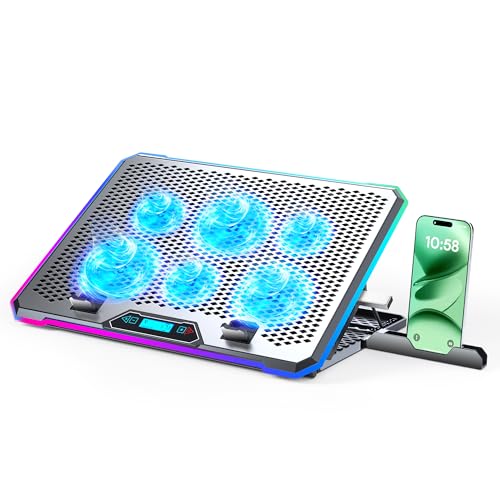
- Aluminum panel and six-fan cooling design
- LCD screen with memory-saving RGB controls
- 4-port USB hub for accessories and drives
Best For: Large-laptop users who want metal build quality and onboard controls
Quiet Aluminum Stand with USB Expansion

- 140mm fan with low-noise operation
- Four USB 3.0 ports plus fan power port
- Adjustable height and angle for better posture
Best For: Gamers and desk users who want quiet cooling with USB expansion
Slim Portable Triple-Fan Cooler

- Three quiet USB-powered fans
- Slim and lightweight for travel
- Two height settings plus extra USB port
Best For: Travel-friendly users who want a lightweight, quiet cooler
Rotating Aluminum Cooling Stand

- Weighted base improves stability
- 360° rotation helps with screen sharing
- Three fan speeds and adjustable height
Best For: Desk users who want stable cooling with rotation and adjustability
Multi-Fan Pick
Kootek 5-Fan Laptop Cooling Stand with USB Hub

- 5 fans with selectable modes
- 2-port USB hub for extras
- 6 height settings and laptop stoppers
Best For: Large laptops and users who want broad, quiet airflow
Aluminum Stand Choice
ICE COOREL Aluminum Laptop Cooling Pad

- Aluminum alloy surface aids heat dissipation
- One quiet 160mm fan with speed control
- 7 height settings in a lightweight build
Best For: Portable cooling for smaller laptops with a metal surface
RGB Gaming Upgrade
ICE COOREL 8-Fan RGB Cooling Pad

- 8 fans for larger laptops
- 10 RGB modes with LCD speed display
- 6 height settings and phone stand
Best For: Gaming setups that want cooling plus RGB style
Ultra-Cooling RGB Workhorse – llano V12 Gaming Laptop Cooling Pad
If you’re shopping for an aluminum gaming laptop cooling pad alternative focused on raw airflow and desk usability, the llano V12 stands out with its large 5.5-inch turbo fan, airtight foam seal, and adjustable speed control. It is built for 15.6 to 19-inch laptops and aims to move a lot of air quickly while also adding practical extras like a 3-port USB hub and dust filtration.
Best For: Gamers and power users who want aggressive cooling, USB expansion, and RGB lighting in one stand.
Pros:
- 5.5-inch turbo fan with sealed foam chamber for fast, focused cooling
- 3 USB 2.0 ports turn the pad into a small desktop hub
- Removable dust filter helps reduce buildup in laptop vents
- RGB lighting with 10 modes and memory function adds desk appeal
Cons:
- Uses ABS construction rather than an aluminum top plate
- Larger and heavier than simpler cooling pads
- USB ports are for peripherals only, not charging devices
Overall, the V12 is a strong choice if cooling performance matters more than minimalism. Its combination of fast airflow, dust control, and adjustable angles makes it a practical pick for long gaming or rendering sessions.
Aluminum Power Cooler – KLIM Turbofrost Gaming Laptop Cooling Pad
The KLIM Turbofrost is a premium aluminum gaming laptop cooling pad designed for users who want a metal build and serious airflow. With four fans reaching a combined 16,000 RPM, aircraft-grade aluminum for faster heat dissipation, and multiple power options, it is aimed at keeping larger laptops running cooler during gaming, streaming, or rendering.
Best For: Desktop gamers and creators who want a metal cooling pad with high airflow and flexible power options.
Pros:
- Aircraft-grade aluminum helps dissipate heat faster than plastic designs
- Four fans deliver a combined 16,000 RPM of cooling force
- Dual USB-C/DC power options make it flexible for desk or on-the-go use
- Three extra USB-A ports add useful peripheral connectivity
Cons:
- Fits laptops only up to 17.3 inches
- More feature-rich than basic pads, so it may be overkill for light use
- Requires the right power source to get full steady output at a desk
As an aluminum gaming laptop cooling pad, the Turbofrost leans hard into performance and convenience. Its metal construction, high RPM fan setup, and integrated USB expansion make it especially appealing for demanding setups.
High-Airflow Value Stand – llano V12 Laptop Cooling Pad Stand
The llano V12 cooling pad is built around a large 5.5-inch turbo fan and a straightforward control layout, making it a practical pick for heavy gaming or work sessions. While it is not an aluminum gaming laptop cooling pad, it does focus on quick cooling, dust protection, and ergonomic support for laptops from 15 to 21 inches.
Best For: Buyers who want fast cooling, a simple interface, and an included mouse pad for a full desk setup.
Pros:
- Large 5.5-inch fan is designed for rapid temperature reduction
- Real-time LED speed display makes adjustments easy
- Includes a 31×14-inch mouse pad in the box
- Dust filter and adjustable height add daily-use practicality
Cons:
- Uses ABS housing instead of aluminum construction
- Single-fan design may be less refined than multi-fan models
- Bulkier than a simple flat stand
This model makes sense if you want a functional cooling solution with a few extras rather than a premium metal build. Its value comes from speed, simplicity, and the added desktop accessories.
RGB Metal Desktop Hub – KYOLLY Aluminum Alloy Gaming Laptop Cooler
If you want an aluminum gaming laptop cooling pad with a more premium feel, the KYOLLY cooler brings an aluminum panel, six fans, and a built-in LCD control screen. It is designed for laptops from 10 to 21 inches and combines cooling, lighting, and extra USB ports in a single stand that works on a desk or lap.
Best For: Large-laptop users who want a metal cooling pad with adjustable angles and onboard controls.
Pros:
- Aluminum panel is built to dissipate heat faster than plastic
- Six fans provide broad airflow at relatively low noise levels
- LCD screen and memory function make fan and RGB settings easy to manage
- 4-port USB hub adds useful connectivity for peripherals and drives
Cons:
- May be more stand than some users need for basic cooling
- Larger footprint may take up more desk space
- Heavier gaming rigs may make angle adjustments feel less compact
The KYOLLY stands out for combining a metal surface, six-fan cooling, and convenient controls in one package. It is a solid fit if you want a feature-rich cooling stand that doubles as a desk organizer.
Quiet Aluminum Stand with USB Expansion – SOUNDANCE 17.3" Cooling Pad
If you want an aluminum gaming laptop cooling pad that also works as a desk stand, the SOUNDANCE model focuses on steady airflow, better ergonomics, and extra connectivity. Its large 140mm fan is designed to move more air with low noise, while the adjustable angle and height help raise your screen to a more comfortable viewing position.
Best For: Gamers and office users who want a stable aluminum stand with quiet cooling and built-in USB hubs.
Pros:
- Large 140mm fan for stronger airflow and overheating prevention
- Low-noise operation with blue LED fan indicator
- Adjustable height and screen angle for improved posture
- Four USB 3.0 ports plus separate USB power port for the fan
Cons:
- Uses a single fan rather than a multi-fan layout
- Bulkier than ultra-slim travel coolers
- Best fit is for laptops up to 17.3 inches
This is a practical pick if you want a cooling pad that does more than just cool. The aluminum build, stable base, and USB hub layout make it a useful desk companion for a gaming notebook or a work laptop that stays in one place.
Slim Portable Triple-Fan Cooler – havit HV-F2056 Cooling Pad
The havit HV-F2056 is a straightforward aluminum gaming laptop cooling pad alternative for users who value portability and simple cooling support. It uses three quiet USB-powered fans under a metal mesh surface, making it a good fit for laptops up to 17 inches without adding much bulk to your bag.
Best For: Travel-friendly laptop users who want a lightweight cooling stand with quiet triple-fan airflow.
Pros:
- Three ultra-quiet fans help circulate air below the laptop
- Slim, lightweight design is easy to carry
- Two height settings improve viewing and typing comfort
- Extra USB port and power switch add convenience
Cons:
- ABS enclosure instead of an aluminum body
- Requires a USB to USB connection
- Type-C devices need an adapter
If you want a basic cooler that is easy to move from place to place, this model keeps things simple. It trades premium materials for a lighter footprint and quiet airflow, which makes it well suited to everyday use and laptop carrying.
Rotating Aluminum Cooling Stand – SHUWEI 360° Gaming Pad
The SHUWEI gaming laptop cooling pad combines an aluminum stand, weighted stability, and a large fan with adjustable speed settings. It is built for users who want a more robust desk setup, with height adjustment, a rotating base, and cooling support for laptops up to 17.3 inches.
Best For: Desk-based gamers and workers who want a stable aluminum stand with rotation and adjustable cooling.
Pros:
- Weighted carbon steel base helps reduce slipping and tipping
- 360° rotating base makes screen sharing easier
- Three wind speeds let you adjust cooling output
- Height and angle adjustments support more comfortable working positions
Cons:
- Heavier build is less portable than slim cooling pads
- Single-fan design may not appeal to users who prefer multiple fans
- External keyboard and mouse are recommended for typing comfort
This is a strong choice if stability matters more than portability. The combination of a weighted base, rotating support, and adjustable airflow makes it a practical pick for a fixed workstation or shared desk environment.
Multi-Fan Pick – Kootek 5-Fan Laptop Cooling Stand with USB Hub
If you want an aluminum gaming laptop cooling pad-style stand that prioritizes broad airflow, the Kootek cooling pad is built around five quiet fans and 360° cooling coverage. It’s a practical choice for users who want adjustable comfort, extra USB connectivity, and a stable fit for larger laptops during gaming or long work sessions.
Best For: Gamers and multitaskers who want wide cooling coverage, quiet operation, and a height-adjustable stand for 12″-17″ laptops.
Pros:
- 5 quiet fans with two switches for 1, 4, or all 5 fans
- 2-port USB hub adds convenient peripheral connectivity
- 6 adjustable height settings for gaming, watching, or working
- Front stoppers help keep laptops secure in place
Cons:
- Type C devices need a Type C to USB adapter
- Metal mesh enclosure, not a full aluminum surface
Overall, this is a flexible cooling stand for buyers who value fan control and comfort features over a minimalist design. Its universal fit and quiet performance make it a strong everyday option for larger laptops.
Aluminum Stand Choice – ICE COOREL Aluminum Laptop Cooling Pad
The ICE COOREL aluminum gaming laptop cooling pad focuses on simple, effective heat management with one large 160mm fan and an aluminum alloy surface that helps draw heat away from the laptop. With a slim, lightweight build and seven height settings, it suits buyers who want a portable stand that still improves comfort and airflow.
Best For: Portable users who want a lightweight aluminum cooling pad with adjustable angles and quiet operation for 12″-15.6″ laptops.
Pros:
- Aluminum alloy surface helps improve heat dissipation
- One 160mm fan with adjustable 1000-1400 RPM speed
- 7 height settings and two anti-slip baffles
- Slim, lightweight design is easy to carry
Cons:
- Only supports laptops up to 15.6 inches
- Single-fan design offers less coverage than multi-fan pads
This is a solid pick if you want a straightforward cooling stand with a true aluminum build and easy portability. It trades flashy extras for practical cooling, quiet operation, and a comfortable typing angle.
RGB Gaming Upgrade – ICE COOREL 8-Fan RGB Cooling Pad
For buyers seeking an aluminum gaming laptop cooling pad with stronger gamer styling, this ICE COOREL model combines eight cooling fans, RGB lighting, and a built-in phone stand. It is designed for larger 15″-17.3″ laptops and gives you adjustable fan modes, an LCD display, and height settings for a more customized setup.
Best For: Gamers with larger laptops who want RGB lighting, fan-speed control, and a feature-rich cooling stand.
Pros:
- 8 cooling fans for strong airflow across larger laptops
- LCD display shows current fan speed clearly
- 10 RGB light modes for a gaming look
- 6 height adjustments plus a built-in phone stand
Cons:
- May be more than needed if you only want a basic cooler
- Large size is better suited to 15″-17.3″ laptops
This model stands out when you want cooling and presentation in one package. The combination of eight fans, RGB options, and adjustable ergonomics makes it a strong match for gaming desks and larger notebooks.
Choosing an Aluminum Gaming Laptop Cooling Pad is mostly about matching airflow to your laptop’s heat output and choosing a stand that feels comfortable for long sessions. Gaming systems with thicker chassis and higher-wattage CPUs or GPUs usually benefit from stronger fan arrays, while slimmer laptops may only need moderate airflow and a lighter, quieter design.
How We Picked the Best Aluminum Gaming Laptop Cooling Pad
We looked for cooling pads that combine effective fan coverage, durable aluminum construction, practical ergonomics, and useful extras such as adjustable height, USB hubs, or RGB lighting where it adds value. We also favored models with broad laptop-size support and designs that are easy to set up, carry, and maintain.
Quick Comparison
In simple terms: high-RPM turbo designs are best for demanding gaming rigs, multi-fan pads suit users who want broader surface coverage, and slim three-fan pads are a smarter choice for portability and quieter use. If you want a desk-friendly setup with more convenience, choose a pad with height adjustment and hub ports; if you want maximum cooling, prioritize airflow first.
Key Buying Factors for an Aluminum Gaming Laptop Cooling Pad
Fan Type and Airflow
Larger turbo fans can push air into laptop intake zones more aggressively, while multiple smaller fans spread airflow across more of the base. Check the fan speed and layout, but also remember that stronger is not always better if noise matters to you.
Size, Fit, and Laptop Support
Make sure the pad supports your laptop’s screen size and chassis depth. A secure fit matters for stability, especially if you use a 17-inch gaming laptop or a machine with rear vents that need unobstructed airflow.
Noise, Comfort, and Adjustability
If you game or work in shared spaces, quieter fans and adjustable height can make a big difference. An ergonomic angle can reduce wrist strain, and some users will prefer a stand that keeps the keyboard at a more natural position.
Ports and Extra Features
USB hubs are convenient if you regularly connect a mouse, headset, or controller. RGB lighting is mostly a style choice, so treat it as a bonus rather than a deciding factor unless aesthetics matter to your setup.
Who Should Buy Which Aluminum Gaming Laptop Cooling Pad?
Choose a high-output cooling pad if your laptop runs hot under sustained gaming or content creation. Pick a quieter, slimmer pad if you want portable everyday cooling for school, work, or travel. If you spend long hours at a desk, an adjustable aluminum stand with added comfort features is often the most practical choice. For most buyers, the best option is the one that matches your laptop size, heat level, and noise tolerance—not just the one with the most fans.