Streaming in a dim room can make even a great camera look soft, noisy, or grainy. The right webcam can help you stay sharp, natural, and professional without rebuilding your whole setup.
In this roundup, we focused on webcams that perform well when light is limited, with a mix of larger sensors, better autofocus, HDR, built-in lights, and dependable mics.
Best 10 Webcam for Low Light Streaming Picks for 2026
Flagship Low-Light Creator Pick
Insta360 Link 2 Pro 4K PTZ Webcam

- 1/1.3-inch sensor improves low-light video quality
- AI Tracking pans and tilts to keep you framed
- Directional dual mics and Stream Deck support
Best For: Streamers who want premium low-light performance and automated framing
Balanced 4K Streaming Value
EMEET S600 4K Streaming Webcam

- Sony sensor with 4K/30 or 1080p/60 options
- PDAF autofocus stays stable in changing scenes
- Auto light adjustment helps in dim rooms
Best For: Creators who want reliable 4K streaming with helpful low-light correction
Auto-Framing Low-Light Choice
Insta360 Link 2C Pro 4K Webcam
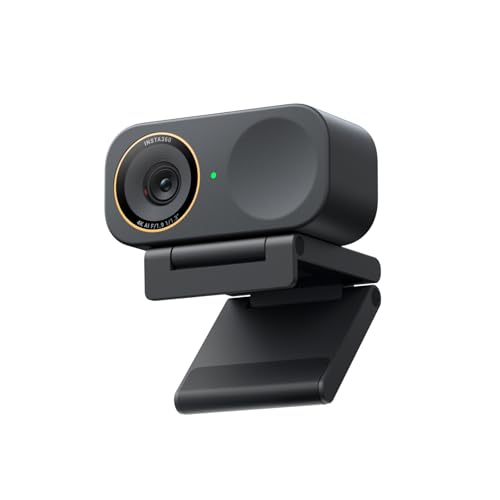
- 1/1.3-inch sensor improves low-light clarity
- Auto Framing keeps people centered in frame
- Directional mics and gesture control add convenience
Best For: Solo creators and small groups wanting low-light quality with auto framing
Budget Light-Assisted Option
NexiGo N960E 1080P Webcam with Light

- Adjustable ring light helps in dim rooms
- 1080p at 60FPS suits streaming and meetings
- Autofocus and low-light correction improve clarity
Best For: Budget users who want built-in lighting support for darker setups
Smart low-light all-rounder
4K Webcam with PDAF Autofocus and Dual Mics

- 1/2.5" CMOS sensor with f/1.78 aperture
- Built-in light correction for dim rooms
- Dual noise-canceling microphones
Best For: Creators who want low-light streaming, sharp autofocus, and simple setup
Lighting-first streaming pick
4K Webcam with Ring Light and Autofocus

- Built-in ring light with 3 color temperatures
- Adjustable brightness helps in low light
- TOF autofocus and dual noise-canceling mics
Best For: People who want built-in lighting for clearer streaming in dim rooms
Software-tuned business webcam
EMEET NOVA 4K Webcam with PDAF

- Automatic light adjustment with software controls
- PDAF autofocus for sharp image tracking
- Dual mics and included privacy cover
Best For: Users who want adjustable image settings for meetings and streaming
Creator-Grade Low-Light Option
NexiGo N680E Pro 4K Webcam with Ring Light

- Sony 4K sensor with 1080p 60FPS support
- Tri-tone ring light with stepless brightness control
- PDAF autofocus and dual noise-canceling mics
Best For: Creators who want the most polished low-light streaming setup
Balanced Low-Light Value Pick
Angetube 4K Webcam with Ring Light

- 4K@30FPS and 1080P@60FPS support
- 3-level ring light for dim rooms
- Notes say it performs well in low-light conditions
Best For: Users wanting a practical, plug-and-play webcam for darker spaces
Flagship Low-Light Creator Pick – Insta360 Link 2 Pro 4K PTZ Webcam
If you want a webcam for low light streaming that still looks polished in brighter rooms, the Insta360 Link 2 Pro is built for exactly that kind of creator setup. Its 1/1.3-inch sensor, 4K capture, and HDR support are aimed at cleaner image quality, while the PTZ design and AI tracking help keep framing consistent as you move.
Best For: Streamers and presenters who want premium low-light performance, automatic framing, and creator-friendly controls.
Pros:
- Large 1/1.3-inch sensor for cleaner video and strong low-light performance.
- AI Tracking physically pans and tilts to follow you around the room.
- Directional dual-mic design helps reduce background noise in busy spaces.
- Stream Deck integration and gesture/mobile controls add flexible workflow options.
Cons:
- Not compatible with ARM-based Windows systems.
- Does not support Windows Hello Face Recognition.
Overall, this is the most feature-rich option here if your priority is a webcam for low light streaming with a more premium, controlled look. It balances image quality, tracking, and software features better than a basic plug-and-play webcam.
Balanced 4K Streaming Value – EMEET S600 4K Streaming Webcam
The EMEET S600 is a practical webcam for low light streaming if you want sharp 4K capture without jumping into the highest-priced tier. Its Sony 1/2.55-inch sensor, PDAF autofocus, and auto light adjustment are designed to keep your image steady and balanced when lighting gets tricky.
Best For: Streamers who want 4K video, dependable autofocus, and useful low-light correction at a more straightforward setup.
Pros:
- Sony 1/2.55-inch sensor delivers 4K at 30FPS or 1080p at 60FPS.
- PDAF autofocus offers faster, more stable focusing.
- Auto light adjustment helps balance shadows and highlights in dim scenes.
- Built-in privacy cover and plug-and-play USB setup make it easy to use.
Cons:
- 4K resolution is limited to 30FPS.
- Noise reduction for the mics depends on the built-in algorithm and software settings.
This is a strong middle-ground pick for creators who want a clean, modern streaming image with low-light support and simple setup. It is especially appealing if you value autofocus stability more than advanced camera motion features.
Auto-Framing Low-Light Choice – Insta360 Link 2C Pro 4K Webcam
If you need a webcam for low light streaming and want the camera to do more of the framing work for you, the Insta360 Link 2C Pro is a strong fit. It uses the same 1/1.3-inch sensor class and 4K output focus as the Pro model, while auto framing and HDR help keep a cleaner on-camera look for streams and meetings.
Best For: Solo creators, presenters, and small groups that want strong low-light image quality with automatic framing.
Pros:
- 1/1.3-inch sensor supports cleaner 4K video and excellent low-light performance.
- Auto Framing keeps one person or a group clearly in view.
- Directional dual mics help isolate voice and reduce background noise.
- Gesture, smartphone, and Stream Deck controls add flexible operation.
Cons:
- Not compatible with ARM-based Windows systems.
- Does not support Windows Hello Face Recognition.
For buyers who want better low-light image quality without a full PTZ webcam, this is an efficient upgrade path. It keeps the core image and audio advantages while focusing on automatic framing instead of physical camera movement.
Budget Light-Assisted Option – NexiGo N960E 1080P Webcam with Light
The NexiGo N960E is a budget-friendly webcam for low light streaming when you want built-in help rather than relying only on your room lighting. Its adjustable ring fill light, software low-light correction, and 1080p 60FPS output make it a practical choice for basic streaming, meetings, and online classes.
Best For: Budget-conscious users who want extra light built into the webcam for dim rooms.
Pros:
- Three-level adjustable ring light adds useful fill in darker setups.
- 1080p at 60FPS keeps motion smooth for streaming and calls.
- Autofocus and software low-light correction help maintain a clear image.
- Built-in privacy cover and plug-and-play USB setup simplify daily use.
Cons:
- Only captures up to 1080p, not 4K.
- Built-in light may not be ideal for users who prefer a separate lighting setup.
This is the most straightforward option in the group if you mainly need a usable image in dim conditions at a lower cost. It trades premium sensor size and advanced tracking for a helpful built-in light and easy setup.
Smart low-light all-rounder – 4K Webcam with PDAF Autofocus and Dual Mics
If you need a webcam for low light streaming that still looks sharp on camera, this 4K model is built around a bright f/1.78 aperture, a 1/2.5″ CMOS sensor, and built-in light correction. It aims to keep your image clear in dim rooms while also giving you fast autofocus and flexible framing for streaming, calls, and recording.
Best For: Streamers and remote workers who want strong low-light image quality plus reliable autofocus.
Pros:
- 4K at 30fps or 1080p at 60fps for flexible video quality
- Low-light performance is supported by a wide f/1.78 aperture and smart light correction
- PDAF autofocus helps keep your face sharp when you move
- Dual noise-canceling mics help reduce background noise in meetings and streams
Cons:
- To get the best results, you may still want some basic room lighting
- Wide 80° field of view may show more of your background than tighter webcams
- Privacy cover is manual rather than automatic
This is a practical all-round option if your priority is a webcam for low light streaming without giving up autofocus, 4K detail, or simple plug-and-play use.
Lighting-first streaming pick – 4K Webcam with Ring Light and Autofocus
For anyone shopping for a webcam for low light streaming, this model stands out because it adds a built-in ring light with three color temperatures and adjustable brightness. That extra fill light can help brighten your face in dark rooms, while the 4K/30fps and 1080p/60fps support keeps video smooth for calls or live content.
Best For: Users who want built-in lighting help for darker rooms and quick plug-and-play streaming.
Pros:
- Built-in ring light with white, natural, and warm color settings
- Brightness is adjustable, which helps in low light conditions
- TOF autofocus locks onto faces or moving objects quickly
- Dual noise-canceling microphones reduce background sounds like typing and AC noise
Cons:
- Built-in lighting may not replace a dedicated studio light for every setup
- Privacy cover is included, but the overall design is still compact and simple
- As with many webcams, the best results depend on your placement and room setup
If you want an easier way to improve dark-camera performance without adding separate gear, this webcam’s integrated ring light makes it a strong practical pick.
Software-tuned business webcam – EMEET NOVA 4K Webcam with PDAF
The EMEET NOVA is a strong webcam for low light streaming if you want more control over image tuning instead of built-in lighting. It uses automatic light adjustment, and the companion software lets you change brightness, contrast, saturation, and even backlight compensation, which can help balance a darker room for meetings or streaming.
Best For: Professionals and streamers who want software-based image control and a privacy-focused USB webcam.
Pros:
- Automatic light adjustment plus EMEETLINK software controls for brightness and contrast
- PDAF autofocus keeps images sharp within its fixed focus range
- Dual microphones capture voice clearly for calls and live streams
- Privacy cover and USB-A plug-and-play design make setup straightforward
Cons:
- Video defaults to 1080p unless you switch to 4K in software or compatible apps
- Fixed 73° field of view cannot be adjusted
- Autofocus works within a set range, so very close or very far positions may be less ideal
This is a solid choice if you prefer tuning the image yourself and want a low-light capable webcam that fits well in business calls, education, and streaming setups.
Best Budget Lighted Pick – Atatat 2K Webcam with Light & Privacy Cover
If you want a webcam for low light streaming that adds its own illumination, this Atatat model is a practical choice. It pairs 2K resolution with a 3-level touch-controlled ring light, so you can improve face brightness for late-night calls, online teaching, or casual streaming without adding a separate desk lamp.
Best For: Streamers, remote workers, and students who need built-in light and sharper-than-1080p video.
Pros:
- 2K resolution helps deliver more detail than standard 1080p webcams.
- Built-in 3-level ring light is designed for dim rooms and evening use.
- PDAF autofocus helps keep your image sharp as you move.
- Privacy shutter and noise-canceling audio add convenience for meetings.
Cons:
- The built-in light is touch-controlled, so brightness options are limited to three levels.
- It is designed as a compact webcam rather than a premium creator camera.
Overall, this is a well-rounded low-light webcam if you want simple plug-and-play operation, added facial lighting, and a privacy cover in one affordable-style setup.
Creator-Grade Low-Light Option – NexiGo N680E Pro 4K Webcam with Ring Light
For a webcam for low light streaming with more creator-focused features, the NexiGo N680E Pro combines a Sony 4K sensor, a bright adjustable ring light, and 1080p 60FPS support. The premium coated lens is designed to improve light transmission and reduce reflections, which is helpful when you need cleaner-looking video in darker rooms.
Best For: Streamers and content creators who want stronger image quality, flexible lighting, and smooth motion.
Pros:
- 4K sensor provides ultra-sharp video, with 1080p 60FPS available for smoother streaming.
- Tri-tone ring light with stepless brightness control helps fine-tune low-light setups.
- PDAF autofocus and dual noise-canceling mics support clear video and audio.
- Privacy shutter, tripod mount, and wide compatibility make setup flexible.
Cons:
- 4K output depends on your software configuration, according to the product notes.
- It is a more feature-rich option, so it may be more than casual users need.
In practice, this is the strongest all-around pick here for low-light streaming if you care about lighting control, smoother frame rates, and a more polished creator-grade image.
Balanced Low-Light Value Pick – Angetube 4K Webcam with Ring Light
The Angetube 4K webcam for low light streaming is aimed at users who want a simple improvement in dim rooms without giving up smooth video. It offers 4K@30FPS or 1080P@60FPS, plus a 3-level ring fill light and a note that it is engineered to perform well in challenging lighting conditions.
Best For: Home office users, late-night streamers, and anyone who wants strong low-light performance with plug-and-play convenience.
Pros:
- Supports 4K@30FPS and 1080P@60FPS for flexible use.
- Three brightness levels on the built-in ring light help lift dim scenes.
- Notes specifically call out strong performance in low-light conditions.
- Dual microphones, privacy shutter, and USB-A/C support add convenience.
Cons:
- The 4K webcam is focused on practical use rather than advanced creator features.
- Its viewing angle is listed at 78 degrees, which is not especially wide.
As a balanced low-light webcam, this Angetube model stands out for straightforward setup, multiple connection options, and clear emphasis on dim-room performance.
How We Picked the Best Webcam for Low Light Streaming
For this roundup, we prioritized webcams that are most practical for Webcam for Low Light Streaming: stronger sensors, solid exposure handling, useful autofocus, and features that reduce the need for extra gear. We also looked at resolution claims, frame-rate support, privacy covers, microphone quality, and whether the camera is truly stream-friendly on PC or Mac.
Quick Comparison
If you want the cleanest image in dim spaces, look first at models with larger sensors and low-light optimization. If your room lighting is inconsistent, HDR and auto light correction matter more than raw resolution. If your face tends to move around during streams, PTZ or auto-framing can make a bigger difference than 4K alone.
Key Buying Factors for Webcam for Low Light Streaming
Sensor Size and Light Handling
A larger sensor usually captures more light and keeps image noise down. That is often more important than simply choosing the highest resolution. For dim setups, look for low-light correction, HDR, or strong sensor descriptions rather than marketing buzz alone.
Autofocus and Framing
Fast, stable autofocus helps the camera stay sharp when you lean in, hold up products, or shift in your chair. Auto-framing can also be useful for creators who move a lot during live sessions.
Built-In Lighting Vs. No Light
A webcam with a ring light or integrated light can help if your room is consistently dark, but it is not a replacement for a better sensor. Use built-in lighting when convenience matters; choose a light-free model if you already have controlled studio lighting.
Audio and Privacy Features
Dual mics, noise reduction, and a privacy cover are helpful quality-of-life extras. They will not replace a real microphone, but they can make a webcam more versatile for quick calls and casual streams.
Who Should Buy Which Webcam for Low Light Streaming?
Creators who want the best overall image in difficult lighting should lean toward higher-end 4K models with larger sensors and better low-light processing. Streamers on a budget may prefer 1080p or 2K cameras with built-in light support, especially if they need plug-and-play simplicity.
If you run long live sessions, choose a model with dependable autofocus and good heat-friendly stability. If you only need a clean look for occasional streaming or meetings, a simpler webcam with light correction and a privacy cover is often the smartest value.