If you want the classic feel of an arcade cabinet plus the precision of a trackball, the right control panel can transform your setup.
This roundup focuses on the best options for retro gaming, PC play, and DIY builds, with a mix of ready-to-use units, fight sticks, and controller components.
Best 10 Arcade Joystick Controller with Trackball Picks for 2026
All-in-One Retro Cabinet

- 3,516 preloaded games
- 8-way joysticks plus USB trackball
- Supports 4-player sessions
Best For: Cocktail-style arcade fans who want a big preloaded library
Wireless Multi-Mode Stick
8Bitdo Arcade Stick for Switch/PC

- Bluetooth, 2.4G, and wired USB-C
- Ultimate Software for macros and mapping
- Compatible with Switch and Windows
Best For: Customizable fight-stick users who want wireless flexibility
Drop-In Trackball Upgrade
ThunderStick LED Trackball Upgrade

- LED arcade trackball module
- Drop-in upgrade for compatible cabinets
- Works with PC, Mac, and Raspberry Pi
Best For: Arcade cabinet owners upgrading to a better trackball
Mod-Friendly Wireless Stick
8Bitdo Retro Arcade Fight Stick

- Switch, Switch 2, and PC support
- Bluetooth, 2.4G, and wired USB-C
- Macro buttons and mod-friendly design
Best For: Players who want a customizable wireless fight stick
Classic Control Interface
I-PAC 2 for Dual-Player Cabinets

- Supports 2 players with joystick, buttons, coin, and start inputs
- Works with SpinTrak Spinner and U-Trak Trackball
- USB interface for PC and Linux cabinet builds
Best For: Dual-player arcade cabinets needing a wired interface with trackball support
Multi-Platform Fight Stick

- Bluetooth, 2.4GHz, and wired connectivity options
- Works with PC, Android, iOS, Switch 1/2, PS3, and PS4
- Includes turbo, macro, display, and audio jack features
Best For: Multi-platform players who want a wireless arcade stick with programmable controls
LED Trackball Module
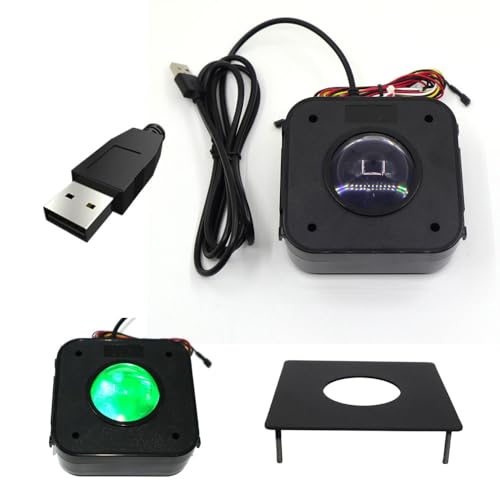
- USB trackball works like a standard 3-button mouse
- Includes metal mounting plate for panel installs
- LED-lit module with attached button wiring
Best For: DIY arcade cabinets needing a USB trackball module with mounting support
Premium All-in-One Fight Stick
FightBox R10 Trackball Arcade Controller

- Sanwa joystick with 3-inch LED trackball
- Metal construction for stable arcade play
- Works with PC, PS3, and Nintendo Switch
Best For: Arcade fans who want a premium trackball fight stick
DIY Builder Pick
Qenker 2-Player LED Arcade DIY Kit

- Includes 2 joysticks, 20 LED buttons, and encoders
- Zero-delay USB support for responsive play
- Built for MAME, PC, Raspberry Pi, and more
Best For: DIY arcade cabinet builders and two-player custom projects
Multi-Player Cabinet Choice
3516 DX 4-Player Trackball Arcade Console

- USB trackball built into a cocktail cabinet
- Supports up to 4 players
- Includes 1280x720 display and LED controls
Best For: Home game rooms and multiplayer arcade-style setups
All-in-One Retro Cabinet – 3516-Game Cocktail Arcade
If you want an arcade joystick controller with trackball built into a full cabinet-style setup, this 3D Saga DX model is aimed at players who want a large game library and multiple control options in one unit. It combines 8-way joysticks, LED push buttons, and USB trackball support with a 1280×720 display and 4-player capability.
Best For: Families or hobbyists who want a multi-game cocktail-style arcade cabinet with trackball control and four-player support.
Pros:
- Massive 3,516-game library with 516 vertical and 3,000 horizontal titles.
- Includes professional-grade 8-way joysticks, LED push buttons, and USB trackball integration.
- Supports up to 4 players for group play.
- 1280×720 display offers a sharper visual experience than basic low-resolution cabinets.
Cons:
- Large cabinet format may not suit small spaces.
- Trackball is part of a bundled arcade system, not a standalone control panel.
This is a strong pick if you want an all-in-one retro setup with a trackball and cocktail-style design rather than a simple fight stick. Its main appeal is breadth of content and controller variety in one arcade package.
Wireless Multi-Mode Stick – 8Bitdo Arcade Stick for Switch/PC
This arcade joystick controller with trackball keyword does not directly apply here, but this 8Bitdo Arcade Stick is still a flexible option if you want a premium fight stick for Switch and Windows. It offers Bluetooth, 2.4G, and wired USB-C connections, plus software support for button mapping and macros.
Best For: Players who want a customizable arcade stick for Switch or Windows with multiple connection modes.
Pros:
- Works with Switch and Windows.
- Three connection modes: Bluetooth, 2.4G, and wired USB-C.
- Ultimate Software support for button mapping and macros.
- Universal mounting plate supports Sanwa arcade sticks.
Cons:
- Does not include a trackball.
- Primarily focused on fighting-game style controls rather than trackball-based arcade games.
For buyers who prioritize customization and wireless flexibility, this is a well-rounded arcade stick. It is less relevant if a built-in trackball is your must-have feature, but it is a capable modern fight stick.
Drop-In Trackball Upgrade – ThunderStick LED Trackball Upgrade
If your goal is a true arcade joystick controller with trackball, this ThunderStick unit is the most direct match in the list because it is specifically a LED arcade trackball upgrade. It is designed as a drop-in replacement for certain Arcade1Up cabinets and also works with PC, Mac, and Raspberry Pi through a USB interface board.
Best For: Arcade cabinet owners who want to upgrade to an industrial-quality trackball control.
Pros:
- Purpose-built LED arcade trackball.
- Drop-in replacement for compatible Arcade1Up cabinets.
- Works with PC, Mac, and Raspberry Pi via USB interface board.
- Built for an industrial-quality upgrade path.
Cons:
- Not compatible with the A1Up Centipede Legacy Unit.
- Compatibility is limited to specific cabinets and setups.
This is the clearest trackball-first option here if you are upgrading an existing arcade cabinet rather than buying a full system. Check compatibility carefully before buying, since the fit is highly specific.
Mod-Friendly Wireless Stick – 8Bitdo Retro Arcade Fight Stick
This arcade joystick controller with trackball is not a trackball model, but it is a feature-rich fight stick for Switch, Switch 2, and PC Windows. It focuses on customization, with macro buttons, button-swapping, dynamic layouts, and support for Bluetooth, 2.4G wireless, and wired USB-C.
Best For: Players who want a heavily customizable arcade stick with strong wireless options.
Pros:
- Supports Switch, Switch 2, and PC Windows.
- Three connection options: Bluetooth, 2.4G, and wired USB-C.
- Includes 2 dedicated macro buttons and customizable profiles.
- Designed for modding with swappable buttons and universal joystick mounting.
Cons:
- Does not include a trackball.
- More specialized for fighting-game controls than general arcade use.
If trackball support is optional and customization matters more, this 8Bitdo stick is a compelling choice. Its mix of wireless modes, macros, and mod-friendly hardware makes it flexible for competitive play.
Classic Control Interface – I-PAC 2 for Dual-Player Cabinets
If you’re building an arcade joystick controller with trackball support for a custom cabinet or control panel, the I-PAC 2 is aimed at wired, PC-based setups that need a flexible encoder. It supports 2 players with a joystick, 8 buttons per player, plus coin and start buttons, and it also works with a SpinTrak spinner and U-Trak trackball.
Best For: Dual-player arcade cabinets that need joystick, button, spinner, and trackball input on PC or Linux.
Pros:
- Supports 2 players with joystick, 8 buttons, coin, and start inputs
- Compatible with a SpinTrak Spinner and U-Trak Trackball
- USB connectivity for PC and Linux setups
- Built for wired arcade control panel builds
Cons:
- Requires correct configuration and wiring
- Setup may not suit plug-and-play buyers
- Focused on cabinet integration rather than a standalone stick
This is a strong pick when your priority is broad control-panel support rather than a finished fight stick. If your build includes a trackball and multiple arcade inputs, the I-PAC 2 gives you a practical interface foundation.
Multi-Platform Fight Stick – Saitake Wireless Arcade Stick
For buyers comparing an arcade joystick controller with trackball-style cabinet options, this Saitake model is a portable fight stick rather than a trackball unit. It focuses on multi-platform play with Bluetooth, 2.4GHz, and wired connection modes, plus extras like a display screen, audio jack, turbo features, and macro programming.
Best For: Players who want a wireless multi-platform arcade stick with programmable features and headset support.
Pros:
- Compatible with Windows PC, Android, iOS, Switch 1/2, PS3, and PS4
- Three connection options: Bluetooth, 2.4GHz, and wired
- Includes turbo, auto turbo, and macro programming features
- Has a 3.5mm headphone jack and display screen
Cons:
- Does not include a trackball
- Better suited to fight-stick gaming than arcade cabinet control panels
- Battery-powered design may not fit every setup
If you want a versatile wireless stick with modern convenience features, this is the more travel-friendly option in the group. Just note that it is not the right pick when a built-in trackball is part of your requirement.
LED Trackball Module – TruBoost USB Arcade Trackball
TruBoost USB Arcade Game Trackball Mouse Illuminated LED Round 4.5cm USB Connector with Bracket Kit
Check Price On AmazonIf you’re assembling an arcade joystick controller with trackball support, this TruBoost module is the dedicated trackball piece to build around. It connects by USB, works like a standard 3-button mouse, and includes a metal mounting plate plus attached wiring for push buttons, making it practical for wood or metal control panels.
Best For: DIY arcade cabinets that need a USB trackball module with mounting hardware and LED illumination.
Pros:
- USB trackball designed to operate like a standard 3-button mouse
- Includes a metal mounting plate for wood or metal panels
- LED illumination adds visibility and cabinet style
- Attached wiring supports push buttons
Cons:
- Trackball module only, not a full joystick controller
- Designed for arcade builds rather than general handheld use
- Requires installation into a control panel
This is the most directly relevant option if your project specifically needs a trackball input. It fits best as a component in a custom control panel, especially when you want USB simplicity and included mounting hardware.
Premium All-in-One Fight Stick – FightBox R10 Trackball Arcade Controller
If you want an arcade joystick controller with trackball that feels closer to a classic cabinet, the FightBox R10 brings together a Sanwa joystick, a 3-inch LED trackball, and a sturdy metal build. It’s aimed at players who want authentic arcade-style control for fighting games, trackball-friendly classics, and multi-platform use without a lot of setup fuss.
Best For: Players who want a premium arcade-style controller with trackball support for PC, PS3, and Switch.
Pros:
- Sanwa joystick for authentic arcade feel
- 3-inch LED trackball adds classic cabinet-style control
- Robust metal construction for a stable setup
- Wide compatibility with PC, PS3, and Switch
Cons:
- Focused on arcade-style play rather than general-purpose controls
- Bulkier footprint than a basic stick-only controller
This is the strongest pick if the trackball is a key part of your setup and you want premium components in a single unit. The RP2040 board is also a useful note for players who care about responsive performance.
DIY Builder Pick – Qenker 2-Player LED Arcade DIY Kit
This arcade joystick controller with trackball roundup entry is really for builders who want to assemble a custom two-player setup. The Qenker kit includes joysticks, 20 LED buttons, and zero-delay USB encoders, making it a practical choice for MAME, Raspberry Pi, and other compatible systems when you want to wire your own panel.
Best For: DIY arcade cabinet projects and two-player builds for PC or Raspberry Pi.
Pros:
- Complete DIY bundle with 2 joysticks and 20 LED buttons
- Zero-delay USB encoders for responsive input
- Compatible with Android, Linux, Mac, PC, and Raspberry Pi
- Designed for easy installation and custom arcade projects
Cons:
- No trackball included
- Requires DIY assembly rather than plug-and-play use
For builders, this kit stands out because it covers the core controls needed for a custom arcade panel. It’s less of a finished controller and more of a parts package, so it makes sense if you’re comfortable with a hands-on project.
Multi-Player Cabinet Choice – 3516 DX 4-Player Trackball Arcade Console
If you’re shopping for an arcade joystick controller with trackball in a full cabinet-style package, the 3516 DX is built for group play. It combines a USB trackball, 8-way joysticks, illuminated buttons, and a 1280×720 display in a 3-sided cocktail design that supports both vertical and horizontal games.
Best For: Families, game rooms, and groups who want a multi-player arcade cabinet with trackball control.
Pros:
- USB trackball integrated into a cocktail-style cabinet
- Supports up to 4 players for shared gameplay
- 8-way joysticks and LED buttons for arcade-style response
- Switchable vertical and horizontal screen support
Cons:
- Larger cabinet form factor takes more space than a stand-alone controller
- Best suited to dedicated indoor game-room use
This option makes sense when you want a complete arcade experience rather than just a control panel. The integrated screen, trackball, and multiplayer layout make it a strong centerpiece for a home game room.
How We Picked These Arcade Joystick Controller with Trackball Options
We prioritized control feel, build quality, platform support, and how well each product fits real-world arcade and retro gaming use. For an Arcade Joystick Controller with Trackball, the most important factors are responsive joystick motion, a trackball that tracks accurately, and layout compatibility with your cabinet or desk setup.
We also considered whether a product is a complete controller, a modular interface, or a DIY part. That distinction matters because the best choice depends on whether you want plug-and-play convenience or a custom build.
Quick Comparison: Which Type Fits Your Setup?
Not every option in this roundup serves the same purpose. Full arcade consoles are best for buyers who want an all-in-one entertainment unit. Fight sticks with trackball suit players who want arcade-style controls for PC or console gaming. Interface boards and DIY kits are better for custom cabinet builders who need flexibility and wiring control.
If you already have buttons, joysticks, or a cabinet panel, component-level products can save money and let you tailor the layout. If you want to start playing quickly, choose a prebuilt controller or complete arcade system.
Key Buying Factors for an Arcade Joystick Controller with Trackball
Compatibility
Check whether the controller supports your target platform: PC, Switch, PlayStation, Android, or Raspberry Pi. Some products use USB only, while others add Bluetooth or 2.4G wireless options.
Trackball Size and Feel
Larger trackballs usually feel closer to classic arcade cabinets and can improve precision in games that rely on cursor control or spinner-style movement. Make sure the mounting hardware and panel depth match your build.
Joystick Gate and Button Layout
Look for 8-way support if you play fighting games or classic arcade titles. Also confirm whether you need extra macro buttons, turbo functions, or specific spacing for two-player use.
Build Type
Prebuilt controllers are easiest, while DIY kits and interface boards require more assembly but offer more customization. For custom cabinets, a reliable interface board and quality parts often matter more than flashy extras.
Who Should Buy Which Arcade Joystick Controller with Trackball?
Choose a full arcade system if you want a ready-made retro gaming solution. Pick a fight stick with trackball if you care about portability and versatile gaming across devices. Go with an interface board or DIY kit if you are building or upgrading a cabinet and need the most control over the final layout.
For most buyers, the best Arcade Joystick Controller with Trackball is the one that matches your platform, cabinet size, and preferred level of assembly. Prioritize fit and function first, then look at lighting, wireless features, and extra controls.