If you want tighter inputs, faster execution, or a more authentic arcade feel, the right stick can make a big difference on Xbox. This roundup focuses on current options that suit fighting games, classic arcade play, and cross-platform setups.
We compared build quality, compatibility, control layout, and convenience so you can quickly narrow down the best arcade joystick controller for Xbox for your budget and play style.
Best 10 Arcade Joystick Controller for Xbox Picks for 2026
Premium Mod-Friendly Pick
HORI Fighting Stick alpha for Xbox Series X|S

- Officially licensed by Microsoft
- Open chassis for maintenance/customization
- Works with Xbox Series X|S, Xbox One, and Windows 10
Best For: Players who want a customizable, maintenance-friendly fight stick for Xbox and PC use.
Retro Arcade Throwback
Mad Catz Xbox 360 Arcade GameStick
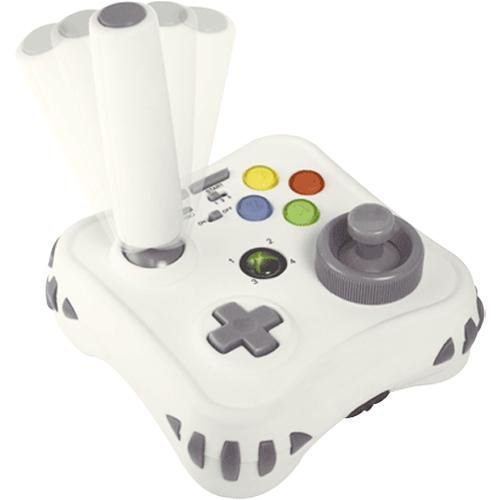
- USB joystick controller for Xbox 360
- Includes 3 pre-installed classic games
- Built around a simple retro arcade feel
Best For: Xbox 360 players who want a straightforward arcade-style controller with a retro angle.
Pro-Grade Sanwa Option
Nacon Daija Arcade Fight Stick for Xbox

- Officially licensed for Xbox
- Uses Sanwa joystick and action buttons
- Customizable front plate with 3-meter cable
Best For: Competitive players who want a licensed Xbox fight stick with premium components and customization.
Multi-Platform Budget Pick
SUBSONIC Arcade Stick for Xbox and PC

- Supports PS4, Xbox Series X/S, Xbox One, PC, and PS3
- Good for multi-platform households
- Classic arcade stick format
Best For: Buyers who want one arcade stick for multiple consoles and PC.
Leverless Precision Pick
8BitDo All-Button Xbox Controller

- All-button leverless layout
- 2.4G wireless or USB-C wired
- SOCD cleaning and tournament lock
Best For: competitive fighting-game players who want a compact, tournament-ready Xbox controller
Multi-System Arcade Workhorse
MAYFLASH F500 FightStick Bundle
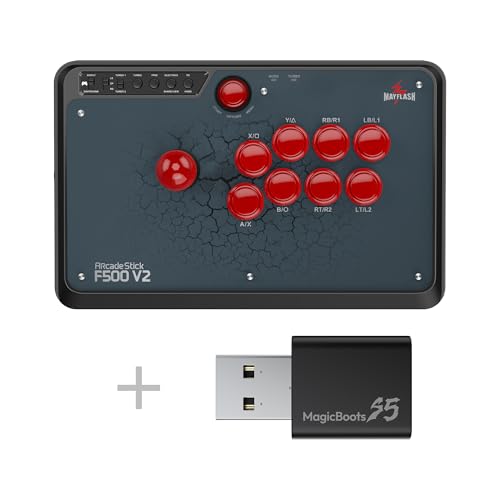
- Works with Xbox and many other systems
- Includes MAGICBOOTS-S5 bundle
- Traditional joystick fight-stick design
Best For: multi-console players who want one arcade stick for Xbox and other platforms
Compact Leverless Speed Pick
8BitDo All-Button Arcade Controller

- Wireless 2.4G for Xbox and PC
- Ultra-thin leverless design
- Hot-swappable PCB with programmable buttons
Best For: fighting-game players who want a slim, portable Xbox controller with fast inputs
Best with Extra Features
MAYFLASH F300 Elite for Xbox and Multi-Platform Play

- Sanwa buttons and joystick
- Works with Xbox and PC platforms
- Mod-friendly internal design
Best For: Players who want a moddable fight stick with Sanwa parts
Officially Licensed Wireless Choice
8BitDo Wireless Arcade Stick for Xbox

- Wireless for Xbox and Windows 10
- Officially licensed for Xbox
- 3.5mm audio jack included
Best For: Xbox and Windows players who want a wireless, officially licensed arcade stick
Feature-Rich Wireless Option
8BitDo 2.4g Arcade Fight Stick for Xbox

- 2.4g wireless for Xbox and Windows 10
- Mic mute and mapping buttons
- 3.5mm audio jack included
Best For: Xbox players who want a wireless fight stick with extra control features
Premium Mod-Friendly Pick – HORI Fighting Stick alpha for Xbox Series X|S
HORI Fighting Stick alpha Designed for Xbox Series X|S - Officially Licensed by Microsoft
Check Price On AmazonIf you want an arcade joystick controller for Xbox that feels built for tinkering, the HORI Fighting Stick alpha is a strong fit. It’s officially licensed by Microsoft, works with Xbox Series X|S, Xbox One, and Windows 10, and adds the kind of features that matter if you like customizing your setup and swapping artwork.
Best For: Players who want a customizable, maintenance-friendly fight stick for Xbox and PC use.
Pros:
- Chassis opens for easy maintenance and customization
- Top housing artwork can be swapped with your own design
- Includes assignable buttons plus Share Button and Profile Button
- Officially licensed by Microsoft for Xbox compatibility
Cons:
- Designed as a wired USB controller, so it’s not a casual plug-and-play wireless option
- May be more than some players need if they only want a basic arcade stick
This is the best choice in the group for users who care about access, personalization, and Xbox-focused compatibility. If modability and official support matter most, the HORI stands out as the most feature-rich option here.
Retro Arcade Throwback – Mad Catz Xbox 360 Arcade GameStick
If you’re shopping for an arcade joystick controller for Xbox and want a simple retro-style option, the Mad Catz Xbox 360 Arcade GameStick is aimed squarely at that classic feel. It’s a USB joystick controller for Xbox 360 and includes three pre-installed classic games, which makes it a nostalgia-focused pick rather than a modern feature-heavy stick.
Best For: Xbox 360 players who want a straightforward arcade-style controller with a retro angle.
Pros:
- USB joystick controller made for Xbox 360
- Includes 3 pre-installed classic games
- Simple, arcade-style setup for retro play
Cons:
- Limited to Xbox 360 compatibility based on the supplied details
- Far fewer customization features than newer fight sticks
This is the most nostalgia-driven pick in the roundup. It makes sense if your goal is an old-school arcade feel on Xbox 360, but it’s not the most flexible choice for newer systems or serious modding.
Pro-Grade Sanwa Option – Nacon Daija Arcade Fight Stick for Xbox
For buyers comparing an arcade joystick controller for Xbox, the Nacon Daija stands out as a more premium fight stick with serious parts and customization. It’s officially licensed for Xbox, supports Xbox Series X|S, Xbox One, and Windows 10/11 PC, and uses Sanwa joystick and action buttons for a more performance-focused layout.
Best For: Competitive players who want a licensed Xbox fight stick with premium components and customization.
Pros:
- Officially licensed for Xbox
- Sanwa joystick and action buttons
- Customizable front plate
- 3-meter cable for flexible placement
Cons:
- Wired cable-only design may not suit players wanting wireless convenience
- More specialized than a general-purpose controller
The Daija is a strong fit if you want a more serious fight stick with recognizable arcade parts and platform support across Xbox and PC. Its customization and licensed compatibility make it feel like a step up from more basic arcade sticks.
Multi-Platform Budget Pick – SUBSONIC Arcade Stick for Xbox and PC
If you want an arcade joystick controller for Xbox that can also cover other systems, the SUBSONIC arcade stick is built for broad compatibility. The supplied details list support for PS4, Xbox Series X/S, Xbox One, PC, and PS3, so it’s a flexible option if you move between platforms.
Best For: Buyers who want one arcade stick for multiple consoles and PC.
Pros:
- Compatible with PS4, Xbox Series X/S, Xbox One, PC, and PS3
- Useful if you play across multiple systems
- Arcade stick format suits fighting games and arcade-style inputs
Cons:
- Supplied notes don’t list premium parts or customization features
- Less specialized than higher-end Xbox fight sticks
The SUBSONIC is appealing mainly for its wide platform support. If flexibility matters more than premium components or deep customization, it’s a practical all-around pick for mixed-console households.
Leverless Precision Pick – 8BitDo All-Button Xbox Controller
If you’re shopping for an arcade joystick controller for xbox but want faster inputs and a compact build, this 8BitDo all-button controller is aimed at competitive fighting-game play. It supports Xbox Series X|S, Xbox One, and Windows, and it can connect either wirelessly over 2.4G or via USB-C wired play.
Best For: Players who want a leverless Xbox arcade controller with tournament-ready features and a small footprint.
Pros:
- Leverless all-button layout designed for quick, accurate inputs
- Officially licensed with Xbox and Windows compatibility
- 2.4G wireless or USB-C wired connection options
- Programmable buttons, SOCD cleaning, tournament lock, and 3.5mm audio jack
Cons:
- No traditional joystick lever, so it may not suit players who prefer classic arcade controls
- Best suited to fighting games rather than general controller use
Overall, this is a strong pick if your priority is competitive performance over traditional stick feel. The slim form factor, programmable features, and hot-swappable PCB make it especially appealing for serious players who want a portable, modern Xbox fight controller.
Multi-System Arcade Workhorse – MAYFLASH F500 FightStick Bundle
If you want an arcade joystick controller for xbox that also works across a wide range of other systems, the MAYFLASH F500 bundle is built for flexibility. This package is listed as compatible with PS5, Xbox Series S/X, PS4, PS3, Xbox One, Xbox 360, PC, Switch, Switch 2, and more, making it a practical pick for multi-console setups.
Best For: Buyers who want one fight stick for Xbox and several other platforms.
Pros:
- Wide compatibility across Xbox, PlayStation, PC, Switch, and more
- Bundle includes MAGICBOOTS-S5 for broader console support
- Traditional arcade fight stick format for classic joystick play
Cons:
- No detailed feature list was provided for buttons, lighting, or customization
- Less specialized for Xbox-only buyers than a licensed Xbox-specific model
This is the most versatile option in the group if you game on multiple platforms and want a single fight stick to cover them. It makes the most sense for players who value compatibility breadth and a conventional arcade joystick feel over extra premium features.
Compact Leverless Speed Pick – 8BitDo All-Button Arcade Controller
For anyone looking for an arcade joystick controller for xbox with a modern leverless layout, this 8BitDo model focuses on speed, portability, and customization. It is officially licensed for Xbox Series X|S, Xbox One, and Windows, and it uses 2.4G wireless on Xbox and PC.
Best For: Players who want a slim, wireless leverless controller for fast fighting-game inputs on Xbox.
Pros:
- Official Xbox licensing with support for Xbox Series X|S, Xbox One, and Windows
- 2.4G wireless connection for Xbox and Windows PC
- Ultra-thin 1.6 cm design for easy portability
- Hot-swappable PCB with 16 low-profile mechanical switches and programmable controls
Cons:
- Leverless layout will not appeal to players who want a traditional arcade stick
- Focused mainly on fighting-game use rather than general gaming
Compared with a standard fight stick, this model is built around speed and space-saving design. If you want a compact Xbox controller for competitive play and value wireless convenience plus swap-friendly hardware, it stands out as a highly practical choice.
Best with Extra Features – MAYFLASH F300 Elite for Xbox and Multi-Platform Play
If you want an arcade joystick controller for Xbox with serious customization potential, the MAYFLASH F300 Elite is built around premium Sanwa parts and broad system support. It works with Xbox Series X/S, Xbox One, Xbox 360, Windows PC, macOS, Steam Deck, Android, and several other platforms, making it a flexible choice for players who switch between devices.
Best For: Players who want a moddable fight stick with Sanwa buttons and wide Xbox compatibility.
Pros:
- Uses 9 Sanwa buttons and a precision 4-way joystick for responsive play
- Compatible with Xbox Series X/S, Xbox One, Xbox 360, and PC
- Designed for modding, with accessible internals for customization
- Supports Turbo and XINPUT/DINPUT on PC
Cons:
- PS5 support requires a separate MAYFLASH adapter or converter
- Heavier, full-size build may be less portable than smaller sticks
Overall, the F300 Elite stands out if you care about upgrade potential and premium parts more than a bare-bones plug-and-play stick. It is especially attractive for gamers who want one arcade stick that can cover multiple platforms while staying ready for future tweaks.
Officially Licensed Wireless Choice – 8BitDo Wireless Arcade Stick for Xbox
The 8BitDo Wireless Arcade Stick is a practical arcade joystick controller for Xbox if you want an officially licensed wireless option for Series X|S, Xbox One, and Windows 10. Its 3.5mm audio jack also adds a useful extra for players who want direct headset support from the fight stick.
Best For: Xbox and Windows players who want a wireless, officially licensed arcade stick.
Pros:
- Wireless design for Xbox Series X|S, Xbox One, and Windows 10
- Officially licensed for Xbox compatibility
- Includes a 3.5mm audio jack for headset connection
Cons:
- Only the supported Xbox and Windows 10 platforms are listed in the title
- No extra feature details were provided in the supplied notes
This model makes sense if you want a straightforward Xbox-focused fight stick without giving up wireless convenience. It is a clean fit for players who value official licensing and simple setup over deep customization details.
Feature-Rich Wireless Option – 8BitDo 2.4g Arcade Fight Stick for Xbox
If you are comparing an arcade joystick controller for Xbox and want extra convenience features, the 8BitDo 2.4g Wireless Arcade Fight Stick adds a mic mute button and joystick mapping button alongside Xbox Series X|S, Xbox One, and Windows 10 support. The 3.5mm audio jack also makes it more practical for headset use during play.
Best For: Xbox players who want a wireless fight stick with extra control features.
Pros:
- 2.4g wireless support for Xbox Series X|S, Xbox One, and Windows 10
- Includes a mic mute button for quick audio control
- Joystick mapping button adds an extra layer of convenience
- 3.5mm audio jack is built in
Cons:
- Only the platforms listed in the title are confirmed in the supplied details
- No information was provided about stick parts or customization
Compared with a more basic wireless fight stick, this one stands out for its practical extras. If you want simple Xbox compatibility plus controls that can help streamline match play, it is a strong option to consider.
How We Picked the Best Arcade Joystick Controller for Xbox
We prioritized controller compatibility with Xbox Series X|S and Xbox One, plus practical features that matter in real use: reliable connectivity, responsive controls, durable parts, and clear platform support. For the Arcade Joystick Controller for Xbox category, official licensing and proven component quality also weighed heavily.
We also looked for options that fit different player types, from traditional lever sticks to all-button leverless controllers, as well as wired and wireless models for home setups and tournament-style play.
Quick Comparison
Traditional arcade sticks are the easiest transition for players coming from standard fighting game controllers. Leverless models usually favor speed and precision, especially for directional inputs and execution-heavy games. Wireless models reduce cable clutter, while wired sticks are often preferred for simplicity and lower latency expectations.
Key Buying Factors for Arcade Joystick Controller for Xbox
Compatibility
Check whether the controller works with Xbox Series X|S, Xbox One, and, if needed, Windows PC. Some models are officially licensed for Xbox, while others rely on adapters or bundles for broader support.
Controls and Layout
Choose a lever stick if you want the familiar arcade feel. Choose an all-button controller if you value fast directional inputs and a more modern competitive layout. Button quality, stick feel, and spacing can affect comfort during long sessions.
Latency and Connection Type
Wired connections are typically the simplest choice for competitive play. Wireless can be excellent for casual and living-room use, but battery life and signal stability matter.
Build Quality and Parts
Sanwa-style parts are popular for their responsiveness and long-term durability. Sturdy cases, non-slip bases, and accessible maintenance features help a controller last longer and feel more stable on a desk or lap.
Extra Features
Audio jacks, mic mute buttons, profile switching, and programmable inputs can be useful, especially if you use your controller for streaming, chat, or multiple games.
Who Should Buy Which Arcade Joystick Controller for Xbox?
If you want an authentic arcade feel, choose a traditional fight stick with a lever and large action buttons. If you play fighting games competitively or want the fastest inputs, consider a leverless model. If you want the cleanest setup for couch play, a wireless option is the most convenient.
For most buyers, the best Arcade Joystick Controller for Xbox is the one that matches your game habits first and your platform support second. Start with compatibility, then decide whether you prefer classic stick controls, leverless speed, or wireless convenience.