If you’re building a retro cabinet or upgrading your fight setup, the right usb arcade joystick controller can make all the difference in feel, latency, and compatibility.
This roundup focuses on practical options for PC, MAME, Raspberry Pi, and hybrid gaming setups, including ready-made sticks and DIY kits for single- and two-player builds.
Best 10 USB Arcade Joystick Controller Picks for 2026
Premium Wireless Pick
8Bitdo Arcade Stick for Switch & Windows

- Bluetooth, 2.4G, and USB-C wired modes
- Works with Switch and Windows
- Ultimate Software supports macros and mapping
Best For: Versatile players who want wireless and wired flexibility
DIY 2-Player Kit
Hikig LED Arcade Buttons and Joysticks Kit

- Includes 2 joysticks and 20 LED buttons
- Zero-delay USB encoder for Windows
- Built for MAME and Raspberry Pi DIY projects
Best For: DIY cabinet builders needing a two-player control set
Budget Encoder Core
Reyann Zero Delay Arcade USB Encoder

- Zero-delay USB encoder for DIY arcade builds
- Supports PC and Raspberry Pi 1/2/3
- Works with 4.8mm joystick and button terminals
Best For: DIY builders who only need the encoder interface
Two-Player LED Set

- Two oval joysticks plus 20 LED buttons
- Zero-delay USB encoder for Windows
- Designed for DIY two-player arcade builds
Best For: Two-player PC or Windows arcade cabinet projects
2-Player DIY Encoder Kit
Zero Delay USB Encoder for HAPP Setups

- Zero delay USB encoder for 2-player builds
- Three 5V outputs for LED arcade parts
- Supports PC, Mac, Raspberry Pi, and Arcade1Up
Best For: 2-player DIY cabinets using HAPP-style joysticks and buttons
4-Player LED Arcade Kit
Zero Delay Encoder Set for MAME Builds
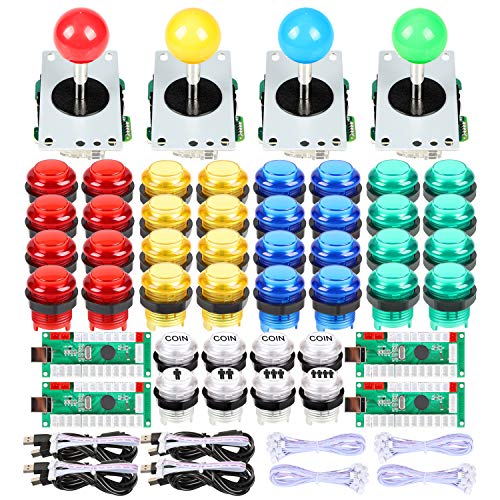
- Full 4-player DIY arcade parts kit
- Zero delay USB encoders for Windows
- Includes 4/8-way sticks and LED buttons
Best For: Large MAME or Raspberry Pi cabinets with four player stations
1-Player LED Starter Kit
USB Encoder with Red Ball Top Stick

- 1-player kit with encoder, joystick, and 10 LED buttons
- 8-way joystick with long-life microswitches
- Works with Windows, MAME, and RetroPie
Best For: Single-player DIY arcade panels and compact test builds
2-Player Zero-Delay Starter Kit
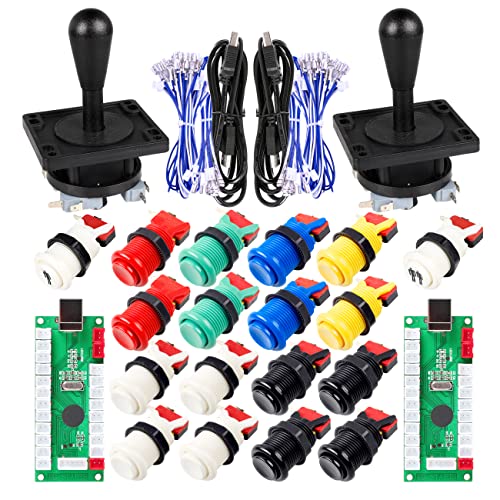
- Includes 2 joysticks and 18 buttons
- Zero-delay USB encoder for PC use
- Microswitches included; auto-fire supported
Best For: DIY 2-player MAME and Windows arcade cabinets
LED Multi-Platform DIY Kit
Qenker 2-Player Retro Controller
- 2 joysticks and 20 LED buttons included
- Two zero-delay USB encoders in the kit
- Works with PC, Raspberry Pi, Mac, and more
Best For: DIY builders wanting an LED arcade kit with multi-platform support
1-Player LED Encoder Kit

- Includes one joystick and 10 LED buttons
- Zero-delay USB encoder for PC play
- Compact choice for single-player builds
Best For: Single-player DIY arcade panels and compact cabinet builds
Premium Wireless Pick – 8Bitdo Arcade Stick for Switch & Windows
If you want a usb arcade joystick controller that works across Switch and Windows, this 8Bitdo arcade stick is built for flexibility. It supports Bluetooth, 2.4G, and wired USB-C connections, and its button mapping can be customized with Ultimate Software for macros and mode-based layouts.
Best For: Players who want a versatile stick for Switch and PC with wireless and wired options.
Pros:
- Three connection modes: Bluetooth, 2.4G receiver, and wired USB-C
- Compatible with Switch and Windows
- Ultimate Software support for button mapping and macros
- Universal mounting plate supports Sanwa arcade sticks
Cons:
- Only listed for Switch and Windows compatibility
- Battery-powered wireless use may require charging
This is a strong choice if you want a polished arcade stick that can move between platforms without giving up customization. The hidden receiver storage is a practical touch for travel and desk setups.
DIY 2-Player Kit – Hikig LED Arcade Buttons and Joysticks Kit
This usb arcade joystick controller kit is aimed at builders who want a 2-player MAME or Raspberry Pi setup. It includes two joysticks and 20 LED arcade buttons, plus a zero-delay encoder with USB support for Windows systems.
Best For: DIY arcade cabinet builders who want a complete two-player parts kit.
Pros:
- Includes 2 joysticks and 20 LED arcade buttons
- 100% zero-delay encoder with USB support for Windows
- Designed for 2-player MAME and Raspberry Pi projects
- Made with high temperature resistant plastic materials
Cons:
- DIY-focused, so it requires installation and setup
- Best suited to Windows-based builds
This kit makes sense if you are assembling a retro controller panel rather than buying a finished stick. The included controls and encoder keep the parts list simpler for a two-player project.
Budget Encoder Core – Reyann Zero Delay Arcade USB Encoder
If you are building a usb arcade joystick controller from scratch, this Reyann encoder is the core part that connects joysticks and buttons to a PC. It supports PC and Raspberry Pi 1/2/3 builds, and it is meant for arcade joysticks and buttons with 4.8mm terminals.
Best For: Builders who need a simple USB encoder for a custom arcade project.
Pros:
- Zero-delay USB encoder for PC arcade builds
- Supports PC and Raspberry Pi 1/2/3
- Works with joystick and push button types using 4.8mm terminals
- Includes TURBO, AUTO, MODE, and CLEAR functions
Cons:
- It is only the encoder, not a complete controller
- Designed for DIY assembly rather than plug-and-play use
This is the practical pick if you already have cabinet parts and just need the USB interface. Its feature set is straightforward, which makes it useful for custom fighting-game builds.
Two-Player LED Set – EG STARTS Oval Joystick Kit
This usb arcade joystick controller kit is a straightforward option for a two-player arcade build on PC or Windows. It comes with two ellipse oval joystick handles and 20 LED-lit arcade buttons, along with a zero-delay encoder and USB connection support.
Best For: Users building a two-player Windows arcade setup with LED controls.
Pros:
- Includes 2 oval joystick handles and 20 LED-lit buttons
- 100% zero-delay encoder with USB support for Windows
- Made with high temperature resistant plastic
- Simple DIY style for arcade PC projects
Cons:
- DIY kit requires assembly
- Listed compatibility is focused on PC and Windows
This is a good fit if you want a bright two-player control set without hunting for individual parts. The oval handles and LED buttons give it a distinct retro look for a home arcade project.
2-Player DIY Encoder Kit – Zero Delay USB Encoder for HAPP Setups
If you’re building a usb arcade joystick controller setup for a two-player cabinet, this encoder kit is aimed at straightforward PC, Raspberry Pi, and Arcade1Up DIY projects. It supports HAPP joysticks and HAPP arcade buttons, includes three 5V power outputs for LED parts, and uses JST XH2.54 to 0.187 inch quick connection plugs for easier wiring.
Best For: 2-player arcade builds that use HAPP-style controls and LED buttons.
Pros:
- Zero delay USB encoder designed for 2-player arcade projects
- Three 5V outputs can power LED joysticks, daisy chains, and illuminated buttons
- Works with PC, Windows, Mac, Raspberry Pi, and Arcade1Up
- Quick-connect terminals fit HAPP joysticks and HAPP arcade buttons
Cons:
- Focused on DIY arcade wiring rather than a ready-made controller
- Best fit is HAPP-style parts, so compatibility may be less ideal for other setups
This is a practical pick if you want a simple encoder for a custom two-player cabinet with LED controls. The included power outputs and quick connectors make it especially useful for arcade projects where cleaner wiring matters.
4-Player LED Arcade Kit – Zero Delay Encoder Set for MAME Builds
For a larger usb arcade joystick controller project, this 4-player kit is built around zero delay USB encoders, 4/8-way sticks, and 5V LED illuminated push buttons. It is positioned as a full DIY parts set for MAME, Raspberry Pi, and Windows-based arcade builds, making it a strong option when you want to wire multiple player stations from one package.
Best For: 4-player DIY arcade cabinets that need a complete LED button and joystick parts set.
Pros:
- Includes parts for a full 4-player arcade project
- Uses 100% zero delay USB encoders for Windows systems
- Comes with 4/8-way sticks and 5V illuminated push buttons
- Suitable for MAME, Raspberry Pi, and video game console DIY builds
Cons:
- Large, heavier kit may be more than a simple one-player build needs
- Focused on DIY assembly rather than plug-and-play use
This kit makes sense if you want to equip a full multiplayer cabinet with matching controls and LED buttons. Its broad parts list is the main advantage, especially for builders who want one set to cover the whole project.
1-Player LED Starter Kit – USB Encoder with Red Ball Top Stick
If you want a compact usb arcade joystick controller kit for a single-player build, this package includes a USB encoder, a high-quality 8-way joystick, and 10 5V LED arcade buttons. It is aimed at Windows arcade games, MAME, and RetroPie-style Raspberry Pi projects, and the individually packaged parts make it easier to organize a small DIY setup.
Best For: Single-player arcade cabinets or test builds with LED buttons and a red ball-top joystick.
Pros:
- Complete 1-player kit with joystick, encoder, and 10 LED buttons
- 8-way joystick is described as high quality with long-life microswitches
- Supports Windows arcade games, MAME, and Raspberry Pi RetroPie projects
- Individually packaged parts and 1-year warranty add convenience
Cons:
- Designed for one player only
- LED button count is limited compared with larger cabinet kits
This is a sensible starter option if you need the essentials for a single-player arcade control panel. It keeps the build focused while still including illuminated buttons and a proper joystick for a classic arcade feel.
2-Player Zero-Delay Starter Kit – EG STARTS Classic Arcade DIY
If you’re building a usb arcade joystick controller setup for a two-player MAME or emulator cabinet, this EG STARTS kit gives you the core controls in one package. It includes two 8-way joysticks, 18 arcade buttons, and a zero-delay USB encoder designed for PC-based arcade projects.
Best For: DIY builders who want a straightforward 2-player USB arcade control kit for Windows-based cabinets and MAME setups.
Pros:
- Includes 2 joysticks, 18 push buttons, and 1/2 start buttons for a full 2-player layout
- Zero-delay USB interface PCB is made for responsive PC arcade control
- Microswitches are included and rated to 10,000,000 cycles
- Supports auto-fire mode for compatible builds
Cons:
- Designed mainly for Windows PC arcade projects
- Focused on DIY installation rather than plug-and-play use
- Best suited to wood or metal panels with 1-1/8" holes
This is a practical all-in-one option if you want the basic parts to wire up a simple arcade cabinet without sourcing controls separately. The zero-delay encoder and included microswitches make it a solid entry point for a budget-friendly build.
LED Multi-Platform DIY Kit – Qenker 2-Player Retro Controller
This usb arcade joystick controller kit is aimed at builders who want a two-player retro setup with lighting and broad platform support. It includes two joysticks, 20 LED arcade buttons, and two zero-delay USB encoders, making it a strong fit for MAME and Raspberry Pi projects.
Best For: Makers who want an LED-lit 2-player USB arcade controller kit for PC, Raspberry Pi, and other compatible systems.
Pros:
- Includes 2 joysticks, 20 LED buttons, and 2 zero-delay USB encoders
- Compatible with Android, Linux, Mac, PC, and Raspberry Pi
- LED design adds a more visible, arcade-style look
- Built for DIY MAME and retro controller projects
Cons:
- Requires DIY assembly and wiring
- Battery-powered listing may be less straightforward than simple USB-only kits
- Not positioned as a finished controller
Compared with a basic encoder kit, this one stands out for its LED buttons and broader compatibility. It’s a good choice if you want a more polished retro build and plan to use the controller across multiple systems.
1-Player LED Encoder Kit – EG STARTS USB Arcade Build
If you need a compact usb arcade joystick controller setup for a single-player build, this EG STARTS kit keeps things simple with one joystick, one USB encoder, and 10 chrome LED buttons. It’s built for PC and Windows arcade projects, including MAME and Raspberry Pi-style DIY cabinets.
Best For: Solo builders who want a compact, LED-lit USB arcade control kit for a single-player cabinet or controller panel.
Pros:
- Includes 1 5-pin joystick, 1 USB encoder, and 10 LED buttons
- Zero-delay USB encoder is designed for responsive PC play
- Easy-install parts suit straightforward DIY builds
- Chrome-plated illuminated buttons give the panel a finished look
Cons:
- Only covers a 1-player layout
- Best fit for PC and Windows systems rather than broad multi-platform use
- Not as expansive as two-player kits
This kit is a sensible pick if you want the main controls for a smaller arcade project without paying for extra player hardware. The LED buttons and zero-delay encoder make it a tidy option for a simple custom build.
How We Picked the Best USB Arcade Joystick Controller
We focused on controller types that suit real-world arcade builds: low-latency USB operation, broad PC and emulator compatibility, reliable button/joystick layouts, and clear support for common setups like MAME, Raspberry Pi, and arcade cabinet projects. We also considered whether each option is better for plug-and-play use or a custom DIY build.
Quick Comparison
At a glance, the lineup splits into two main groups. Ready-made fight sticks are best if you want the simplest setup and a polished finish. DIY kits are better if you’re wiring a cabinet, a two-player tabletop, or a custom control panel. If you need portability and fast setup, choose a finished stick. If you want the best value per button and the flexibility to mount everything your way, choose a kit.
Key Buying Factors for a USB Arcade Joystick Controller
Compatibility
Check whether the controller works with your target platform before buying. Some options are tuned for Windows PC and MAME, while others are better suited to Raspberry Pi, Arcade1Up conversions, or mixed retro builds. If you plan to swap systems later, look for broad USB support and simple plug-and-play behavior.
Player Count and Layout
Single-player sticks are more compact and easier to place on a desk. Two-player kits are better for cabinets and couch-friendly builds. Four-player kits make sense for party and classic arcade titles, but they require more space, more wiring, and a stronger plan for button layout.
Joystick Style
Ball-top and bat-top designs feel different in hand, and 4-way versus 8-way gate support matters for the games you play. Fighters and shmups usually benefit from 8-way control, while some classic arcade titles and maze games may feel better with a 4-way setup.
Wiring and Lag
For DIY kits, zero-delay USB encoders are a major plus because they simplify wiring and help keep input response consistent. Look for labeled connectors, LED power support if you want illuminated buttons, and enough cable length for your cabinet depth.
Who Should Buy Which USB Arcade Joystick Controller?
If you want the easiest path to gaming, a finished arcade stick is the best choice. If you’re building a custom cabinet, a USB Arcade Joystick Controller kit gives you more flexibility and usually better value. New builders should favor kits with clear wiring and fewer parts, while experienced modders may prefer expandable options with coin inputs, LED support, and multiple player layouts.
For most buyers, the smartest choice comes down to one question: do you want convenience or customization? Choose convenience for fast setup, and choose customization if you care most about cabinet fit, button count, and long-term upgrade potential.