A mouse that feels manageable in a larger hand can force a smaller hand to stretch for side buttons or fight a bulky rear hump. Shape matters just as much as sensor specs when you want comfortable, controlled aim.
These 10 picks cover compact wired and wireless designs, from lightweight esports options to straightforward budget mice. Use your hand measurements and grip style to narrow the field before choosing.
Best 10 Gaming Mouse for Small Hands Picks for 2026
Best Rechargeable Wireless Pick

- Compact 59g design
- 2.4GHz and Bluetooth
- Up to 100-hour rechargeable battery
Best For: Small-hand players seeking lightweight, rechargeable wireless play
Best for Long Battery Life

- Up to 950 hours on Bluetooth
- AA or AAA battery option
- Under 60g without battery
Best For: Portable wireless gaming with fewer battery changes
Best Wired Option

- USB wired connection
- Six customizable buttons
- 8,000 DPI sensor and RGB
Best For: Wired play with customizable controls and lighting
Best Lightweight Esports Pick

- Compact 49g shape
- Designed for fingertip and claw grips
- Wired, 2.4GHz, and Bluetooth
Best For: Right-handed FPS players seeking an ultralight compact mouse
Best Wireless Pick

- Compact wireless design
- Up to 12,000 DPI
- Up to 250 hours on one AA
Best For: Compact wireless play with long battery life
Lightest Pick

- 49 g lightweight build
- Up to 26,000 DPI
- Flexible cable and PTFE feet
Best For: Fast swipes with a lightweight wired mouse
Narrow-Width Pick

- 2.17-inch body width
- Roughly 61 g weight
- Six programmable buttons
Best For: Narrow wired fit with lightweight control
Best for Fingertip Grip
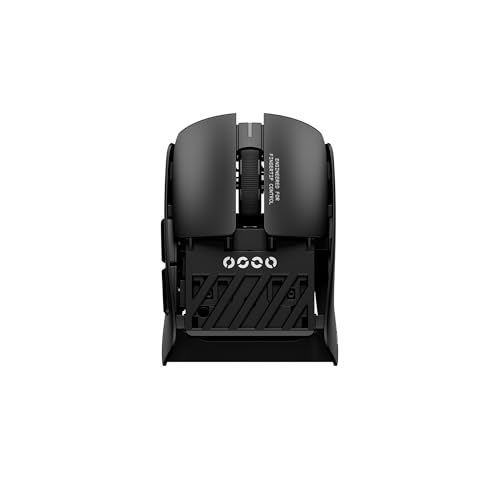
- Rear-cut mini fingertip shape
- Ultra-light 38 g design
- 8,000 Hz wired and wireless polling
Best For: Small-handed competitive fingertip players
Best Versatile Connection Options
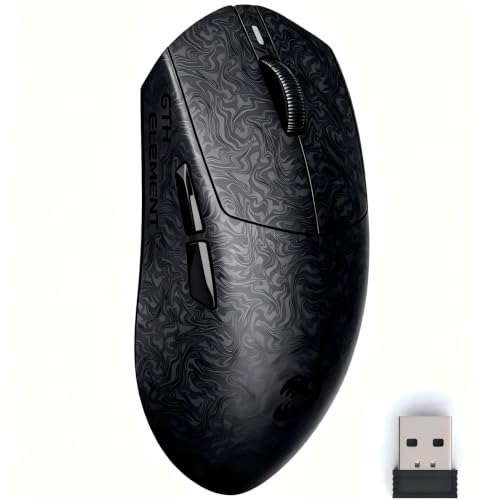
- Wired, Bluetooth, and 2.4 GHz
- Around 60 g with textured finish
- Case and grip tape included
Best For: Players who switch between devices and connection types
Best Classic Wireless Pick

- Compact 4.6-inch classic shape
- 12,000 DPI HERO sensor
- Up to 250 hours stated battery life
Best For: Players seeking a familiar, portable wireless mouse
Best Rechargeable Wireless Pick – HyperX Pulsefire Haste 2 Mini
The HyperX Pulsefire Haste 2 Mini is a gaming mouse for small hands that combines a compact shape with a 59g weight. It offers both 2.4GHz wireless and Bluetooth, plus a rechargeable battery rated for up to 100 hours.
Best For: Players who want a light, compact wireless mouse without swapping batteries.
Pros:
- Compact, 59g design made with smaller hands in mind.
- 2.4GHz and Bluetooth connectivity.
- Up to 100 hours of battery life; supports play while charging.
Cons:
- Six buttons may not suit players who need many extra controls.
- Requires charging eventually, unlike a wired mouse.
The solid-shell design and included grip tape give you options for handling, while the 26,000 DPI sensor leaves ample room to tune sensitivity.
Best for Long Battery Life – Razer Orochi V2
The Razer Orochi V2 is a compact gaming mouse for small hands worth considering if battery life matters most. It runs on one AA or AAA battery and offers Bluetooth alongside Razer HyperSpeed wireless.
Best For: Players who want a portable wireless mouse with long battery life and replaceable batteries.
Pros:
- Rated for up to 950 hours on Bluetooth or 425 hours on HyperSpeed wireless.
- Compact body weighs under 60g before adding a battery.
- Accepts either one AA or one AAA battery.
Cons:
- Battery adds to the stated under-60g weight.
- Right-handed orientation will not suit everyone.
Choose HyperSpeed for gaming or Bluetooth when longer runtime is the priority. Its 18,000 DPI optical sensor and six buttons round out a practical travel-friendly setup.
Best Wired Option – Logitech G203 LIGHTSYNC
The Logitech G203 is a wired gaming mouse for small hands to consider if you prefer a straightforward USB connection. Its listed dimensions are 4.59 by 2.45 inches, so compare them with a mouse you already find comfortable before buying.
Best For: Players who prefer wired play, customizable buttons, and RGB lighting.
Pros:
- 8,000 DPI optical sensor with adjustable sensitivity settings.
- Six buttons can be assigned commands through Logitech G HUB.
- Customizable LIGHTSYNC RGB lighting.
Cons:
- USB cable limits movement compared with wireless options.
- Listed as right-handed rather than ambidextrous.
The 6.89-foot cable provides some desk-placement flexibility, while the DPI-cycle button makes switching among configured sensitivity levels convenient.
Best Lightweight Esports Pick – ASUS ROG Harpe Ace Mini
The ASUS ROG Harpe Ace Mini is a gaming mouse for small hands built around a compact, 49g shape. Its right-handed, semi-symmetrical form was refined for fingertip and claw grips, making it a focused option for competitive play.
Best For: Right-handed FPS players who use fingertip or claw grip and want a very light mouse.
Pros:
- 49g compact design aimed at smaller hands.
- Wired USB, 2.4GHz wireless, and Bluetooth connectivity.
- Includes grip tape and replacement mouse feet.
Cons:
- Four buttons offer fewer controls than the other mice listed here.
- Right-handed shape may not work for left-handed use.
Its tri-mode connectivity adds versatility beyond FPS sessions. The supplied product information gives conflicting maximum-DPI and battery-runtime figures, so check the current listing if either specification will drive your decision.
Best Wireless Pick – Logitech G305 Lightspeed
The Logitech G305 is a practical gaming mouse for small hands if you want a compact, cable-free option. Its 4.59-inch length and 2.45-inch width make it worth considering for a smaller setup, though fit will still depend on your grip.
Best For: Players who want a compact wireless mouse with long battery life.
Pros:
- LIGHTSPEED wireless has a specified 1 ms report rate.
- HERO optical sensor supports up to 12,000 DPI.
- Rated for up to 250 hours of play on one AA battery, with receiver storage for travel.
Cons:
- At about 3.4 ounces, it is heavier than the two wired mice here.
- Requires an AA battery.
Choose the G305 when freedom from cable drag and fewer battery changes matter more than getting the lowest possible weight.
Lightest Pick – GLORIOUS Model O 2 Mini Wired
At 49 g, the GLORIOUS Model O 2 Mini is a gaming mouse for small hands that prioritizes quick, low-effort movement. Its symmetrical shape and flexible cable make it appealing if you prefer a lightweight wired setup.
Best For: Players seeking an especially light, compact wired mouse for fast swipes.
Pros:
- 49 g weight is the lowest of these three picks.
- BAMF 2.0 optical sensor supports up to 26,000 DPI.
- Includes six programmable buttons, PTFE feet, and an ultra-flexible cable.
Cons:
- Wired connection may be less convenient than wireless.
- Despite its symmetrical shape, the supplied specifications list a right-hand orientation.
This is the pick to consider when minimum weight is your priority; check the shape against your preferred grip, especially if you use your left hand.
Narrow-Width Pick – Razer Viper Mini
The Razer Viper Mini is a gaming mouse for small hands worth a look if you prefer a narrower body: it measures 4.45 inches long and 2.17 inches wide. Its roughly 61 g weight and flexible Speedflex cable also suit frequent repositioning.
Best For: Players who want a narrow, lightweight wired mouse with programmable controls.
Pros:
- Compact 4.45-by-2.17-inch footprint.
- Six programmable buttons and optical switches rated for up to 50 million clicks.
- Speedflex cable is designed to minimize drag; sensor supports up to 8,500 DPI.
Cons:
- Wired design will not suit players who want a cable-free desk.
- Not as light as the 49 g GLORIOUS Model O 2 Mini.
Its documented narrow width makes the Viper Mini especially easy to assess for smaller hands, but comfort still depends on your hand size and grip style.
Best for Fingertip Grip – Pulsar Lab X2F Mini
If you want a gaming mouse for small hands and use a fingertip grip, the Pulsar Lab X2F is the most specialized option here. Its rear-cut mini shape and 38 g weight are designed for quick fingertip movements rather than a full-palm hold.
Best For: Small-handed competitive players who prefer fingertip grip and a very light mouse.
Pros:
- Rear-cut mini shape is purpose-built for fingertip control.
- 38 g weight makes fast repositioning easy.
- XS-1 sensor supports up to 32,000 DPI, with 8,000 Hz polling in wired and wireless modes.
Cons:
- Specialized rear-cut shape may not suit players who want palm support.
- Its 8,000 Hz polling capability may be more than casual players need.
Choose the X2F for its shape first: the sensor and polling specs are strong, but the compact fingertip design is what sets it apart.
Best Versatile Connection Options – ZORNHER X Mloong MX301 PRO
The ZORNHER X Mloong MX301 PRO is a gaming mouse for small hands worth considering if you want multiple ways to connect. Its 4.76-inch length, roughly 60 g weight, and included grip tape make it a practical option to compare for fit and control.
Best For: Players who want a compact-leaning mouse with wired, Bluetooth, and 2.4 GHz connectivity.
Pros:
- Supports wired, Bluetooth, and 2.4 GHz connections.
- Carbon-fiber-inspired texture and included grip tape offer grip options.
- Includes a carrying case, USB-C cable, and 2.4 GHz receiver.
Cons:
- At around 60 g, it is heavier than the 38 g Pulsar X2F.
- The supplied specifications disagree on maximum DPI: the title lists 26,000, while the details list 16,000.
The MX301 PRO makes the strongest case as a flexible everyday-and-gaming package. Check the listed sensor specification before buying if maximum DPI matters to you.
Best Classic Wireless Pick – Logitech G305 Lightspeed
The Logitech G305 Lightspeed is a straightforward gaming mouse for small hands if you prefer a classic shape over an aggressively cut-down design. Its 4.6-inch length, wireless receiver storage, and stated battery life of up to 250 hours make it convenient for a desk setup or travel.
Best For: Players who want a compact, familiar wireless mouse with long stated battery life.
Pros:
- HERO optical sensor supports up to 12,000 DPI.
- LIGHTSPEED wireless has a stated 1 ms response time.
- Built-in receiver storage helps keep the USB receiver with the mouse.
Cons:
- At 3.36 ounces, it is heavier than the other two mice listed here.
- The supplied notes conflict on battery type: the bullets specify one AA, while the details list one AAA.
The G305 is the conventional choice in this group. Pick it if its classic shape and wireless convenience appeal more than the lowest possible weight.
How We Picked the Best Gaming Mouse for Small Hands
For a Gaming Mouse for Small Hands, we prioritized compact shapes, manageable weight, accessible controls, and a choice of wired and wireless connections. The lineup also spans different prices and grip preferences. A published size or weight is a useful starting point, not proof of fit: hand measurements, finger length, and how you hold the mouse still matter. We treated sensor specifications as a baseline rather than assuming a higher maximum DPI makes a mouse better.
Quick Comparison: Where to Start
For the lightest listed designs, look at the 49 g ASUS ROG Harpe Ace Mini and Glorious Model O 2 Mini Wired. The HyperX Pulsefire Haste 2 Mini and Pulsar X2F Mini are compact wireless alternatives, while the wired Razer Viper Mini remains worth considering if its shape and availability suit you. The Logitech G203 offers a straightforward wired option. The Logitech G305 comes in black and white; treat those as color choices for the same model, not two different fits. If you want a portable wireless mouse, compare the Razer Orochi V2’s shape and battery setup with the others. The ZORNHER X Mloong MX301 PRO adds another small wireless option, but check its dimensions and software support before buying.
Key Buying Factors for a Gaming Mouse for Small Hands
Shape, Length, and Grip
Measure from your palm crease to the tip of your middle finger, then compare that measurement with the mouse’s published length, width, and height. A shorter body can be easier to reposition with a fingertip grip; a pronounced rear hump may offer more palm contact for claw grip. Side-button placement is equally important: you should reach both buttons without shifting your grip. If possible, check return terms in case the shape does not work for you.
Weight and Connection
A lighter mouse can feel easier to lift and make repeated aim adjustments with, but balance and shape affect comfort too. Wired mice avoid charging and battery changes; look for a flexible cable if you make broad movements. For wireless play, check whether the mouse supports a 2.4 GHz receiver, Bluetooth, or both. Prefer 2.4 GHz for latency-sensitive gaming; Bluetooth can be convenient for everyday use. Also account for replaceable batteries or charging access.
Controls and Compatibility
Check that the main clicks, wheel, and side buttons feel usable with your grip. Confirm that configuration software supports your operating system if you need button remapping, DPI changes, or saved profiles. Maximum DPI alone is a poor way to rank mice.
Who Should Buy Which Gaming Mouse for Small Hands?
Choose a compact, light model if quick lifts and low effort are priorities; start with the Harpe Ace Mini, Model O 2 Mini Wired, or Pulsefire Haste 2 Mini. For a simple wired setup, compare the G203 and Viper Mini by shape and price. For wireless value, consider either G305 color, then check whether its battery-powered design suits you. If portability matters, look at the Orochi V2. Buyers considering the X2F Mini or MX301 PRO should verify dimensions, connection options, and current support against their needs before ordering.