If you want a more immersive cockpit without building a full sim rig, a flight simulator chair with joystick mount is one of the smartest upgrades you can make. It keeps your HOTAS controls where your hands expect them, improving comfort and control.
Below, we focus on options that balance stability, compatibility, and adjustability so you can find a setup that fits your gear and your space.
Best 10 Flight Simulator Chair with Joystick Mount Picks for 2026
Best for Dual-Purpose Sim Racers
Marada Flight & Racing Cockpit

- Flight and racing modes in one cockpit
- Adjustable mounts for better ergonomic positioning
- Folds to save space when not in use
Best For: Sim racers and flight sim fans who want a versatile cockpit for both styles of play.
Best for Broad Device Compatibility
EG STARTS 2-Pack Chair Mount Hotas

- Fits many Logitech, Thrustmaster, and VKB HOTAS devices
- Includes separate joystick and throttle mounts
- Stable, cockpit-style setup for chair mounting
Best For: Flight sim players who need a flexible chair-mounted HOTAS solution for multiple controllers.
Best Foldable Stand
GTPLAYER Foldable Flight Racing Stand

- Supports popular Logitech and Thrustmaster devices
- Adjustable height and tilt for better ergonomics
- Folds down for storage in tight spaces
Best For: Sim racers and flight sim players who need a stable mount that won’t dominate the room.
Best for Direct-Drive Stick Stability
Fosiya Center Joystick Chair Mount

- Broad support for popular HOTAS and stick setups
- Heavy-duty clamp design aims for very solid hold
- Adjustable fit for more comfortable center-mounted control
Best For: Sim pilots who want a secure center stick mount with flexible adjustment.
Best for Multi-Use Sim Racers
Anman Multifunctional Flight/Racing Cockpit
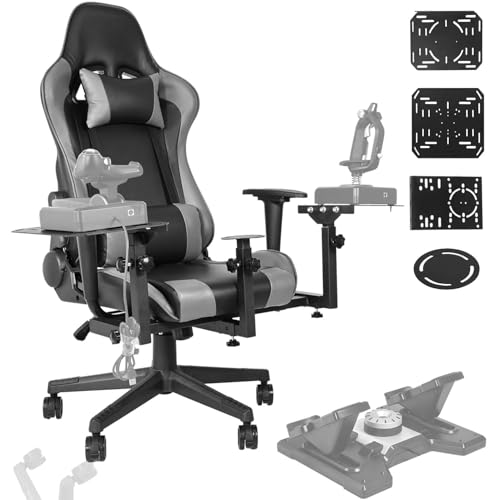
- Works with both HOTAS flight gear and racing wheel setups
- Adjustable seating and mounts help improve comfort
- Compact design is easier to fit in smaller rooms
Best For: Players who want one cockpit for both flight and racing simulations.
Best for Logitech Extreme 3D Pro
WELLMETE Clamp-On Joystick Mount

- Made specifically for the Logitech G Extreme 3D PRO
- Adjustable steel clamp improves stability and fit
- Silicone pad helps protect the desk from slipping
Best For: Logitech G Extreme 3D PRO users who want a stable clamp-on joystick mount for a cleaner desk setup.
Best for Adjustable Cockpit Seating
Marada Flight Joystick Hotas Mount with Chair

- Seat-mounted cockpit feel with adjustable layout
- Steel frame and locking rollers improve stability
- Works with Thrustmaster, Logitech X56/X52, and Warthog
Best For: Sim pilots who want a stable, adjustable cockpit chair for HOTAS gear and longer sessions.
Best for Universal HOTAS Compatibility
Hikig Desk Mount for Flight Sim

- Fits a wide range of HOTAS and flight controller setups
- Adjustable mount height and depth improve ergonomics
- Easy clamp-on installation for desk-based sim rigs
Best For: Players who want a versatile, desk-mounted joystick and throttle setup for flight sims.
Best for Wide Compatibility
Hikig Dual Desk Mount for HOTAS & Flight Sims

- Fits many major HOTAS and joystick brands
- Strong clamp with stable, cockpit-style placement
- Adjusts for left- or right-handed layouts
Best For: Sim racers and flight sim players who want a versatile desk-mounted HOTAS solution.
Best Simple Pick

- Fits many popular HOTAS and flight control devices
- Chair-mounted design clears desk space and improves ergonomics
- Adjustable height and angle help fine-tune your setup
Best For: Sim racers and flight sim players who need a versatile chair-mounted HOTAS solution.
Best for Dual-Purpose Sim Racers – Marada Flight & Racing Cockpit
If you want a flight simulator chair with joystick mount that can also pull double duty for racing games, this Marada cockpit is a practical all-in-one pick. It supports major flight gear brands, includes adjustable mounting positions, and folds down when you need to reclaim floor space.
Best For: Sim pilots who also race and want one cockpit that can switch between flight and driving setups without buying separate rigs.
Pros:
- Switches between flight and racing configurations
- Adjustable frame height plus pedal and wheel angles
- Extra-large side panel adds room for mouse, keyboard, shifter, or handbrake
- Foldable design helps save space between sessions
Cons:
- Peripherals like throttle, joystick, and keyboard are not included
- Bulkier than a simple stand, even when folded
For buyers comparing a flight simulator chair with joystick mount options, this Marada setup stands out for flexibility rather than simplicity. It makes the most sense if you want one stable cockpit that can grow with both your flight sim and racing gear.
Best for Broad Device Compatibility – EG STARTS 2-Pack Chair Mount Hotas
If you want a flight simulator chair with joystick mount that can handle a wide range of gear, this EG STARTS 2-pack is built around compatibility and cockpit-style positioning. It adds separate joystick and throttle mounts to your chair so you can fly with a more ergonomic setup without a full simulator rig.
Best For: Sim racers and flight sim fans who use multiple HOTAS setups and want a sturdy chair-mounted solution that’s easy to adapt.
Pros:
- Supports many popular sticks and throttles, including Logitech, Thrustmaster, VKB, and more
- Two-mount design gives you a proper joystick-and-throttle layout
- Heavy-duty build aims for stable, comfortable control during longer sessions
- Installs without major cockpit modifications
Cons:
- Not every listed device setup is equally ideal, especially some longer throttle configurations
- May take a little adjustment to get the perfect chair position
This is a practical choice if your priority is flexibility over luxury extras. For a flight simulator chair with joystick mount that can fit a broad mix of hardware and still feel cockpit-like, it’s an easy one to consider.
Best Foldable Stand – GTPLAYER Foldable Flight Racing Stand
If you want a practical flight simulator chair with joystick mount support without committing to a full cockpit, this foldable GTPLAYER stand is a smart pick. It supports a wide range of Logitech and Thrustmaster gear, lets you tune the angle and height for a better driving or flying position, and folds away when you need your space back.
Best For: Sim racers and flight sim players who want a stable, adjustable mount that stores easily between sessions.
Pros:
- Wide compatibility with popular Logitech, Thrustmaster, and PXN devices
- Height and angle adjustments help dial in a comfortable setup
- Strong carbon steel frame adds stability during intense sessions
- Folds compactly for easier storage in small rooms
Cons:
- Wheel, pedals, shifter, and other devices are not included
- It’s a stand, not a full enclosed cockpit seat setup
- May feel basic for buyers wanting an all-in-one rig
Overall, this is a solid choice if you need a flight simulator chair with joystick mount compatibility in a compact, adjustable format. It focuses on stability and storage convenience, making it especially appealing for shared rooms or home setups that need to pack up fast.
Best for Direct-Drive Stick Stability – Fosiya Center Joystick Chair Mount
If you want a flight simulator chair with joystick mount that keeps your controls centered and firmly planted, this Fosiya setup is built for sim pilots who value stability and adjustability. It supports a wide range of HOTAS and stick setups, and the height and side-to-side adjustments make it easier to dial in a comfortable position.
Best For: Sim racers and flight sim fans who want a center-mounted stick setup with strong clamping and flexible positioning.
Pros:
- Supports many popular flight sticks, throttles, and shifters, including T-Flight Hotas 4, Warthog, T16000M FCS, and TCA Airbus Edition
- Heavy-duty M8 screws and claimed 300kg holding capacity for a very secure feel
- Adjustable height and left-right positioning helps fine-tune cockpit ergonomics
- Quick to remove when you want your chair back to normal use
Cons:
- Best suited to users who want a center stick mount rather than a full cockpit frame
- Assembly requires following the manual or video closely
- May feel oversized if you only use a lightweight stick occasionally
For buyers shopping a flight simulator chair with joystick mount, this Fosiya option stands out for secure clamping and broad compatibility more than flashy extras. It is a practical pick if you want a centered, adjustable stick position without committing to a larger rig.
Best for Multi-Use Sim Racers – Anman Multifunctional Flight/Racing Cockpit
If you want a flight simulator chair with joystick mount that can also handle racing duties, this Anman cockpit is built for flexible sim setups. It supports popular HOTAS systems, includes room for keyboard and mouse use, and uses manual adjustments to help you fine-tune comfort and control position.
Best For: Sim racers and flight fans who want one cockpit for both HOTAS flying and racing wheel setups.
Pros:
- Compatible with major flight controls like Logitech X56/X52 and Thrustmaster HOTAS Warthog
- Adjustable seat backrest and mounting positions help dial in a more comfortable fit
- Compact footprint suits smaller game rooms better than larger full-frame rigs
- Locking wheels and fixed pulleys improve stability during long sessions
Cons:
- Not as rigid or premium-feeling as higher-end metal cockpit frames
- Manual adjustments may take extra time when switching between users or setups
- Seat design is more functional than luxury-focused
This is a practical pick if you need a flight simulator chair with joystick mount that can pivot between air and racing simulation without taking up a huge amount of space. It leans more toward versatility and compatibility than showpiece looks.
Best for Logitech Extreme 3D Pro – WELLMETE Clamp-On Joystick Mount
If you want a cleaner, more stable flight simulator chair with joystick mount setup, this WELLMETE clamp-on desk mount is a straightforward way to raise your Logitech G Extreme 3D PRO off the desktop. The adjustable steel clamp and vertical plate let you fine-tune positioning for a more comfortable, more controlled flying posture.
Best For: Logitech G Extreme 3D PRO owners who want a sturdy, desk-clamped joystick mount with quick setup and better ergonomics than a loose desktop placement.
Pros:
- Purpose-built compatibility with the Logitech G Extreme 3D PRO joystick
- Adjustable clamp and vertical plate help dial in a comfortable position
- Silicone padding adds grip and helps protect your desk surface
- Rounded edges make the mount more comfortable to handle during setup
Cons:
- Only works for this specific joystick, so it is not a universal HOTAS solution
- Designed around desk clamping, not chair-mounted sim rigs
For a flight simulator chair with joystick mount-style upgrade in a compact desk-friendly form, this is a practical pick if you mainly fly with the Extreme 3D PRO and want steadier control without building a full cockpit.
Best for Adjustable Cockpit Seating – Marada Flight Joystick Hotas Mount with Chair
If you want a flight simulator chair with joystick mount that feels more like a dedicated cockpit than a desk add-on, this Marada setup is built around adjustability and stability. It supports popular HOTAS gear from Thrustmaster, Logitech X56/X52, and Warthog, while the integrated chair and bracket design helps keep controls positioned for more immersive flying.
Best For: Sim pilots who want a seat-mounted, highly adjustable cockpit frame for HOTAS gear and longer flying sessions.
Pros:
- Adjustable chair and mount layout for a more custom cockpit fit
- Heavy steel frame with locking rollers for added stability
- Wide compatibility with major HOTAS systems and DIY accessories
- Reclining backrest adds comfort for extended sessions
Cons:
- Gaming devices are not included
- Bulkier than a simple desk mount
- May be more cockpit than casual flyers need
This is a strong fit if you want a flight simulator chair with joystick mount that prioritizes comfort, compatibility, and a stable seated setup. It’s especially appealing for players building a more serious sim-racing or flight-cockpit hybrid without starting from scratch.
Best for Universal HOTAS Compatibility – Hikig Desk Mount for Flight Sim
If you need a flight simulator chair with joystick mount support for a wide range of controls, this Hikig desk mount is built around flexibility. It clamps to your desk, then lets you position your joystick and throttle with adjustable height and depth for a more natural cockpit feel.
Best For: Sim racers and flight sim players who want an easy-to-install HOTAS mount with broad device compatibility and a stable desk setup.
Pros:
- Works with many popular flight sticks and throttle systems, including Logitech, Thrustmaster, Turtle Beach, and VKB gear
- Highly adjustable height and forward/back positioning for better ergonomics
- Clamp-based installation is simple and practical for most desks
- Stable setup helps improve immersion during long sessions
Cons:
- Designed for desk mounting, not a full standalone cockpit frame
- Fit and comfort depend on your desk thickness and chair positioning
- May be more hardware than needed for casual players
For buyers comparing a flight simulator chair with joystick mount options, this Hikig setup stands out for compatibility first and customization second. It is a strong pick if you already have a desk-based sim station and want a cleaner, more immersive control layout without moving to a full cockpit rig.
Best for Wide Compatibility – Hikig Dual Desk Mount for HOTAS & Flight Sims
If you want a flight simulator chair with joystick mount setup that works across a lot of popular controls, this desk clamp is a practical choice. It’s built to hold many HOTAS and hand-controller setups, with quick clamping, left/right flexibility, and height adjustment for a more cockpit-like position.
Best For: Sim pilots who need a versatile, desk-mounted joystick and throttle solution for multiple gear brands and a stable everyday setup.
Pros:
- Wide compatibility with Logitech, Thrustmaster, VKB, VPC, Winwing, and more
- Strong quick-clamp design with very high holding capacity
- Adjustable for left- or right-handed use and different desk thicknesses
- Non-slip feet help protect the desk surface and improve grip
Cons:
- Designed for desk mounting, not a standalone chair frame
- Can take a little time to dial in the ideal position
- May be more mount than casual players need
For buyers building a serious flight simulator chair with joystick mount arrangement, this Hikig mount stands out for flexibility and stable placement rather than flashy extras. It’s a strong fit if you want your controls positioned like a real cockpit without committing to a full rig.
Best Simple Pick – EG STARTS 2-Set Chair Mount
If you want a flight simulator chair with joystick mount that works across a broad range of HOTAS gear, this EG STARTS 2-set chair mount is built to keep your controls stable, reachable, and off the desk. It’s a practical choice for sim pilots who want a more cockpit-like setup without committing to a full rig.
Best For: Flight sim players who need a flexible chair-mounted solution for joysticks, throttles, and mixed HOTAS setups.
Pros:
- Supports a wide list of popular controllers, including Logitech, Thrustmaster, and VKB gear
- Chair-mounted design helps free up desk space and improve ergonomics
- Height and angle adjustments make it easier to dial in a comfortable position
- Heavy-duty construction aims to keep sticks and throttles steady during play
Cons:
- Requires screw-in installation under the seat
- Throttle fit may be limited for some longer or less common models
- Not the most compact option if you swap chairs often
For simmers who care more about compatibility and everyday usability than flashy extras, this flight simulator chair with joystick mount is a smart, straightforward way to build a cleaner cockpit layout.
How We Picked the Best Flight Simulator Chair with Joystick Mount
We focused on products that make a Flight Simulator Chair with Joystick Mount setup more practical for real-world use: sturdy construction, broad HOTAS compatibility, usable adjustability, and mounting styles that suit different spaces. We also favored options that can support common controllers from Logitech, Thrustmaster, and similar systems.
Quick Comparison
Desk mounts are usually the easiest way to get started and work well if you already have a solid desk. Chair mounts and cockpit-style stands offer a more immersive feel and can keep your controls aligned with the seat for better ergonomics. Foldable stands are a strong choice if you need to save space or move the setup often.
Key Buying Factors for a Flight Simulator Chair with Joystick Mount
Compatibility
Check that the mount supports your exact joystick, throttle, or HOTAS bundle. Some products are designed around specific models, while others offer broader fit ranges. If you plan to upgrade later, wider compatibility can save money.
Stability and Build Quality
A good mount should resist wobble during aggressive inputs. Steel frames, reinforced clamps, and secure adjustment points usually perform better than lighter designs, especially for users who fly fast jets, helicopters, or space sims.
Adjustability
Look for height, angle, and lateral positioning options. The best Flight Simulator Chair with Joystick Mount setups let you place the stick and throttle at a natural reach so your shoulders stay relaxed during long sessions.
Space and Storage
If you have a small room, consider foldable stands or compact chair mounts. Desk clamps can be easier to store, while cockpit-style frames often deliver the best seated position but require more permanent space.
Who Should Buy Which Flight Simulator Chair with Joystick Mount?
If you want the simplest upgrade, choose a clamp-on desk mount. If you want better cockpit feel and already have a gaming chair, a chair-mounted HOTAS solution is usually the best balance of immersion and convenience. If you want a more complete sim experience and have room to spare, a full cockpit stand is the most robust choice.
For budget-conscious buyers, a basic mount can dramatically improve ergonomics without a full rig investment. For serious sim pilots, prioritize adjustability and rigidity first, then choose the style that best matches your room and control layout.