A good flight sim rig should keep your controls steady, your posture comfortable, and your setup easy to reach. That matters even more when you use a HOTAS system and want a chair that feels dialed in, not improvised.
Below, we focus on chair-mounted and cockpit-style options that help reduce wobble, improve immersion, and make long sessions more manageable.
Best 10 Flight Simulator Chair for Hotas Setup Picks for 2026
Best for Full-Cockpit Immersion
Next Level Racing Flight Simulator Cockpit

- Dedicated flight cockpit for maximum immersion
- Compatible with yokes, joysticks, throttles, and pedals
- Wide adjustment range for dialing in HOTAS position
Best For: Sim pilots building a dedicated, highly adjustable flight cockpit for HOTAS and yoke-based setups.
Best for Multi-Device Compatibility
EG STARTS Chair Mount for HOTAS

- Supports a broad range of HOTAS and joystick gear
- Chair-mounted layout improves stability and ergonomics
- Adjustable height and angle help fine-tune positioning
Best For: Gamers who want a flexible chair-mounted cockpit for multiple flight sim controllers.
Best Rudder Pedals for Precision
Thrustmaster TFRP Flight Rudder Pedals

- Smooth S.M.A.R.T. rail system with four aluminum rails
- Long rudder travel and self-centering action
- Compatible with PS5, Xbox Series X|S, and PC
Best For: Sim flyers who want responsive rudder pedals to complete a HOTAS cockpit.
Best for Small Spaces
EG STARTS 2-Pack Hotas Chair Mounts

- Fits many Logitech, Thrustmaster, VKB, and VPC devices
- Two-mount setup supports joystick + throttle
- Chair-mounted design adds cockpit feel without a full rig
Best For: Players who want a flexible chair-mounted HOTAS solution with broad gear compatibility.
Best for Realism

- All-metal A-10C replica design
- Hall effect sensors for precise control
- Dual throttle for advanced combat sims
Best For: Advanced sim pilots building a realistic PC combat flight setup.
Best for Easy Setup
DIWANGUS Foldable Racing Cockpit

- Ready to use fast with minimal assembly
- Folds away quickly to save space
- Adjustable seating and controls improve comfort
Best For: Sim racers who want a foldable cockpit that sets up fast and stores easily.
Best for Advanced HOTAS Controls
Logitech G X56 HOTAS Controller
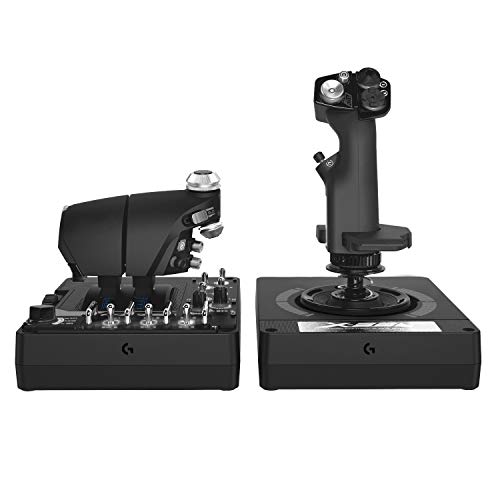
- 189 programmable controls for deep customization
- Twin throttles and mini analog stick broaden control
- Adjustable spring tension and hall sensors improve precision
Best For: PC sim pilots who want a feature-rich HOTAS with dual throttles and high control depth.
Best For Xbox Hotas Integration
Thrustmaster T-Flight Full Kit

- Includes stick, throttle, and rudder pedals
- Xbox Series X|S buttons simplify navigation
- S.M.A.R.T pedals improve smooth yaw control
Best For: Xbox and PC pilots who want an all-in-one HOTAS bundle with pedals.
Best For Beginners

- Detachable throttle suits flexible chair or desk layouts
- 12 programmable buttons and 5 axes for basic customization
- Adjustable stick resistance helps with precise control
Best For: New sim pilots building an affordable HOTAS setup for chair or desk use.
Best for Dual-Stick Space Sims
Thrustmaster T16000M FCS Space Sim Duo

- Hall Effect sensors for precise, drift-free input
- 32 programmable buttons across both sticks
- Ambidextrous grips support left, right, or dual-stick use
Best For: Space sim players who want accurate dual-stick control with lots of programmable inputs.
Best for Full-Cockpit Immersion – Next Level Racing Flight Simulator Cockpit
If you want a flight simulator chair for hotas setup that feels closer to a real cockpit than a basic gaming seat, the Next Level Racing Flight Simulator Cockpit is built for that job. It gives you a dedicated frame for flight controls, with broad adjustment range so you can place your yoke, joystick, throttle, and pedals where they feel natural.
Best For: Sim pilots who want a dedicated, highly adjustable cockpit for combat or civilian flying with HOTAS, yokes, and other flight peripherals.
Pros:
- Dedicated flight cockpit layout improves immersion for serious sim setups
- Compatible with major-brand yokes, joysticks, throttles, and other electronics
- Wide height and distance adjustments help dial in a comfortable HOTAS position
- Includes keyboard and mouse support for easier menu navigation
Cons:
- Large and heavy, so it is not easy to move around
- More of a space commitment than a simple chair-and-desk setup
- Higher-end cockpit option if you only need a basic flight seat
For buyers building a dedicated flight simulator chair for hotas setup, this cockpit stands out because it prioritizes adjustability, accessory compatibility, and immersion over convenience. It is a strong pick if you want a stable, purpose-built rig that can grow with more advanced flight hardware.
Best for Multi-Device Compatibility – EG STARTS Chair Mount for HOTAS
If you want a flight simulator chair for hotas setup that keeps your controls in a fixed, ergonomic position, this EG STARTS chair mount is built around broad compatibility and simple chair-based installation. It’s a practical way to move your joystick and throttle off the desk, tidy your cockpit area, and make long sessions feel more natural.
Best For: Sim racers and flight sim pilots who use multiple HOTAS, joystick, throttle, or shifter-style controllers and want a sturdy chair-mounted setup.
Pros:
- Works with a wide range of popular Logitech, Thrustmaster, VKB, and other flight controls
- Chair-mounted design helps keep controls stable and within comfortable reach
- Adjustable height and outward angle add flexibility for different seating positions
- Clears desk space and creates a cleaner, more immersive cockpit layout
Cons:
- Requires screw-based mounting, so setup is less portable than clamp-on options
- May need some adjustment time to dial in the ideal joystick and throttle position
- Not the most compact choice if you switch between multiple chairs often
Overall, this is a strong fit if you want a flight simulator chair for hotas setup that emphasizes compatibility, stability, and a more cockpit-like seating position. It’s especially appealing for users who already know their controller layout and want a dedicated mounted solution instead of a temporary desk rig.
Best Rudder Pedals for Precision – Thrustmaster TFRP Flight Rudder Pedals
If you’re building a flight simulator chair for hotas setup, the Thrustmaster TFRP is a strong add-on for adding realistic rudder and brake control without overcomplicating the rig. Its long pedal travel, self-centering axis, and smooth rail system make it a practical upgrade for sim pilots who want more accurate ground handling and coordinated turns.
Best For: Sim flyers who want responsive, console-and-PC-compatible rudder pedals to round out a HOTAS cockpit.
Pros:
- Smooth S.M.A.R.T. rail system with four aluminum rails for consistent motion
- Long rudder travel and self-centering action for precise control inputs
- Works with PS5, Xbox Series X|S, and PC
- Stable, ergonomic design suited to longer sim sessions
Cons:
- Pedals only, so you’ll still need a joystick/throttle for a full HOTAS setup
- May feel basic compared with higher-end metal rudder pedal sets
For a flight simulator chair for hotas setup, the TFRP is a sensible choice if you want better rudder precision and reliable comfort without jumping to a more expensive cockpit-grade pedal system. It’s especially appealing for players who split time between PC and consoles and need straightforward compatibility.
Best for Small Spaces – EG STARTS 2-Pack Hotas Chair Mounts
If you want a flight simulator chair for hotas setup without committing to a full cockpit frame, this 2-pack chair mount is a practical way to add a joystick and throttle to your existing seat. It’s aimed at sim pilots who need a stable, ergonomic mounting solution that works with a wide range of gear and stays easy to install.
Best For: Sim racers and flight sim players who want a chair-mounted HOTAS setup with broad device compatibility and minimal cockpit-building hassle.
Pros:
- Supports many popular HOTAS and flight-control devices, including Logitech, Thrustmaster, VKB, and VPC models
- Two-mount design lets you set up both joystick and throttle for a more immersive cockpit feel
- Heavy-duty construction is built to keep controls stable during use
- Simple chair-mounted approach avoids major modifications to your gaming space
Cons:
- Not every throttle and accessory is supported equally, so fit should be checked carefully
- Chair style and armrest layout may affect installation and positioning
- Best for users who already own compatible HOTAS gear, not a complete flight system
This is a strong pick if you want a flight simulator chair for hotas setup that prioritizes flexibility over a dedicated cockpit rig. It’s especially appealing for players with mixed or upgrade-ready gear who want a stable, affordable way to get flying fast.
Best for Realism – Thrustmaster HOTAS Warthog
If you want a premium control set to pair with a flight simulator chair for hotas setup, the Thrustmaster HOTAS Warthog is built for cockpit-style immersion. Its all-metal construction, 1:1 A-10C replica design, and dual-throttle layout make it a serious choice for combat flight sim fans who want hardware that feels as close to the real thing as possible.
Best For: Advanced sim pilots who want a durable, ultra-realistic HOTAS for military flight sims and deep cockpit immersion.
Pros:
- Metal-heavy build with an authentic A-10C replica feel
- Hall effect sensors deliver precise, long-lasting stick control
- Dual throttle is ideal for twin-engine and combat aircraft
- 55 programmable buttons support complex sim bindings
Cons:
- Premium price makes it a big investment
- PC-focused, so it is not the most flexible cross-platform option
- Large and heavy compared with simpler desk-friendly controls
The HOTAS Warthog is a standout if your priority is realism over convenience. For a flight simulator chair for hotas setup, it fits the advanced-cockpit brief especially well, though its size and cost make it more suited to dedicated sim rigs than casual desks.
Best for Easy Setup – DIWANGUS Foldable Racing Cockpit
If you want a practical flight simulator chair for hotas setup-style ergonomics but also need a true sim-racing cockpit, the DIWANGUS foldable rig is a smart value pick. It arrives mostly pre-assembled, adjusts for comfort, and folds away quickly when you need your space back.
Best For: Sim racers who want a quick-to-set-up, foldable cockpit with adjustable seating and support for popular wheel-and-pedal combos.
Pros:
- Pre-assembled design can be ready in about 10 minutes
- Folds in roughly 15 seconds for easier storage
- Wide compatibility with Logitech and Thrustmaster setups
- Adjustable wheel, pedal, and shifter positioning for better ergonomics
Cons:
- Does not include a steering wheel or pedals
- More suited to racing hardware than a true HOTAS flight rig
- 110 kg support limit may not suit every user
For buyers comparing a flight simulator chair for hotas setup versus a racing cockpit, this model stands out for convenience and storage, not aviation-specific mounting. It works best if you mainly want a stable, adjustable seat for sim racing and occasional flight-sim use with adaptable accessories.
Best for Advanced HOTAS Controls – Logitech G X56 HOTAS Controller
If you want a flight simulator chair for hotas setup that feels more like a cockpit than a casual controller desk, the Logitech G X56 is built for depth and precision. It gives sim pilots a huge control surface, dual throttles, and plenty of programmable inputs for space, combat, and general flight sims.
Best For: PC sim pilots who want a highly programmable HOTAS with fine control, twin throttles, and VR-friendly layout.
Pros:
- 189 programmable controls for serious sim customization
- Hall-effect sensors and 16-bit axes for accurate stick input
- Adjustable 4-spring system helps tune stick resistance to your preference
- Twin throttles and mini analog stick expand control options
Cons:
- Requires two USB ports, so cable management matters
- More complex than entry-level HOTAS setups
- Best suited to players who will use the advanced mapping features
Overall, the X56 stands out for simmers who want a dense, customizable control layout rather than a simple starter kit. In a flight simulator chair for hotas setup, it rewards a dedicated cockpit-style arrangement with strong precision and lots of room to grow.
Best For Xbox Hotas Integration – Thrustmaster T-Flight Full Kit
If you want a flight simulator chair for hotas setup that feels more like a real cockpit than a basic desk rig, the Thrustmaster T-Flight Full Kit is a strong all-in-one option. It combines a HOTAS stick and throttle with TFRP rudder pedals, giving you the key controls needed for smoother takeoffs, coordinated turns, and more precise landings in both combat and civil sims.
Best For: Xbox Series X|S and PC sim pilots who want a complete HOTAS-and-pedals bundle with simple console integration.
Pros:
- Includes stick, throttle, and rudder pedals in one package
- Dedicated Xbox buttons make console navigation easier during play
- S.M.A.R.T slide rail pedals help yaw control feel smoother and more natural
- Full-foot pedal design and heel rests can reduce fatigue in longer sessions
Cons:
- Requires enough space for both the HOTAS controls and pedal set
- Not a chair mount or cockpit frame by itself
- More of a complete controller bundle than a premium enthusiast setup
This is a practical pick if you’re building a flight simulator chair for hotas setup and want the core controls covered without piecing everything together separately. The big advantage is convenience: you get the major flying inputs and Xbox-friendly controls in one kit, making it easier to jump straight into sim flying.
Best For Beginners – Thrustmaster T-Flight Hotas X
If you want an affordable entry point into a flight simulator chair for hotas setup, the Thrustmaster T-Flight Hotas X is a simple, comfortable pick with enough control to make cockpit-style flying feel natural. The detachable throttle, adjustable stick resistance, and plug-and-play layout make it easy to pair with a desk mount or a more dedicated sim chair setup.
Best For: New sim pilots who want an easy-to-use HOTAS with flexible desktop or cockpit-style placement.
Pros:
- Comfortable ergonomic grip and wide hand rest for longer sessions
- Detachable throttle works well for compact desks or chair-mounted setups
- 12 programmable buttons and 5 axes give you solid customization
- Adjustable resistance helps fine-tune stick feel for smoother control
Cons:
- Mostly aimed at entry-level users rather than advanced sim rigs
- Plastic build feels less premium than higher-end HOTAS systems
- Limited to PC compatibility
The T-Flight Hotas X is a practical choice if you’re building a flight simulator chair for hotas setup on a budget and want straightforward controls without a steep learning curve. It’s not the most advanced option, but it covers the essentials well for casual flying and early sim upgrades.
Best for Dual-Stick Space Sims – Thrustmaster T16000M FCS Space Sim Duo
If you want a precise, hands-on control layout for a flight simulator chair for hotas setup, the Thrustmaster T16000M FCS Space Sim Duo is built for dual-stick space combat rather than a traditional joystick-and-throttle rig. Its Hall Effect sensors, ambidextrous grip parts, and 32-button layout make it a strong fit for players who want fine control in space sims, dogfights, and other high-input cockpit games.
Best For: Space sim players who want a dual-stick control setup with accurate inputs, lots of buttons, and flexible left/right-hand configuration.
Pros:
- Hall Effect sensors help maintain precise input with no drift over time.
- 32 buttons give you plenty of direct control for weapons, systems, and mapping.
- Ambidextrous design makes it easy to set up for left, right, or dual-stick use.
- Weighted bases and hand rests improve comfort during long sessions.
Cons:
- Not a full HOTAS package, since it uses dual sticks instead of a throttle.
- Extra software setup may be needed for the best custom profiles.
- Primarily aimed at space sims, so it may be less ideal for traditional flight sim users.
For players building a cockpit around a flight simulator chair for hotas setup, this is a specialized choice that favors precision and control depth over a conventional throttle-based layout. It makes the most sense if your favorite games reward dual-stick maneuvering and lots of programmable inputs.
How We Picked the Best Flight Simulator Chair for Hotas Setup
We focused on products that make a Flight Simulator Chair for Hotas Setup more practical, not just more premium. The best picks offered secure mounting, sensible ergonomics, broad compatibility with common sticks, throttles, and pedals, and enough adjustability to suit different desk and chair arrangements.
We also favored options that balance realism with everyday usability. For many buyers, the right setup is less about the most complex cockpit and more about stable placement, easy entry and exit, and controls that stay where your muscle memory expects them.
Quick Comparison
Broadly, the options here fall into three groups: full cockpit frames for maximum immersion, chair mounts for a compact and affordable upgrade, and HOTAS bundles or control sets for users building the system around the chair. Full rigs usually deliver the most stability, while chair mounts are best when space is limited. Bundles make sense if you are starting from scratch and want matched components.
Key Buying Factors for a Flight Simulator Chair for Hotas Setup
Mounting Stability
Look for rigid attachment points, minimal flex, and hardware that keeps the stick and throttle from shifting during aggressive inputs. If you fly fast jets or space sims, stability matters as much as comfort.
Compatibility
Check your exact gear model before buying. Some mounts fit popular Logitech and Thrustmaster systems directly, while others work best with generic dimensions or adjustable brackets.
Ergonomics and Reach
The best setup positions your HOTAS controls, pedals, and seat height so your arms and legs stay relaxed. Poor placement leads to fatigue, slower reaction times, and less consistent control.
Space and Storage
If you need to move the rig often, foldable stands or modular mounts are easier to live with than a permanent cockpit frame. Dedicated rigs are better if the setup can stay put.
Pedals and Expansion
Rudder pedals can significantly improve realism and control, especially for aircraft that reward coordinated turns and ground handling. A good chair-based system should leave room for pedal placement without crowding your legs.
Who Should Buy Which Flight Simulator Chair for Hotas Setup?
If you want maximum immersion and plan to keep everything in one place, choose a cockpit-style frame. If you are short on space or want a cleaner upgrade from a desk setup, chair mounts are often the smartest choice. If you are new to sim flying, a HOTAS bundle can simplify the buying process and help you build a balanced system around your chair.
For serious enthusiasts, the best Flight Simulator Chair for Hotas Setup is the one that matches your room, your aircraft type, and how often you fly. Prioritize stability and comfort first, then add realism features once the core fit is right.