TECKNET Wireless Mouse review: this is a straightforward, office-friendly wireless mouse built around comfort, silence, and easy compatibility.
If you want a reliable everyday pointer for work, study, or home use, the TECKNET Wireless Mouse makes a strong case.
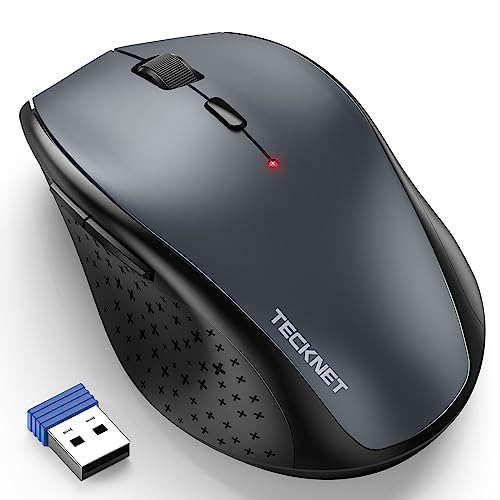
TECKNET Mouse Review Summary
The TECKNET Wireless Mouse is a smart pick for buyers who value comfort more than flashy extras.
It combines a full-size ergonomic shape, silent clicking, adjustable DPI, and broad cross-platform support into a mouse that feels purpose-built for everyday productivity.
That makes it especially appealing for students, office workers, and home users who spend long hours at a desk and want a mouse that is easy on the hand, quiet in shared spaces, and simple to get running.
If you are comparing the TECKNET Wireless Mouse review results across office mice, this model stands out for practicality rather than gimmicks.
Scorecard
| Category | Score | What it means |
|---|---|---|
| Ergonomic comfort | 8.0 | Full-size curved shape, palm rest, and non-slip rubber sides help reduce strain. |
| Tracking precision | 8.0 | Six DPI settings up to 4800 make sensitivity easy to tune for different tasks. |
| Click noise | 9.0 | Silent left and right clicks suit libraries, offices, dorms, and other quiet spaces. |
| Battery efficiency | 8.0 | Sleep modes and independent power switches are designed to stretch battery life. |
| Compatibility | 9.0 | Wide support across Windows, Chromebook, Mac OS, Linux, and PCs. |
| Setup and connectivity | 8.0 | 2.4G USB plug-and-play keeps installation fast and simple. |
| Portability and size | 7.0 | Portable enough for a bag, but not as tiny as a travel-first mouse. |
Bottom line: the TECKNET Wireless Mouse is a strong everyday value buy if you want a quiet, ergonomic, no-fuss wireless mouse for a laptop or desktop.
It is not the most advanced mouse in the market, but it is thoughtfully designed for dependable daily use.
Key Features and Specifications of TECKNET Mouse
The TECKNET Mouse keeps the spec sheet focused on usability rather than extras you may never use.
Here is what matters most when deciding whether it fits your desk setup.
| Specification | Details |
|---|---|
| Brand | TECKNET |
| Model | EWM01002 |
| Connection | 2.4G wireless USB receiver |
| Movement detection | Optical |
| Buttons | 6 |
| DPI levels | 800 / 1200 / 1600 / 2400 / 3200 / 4800 |
| Hand orientation | Right-handed |
| Dimensions | 4.23 x 2.61 x 1.63 in |
| Material | ABS with plastic finish |
| Color | Grey |
| Power | Battery powered |
| Batteries required | 2 AA batteries |
| Battery life | Up to 400 hours in specs; marketing language also references longer endurance |
| Wireless range | Up to 50 ft / 15 m stated |
| Compatibility | Windows XP, Vista, 7, 8, 10, 11, Chromebook, Mac OS, Linux, and PCs |
| Special design features | Silent clicks, ergonomic sculpted shape, palm rest, non-slip rubber sides |
| Surface support | Paper, resin, cloth, and glass |
Several details deserve attention.
First, the 2.4G USB receiver makes this a classic plug-and-play mouse, which is ideal if you do not want to deal with software, pairing menus, or Bluetooth troubleshooting.
Second, the six DPI settings give it a wider sensitivity range than many basic office mice.
Third, the ergonomic shell and side grip material show that TECKNET designed this mouse with comfort as a priority rather than raw portability.
Pros and Cons of TECKNET Mouse
Every practical review should weigh the trade-offs, and the TECKNET Wireless Mouse pros and cons are easy to define.
| Pros | Cons |
|---|---|
| Very quiet left and right clicks | Requires 2 AA batteries, which are not included |
| Comfortable ergonomic full-size shape | Right-hand design excludes left-handed users |
| Six DPI levels for flexible pointer control | May feel a bit large for users wanting a tiny travel mouse |
| Simple plug-and-play setup | USB receiver setup is less convenient than built-in Bluetooth for some buyers |
| Broad compatibility across many operating systems | Battery-life claims should be treated as approximate marketing guidance |
| Non-slip sides improve handling |
The biggest strength is comfort combined with quiet operation. The main drawbacks are equally clear: battery dependency, right-hand-only shaping, and a form factor that favors desk use over ultra-portable travel.
How the 6 DPI Levels Feel in Daily Use
The adjustable DPI range is one of the most useful parts of the TECKNET Wireless Mouse.
Instead of locking you into one cursor speed, it offers 800, 1200, 1600, 2400, 3200, and 4800 DPI, which gives you meaningful control over how the mouse behaves.
At the lower settings, the cursor feels calmer and easier to manage for tasks like document editing, spreadsheet work, photo sorting, or precision browsing.
At the higher end, pointer movement becomes quicker and more responsive, which can be helpful on larger monitors or when you want to cover more screen distance with less hand motion.
That flexibility matters because not everyone uses a mouse the same way.
A student may want one setting for note-taking and another for drawing or web research, while an office worker may appreciate faster navigation across multiple windows.
In that sense, the TECKNET Mouse is more adaptable than a single-sensitivity budget mouse.
Buyer takeaway: if you regularly switch between tasks or screens, the DPI range is a real practical advantage rather than a spec-sheet filler.
Silent Click Performance in Shared Spaces
Noise reduction is one of the most compelling reasons to choose this mouse.
The TECKNET Wireless Mouse uses silent left and right clicks, and in normal use that makes a noticeable difference compared with many standard office mice.
In a library, classroom, shared apartment, or meeting room, the softer click profile is a genuine quality-of-life upgrade.
It helps reduce distraction without making the mouse feel mushy or vague.
You still get a clear sense of actuation, but without the sharp, repetitive clicking sound that can become irritating over a full workday.
This is where the mouse really earns its place as a quiet productivity tool.
If you work late while others sleep nearby, attend frequent online meetings, or simply dislike loud peripherals, the silent-click design is a major win.
The only caveat is that silent switches are not a substitute for a premium tactile switch feel.
If you want crisp, mechanical feedback, this mouse may feel softer than expected.
For most everyday buyers, though, that trade-off is worth it.
Ergonomic Grip and Hand Size Fit
TECKNET clearly aimed at comfort here.
The mouse uses a full-size curved body with a palm-rest style shape and non-slip rubber sides, which helps the hand settle naturally instead of pinching around a narrow shell.
The sculpted body is designed to support small-to-medium hands especially well.
For office use, that matters more than many shoppers realize.
A mouse that is too flat can force extra wrist movement, while a mouse that is too small can make your fingers and palm work harder over time.
The TECKNET Mouse sits in a comfortable middle ground for desk work, especially if you prefer to rest part of your palm on the mouse rather than hover over a tiny shell.
Because it is right-handed, left-handed users should skip it unless they are comfortable adapting to a mirrored setup.
Also, if you travel constantly and want something that disappears into a laptop sleeve, this is more of a compact full-size mouse than a true micro mouse.
Best fit: users who want a comfortable office mouse more than a pocket-sized travel companion.
Battery Life and Power-Saving Features
Battery life is another reason this mouse looks good for practical buyers.
TECKNET includes sleep mode and independent power switches, both of which are designed to minimize unnecessary drain.
The mouse runs on two AA batteries, which are not included, so you should plan on picking up batteries separately.
There is one important nuance: the product information references different runtime claims, including an average-life figure and a longer marketing claim.
That is common in peripherals, but buyers should treat the exact runtime as approximate rather than absolute.
Real battery life will depend on how often you use the mouse, whether you shut it off, and how sensitive your sensitivity setting is.
Even with that caution, the power design makes sense for a low-maintenance home or office mouse.
If you prefer a wireless mouse that does not need charging every few days, AA-powered simplicity is still appealing.
The trade-off is convenience: rechargeable USB-C mice are easier for some users, while this model prioritizes long runtime and straightforward replacement batteries.
Practical verdict: good power efficiency, but not the best choice if you want built-in rechargeable convenience.
Compatibility Across Windows, Mac, Chromebook, and Linux
Compatibility is one of the TECKNET Mouse’s strongest selling points.
It is designed to work across Windows, Chromebook, Mac OS, Linux, and PCs, which makes it especially useful in households or offices with mixed devices.
That broad support lowers the risk of buying the wrong mouse for your machine.
You can move it between a school laptop, a work PC, or a family desktop without needing a new driver package.
The plug-and-play receiver approach also keeps setup simple: insert the USB receiver, power the mouse, and start using it.
This kind of compatibility is especially valuable for people who want a “just works” accessory.
If you do not want to troubleshoot Bluetooth pairing, macOS permissions, or driver installation, the TECKNET Wireless Mouse is refreshingly uncomplicated.
The one limitation is that USB receiver-based mice consume a port and are less universal than Bluetooth models on modern thin laptops.
If your computer has very few USB ports, a Bluetooth alternative may fit better.
Design and Everyday Usability
From a design standpoint, the TECKNET Wireless Mouse is intentionally conservative.
The grey ABS body looks like a classic office mouse, not a gaming peripheral or fashion accessory.
That is a good thing for buyers who want something professional and unobtrusive.
The buttons, side grips, and palm support all contribute to a mouse that feels made for repetitive daily use.
The shape is not flashy, but it is thoughtfully tuned for comfort and efficiency.
The six-button layout also gives you the standard controls you need without overwhelming the user with unnecessary extras.
One nice practical detail is that the mouse is stated to work on multiple surface types, including paper, resin, cloth, and glass.
That will not replace a proper mouse pad in every situation, but it does suggest good flexibility for home, dorm, and office setups.
Design verdict: simple, sensible, and built around actual desk use rather than spec-sheet bragging rights.
TECKNET Mouse Compared with Similar Alternatives
If you are still deciding whether the TECKNET Wireless Mouse is the right fit, it helps to compare it with a few common alternatives sold on Amazon.
- Logitech M705 Marathon Mouse – A popular alternative for buyers who want a more established brand name, long battery focus, and a similar productivity-first approach.
- Anker 2.4G Wireless Vertical Mouse – Better for shoppers specifically seeking a vertical ergonomic grip rather than a classic curved mouse shape.
- HP X3000 Wireless Mouse – A simpler mainstream option if you want a basic wireless mouse with broad familiarity.
- TECKNET Bluetooth Wireless Mouse – Worth considering if you want to avoid the USB receiver and prefer Bluetooth connectivity.
Compared with these alternatives, the TECKNET model is strongest when you want quiet clicks, easy setup, and ergonomic comfort at the same time.
If you specifically want Bluetooth or a vertical grip, another model may be a better match.
If you mainly want a dependable everyday office mouse, this one is very competitive.
Who Should Buy TECKNET Mouse?
The TECKNET Mouse is a good fit for buyers who want a quiet, comfortable, low-maintenance wireless mouse for everyday work.
- Office workers who want a mouse that stays quiet during meetings or shared desk time
- Students who need simple plug-and-play setup on laptops or school computers
- Home users who want a dependable everyday mouse without extra software
- People with small-to-medium hands who prefer a full-size ergonomic shape
- Multi-device households that use Windows, Mac, Chromebook, or Linux systems
Who should skip it?
- Left-handed users, because the shape is right-hand oriented
- Frequent travelers who want an ultra-small mouse for constant packing
- Bluetooth-first buyers who do not want to use a USB receiver
- Anyone wanting a rechargeable mouse instead of AA batteries
If you fall into the first group, the TECKNET Wireless Mouse offers a very appealing balance of comfort, silence, and simplicity.
If you fall into the second group, there are better alternatives for your workflow.
Is TECKNET Mouse Worth It?
Yes, the TECKNET Wireless Mouse is worth it for the right buyer. It is not trying to compete as a premium gaming mouse or a highly specialized ergonomic device.
Instead, it focuses on the features that matter most for daily productivity: quiet clicks, an easy setup process, flexible DPI control, and broad compatibility.
The main reasons to buy it are simple.
You get silent operation for shared spaces, comfortable ergonomic shaping for long sessions, and plug-and-play wireless convenience across many operating systems.
Those strengths make it a genuinely practical choice for office and home use.
The main reasons to hesitate are also straightforward: it needs AA batteries, it is not left-handed friendly, and it may feel too full-size if you want a tiny travel mouse.
None of those are deal-breakers for the right audience, but they do define the product clearly.
Final verdict: if you want a dependable, quiet, and comfortable wireless mouse for everyday computing, the TECKNET Wireless Mouse is an easy recommendation.
If you want Bluetooth, rechargeable power, or a more compact design, keep shopping.
Buying advice: choose the TECKNET Wireless Mouse if comfort and silence are top priorities; skip it only if your workflow demands Bluetooth or a truly portable form factor.