As you gear up for the next generation of console gaming, choosing the right external capture card is essential. With options boasting 4K60 recording and low latency, the market is packed with choices. You’ll want a card that suits your streaming and recording needs seamlessly. But with so many models available, which ones truly stand out? Let’s explore the top contenders that could elevate your gaming experience.
Elgato 4K S External Capture Card for PS5, Xbox, Switch, PC, Mac, iPad

If you’re a gamer looking to capture high-quality gameplay across multiple platforms, the Elgato 4K S External Capture Card is your go-to choice. It’s compatible with PS5, Xbox, Switch, PC, Mac, and iPad, allowing you to record stunning 4K60 footage. With near-zero latency and HDR10 support on Windows, you’ll experience gameplay like never before. The card supports passthrough resolutions up to 2160p60, ensuring a seamless gaming experience. Weighing only 90 grams, it’s portable and easy to set up. Plus, with a 4.5 out of 5-star rating, it’s a favorite among gamers for good reason.
Best For: Gamers looking for a versatile and high-quality capture solution across multiple platforms.
Pros:
- High-quality capture resolutions support up to 4K60, providing stunning video quality.
- Near-zero latency ensures that gameplay is smooth and responsive during recording.
- Lightweight and portable design makes it easy to set up and transport for gaming sessions on the go.
Cons:
- HDR10 support is only available on Windows, limiting functionality for macOS or iPad users.
- Requires a USB 3.0 Type-C port, which may not be available on all older devices.
- Limited capture resolutions for HDR10, capped at 1080p60, which may not satisfy all users.
Acer USB 3.0 Video Capture Card for Streaming

The Acer USB 3.0 Video Capture Card stands out as an ideal choice for gamers and content creators seeking high-quality streaming capabilities. With 4K input and 1080P@60Hz output, it delivers stunning visuals. Its lightweight, portable design makes it perfect for on-the-go recordings, while the mic-in functionality allows you to add real-time commentary effortlessly. You’ll love the plug-and-play feature, ensuring easy setup without extra drivers. Compatible with various consoles and operating systems, it supports popular streaming apps like OBS and YouTube. With a 4.3-star rating and a one-year warranty, it’s a reliable option for all your streaming needs.
Best For: Gamers and content creators seeking a high-quality, portable solution for streaming and recording.
Pros:
- High-quality video output with 4K input and 1080P@60Hz for stunning visuals.
- Mic-in functionality allows for real-time commentary, enhancing the streaming experience.
- Plug and play design ensures easy setup without the need for additional drivers.
Cons:
- May have compatibility issues with some less common devices or software.
- Limited to 1080P output, which may not meet the needs of users looking for higher resolutions.
- The lightweight design, while portable, may feel less sturdy compared to heavier models.
Elgato HD60 X Game Capture Card for Streaming and Recording

For gamers who want to elevate their streaming and recording experience, the Elgato HD60 X Game Capture Card stands out with its ability to capture and stream in stunning 1080p60 HDR10 or 4K30. It’s compatible with major consoles like PS5, Xbox Series X, and Nintendo Switch 2, making it versatile for any setup. Enjoy ultra-low latency VRR passthrough and no annoying watermarks or time limits. With support for popular software like OBS and Streamlabs, you’ll easily share your gameplay on platforms like Twitch and YouTube. Plus, its compact design guarantees it won’t clutter your gaming space.
Best For: Gamers and content creators looking for high-quality streaming and recording capabilities on various gaming consoles.
Pros:
- Supports stunning video quality up to 4K30 and 1080p60 HDR10 for an immersive viewing experience.
- Compatible with multiple platforms including PS5, Xbox Series X, and Nintendo Switch 2, providing versatility for different gaming setups.
- Ultra-low latency VRR passthrough ensures seamless audio and video syncing without watermarks or time limits.
Cons:
- Requires a powerful PC setup for optimal performance, which might not be accessible for all users.
- Limited to HDMI input, meaning it can’t capture from other types of video sources.
- May have a learning curve for beginners unfamiliar with streaming software and setup.
Elgato Cam Link 4K – External Capture Card for DSLR & Camcorder

Streamers and content creators seeking to elevate their video quality will find the Elgato Cam Link 4K an invaluable tool. This external capture card transforms your DSLR, mirrorless camera, or camcorder into a high-quality webcam, supporting resolutions up to 4K at 60 fps. It’s compatible with PC, Mac, and iPad, and works seamlessly with popular software like OBS and Zoom. With ultra-low latency, your video and audio stay perfectly in sync, and the easy plug-and-play setup means you can start streaming in no time. Enjoy a professional edge in your content creation with this powerful capture card.
Best For: Streamers and content creators looking to enhance their video quality with high-resolution webcam capabilities.
Pros:
- Supports up to 4K at 60 fps for stunning video quality.
- Ultra-low latency ensures video and audio sync, enhancing the streaming experience.
- Easy plug-and-play setup allows for quick and hassle-free installation.
Cons:
- Requires compatible camera for optimal performance at higher resolutions.
- Limited to HDMI input, which may restrict some users depending on their equipment.
- Not all features may work on older operating systems, necessitating updates for compatibility.
Elgato 4K Pro Internal Capture Card for Streaming & Recording

If you’re looking to elevate your gaming broadcasts, the Elgato 4K Pro Internal Capture Card is an excellent choice, especially for those using next-gen consoles like the PS5 or Xbox Series X. This powerful card captures gameplay at stunning 4K60 resolution and offers 8K60 passthrough. With ultra-low latency, you’ll experience synchronized broadcasts and gameplay, ensuring smooth streaming on platforms like Twitch and YouTube. It supports both single and dual PC setups, and its compatibility with OBS and other software makes broadcasting seamless. Plus, its compact design and robust performance make it a top pick for gamers seeking quality.
Best For: Gamers and streamers who want to enhance their broadcasts with high-quality 4K resolution and low-latency performance on next-gen consoles.
Pros:
- Captures gameplay at stunning 4K60 resolution and features 8K60 passthrough.
- Ultra-low latency ensures synchronized gameplay and broadcast for a seamless experience.
- Compatible with a wide range of platforms and software, making it versatile for different streaming setups.
Cons:
- Requires a minimum system configuration that may not be met by all users.
- Higher price point compared to basic capture cards, which may not be suitable for casual gamers.
- Limited to HDMI (unencrypted) input, which may restrict compatibility with some devices.
Acer 4K HDMI to USB 3.0 Capture Card for Streaming

The Acer 4K HDMI to USB 3.0 Capture Card stands out as an excellent choice for gamers who want to elevate their streaming experience without the hassle of complicated setups. You’ll enjoy smooth gameplay with support for 1080P at 60FPS and HDMI input up to 4K at 30FPS. Its high-speed USB 3.0 interface guarantees quick data transfer, eliminating motion blur and stuttering. Plus, it’s compatible with a wide range of devices, from PS5 to laptops, and works seamlessly with popular software like OBS Studio and Twitch. With its compact design and plug-and-play feature, you can easily take your streaming on the go.
Best For: Gamers and content creators looking for a simple, high-quality capture solution for streaming and recording.
Pros:
- High-speed USB 3.0 interface ensures smooth and quick data transmission with minimal lag.
- Wide compatibility with various gaming consoles, cameras, and operating systems makes it versatile for different setups.
- Compact and lightweight design allows for easy portability, perfect for on-the-go streaming.
Cons:
- One-way transmission only limits functionality to HDMI input to USB output, which may not suit all users’ needs.
- Limited to 30FPS for 4K input, which may not meet the expectations of those seeking higher frame rates for 4K content.
- Restocking fees may apply for returns, which could deter some customers from purchasing.
Elgato HD60 S+ External Capture Card for Streaming and Recording
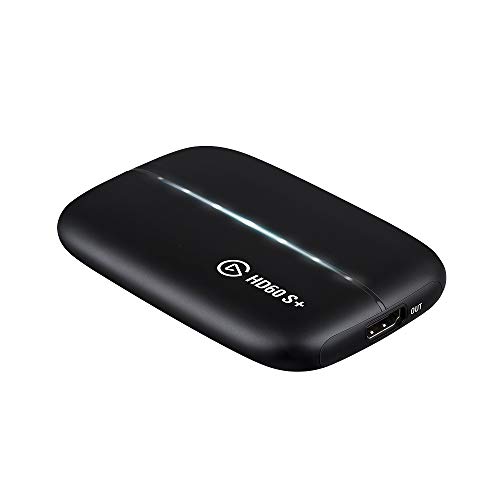
For gamers who demand high-quality visuals and seamless performance, the Elgato HD60 S+ stands out as an exceptional choice in external capture cards. You can capture gameplay in stunning 1080p60 HDR10 or experience 4K60 HDR10 zero-lag passthrough, ensuring no delays while playing. With features like Instant Gameview for ultra-low latency and unlimited capture, your streaming and recording will be effortless. Flashback recording lets you save those epic moments retroactively. Compatible with PS5, Xbox, PC, and Mac, it’s versatile for any setup. Plus, with a solid 2-year warranty and impressive reviews, you can trust its reliability.
Best For: Gamers seeking high-quality streaming and recording solutions with minimal latency and versatile compatibility.
Pros:
- High-Quality Capture: Supports 1080p60 HDR10 and 4K60 HDR10 for stunning visuals.
- Zero-Lag Passthrough: Play games without any delay, maintaining the original quality.
- Unlimited Capture & Flashback Recording: Record extensive gameplay and retroactively save highlights.
Cons:
- Requires Compatible Hardware: Minimum system requirements may limit use for some users.
- External Device Dependency: Being an external capture card, it requires additional setup compared to internal capture solutions.
- Best Performance on Newer Consoles: While compatible with older systems, optimal performance is seen with newer gaming consoles.
Capture Card for Nintendo Switch, 4K HDMI Video Capture Card

Looking to elevate your Nintendo Switch gaming experience? The 4K HDMI Video Capture Card is your go-to solution, allowing you to stream and record at 1080p60FPS. With plug-and-play functionality, it’s super easy to set up—no drivers or external power needed. Plus, it supports a variety of devices, from PS4 to cameras. Thanks to its HDMI LOOP-OUT feature, you can enjoy real-time gameplay without any delay. The high-speed USB 3.0 tech guarantees low latency for live streaming on platforms like Twitch and YouTube. This capture card is perfect for gamers wanting excellent quality and easy compatibility!
Best For: Gamers and content creators looking for an easy-to-use capture card to stream and record high-quality gameplay from various HDMI devices.
Pros:
- Plug and Play functionality allows for hassle-free setup without the need for drivers.
- Supports HDMI LOOP-OUT for real-time gameplay viewing without any lag.
- High-speed USB 3.0 technology ensures low latency for smooth live streaming.
Cons:
- Limited output resolution of up to 2K30Hz may not meet the needs of some high-end users.
- Potential restocking fees may apply for returns due to customer misuse or misrepresentation.
- Compatibility issues may arise with some older devices or non-standard setups.
Elgato HD60 S External Capture Card for Streaming and Recording

Streamers and gamers seeking to elevate their content will find the Elgato HD60 S an ideal choice, thanks to its impressive 1080p60 capture capability and ultra-low latency performance. This external capture card seamlessly connects with PS5, PS4/Pro, Xbox Series X/S, and Xbox One X/S. With true passthrough technology, you’ll experience zero lag during gameplay. Plus, Instant Gameview enhances your workflow for smooth streaming. You can record unlimited gameplay directly to your hard drive and even use Flashback Recording to save those epic moments retroactively. With rave reviews and a solid warranty, the HD60 S is a top contender for serious gamers.
Best For: Streamers and gamers looking to enhance their content with high-quality capture and low latency performance.
Pros:
- Supports 1080p60 capture, delivering high-quality gameplay sharing.
- True passthrough technology ensures zero lag during console gameplay.
- Unlimited capture and Flashback Recording allow for extensive gameplay recording and saving of memorable moments.
Cons:
- Requires a compatible PC setup with specific hardware requirements.
- May incur fees for misrepresentation of product condition upon return.
- Limited to unencrypted HDMI input, which may restrict some console connections.
Elgato HD60 X External Capture Card for PS5, PS4, Xbox Series X/S, Xbox One, PC/Mac

Gamers seeking to elevate their streaming experience will find the Elgato HD60 X External Capture Card an excellent choice. This powerful device supports PS5, PS4, Xbox Series X/S, Xbox One, and PC/Mac, capturing gameplay in stunning 1080p60 HDR10 or 4K30 HDR10 quality. With sub 100ms latency, you’ll enjoy seamless audio and video syncing. The plug-and-play setup makes it simple to use, and its compatibility with popular apps like OBS and Streamlabs enhances your streaming capabilities. Plus, you can trigger flashback recordings with ease. Weighing just 4.8 ounces, the HD60 X is both portable and efficient for all your gaming needs.
Best For: Gamers and streamers looking for high-quality gameplay capture and seamless streaming experiences across multiple platforms.
Pros:
- Stunning Capture Quality: Supports 1080p60 HDR10 and 4K30 HDR10 for exceptional video clarity.
- Low Latency Performance: Offers sub 100ms latency for synchronized audio and video.
- Easy Setup: Plug and play functionality ensures hassle-free installation on Windows and Mac.
Cons:
- Weight Limitations: At 4.8 ounces, it may not be as lightweight as other portable options.
- Limited Warranty: Comes with a 90-day warranty, which may not be sufficient for some users.
- Subscription-Free Software: While convenient, the lack of advanced features in free software may limit more experienced streamers.
Factors to Consider When Choosing an External Capture Card for Console
When you’re choosing an external capture card for your console, you’ll want to think about several key factors. Consider the capture resolution options, how well it works with your devices, and its latency and performance. Don’t forget to check the ease of setup, price, and warranty to make the best choice for your gaming needs.
Capture Resolution Options
Choosing the right capture resolution for your external capture card is vital, as it directly affects the quality of your streams and recordings. Capture resolution options usually range from 480p to 4K, allowing you to select the quality that suits your needs. Many capture cards support multiple resolutions, such as 1080p60, 1440p120, and 4K30, catering to both casual gamers and professionals. Keep in mind that higher resolutions require more robust hardware; you’ll need powerful CPUs and GPUs for smooth performance. Some capture cards even offer passthrough resolutions up to 8K, letting you enjoy ultra-high-definition gameplay while streaming at lower resolutions. Finally, consider latency—higher resolutions can lead to increased processing time, which is significant for real-time gaming.
Compatibility With Devices
Finding the right external capture card hinges on compatibility with your gaming console. Make certain it works seamlessly with popular systems like the PS5, Xbox Series X/S, or Nintendo Switch. Check that it supports a range of resolutions, such as 4K, 1440p, and 1080p, to match your console’s output. It’s essential to verify that the capture card can handle unencrypted HDMI input since most consoles require this for capturing gameplay. Don’t forget to take into account the operating system compatibility; some cards only work with specific systems like Windows, macOS, or iPadOS. Finally, confirm it supports popular streaming and recording software like OBS or Streamlabs to enhance your content creation experience.
Latency and Performance
Compatibility with your console is just the starting point; latency and performance play a vital role in ensuring an enjoyable gaming experience. Low latency is essential, so look for external capture cards that offer near-zero latency to keep audio and video in sync during gameplay. Opt for cards featuring ultra-low latency technology, delivering less than 100 milliseconds of delay for responsive streaming and recording. Performance matters too; a capture card supporting VRR (Variable Refresh Rate) enhances visuals during fast-paced action. Aim for high-quality passthrough resolutions like 4K60 or 1080p120 to maintain visual fidelity while minimizing lag. Finally, select a card that supports the latest HDMI standards to boost latency and overall performance, ensuring compatibility with high-resolution outputs.
Ease of Setup
When considering an external capture card for console gaming, ease of setup is essential to getting you into the action quickly. Look for models that offer plug-and-play functionality, eliminating the hassle of additional drivers or external power sources. A straightforward connection process via HDMI and USB will minimize complexity during installation. Verify the capture card is compatible with popular streaming software like OBS and Streamlabs, as this simplifies integration into your setup. Additionally, opt for cards with low-latency features, which enhance your workflow by providing real-time video capture without delays. Finally, check for included accessories like USB and HDMI cables to ease the initial setup process and reduce the need for extra purchases.
Price and Warranty
A wide range of prices for external capture cards makes it essential to choose one that fits your budget and needs. You’ll find options under $100, but premium models can exceed $200. To make a wise investment, consider the warranty period; some cards offer 1-year protection, while others extend up to 2 years or more. Don’t forget to check the return policy, as many retailers provide a 30-day full refund for defective products, ensuring customer satisfaction. Be cautious of potential restocking fees if you return a card due to misuse. Finally, read customer feedback and ratings to gauge reliability—more reviews usually indicate a trustworthy option that suits your gaming setup.