When it comes to maintaining your PC’s performance, monitoring its temperature is essential. A reliable temperature monitor display can provide you with real-time insights, helping you prevent overheating and system failures. With various options available, from sleek designs to customizable features, you might wonder which ones stand out. Let’s explore the top contenders that can keep your system cool and running efficiently.
Lian Li Universal Screen for PC (SM088X)

The Lian Li Universal Screen for PC (SM088X) is the ideal choice for gamers and content creators looking to elevate their setup with a sleek, multifunctional display. Its 8.8″ LCD serves as a secondary monitor, showing hardware stats, media, or your custom visuals. You’ll love the adjustable mounting that fits various setups, whether on fan frames or flat surfaces. With L-Connect 3 software, you can personalize your display with themes or your own videos. Plus, the built-in ARGB lighting strip syncs with your system, adding a vibrant touch. It’s the perfect blend of style and functionality for any PC enthusiast.
Best For: Gamers and content creators seeking a multifunctional and stylish secondary display for their PC setups.
Pros:
- Customizable Display: Personalize the screen with themes, videos, and photos through L-Connect 3 software.
- Versatile Mounting Options: Adjustable bracket allows installation on various surfaces, ensuring compatibility with different setups.
- Enhanced Aesthetics: Built-in diffused ARGB lighting creates a cohesive and vibrant look that syncs with your system.
Cons:
- Limited Screen Size: The 8.8″ display may be too small for users needing extensive screen real estate.
- Dependency on Software: Full customization and lighting effects require the use of L-Connect 3 software, which may not appeal to all users.
- USB Power Requirement: Requires a USB connection for power, which could limit placement options if ports are not conveniently located.
Lian Li 8.8″ Universal Screen for PC (SM088W)

For those seeking a sleek and efficient way to monitor PC performance, the Lian Li 8.8″ Universal Screen (SM088W) stands out with its impressive 1920×480 resolution and vibrant 500-nit brightness. This USB-powered secondary display features a 60Hz IPS LCD, ensuring smooth visuals. Installation is a breeze with the provided stand and specific screws. Once set up, you can customize it through L-Connect 3, allowing for dynamic content and an ARGB lighting strip that syncs with your system. Its compact design fits perfectly in gaming or workstation setups, making it ideal for displaying stats, media, or custom visuals.
Best For: Those looking for a stylish and functional secondary display to enhance their gaming or workstation setups with customizable visuals.
Pros:
- High-resolution display (1920×480) with vibrant 500-nit brightness for clear and vivid visuals.
- Easy installation with a flexible mounting bracket that allows height and tilt adjustments.
- Dynamic customization options through L-Connect 3, including ARGB lighting synchronization.
Cons:
- Limited resolution compared to traditional monitors, which may not be suitable for all tasks.
- Dependent on USB power, which may limit placement options based on available ports.
- Software compatibility issues may arise, requiring updates or beta versions for full functionality.
WOWNOVA 5″ Computer Temp Monitor (Black)

Looking for a sleek and efficient way to monitor your PC’s temperatures? The WOWNOVA 5″ Computer Temp Monitor is your perfect solution. This dynamic ARGB panel features a mini IPS Type-C USB screen, allowing you to track CPU, RAM, HDD, and GPU data effortlessly. With customizable themes and preset dynamic videos, you can personalize your display. It operates with just one USB-C cable, simplifying connectivity. The user-friendly interface offers energy-saving options and continuous updates for an enhanced experience. Plus, dedicated customer support guarantees you’ll get the help you need. Keep your system cool and stylish with the WOWNOVA monitor!
Best For: PC enthusiasts and gamers looking for an efficient and stylish way to monitor system temperatures and performance data.
Pros:
- Simple connectivity with a single USB-C cable, eliminating the need for HDMI or extra power sources.
- Customizable themes and dynamic videos allow for personalization of the display.
- User-friendly interface with energy-saving options and continuous updates enhance the overall experience.
Cons:
- The resolution of 800×480 may not satisfy users looking for higher display quality.
- Limited to English software compatibility, which may not suit non-English speaking users.
- The reliance on a single USB-C connection may limit placement options for some setups.
WOWNOVA PC Temperature Display Monitor

With its vibrant 3.5-inch IPS mini screen, the WOWNOVA PC Temperature Display Monitor is perfect for gamers and PC enthusiasts who want real-time insights into their system’s performance. This sleek device fits seamlessly into your setup, displaying CPU, GPU, RAM, and HDD usage data. Its customizable screen layout and visual theme editor let you personalize your display. You’ll appreciate the energy-saving mode and adjustable brightness for comfortable viewing. Plus, it connects effortlessly via USB without needing HDMI or extra power. With dedicated customer support, you can expect a premium experience and solutions for any issues that arise.
Best For: The WOWNOVA PC Temperature Display Monitor is best for gamers and PC enthusiasts seeking real-time performance monitoring of their system components.
Pros:
- Customizable screen layouts and visual themes for a personalized display experience.
- Energy-saving mode and adjustable brightness enhance usability and comfort.
- Easy USB connectivity without the need for HDMI or additional power sources.
Cons:
- Compatibility limited to Windows operating systems only.
- Small screen size may not be suitable for detailed analysis or extensive multitasking.
- Lacks HDMI support which may limit connectivity options for some users.
Upgraded 8.8 Inch Touchscreen Monitor for PC

The upgraded 8.8 Inch Touchscreen Monitor for PC is perfect for tech enthusiasts who want a sleek and functional display to monitor their system’s performance. With a resolution of 1920 × 480 and a refresh rate of 60Hz, you’ll enjoy clear visuals for tracking CPU, GPU, and RAM usage. Its customizable layout and built-in themes let you personalize your experience. Whether you’re using it as an on-board display or a chassis monitor, it’s compatible with various operating systems and Raspberry Pi models. Plus, the commitment to customer support guarantees you’ll have help whenever you need it.
Best For: Tech enthusiasts looking for a versatile and customizable display to monitor system performance.
Pros:
- Touchscreen capability enhances user interaction and ease of use.
- High resolution and refresh rate provide clear and smooth visuals for monitoring performance.
- Customizable layout and built-in themes allow for personal design preferences.
Cons:
- Requires configuration for specific display resolution prior to use.
- Limited to certain operating systems and Raspberry Pi models for compatibility.
- Response time of 30s may not be suitable for fast-paced gaming or high-speed applications.
WOWNOVA English Version Computer Temp Monitor
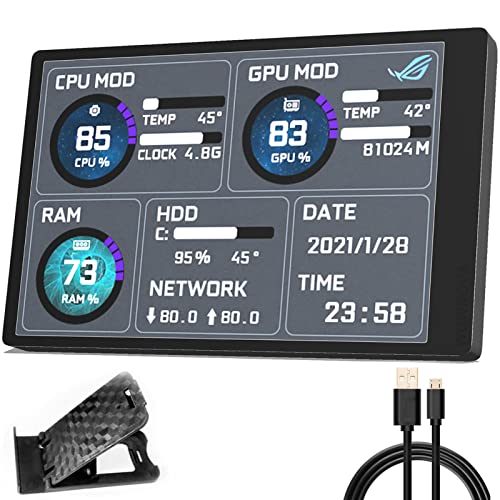
For gamers and content creators seeking a reliable way to monitor their system’s performance, the WOWNOVA English Version Computer Temp Monitor stands out as an excellent choice. This sleek 3.5-inch IPS mini screen displays essential CPU, RAM, and HDD data, all through a single USB-C connection—no HDMI fuss required. With customizable layouts and a visual theme editor, you can personalize your monitoring experience. Enjoy great viewing angles and energy-saving features, plus adjust brightness for comfort. Weighing just 3.84 ounces and measuring 2.17 x 3.35 inches, it’s a compact solution to keep your system cool and efficient.
Best For: Gamers and content creators seeking an efficient way to monitor system performance in real-time.
Pros:
- Compact and lightweight design, making it easy to integrate into any setup.
- Customizable screen layouts and visual themes for a personalized monitoring experience.
- Energy-saving features with automatic screen turn-off and adjustable brightness.
Cons:
- Limited to a single USB-C connection, which may restrict setup options for some users.
- Average customer rating of 3.7 out of 5 stars, indicating mixed user experiences.
- Requires English version software, which may not be suitable for all users.
iPitstBit 8.8 Inch Touchscreen Monitor for Raspberry Pi

If you’re a Raspberry Pi enthusiast looking for an effective way to monitor your system’s temperature, the iPitstBit 8.8 Inch Touchscreen Monitor is an excellent choice. With its 1920×480 high-resolution display and adjustable brightness, you’ll enjoy clear visuals in any lighting. It supports multiple display modes, allowing you to extend, duplicate, or use it as a secondary screen. The monitor connects effortlessly via mini HDMI, making it compatible with various devices. You won’t need to install drivers, just plug it in through USB-C and mini HDMI. Plus, with a 30-day money-back guarantee and a year of support, your purchase is risk-free!
Best For: Raspberry Pi enthusiasts seeking a versatile and high-resolution touchscreen monitor for system monitoring and display.
Pros:
- High Resolution: 1920×480 display provides clear and vibrant visuals.
- Multiple Display Modes: Offers flexibility with extend, duplicate, and secondary screen options.
- Easy Connectivity: Simple plug-and-play setup via mini HDMI and USB-C, with no driver installation required.
Cons:
- Limited Size: 8.8 inches may be small for some users needing more screen real estate.
- Brightness Adjustment: Although adjustable, the brightness might not be sufficient for very bright environments.
- Compatibility Limitations: Primarily designed for Raspberry Pi and specific Windows versions, which may exclude some users.
WOWNOVA 8.8″ Computer Temperature Monitor

Designed for tech enthusiasts and gamers, the WOWNOVA 8.8″ Computer Temperature Monitor offers a sleek, mini secondary screen that seamlessly integrates with your setup. With a resolution of 1920 x 480, it displays vital data like CPU, GPU, RAM, and more using self-developed software. You’ll appreciate its simple connectivity—just one USB-C or 9-pin cable required—eliminating the need for HDMI. The aluminum housing guarantees durability, while the IPS display provides excellent visibility from various angles. Plus, with customizable themes and regular updates, you can keep your monitor fresh and engaging. Enjoy efficient performance with this stylish addition to your workspace.
Best For: Tech enthusiasts and gamers looking for a stylish and functional secondary monitor to display system performance data.
Pros:
- Easy Setup: Simple connectivity with only one USB-C or 9-pin cable required.
- Customizable UI: Offers a variety of themes and layouts to personalize the display.
- Durable Build: Made with aluminum housing for enhanced durability and an IPS display for excellent visibility.
Cons:
- Limited Resolution: The 1920 x 480 resolution may not be suitable for detailed graphics or high-resolution tasks.
- Niche Use: Primarily designed for monitoring system performance, which may not appeal to all users.
- Weight: At 14.9 ounces, it may be less portable compared to lighter monitors or displays.
8.8 Inch PC Temperature Display for Computer Monitor

The 8.8 Inch PC Temperature Display is perfect for tech enthusiasts who want real-time monitoring of their system’s performance. This IPS USB mini screen boasts a high-resolution touch display, offering 1920 x 480 pixels and adjustable brightness up to 600 candela. You can easily track CPU, GPU, and RAM usage, along with network speed and weather forecasts. Plus, its customizable layouts let you switch between horizontal and vertical orientations. Compatible with various operating systems, it’s a great addition to your setup. With a solid customer rating, this display guarantees you keep your system cool and running smoothly.
Best For: Tech enthusiasts and gamers looking for real-time monitoring of system performance and customizable display options.
Pros:
- High-resolution touch screen with adjustable brightness for clear visibility.
- Displays comprehensive system information including CPU, GPU, RAM usage, and weather forecasts.
- Customizable layouts allow for personalized screen designs and orientation switching.
Cons:
- Requires configuration for display resolution before use, which may be cumbersome for some users.
- Limited compatibility with older operating systems such as Windows XP.
- Some users may find the screen size small for extensive data monitoring.
WOWNOVA LCD Screen Inside PC Case with Desktop Stand

For PC enthusiasts seeking a sleek and effective way to monitor system temperatures, the WOWNOVA LCD Screen stands out with its customizable display options. This 4.6-inch IPS panel offers a crisp 960×320 resolution, allowing you to track CPU, GPU, RAM, FPS, and HDD temperatures effortlessly. Its simple setup requires just one 9-pin cable, and it can be mounted internally to save GPU ports. With a user-friendly interface, you can easily customize themes and layouts. Plus, continuous updates and dedicated customer support guarantee you’ll always have the latest features at your fingertips. Keep your system cool with WOWNOVA!
Best For: PC enthusiasts looking for a customizable and efficient way to monitor system temperatures and performance metrics.
Pros:
- Customizable display options for real-time monitoring of CPU, GPU, RAM, FPS, and HDD temperatures.
- Easy setup with a single 9-pin cable and internal mounting to conserve GPU ports.
- User-friendly interface with drag-and-drop theme editing and continuous updates for new features.
Cons:
- Limited to internal mounting, which may not suit all PC cases.
- Requires Windows 10/11 for compatibility, excluding other operating systems.
- The resolution may be lower compared to larger external monitors.
Factors to Consider When Choosing a PC Temperature Monitor Display
When choosing a PC temperature monitor display, you’ll want to take into account several key factors. Screen size, display resolution, and connectivity options can greatly impact your experience. Additionally, think about customization features and mounting flexibility to guarantee the monitor fits perfectly in your setup.
Screen Size Options
Choosing the right screen size for your PC temperature monitor can considerably impact your overall setup and user experience. Screen sizes typically range from compact 3.5 inches to larger 8.8 inches. If you prefer a minimal setup or want a discreet display, a smaller screen might be ideal. However, if visibility is a priority, larger screens provide more detailed information and are easier to read from a distance. Bigger displays often come with higher resolutions, enhancing clarity. An 8.8-inch monitor usually features added functionalities like touch capability and customizable layouts, boosting interactivity. Always consider the available space in your setup and how prominently you want the temperature monitor to feature in your configuration.
Display Resolution Quality
Display resolution quality plays an essential role in how effectively you can monitor your PC’s temperature and performance. Higher resolutions, like 1920×480 or above, offer sharper visuals, making it easier to read detailed stats. This clarity is vital, especially when you’re trying to interpret small text or graphics. Opting for an IPS display technology enhances your experience with better color accuracy and wider viewing angles. Additionally, a contrast ratio of 800:1 or better greatly improves visibility, particularly in different lighting conditions. Don’t overlook the refresh rate, usually around 60Hz; it affects how smoothly dynamic visuals appear, which can enhance your interaction with the data. Choosing a monitor with these features guarantees you stay informed and your system runs smoothly.
Connectivity Compatibility Types
Understanding connectivity compatibility types is essential for guaranteeing your PC temperature monitor display integrates seamlessly with your setup. When choosing a monitor, look for models that connect using minimal cables, such as USB-C or 9-pin connections. This way, you can avoid the hassle of HDMI or extra power sources. Make sure the monitor supports your operating system, as compatibility can vary between Windows versions and other systems. Opt for devices that offer plug-and-play functionality to save time and prevent installation headaches. Additionally, check the included data cables; having multiple connection options can enhance flexibility. Finally, verify the monitor fits well with your existing ARGB setups, maintaining both aesthetics and functionality in your system.
Customization Features Available
When it comes to enhancing your PC setup, customization features can make all the difference in creating a personalized experience. Many PC temperature monitors let you choose screen layouts, enabling you to switch between horizontal and vertical orientations to suit your workspace. You might also find visual theme editors that allow you to craft and upload your designs, boosting the aesthetic appeal of your setup. Plus, with preset dynamic videos and themes, you can quickly customize your display without starting from scratch. Some models even let you upload personal videos and photos, reflecting your unique tastes. Additionally, customizable lighting features like ARGB strips enhance visual integration, allowing synchronization with your system’s other components.
Mounting Options Flexibility
Customizing your PC setup goes beyond just aesthetics; it also involves how you position your temperature monitor. Look for monitors with versatile mounting options, such as adjustable brackets for height and tilt, to fit various setups. Consider options that can be mounted on different surfaces, like fan frames or case panels, and even flat surfaces using adhesive pads. Make sure the monitor includes a clear installation guide that specifies the correct screws to avoid compatibility issues. It’s important that the design allows for a compact fit, preventing airflow obstruction. Finally, evaluate whether the monitor can be easily repositioned or removed for maintenance, enhancing your overall setup flexibility. This way, you can keep your system cool and running smoothly.
Power Supply Requirements
Power supply requirements play a essential role in selecting the right PC temperature monitor display for your setup. Many monitors use USB-C or 9-pin connectors, which simplify connectivity without the need for HDMI or extra power sources. Some models operate solely on USB power, making your setup even more straightforward by removing external adapters. It’s important to check the voltage requirements; most monitors function best at 5 Volts (DC). Certain options provide USB power independent of GPU ports, offering versatility for various installations. Always verify your USB port can supply enough power, especially if you’re using multiple peripherals. This attention to power needs will help keep your monitor running smoothly alongside your other components.