If you’re looking to enhance your workspace, choosing the right monitor stand can make a significant difference. These stands not only elevate your monitor to a comfortable eye level but also offer convenient storage options with built-in drawers. This combination helps you maintain an organized and efficient work environment. Want to discover which monitor stands stand out in both functionality and style? Let’s explore the top options available.
OPNICE Desk Organizer and Monitor Stand Riser (Black 2-Pack)
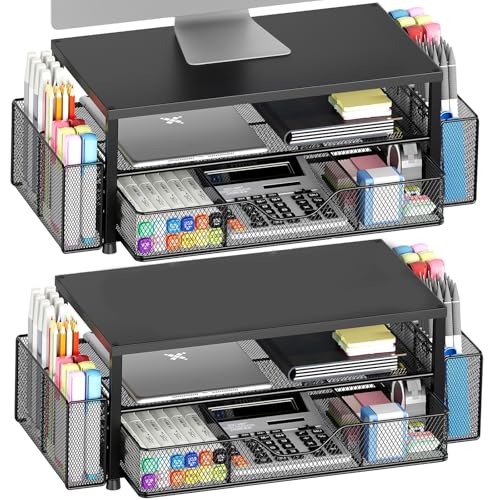
If you’re looking for a monitor stand that combines functionality with style, the OPNICE Desk Organizer and Monitor Stand Riser (Black 2-Pack) is an excellent choice for students and professionals alike. This 2-tier design elevates your monitor or laptop to a comfortable height, relieving neck and shoulder strain. It features a drawer and two pen holders, offering ample storage for your office supplies while keeping your workspace tidy. Made from high-quality materials, it guarantees stability and durability for long-term use. Plus, its modern aesthetic complements any décor, making your workspace not just organized but stylish too.
Best For: Students and professionals seeking a stylish and functional solution to improve their workspace organization and ergonomics.
Pros:
- Ergonomic design elevates monitors or laptops to a comfortable viewing height, reducing neck and shoulder strain.
- Ample storage with a drawer and two pen holders keeps office supplies organized and easily accessible.
- Durable construction ensures stability and longevity, making it suitable for various environments like offices, dorms, or homes.
Cons:
- The 2-pack may be more than what some users need if they only require a single stand.
- Limited color options may not appeal to all aesthetic preferences.
- The height-adjustable pads may require occasional adjustments to maintain stability on uneven surfaces.
Simple Houseware Desk Dual Monitor Stand Riser with Drawer, Black

The Simple Houseware Desk Dual Monitor Stand Riser with Drawer, Black, is perfect for those who need an organized workspace without sacrificing comfort. Its ergonomic design elevates your monitors or laptop, reducing neck and eye strain. With compact dimensions of 10.9D x 33.3W x 5H, it fits seamlessly into your setup. The built-in phone and tablet holder keeps devices accessible, while side caddies store office tools and cables. The organizer tray features six removable dividers, allowing you to create up to nine compartments for pens and sticky notes. This stand combines functionality and style, enhancing your productivity effortlessly.
Best For: Those seeking an organized and ergonomic workspace to enhance productivity while reducing neck and eye strain.
Pros:
- Ergonomic design elevates monitors or laptops, promoting all-day comfort and reducing strain.
- Built-in storage features such as a phone/tablet holder and side caddies for easy access to office tools and personal items.
- Customizable organizer tray with removable dividers allows for personalized organization of small supplies.
Cons:
- Limited height adjustment may not accommodate all user preferences for monitor positioning.
- Compact design might not provide enough space for larger monitors or additional accessories.
- Drawer size may be too small for storing larger office supplies or documents.
Zimilar 2 Pack Adjustable Monitor Stand Riser with Storage

Looking for a versatile solution to elevate your workspace? The Zimilar 2 Pack Adjustable Monitor Stand Riser is perfect for you. With three height adjustments (4.13”, 4.92”, and 5.71”), it raises your screen to a comfortable eye level, improving posture and reducing strain. Each stand features a metal drawer for organizing essentials, fitting US letter-size paper, and foldable phone holders for added convenience. Constructed from durable steel, it supports up to 44 lbs and includes anti-skid rubber feet for stability. Plus, assembly is a breeze—just press a button to adjust and enjoy the unique design that enhances airflow.
Best For: Individuals looking to enhance their workspace ergonomics while maintaining organization and convenience.
Pros:
- Three height adjustments for customizable viewing angles, promoting better posture and reducing strain.
- Durable steel construction supports heavy monitors (up to 44 lbs) and ensures long-lasting use.
- Built-in storage options with a metal drawer and phone holders, keeping the workspace tidy and efficient.
Cons:
- Limited color options may not suit every aesthetic preference.
- Height adjustments may not provide enough flexibility for all user heights.
- Drawer size may restrict the type of items that can be stored, particularly larger office supplies.
Gianotter Dual Monitor Stand Riser with Drawer and Pen Holders

For those seeking a clutter-free workspace, the Gianotter Dual Monitor Stand Riser with Drawer and Pen Holders stands out as an ideal solution. This sleek black desk organizer not only elevates your monitors to eye level, reducing neck strain, but also maximizes your desktop space with its clever design. With two magnetic pen holders and a spacious drawer, you’ll easily keep your essentials within reach. Weighing just 6.78 pounds and capable of supporting up to 33 pounds, it’s sturdy and practical. Plus, there’s no assembly required—just unbox and start enjoying a more organized workspace!
Best For: Those looking to enhance their workspace ergonomics while keeping their desk organized.
Pros:
- Ample Storage: Features a drawer and two pen holders for efficient organization of desk accessories.
- Ergonomic Design: Raises monitors to eye level, reducing neck and eye strain for improved posture.
- Sturdy Construction: Made from high-strength metal materials, supporting up to 33 pounds without assembly.
Cons:
- Limited Color Options: Available only in black, which may not suit all decor styles.
- Size Consideration: Its dimensions may be too large for smaller desks.
- Not Adjustable: Fixed height may not accommodate all user preferences for monitor positioning.
Simple Houseware Desk Dual Monitor Stand Riser with Pull-Out Drawers, Black
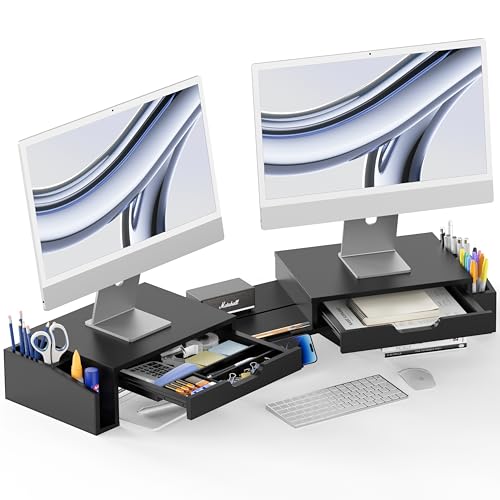
Designed with organization in mind, the Simple Houseware Desk Dual Monitor Stand Riser with Pull-Out Drawers is perfect for anyone juggling multiple tasks at their workstation. This sleek black stand features two pull-out drawers: one for pens and sticky notes, and another for larger items. With built-in side caddies, you’ll maximize your desk space effortlessly. You can also customize your setup with three adjustable modes, ensuring the stand fits your workspace perfectly. Plus, the removable phone holder keeps your devices within reach. Elevate your workspace with this functional and stylish solution that enhances both efficiency and organization.
Best For: This product is best for individuals working in multi-monitor setups who need to organize their workspace efficiently.
Pros:
- Maximizes Desk Space: The dual monitor stand features side caddies and pull-out drawers for efficient storage of office supplies.
- Customizable Setup: With three adjustable modes, the stand can be configured to fit various workspace requirements.
- Hands-Free Device Holder: The removable phone holder allows for convenient access to devices while keeping the workspace tidy.
Cons:
- Limited Color Options: Currently, the stand is only available in black, which may not suit all aesthetic preferences.
- Potential Stability Issues: Depending on the weight of the monitors, stability could be a concern with fully extended configurations.
- Drawer Size Constraints: The size of the drawers may limit the storage capacity for larger office supplies.
Gianotter Dual Monitor Stand Riser with Drawer and Pen Holders

The Gianotter Dual Monitor Stand Riser with Drawer and Pen Holders is perfect for anyone seeking to declutter their workspace while enhancing ergonomics. By elevating your monitors to eye level, it reduces neck and eye strain, allowing you to focus better. The built-in drawer offers ample storage for desk accessories, while the two magnetic pen holders keep your essentials within reach. Plus, the space beneath the stand is ideal for storing a mouse, keyboard, or other supplies. With no assembly required, you can quickly transform your cluttered desktop into a tidy and aesthetically pleasing workspace.
Best For: Those looking to optimize their workspace ergonomically while keeping it organized and clutter-free.
Pros:
- Promotes better posture and reduces neck and eye strain by elevating monitors to eye level.
- Includes a built-in drawer and two magnetic pen holders for efficient storage and organization of desk accessories.
- Easy to set up with no assembly required, perfect for quick workspace transformation.
Cons:
- Limited to dual monitor setups, which may not suit users with single or multiple larger monitors.
- The design may not fit all aesthetic preferences, depending on personal taste in office decor.
- Space beneath the stand may not accommodate larger keyboards or additional equipment comfortably.
Vaydeer All-in-One Dual Monitor Stand Riser with USB Ports and Wireless Charging

Looking to enhance your workspace? The Vaydeer All-in-One Dual Monitor Stand Riser is your solution. With its multifunctional design, it features a dual monitor riser, a 15W wireless charging pad, and eight USB ports—four for fast charging and four for data transfer. This stand can support up to 50kg, ensuring stability for your monitors. Plus, the two pull-out drawers keep your essentials organized, reducing clutter. By elevating your monitors, you’ll also improve your posture and reduce eye strain. This practical gift is perfect for anyone looking to boost productivity and create a more comfortable workspace.
Best For: Professionals, students, and gamers looking to enhance their workspace efficiency and comfort.
Pros:
- 13-in-1 multifunctional design with wireless charging and multiple USB ports for seamless connectivity.
- Two-tier storage with drawers helps keep the workspace organized and clutter-free.
- Ergonomically elevates monitors to reduce eye and neck strain, promoting better posture.
Cons:
- Larger footprint may not be suitable for smaller desks or limited spaces.
- Requires access to power outlets for the USB ports and wireless charging to function.
- The weight capacity might limit the type of monitors that can be used effectively.
Computer Monitor Stand Riser with Drawer

For those who value both organization and ergonomics in their workspace, the Computer Monitor Stand Riser with Drawer stands out as an ideal choice. This stylish stand elevates your monitor to eye level, reducing neck and shoulder strain while enhancing your posture. With its large storage space, you can easily keep small items organized in the drawer and utilize the desktop and bottom compartments for additional storage. Made from wood and steel, it combines durability with a modern aesthetic. Plus, setup is a breeze with included tools and instructions, and customer support is just a message away for any inquiries.
Best For: Individuals seeking an ergonomic workspace solution that combines functionality and organization.
Pros:
- Elevates monitor to eye level, promoting better posture and reducing strain on neck and shoulders.
- Ample storage options with a drawer and compartments for keeping small items organized.
- Sturdy construction with wood and steel materials ensures durability and a modern look.
Cons:
- Limited color options may not suit all aesthetic preferences.
- Assembly may require time and effort, especially for those unfamiliar with furniture setup.
- The drawer size may not accommodate larger items, limiting storage versatility.
Fenge Dual Monitor Stand with Drawer

Designed for professionals who need a spacious workspace, the Fenge Dual Monitor Stand with Drawer offers a perfect blend of functionality and style. Measuring 42.5L x 9.2W x 5.4H inches, this sturdy stand supports up to 99 lbs, thanks to its robust MDF panel and heavy-duty steel footing. The two semi-transparent drawers keep your essentials organized, while the 1.9-inch bottom space is ideal for hiding keyboards or office supplies. Plus, it elevates your monitors to a comfortable height, reducing neck strain. Assembly is a breeze, taking just 15 minutes with the provided instructions and tools.
Best For: Professionals and gamers who require a spacious and organized workspace for dual monitors.
Pros:
- Sturdy construction: Supports up to 99 lbs with a robust MDF panel and heavy-duty steel footing.
- Ergonomic design: Elevates monitors by 5.4 inches, promoting a comfortable viewing position and reducing neck strain.
- Organized storage: Features two semi-transparent drawers and an open compartment for efficient workspace organization.
Cons:
- Limited color options: Available primarily in one design, may not suit all aesthetic preferences.
- Size constraint: May not fit well in smaller desks or workspaces due to its length.
- Assembly required: Takes approximately 15 minutes to set up, which may be inconvenient for some users.
Gianotter Dual Monitor Stand Riser with Drawer and Pen Holders

If you want to maximize your workspace while keeping essential office supplies organized, the Gianotter Dual Monitor Stand Riser with Drawer and Pen Holders is an excellent choice. With dimensions of 40.6 x 9.3 x 4.3 inches, it elevates your monitors to eye level, helping reduce neck and eye strain. The stand features a convenient drawer and two magnetic pen holders, providing ample storage for your desk accessories. Crafted from high-strength metal, it guarantees durability while enhancing your workspace’s aesthetics. With a 4.6-star rating from nearly 2,000 reviews, you can trust that this stand will boost your efficiency and organization.
Best For: Professionals and students looking to enhance their workspace organization and ergonomics.
Pros:
- Ample storage with a drawer and magnetic pen holders keeps desk accessories neatly organized.
- Ergonomic design elevates monitors to eye level, reducing neck and eye strain.
- Durable construction from high-strength metal ensures long-lasting support and aesthetic appeal.
Cons:
- Limited color options may not suit all personal styles or office decors.
- Weight of 6.87 pounds might make it less portable for those needing to frequently move their setup.
- No assembly required, which may be a downside for those who prefer customizable setups.
Factors to Consider When Choosing a Monitor Stand With Drawer
When choosing a monitor stand with a drawer, consider how it impacts your workspace ergonomics, as the right height can enhance comfort and productivity. You’ll also want to think about storage capacity and features that meet your needs, ensuring it can hold your essentials. Finally, pay attention to materials, design, and assembly ease to find a stand that fits both your style and your setup.
Ergonomic Height Adjustment
Choosing the right monitor stand with drawers involves considering ergonomic height adjustment to guarantee ideal comfort and productivity. An adjustable monitor stand helps elevate your screen to eye level, reducing neck and back strain during long hours. Ideally, the top of your monitor should sit 4 to 6 inches below your line of sight when seated comfortably. This height promotes a neutral spine alignment, improving your posture and enhancing overall comfort. Additionally, elevating your monitor can minimize glare from overhead lighting, reducing eye strain during extended work sessions. Look for designs with multiple height settings, allowing you to customize your workspace to fit your unique needs and preferences for maximum efficiency.
Storage Capacity and Features
While you prioritize ergonomic height adjustment, don’t overlook the importance of storage capacity and features in a monitor stand with drawers. Consider the number of compartments and drawers available for organizing small items; features like removable dividers can create customized storage solutions. Look for built-in options such as pen holders, phone and tablet slots, and side caddies to maximize workspace efficiency. Evaluate the total storage capacity to guarantee it meets your needs for office supplies and personal items without overcrowding your desk. Assess the design of storage features, focusing on the accessibility of pull-out drawers versus fixed compartments for easy access to frequently used items. Finally, check the overall dimensions so it fits comfortably on your desk.
Material Durability and Quality
Material durability and quality play an essential role in selecting the right monitor stand with drawers. When you’re choosing, consider high-strength metal for exceptional support, as many stands can handle weights up to 44 lbs or more. Wooden options, made from MDF or solid wood, not only look modern but also provide sturdy construction that withstands regular use without sagging. Look for stands featuring steel tubing or heavy-duty steel frames to enhance stability and longevity in various office environments. A quality finish, like powder coating, improves resistance to scratches and wear. Additionally, monitor stands with anti-slip pads or adjustable feet protect your desk surface while ensuring the stand stays securely in place during use.
Design and Aesthetic Appeal
When selecting a monitor stand with a drawer, it’s crucial to take into account how the design and aesthetic appeal align with your office decor. Look for a modern, minimalist style that enhances your workspace while offering functionality. Materials like high-strength metal or stylish wood finishes not only boost durability but also elevate the visual charm of the stand. Clean lines and a cohesive color scheme help the stand integrate seamlessly into various office styles. Ergonomics should also be a priority; a well-designed stand promotes comfort during use. Plus, a drawer adds practical storage without sacrificing aesthetics, keeping your environment tidy and organized. Choose wisely to create a workspace that’s both beautiful and functional.
Assembly Process and Ease
Choosing a monitor stand with a drawer isn’t just about aesthetics and functionality; the assembly process plays a vital role in your overall experience. Some models require no assembly, while others may take around 15 minutes to set up. Look for stands that come with pre-drilled holes and installation tools, as these features simplify the process. If you prefer quick setups, one-step assembly models allow you to unbox and start using your stand immediately. Remember, ease of assembly can greatly impact your satisfaction; products that are easier to assemble often receive higher ratings. By prioritizing straightforward assembly, you can enhance your workspace without the hassle of complicated instructions or additional tools.
Price and Budget Considerations
How do you balance quality and affordability when selecting a monitor stand with a drawer? Monitor stands can range from $30 to over $100, influenced by features and materials. If you’re on a budget, simpler designs with limited storage might catch your eye, but remember that higher-priced models often provide better ergonomics and durability. Investing more upfront can reduce future health-related expenses due to poor posture. Don’t forget to factor in extra costs like shipping and any necessary accessories. To get the best value, compare prices across different retailers. This way, you can find a monitor stand that fits your workspace needs while keeping your budget in check.
Compatibility With Devices
Selecting the right monitor stand with a drawer involves considering several key factors to guarantee compatibility with your devices. First, verify the stand can support the size and weight of your monitor or laptop—some models can handle up to 44 lbs or more. Next, check for height adjustment features, as ergonomic designs can help elevate your devices to a comfortable eye level, reducing neck and eye strain. Look for adjustable compartments or customizable storage options to keep your devices and office supplies organized. Additionally, confirm that the stand’s dimensions fit your workspace layout, maximizing desk space efficiently. Finally, check compatibility with various devices, such as monitors, laptops, or tablets, to verify versatility in your setup.