Building a smaller PC does not mean settling for limited performance. The right compact case can fit powerful components while reducing desk clutter and making your system easier to place, transport, and maintain.
This roundup compares 10 compact cases across mini-ITX, micro-ATX, and ATX formats, with attention to compatibility, airflow, cooling support, expandability, and overall practicality.
Best 10 Computer Cases for Compact Builds Picks for 2026
Best Airflow Pick

- Compact ATX/Micro-ATX mid-tower
- Mesh panels and two included 120mm fans
- Supports up to a 360mm front radiator
Best For: Airflow-focused compact ATX builds
Best Small-Form-Factor Value

- Mini-ITX/Mini-DTX support
- Fits ATX PSUs and GPUs up to 275mm
- Supports a 120mm AIO radiator
Best For: Compact Mini-ITX gaming systems
Best Showcase Design

- Compact ATX/Micro-ATX dual-chamber layout
- Three tempered-glass panels
- Supports back-connect boards and a 360mm top AIO
Best For: Visually focused compact ATX builds
Best Ultra-Compact Build

- Approximately 4.5-liter Mini-ITX case
- Supports 1U Flex PSU and low-profile GPUs
- Includes PCIe 4.0 riser cable
Best For: Portable, highly compact Mini-ITX systems
Best Panoramic Micro-ATX Pick

- 270° panoramic tempered glass
- Micro-ATX and Mini-ITX support
- Three pre-installed fans
Best For: Showcase-focused compact gaming builds
Best Full-ATX Compact Case

- Fits standard ATX motherboards
- Handle improves portability
- Supports 240mm AIO cooling
Best For: Portable and space-conscious ATX builds
Best Value Case With PSU

- Includes a 400W power supply
- Micro-ATX and Mini-ITX support
- Supports 240mm or 280mm AIOs
Best For: Budget compact PCs and office systems
Best Ultra-Compact Pick
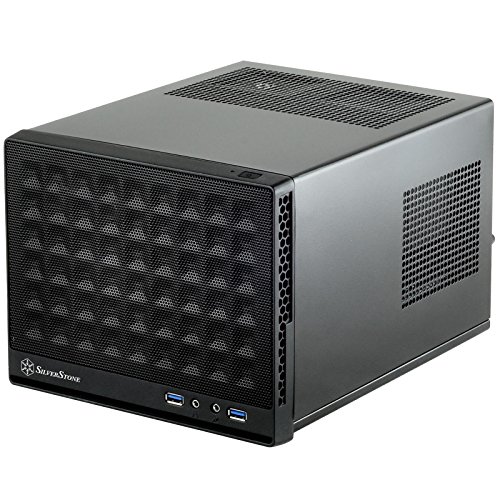
- 11.5-liter Mini-ITX design
- Supports standard-length expansion cards
- Compatible with ATX PSUs and 120/140mm liquid coolers
Best For: Space-conscious Mini-ITX builds
Best Flexible ATX Option
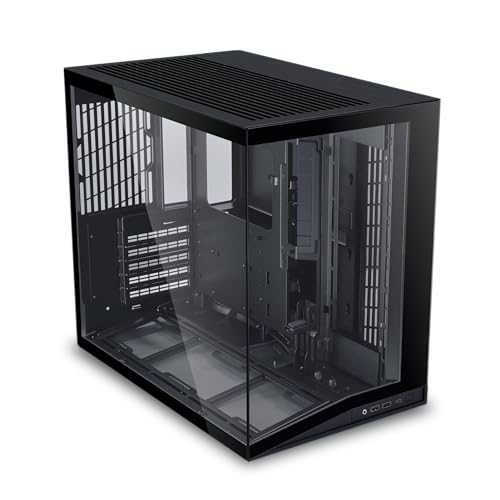
- Supports ATX, Micro-ATX, and Mini-ITX
- Fits full-sized ATX power supplies
- Pillar-free glass panels and GPU anti-sag brackets
Best For: Compact ATX showcase builds
Best Value Micro-ATX Case

- 17.1-liter Micro-ATX/Mini-ITX chassis
- Supports ATX PSUs and GPUs up to 260mm
- Includes an 80mm fan and perforated front panel
Best For: Practical small-form-factor desktops
Best Airflow Pick – NZXT H5 Flow
The NZXT H5 Flow is a practical choice for computer cases for compact builds when you want ATX compatibility without moving to a full-size tower. Its mesh panels, included fans, and broad radiator support make it well suited to an airflow-focused gaming or workstation build.
Best For: Compact ATX and Micro-ATX builds prioritizing airflow and cooling flexibility.
Pros:
- Supports ATX and Micro-ATX motherboards in a compact mid-tower design.
- Ultra-fine mesh panels promote airflow while helping filter dust.
- Includes two 120mm fans and supports radiators up to 360mm in front or 240mm up top.
- Wide cable-routing channels, hooks, and straps simplify cable management.
Cons:
- The two PSU-shroud intake fans are not included.
- Its mid-tower format is larger than a true Mini-ITX small-form-factor case.
Choose the H5 Flow if you want a manageable ATX footprint with strong cooling potential and straightforward assembly features. It is a particularly balanced option for a first airflow-oriented build.
Best Small-Form-Factor Value – SilverStone SUGO 16
The SilverStone SUGO 16 is a strong fit for computer cases for compact builds that need a genuinely small Mini-ITX enclosure. It accepts a standard ATX power supply and graphics cards up to 275mm, while retaining support for a 120mm all-in-one cooler.
Best For: Mini-ITX systems needing a small footprint with standard-power-supply compatibility.
Pros:
- Supports Mini-ITX and Mini-DTX motherboards.
- Accommodates standard-length graphics cards up to 275mm.
- Supports an ATX PSU and a 120mm all-in-one liquid-cooling radiator.
- Front I/O includes two USB 3.0 ports and combo audio.
Cons:
- Limited to one expansion slot.
- Its compact layout may require more careful component planning than a larger case.
The SUGO 16 makes sense when minimizing case size is important but you do not want to give up ATX PSU support or a reasonably sized graphics card. It is a focused Mini-ITX platform rather than a highly expandable enclosure.
Best Showcase Design – Lian Li O11 Vision Compact
The Lian Li O11 Vision Compact combines a compact ATX layout with a presentation-focused three-panel glass design. For computer cases for compact builds, it is a good option when component visibility, dual-chamber organization, and back-connect motherboard support matter as much as footprint.
Best For: Showcase ATX or Micro-ATX builds with visible components and organized cabling.
Pros:
- Supports ATX and Micro-ATX motherboards.
- Three tempered-glass panels provide an uninterrupted view of the components.
- Top mesh panel supports installation of a 360mm AIO.
- Back-connect motherboard support and concealed AIO tubing help maintain a clean presentation.
Cons:
- It is heavier and larger than many small-form-factor cases.
- Only four expansion slots are listed.
- Its showcase design may prioritize appearance over maximum compactness.
The O11 Vision Compact is best suited to builders who want a polished display build without moving to a full-size case. Its dual-chamber concept and back-connect compatibility can create a notably clean interior when paired with compatible hardware.
Best Ultra-Compact Build – JONSBO NV10
The JONSBO NV10 is designed for computer cases for compact builds where a very small footprint is the main priority. Its approximately 4.5-liter volume, aluminum construction, flexible orientation, and support for a 1U Flex PSU make it suitable for carefully planned Mini-ITX systems.
Best For: Portable Mini-ITX builds using a low-profile GPU and Flex power supply.
Pros:
- Very compact approximately 4.5-liter enclosure measuring 205mm by 205mm by 108mm.
- Can be positioned standing or lying down.
- Includes a PCIe 4.0 extension cable and a tool-free removable top cover.
- Supports four 2.5-inch SSDs and a 38mm air cooler.
Cons:
- Limited to Mini-ITX motherboards and 1U Flex power supplies up to 150mm.
- GPU support is limited to low-profile cards up to 190mm.
- The 38mm air-cooler limit restricts cooling hardware choices.
The NV10 is the most space-conscious choice in this group, but its component limits require deliberate selection. Pick it for portability and minimal desk presence rather than for high-end, full-size graphics hardware.
Best Panoramic Micro-ATX Pick – Morovol V3
For builders who want compact dimensions without hiding their components, this Morovol V3 is a visually focused option among computer cases for compact builds. Its Micro-ATX and Mini-ITX support, three pre-installed fans, and 270-degree tempered-glass design make it well suited to showcase-oriented gaming systems.
Best For: Micro-ATX gaming builds where panoramic component visibility and included airflow matter.
Pros:
- 270-degree panoramic tempered-glass panel provides a broad view of the build.
- Supports Micro-ATX and Mini-ITX motherboards.
- Includes three pre-installed fans for out-of-box airflow.
- Offers a front USB 3.0 port and three internal bays.
Cons:
- Supports only four expansion slots.
- Air cooling is the listed cooling method, with no liquid-radiator support specified.
- The tempered-glass presentation may require more attention to cable appearance.
The V3 is a strong choice when aesthetics are a priority and a compact Micro-ATX layout fits your parts. Verify your motherboard, graphics card, and cooler clearances before buying.
Best Full-ATX Compact Case – MECHANIC MASTER C34
The MECHANIC MASTER C34 stands out among computer cases for compact builds by fitting a standard ATX motherboard and full-size ATX power supply into a highly compact enclosure. Its carry handle adds portability, while support for a 240mm radiator or a 162mm air cooler gives builders meaningful cooling flexibility.
Best For: Portable ATX systems, LAN builds, and space-conscious workstations that still need full-size component compatibility.
Pros:
- Supports standard ATX motherboards and graphics cards up to 335mm.
- Built-in handle makes the system easier to transport.
- Supports a 240mm liquid-cooling radiator or air coolers up to 162mm.
- Front I/O includes USB 3.0 and USB Type-C connectivity.
Cons:
- SFX or SFX-L power supply use is recommended for the cleanest cable management and easiest building.
- Internal storage capacity is listed as one bay.
- Compact dimensions may make installation more involved than in a conventional ATX tower.
The C34 is one of the more flexible compact choices for ATX hardware, especially if portability matters. Plan the power-supply and cable layout carefully, and confirm cooler, RAM, and GPU clearances for your selected parts.
Best Value Case With PSU – Rosewill FBM-X5
The Rosewill FBM-X5 is a practical mini-tower option among computer cases for compact builds, particularly for buyers who want a straightforward enclosure with a power supply included. It supports Micro-ATX and Mini-ITX motherboards, includes a 400W non-modular PSU, and provides room for additional fans or a 240mm front radiator.
Best For: Budget-conscious office PCs and compact entry-level gaming systems using modest power requirements.
Pros:
- Includes a pre-installed 400W non-modular power supply.
- Supports Micro-ATX and Mini-ITX motherboards with four expansion slots.
- Provides two 2.5-inch bays and one 3.5-inch bay.
- Supports additional fans and a 240mm or 280mm AIO configuration as specified.
Cons:
- Only one 120mm PWM fan is pre-installed.
- The included 400W PSU may limit high-power component choices.
- The power supply is non-modular, which can make cable management less flexible.
The FBM-X5 offers a convenient starting point for a compact system because the PSU is included. It is best matched with components that stay within the 400W supply’s practical capacity; verify your planned system’s power needs before purchase.
Best Ultra-Compact Pick – SilverStone SG13B
For truly space-conscious computer cases for compact builds, the SilverStone SG13B keeps the footprint small at about 11.5 liters while supporting a Mini-ITX or Mini-DTX motherboard. Its mesh front panel and compatibility with ATX power supplies make it a flexible choice for a small desktop or gaming system.
Best For: Mini-ITX builders who want an exceptionally compact case with standard expansion-card and ATX PSU support.
Pros:
- Very compact 11.5-liter design
- Supports standard-length expansion cards
- Compatible with ATX PSUs and 120mm or 140mm all-in-one liquid coolers
- Supports both 2.5-inch and 3.5-inch hard drives
Cons:
- Limited to Mini-ITX or Mini-DTX motherboards
- Compact interior may require careful component planning
The SG13B is a practical option when minimizing desk space matters most. Its component support is broader than its small dimensions suggest, though builders should verify cooler, PSU, and graphics-card clearances before purchasing.
Best Flexible ATX Option – Lian Li O11D Mini V2
The Lian Li O11D Mini V2 is a compact ATX-oriented case for builders who want computer cases for compact builds without giving up standard ATX motherboard support. It accommodates ATX, Micro-ATX, and Mini-ITX boards, while its slanted bottom intake and mesh side panel are designed to support airflow and full-sized ATX power supplies.
Best For: Showpiece builds needing ATX compatibility, full-sized power-supply support, and broad motherboard flexibility.
Pros:
- Supports ATX, Micro-ATX, and Mini-ITX motherboards
- Designed for full-sized ATX power supplies and full-length graphics cards
- Panoramic pillar-free tempered-glass front and side panels
- Includes GPU anti-sag brackets and cable-management support
Cons:
- Fans are not included
- Heavier and larger than ultra-small Mini-ITX cases
This case prioritizes flexibility and presentation over the smallest possible footprint. It is a strong fit for compact ATX systems, but the no-fan configuration means cooling hardware must be added separately.
Best Value Micro-ATX Case – Zalman CUBIX
The Zalman CUBIX is a straightforward choice among computer cases for compact builds, supporting Micro-ATX and Mini-ITX motherboards in a 17.1-liter mini-tower chassis. It combines a perforated front panel with a pre-installed 80mm fan and accepts standard ATX power supplies, making it useful for practical small-form-factor desktops.
Best For: Budget-conscious Micro-ATX or Mini-ITX builds that need ATX PSU and modest graphics-card support.
Pros:
- Supports Micro-ATX and Mini-ITX motherboards
- Accepts standard ATX power supplies and GPUs up to 260mm
- Includes a pre-installed 80mm fan and perforated front panel
- Sturdy 0.8T steel construction
Cons:
- Cooling setup is limited to the included 80mm fan specification
- GPU length is limited to 260mm
The CUBIX offers a sensible balance of compact dimensions, durable construction, and mainstream power-supply compatibility. Check graphics-card and CPU-cooler dimensions carefully, especially for higher-performance components.
How We Picked the Best Computer Cases for Compact Builds
We focused on cases that reduce overall footprint without making component selection unnecessarily restrictive. The lineup includes mini-ITX, micro-ATX, and compact ATX designs, so you can match the enclosure to your motherboard and performance goals.
Our comparison criteria included internal layout, supported graphics-card and power-supply sizes, CPU-cooler and radiator clearance, ventilation, dust management, cable-routing space, included fans, build access, and the amount of expansion room available. We also considered practical details such as tempered-glass panels, carrying handles, front-panel connectivity, and whether a case is better suited to a first-time builder or an experienced small-form-factor enthusiast.
Quick Comparison
- Best for mainstream ATX builds: NZXT H5 Flow, with a familiar layout and airflow-focused design.
- Best for showcase builds: Lian Li O11 Vision Compact and O11D Mini V2, especially for visible components and distinctive layouts.
- Best for ultra-small systems: SilverStone SUGO 16 and SST-SG13B-USA, designed around mini-ITX hardware.
- Best for stylish compact builds: JONSBO NV10, which combines a small footprint with aluminum construction and walnut detailing.
- Best for flexible value builds: The micro-ATX and MATX options, which offer more room than mini-ITX without requiring a full-size tower.
Key Buying Factors for Compact PC Cases
Motherboard and Power-Supply Compatibility
Start with the motherboard size, then verify the supported PSU standard. Mini-ITX cases may require SFX or other compact power supplies, while some micro-ATX and ATX cases accept standard ATX units. Never assume compatibility based only on the case’s external dimensions.
Graphics-Card and Cooling Clearance
Check maximum GPU length, thickness, and height, particularly if you are installing a large modern graphics card. Also confirm CPU-cooler height and radiator support. Compact layouts can create conflicts between the GPU, radiator, storage drives, and power cables.
Airflow and Noise
Mesh panels and a clear intake-to-exhaust path generally help compact systems maintain lower temperatures. Tempered glass looks attractive but can restrict ventilation if the case lacks adequate mesh elsewhere. Check how many fans are included and budget for additional fans when needed.
Ease of Building and Upgrading
Removable panels, accessible cable-routing channels, and a sensible component installation order make a major difference in small cases. If you expect frequent upgrades, choose a design with more clearance and expansion room rather than the smallest possible enclosure.
Who Should Buy Which Computer Cases for Compact Builds?
Choose a compact ATX case if you want standard components, multiple expansion slots, and easier upgrades while still reducing the footprint of a traditional tower. Micro-ATX is a strong middle ground for affordable gaming PCs, workstation builds, and users who need more flexibility than mini-ITX provides.
Mini-ITX cases are best for buyers prioritizing portability, minimal desk space, or a clean living-room setup. They can deliver excellent performance, but careful part selection and more involved assembly are common. For a display-focused build, prioritize panel design and internal visibility; for a quiet, powerful system, prioritize mesh ventilation, fan support, and cooler clearance over appearance.