Apple no longer includes built-in optical drives in modern Macs, but an external model can still be useful for playing CDs and DVDs, importing older media, burning discs, or accessing archived files.
This roundup compares 10 optical disc drives for Mac across compatibility, connection types, disc formats, portability, and backup features so you can choose the right drive for your setup.
Best 10 Optical Disc Drives for Mac Picks for 2026
Best Apple Pick
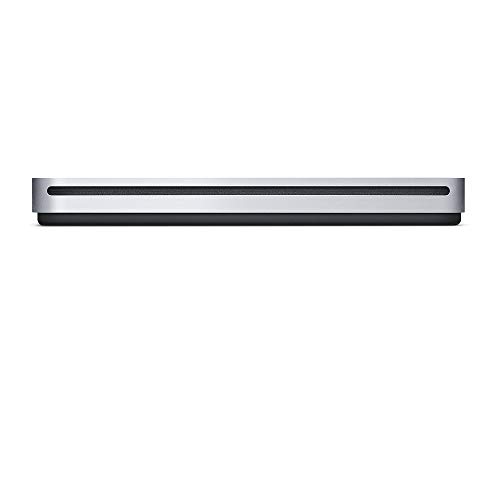
- Plays and burns CDs and DVDs
- Built-in USB Type-A cable
- Compact and adapter-free
Best For: Compatible Mac users needing a simple CD/DVD drive
Best Ultra-Slim Value
Samsung SE-218GN/RSBD DVD Rewriter

- Mac OS X compatible
- 14mm ultra-slim design
- Supports M-Disc and 8x DVD writing
Best For: Portable CD/DVD use with M-Disc support
Best Basic DVD Burner

- DVD±RW and DVD-RAM support
- Up to 24x CD speeds
- Compact USB 2.0 design
Best For: Basic CD/DVD burning after confirming Mac compatibility
Best Blu-ray Option
ASUS SBW-06D5H-U Blu-ray Burner

- Blu-ray, BDXL, and M-Disc support
- USB 3.1 Type-A and Type-C cables
- macOS compatible and ultra-slim
Best For: Portable Blu-ray and archival disc burning on Mac
Best Cable-Storage Pick
ASUS ZenDrive V1M External DVD Drive

- Built-in 24 cm cable storage
- USB-C connection for newer laptops
- M-DISC support and macOS compatibility
Best For: Mac users wanting a tidy, portable USB-C DVD drive
Best Slim Dual-Cable Model
ASUS ZenDrive 8X External DVD Burner

- Ultra-slim 13 mm design
- USB 2.0 and Type-C cables included
- M-DISC and DISC Encryption II support
Best For: Mac users wanting a compact DVD burner with added security features
Best Overall
Amicool USB 3.0/USB-C External DVD Drive

- USB-A and USB-C connectivity
- Works with Intel and Apple Silicon Macs
- Reads, writes, and burns CDs/DVDs
Best For: Mac users wanting flexible connections and portable disc burning
Best Multiport Option

- Adds USB, USB-C, SD, and TF connectivity
- Reads and burns CDs/DVDs
- Supports Mac, Windows, and Linux
Best For: Laptop users needing disc access and peripheral or card-reader ports
Best Simple Design
Rioddas Portable USB 3.0 DVD Burner
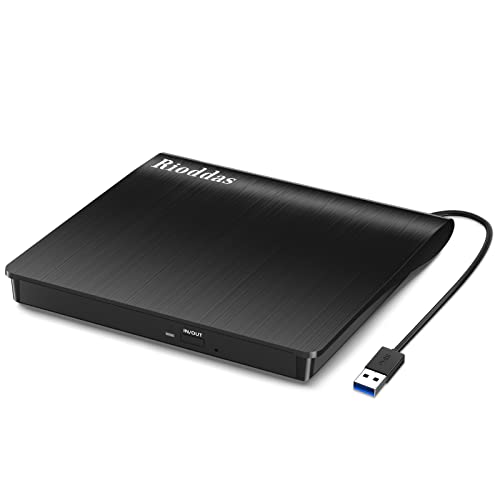
- USB-powered plug-and-play operation
- Physical eject button and stored cable
- Up to 24x CD and 8x DVD speeds
Best For: Mac users who want a simple USB-A CD/DVD burner
Best Apple Pick – Apple USB SuperDrive
The Apple USB SuperDrive is a straightforward choice among optical disc drives for Mac users who want to play and burn CDs and DVDs. Its compact design and built-in USB Type-A cable make it convenient for travel, backups, software installation, and DVD playback.
Best For: Mac owners with compatible 2008-and-later models that lack a built-in optical drive.
Pros:
- Plays and burns both CDs and DVDs
- Compact design fits easily in a travel bag
- Built-in USB Type-A cable requires no separate cable
- No separate power adapter is required
Cons:
- Uses USB Type-A rather than USB-C
- Compatible with specified Mac models only
- Does not support Blu-ray discs
Choose the SuperDrive when Apple-focused compatibility and simple, portable CD/DVD use matter more than newer interfaces or Blu-ray support.
Best Ultra-Slim Value – Samsung SE-218GN/RSBD DVD Rewriter
The Samsung SE-218GN/RSBD is a portable option for shoppers comparing optical disc drives for Mac. It supports Mac OS X, uses a USB connection, and combines an ultra-slim 14mm design with CD and DVD reading and writing at up to 8x.
Best For: Mac users who want a lightweight, portable DVD rewriter with M-Disc support.
Pros:
- Mac OS X compatible
- Ultra-slim 14mm drive height
- Supports DVD writing and reading up to 8x
- Includes M-Disc support
Cons:
- Uses USB 2.0 connectivity
- Does not offer Blu-ray support
- Supplied notes list a tray-loading design, which may be less convenient than slot loading
This Samsung is a sensible fit for basic CD/DVD tasks when portability and M-Disc support are priorities, though its USB 2.0 interface is not the fastest option.
Best Basic DVD Burner – Dell Slim DW316 USB Drive
The Dell Slim DW316 is a compact external DVD±RW drive for everyday disc tasks. It connects over USB 2.0, uses a tray loader, and offers up to 24x CD read, write, and rewrite speeds, making it a practical budget-style option among optical disc drives for Mac when compatibility is confirmed.
Best For: Users seeking a compact USB DVD burner for basic CD and DVD work.
Pros:
- Compact, lightweight black design
- Supports DVD±RW, dual-layer DVD±R, and DVD-RAM formats
- Up to 24x CD read, write, and rewrite speeds
- Plug-and-play operation is listed
Cons:
- Supplied operating-system information lists Windows rather than macOS
- Uses USB 2.0
- Does not support Blu-ray discs
The Dell drive offers useful CD/DVD capabilities and a portable form factor, but Mac buyers should verify macOS compatibility before choosing it because the supplied specifications identify Windows as its operating system.
Best Blu-ray Option – ASUS SBW-06D5H-U Blu-ray Burner
ASUS SBW-06D5H-U BDXL External Ultra Slim Blu-ray and MDisc Burner USB 3.1 USB-C 2 Cables Black
Check Price On AmazonThe ASUS SBW-06D5H-U stands out among optical disc drives for Mac because it adds external Blu-ray and BDXL burning to a slim design. It supports macOS, includes both USB 3.1 Type-A and USB 3.1 Type-C connectivity, and also supports M-Disc media.
Best For: Mac users who need Blu-ray, BDXL, and M-Disc burning in a portable drive.
Pros:
- Supports external Blu-ray and M-Disc burning
- Includes USB 3.1 Type-A and Type-C connectivity
- macOS is listed as a supported operating system
- Ultra-slim portable form factor
Cons:
- More specialized than a basic CD/DVD drive
- Supplied notes list a maximum optical write speed of 10x, depending on media and format
- Software for Blu-ray playback or burning is not specified
The ASUS is the most capable choice here for Blu-ray-focused workflows, particularly if you value modern USB connectivity and M-Disc support in a travel-friendly enclosure.
Best Cable-Storage Pick – ASUS ZenDrive V1M External DVD Drive
The ASUS ZenDrive V1M is a practical choice among optical disc drives for Mac if you want a compact USB-C model with its connecting cable built into the enclosure. It supports macOS, reads DVDs at up to 8X and CDs at up to 24X, and can write DVDs at up to 6X.
Best For: Mac users who prioritize convenient cable storage, USB-C connectivity, and M-DISC support.
Pros:
- Built-in 24 cm cable helps prevent cable loss.
- USB-C interface suits newer slim laptops.
- Supports M-DISC for long-term photo, video, and data storage.
- Works with macOS and Windows.
Cons:
- Listed DVD write speed is up to 6X.
- The drag-and-burn interface is specified for Windows only.
Choose this ZenDrive when portability and a tidy setup matter more than maximum write speed. Its M-DISC capability adds useful long-term storage flexibility, while the built-in cable keeps the travel kit simple.
Best Complete Travel Kit – ROOFULL External CD DVD Drive
The ROOFULL ECD829-Y is a flexible option among optical disc drives for Mac, with both USB 3.0 Type-A and USB-C connectors built into the drive. It is designed for reading, burning, and ripping common CDs and DVDs, and includes a protective carrying case.
Best For: Mac owners who want dual connectors, broad CD/DVD functions, and a case for travel.
Pros:
- Built-in USB-A and USB-C connectors reduce the need for adapters.
- Supports DVD read/write speeds up to 8X and CD speeds up to 24X.
- Handles playback, burning, ripping, photo CDs, software installation, and backups.
- Includes a protective sleeve and two-year service.
Cons:
- Does not support Blu-ray or 4K discs.
- Not compatible with Chromebooks, mobile devices, TVs, cars, or gaming consoles.
- On Mac, the disc icon appears after a disc is successfully read.
This is a strong all-purpose pick if you use different Mac ports or also connect the drive to other computers. The included case and dual-cable design make it especially convenient for moving between home, work, and travel.
Best Slim Dual-Cable Model – ASUS ZenDrive 8X External DVD Burner
The ASUS ZenDrive SDRW-08U9M-U is an ultra-slim option among optical disc drives for Mac. It supports Mac OS X 10.6 or higher, includes USB 2.0 and Type-C cables, and offers DVD read and write speeds up to 8X plus CD speeds up to 24X.
Best For: Mac and PC users seeking a slim DVD burner with disc-encryption features and two cable options.
Pros:
- Ultra-slim 13 mm design is easy to carry.
- USB 2.0 and Type-C cables are included.
- Supports M-DISC for archival storage.
- Includes DISC Encryption II and Nero BackItUp for Android devices.
Cons:
- Uses USB 2.0 rather than a higher-speed USB 3.0 interface.
- It is a CD/DVD drive and does not support Blu-ray discs.
- Listed warranty is one year.
This model makes sense when a thin form factor and flexible cabling are more important than the newest USB standard. Its encryption and M-DISC features give it added appeal for users who want more than basic disc playback.
Best Overall – Amicool USB 3.0/USB-C External DVD Drive
For shoppers comparing optical disc drives for Mac, the Amicool stands out for its dual USB-A and USB-C interfaces, broad macOS compatibility, and portable built-in-cable design. It supports CD/DVD reading, writing, and burning, although it does not support Blu-ray or DVD-RAM.
Best For: MacBook, iMac, and Mac mini users who want a versatile, portable CD/DVD burner with both USB-A and USB-C connectivity.
Pros:
- USB 3.0 and USB-C interfaces support up to 5Gbps data transfer.
- Compatible with Intel and Apple Silicon Macs, Windows, and Linux.
- Reads, writes, and burns common CD and DVD formats.
- Slim design includes a built-in cable for convenient travel.
Cons:
- Does not support Blu-ray, DVD-RAM, iPad, iPhone, or ChromeOS.
- Mac users may need VLC Player because Apple DVD Player is not supported.
- Direct connection is recommended; some Apple Silicon Macs may need a powered USB hub.
The Amicool is a well-rounded choice when flexible connectivity matters. Its format limitations and power guidance are worth noting, but its dual-interface design makes it especially practical for newer and older Macs.
Best Multiport Option – 8-in-1 External CD/DVD Drive
This 8-in-1 model is more than one of the optical disc drives for Mac: it combines CD/DVD reading and burning with USB expansion and SD/TF card access. USB-A and USB-C connectivity supports Macs, Windows PCs, and Linux systems, while the slim format suits laptop use.
Best For: Laptop users who need a disc drive plus extra USB ports and memory-card readers for photo and video transfers.
Pros:
- Combines a CD/DVD burner with one USB 3.0 port, three USB 2.0 ports, and USB-C.
- Includes SD and TF card readers for transferring files from cameras and other devices.
- Supports common CD/DVD formats, including DVD-RAM, according to the supplied specifications.
- USB 3.0 offers transfer rates up to 5Gbps and the drive reaches 8x DVD and 24x CD speeds.
Cons:
- SD and TF cards cannot be used at the same time.
- Some Windows laptops may require the extra power cable if the drive is not recognized.
- Not compatible with Blu-ray discs, TVs, tablets, smartphones, cars, or projectors.
Choose this model if the added ports are as important as disc access. Its expanded connectivity is useful for file management, but the larger feature set may be unnecessary if you only need a basic Mac DVD drive.
Best Simple Design – Rioddas Portable USB 3.0 DVD Burner
The Rioddas is a straightforward option for optical disc drives for Mac, offering USB 3.0 connectivity, plug-and-play setup, and CD/DVD reading and burning. Its embedded cable, physical eject button, and compact shell make it convenient for everyday laptop or desktop use.
Best For: MacBook, iMac, and PC owners who want a simple USB-A optical drive with convenient cable storage and reliable disc handling.
Pros:
- USB-powered plug-and-play setup requires no external driver or power adapter.
- Supports macOS 10.16+, Windows, and Linux computers.
- Reads and writes common CD and DVD formats at up to 24x CD and 8x DVD speeds.
- Physical eject button and embedded cable improve everyday usability.
Cons:
- Uses USB-A rather than USB-C, so some Macs may require an adapter.
- Not compatible with ChromeOS, mobile devices, TVs, vehicles, projectors, Blu-ray, or 4K discs.
- For best desktop performance, the manufacturer recommends a high-power rear USB port.
The Rioddas keeps things simple and portable, making it a sensible pick for routine CD and DVD tasks. Its main drawback for newer Macs is the USB-A-only connection, so check your available ports before buying.
How We Picked the Best Optical Disc Drives for Mac
We focused on drives that are practical for current Mac users, giving priority to macOS compatibility, dependable USB connectivity, compact designs, and support for common CD and DVD formats. We also considered whether each model includes USB-C connectivity or adapters, supports M-Disc or Blu-ray media, and offers useful extras such as built-in cable storage, a carrying case, or bundled backup software.
Because external optical drives vary widely in capability, the list includes simple DVD readers and writers as well as higher-end Blu-ray burners. That makes it easier to match the drive to your actual media needs rather than paying for features you will not use.
Quick Comparison
For straightforward Apple-branded compatibility, the Apple USB SuperDrive is the obvious choice. Slim DVD writers from Samsung, ASUS, Dell, Amicool, ROOFULL, and Rioddas are generally better suited to everyday CD and DVD playback or burning at a lower price. The ASUS SBW-06D5H-U is the specialist option for users who need Blu-ray and BDXL support, while USB-C models such as the ASUS ZenDrive V1M are convenient for newer MacBooks.
Check the included cable carefully. Some drives use USB-A, some use USB-C, and others include both or require an adapter. A drive can be macOS-compatible yet still need a suitable connection for your Mac.
Key Buying Factors for Optical Disc Drives for Mac
Disc Formats and Writing Capability
Confirm whether you need reading only or both reading and writing. DVD±RW models can burn standard CDs and DVDs, while M-Disc support is useful for archival-grade compatible media. Choose a Blu-ray model if you need to read or write Blu-ray discs; a standard DVD drive cannot be upgraded for that purpose.
Ports and Power
USB 3.0 or USB 3.1 offers faster data transfer than USB 2.0, although disc speed remains the main limitation. USB-powered drives are convenient, but some computers or media may require two USB connections or a powered hub for stable operation.
Portability and Noise
A slim drive is easier to store with a laptop, while a slightly larger enclosure may provide better durability. Mechanical optical drives make audible spinning and seeking sounds, so look for a well-built model if noise matters.
Software and MacOS Support
Most Macs can read supported discs without extra drivers, but burning, DVD playback, and Blu-ray use may require compatible third-party software. Do not assume Windows-only bundled applications will work on macOS.
Who Should Buy Which Optical Disc Drives for Mac?
- Choose Apple USB SuperDrive if you want the simplest Apple-focused DVD solution and value familiar branding.
- Choose a compact ASUS, Samsung, Dell, ROOFULL, Amicool, or Rioddas model for everyday CD/DVD playback, file access, or occasional disc burning.
- Choose the ASUS ZenDrive V1M if your Mac has USB-C ports and you want a tidy, modern portable design.
- Choose the ASUS SBW-06D5H-U if Blu-ray, BDXL, or M-Disc burning is essential.
- Choose a bundled-case model if you travel frequently and want better protection for the drive and its cable.
Before buying, verify your Mac’s ports, the disc formats you use, and whether your preferred playback or burning software supports macOS. Those checks matter more than maximum advertised read speed for most home users.