The best USB-C cables make charging simpler, but the right choice depends on connector type, power rating, length, and construction. A cable suited to a phone may not be suitable for a laptop or high-speed charger.
We compared 10 USB-C cable options across charging capability, pack size, cable length, durability, and everyday value to help you choose with confidence.
Best 10 USB C Cables Picks for 2026
Best Overall
Anker 60W USB-C to USB-C Cable 2-Pack

- 60W Power Delivery support
- Two durable 6-foot braided cables
- 480Mbps data transfer
Best For: USB-C charging setups needing extra length and durability
Best Value Pack
5-Pack 6-Foot USB-A to USB-C Cables

- Five cables with 6-foot reach
- USB-A compatibility for common chargers
- 3A charging and 480Mbps syncing
Best For: Multi-room, car, and backup charging with USB-A ports
Best Short Cable
Anker USB-A to USB-C 3-Foot 2-Pack

- Space-saving 3-foot length
- Braided Anker construction
- 15W charging and 480Mbps data
Best For: Desk and bedside setups using USB-A chargers
Best Multipack for Fast Charging

- Five 6-foot USB-C-to-USB-C cables
- 60W PD charging support
- Braided design with E-marker chip
Best For: Multi-device USB-C households and offices
Best Value USB C Cable

- 100W charging support
- Durable braided construction
- Two 3.3-foot cables
Best For: Everyday charging across phones, tablets, and laptops
Highest-Power USB C Cable
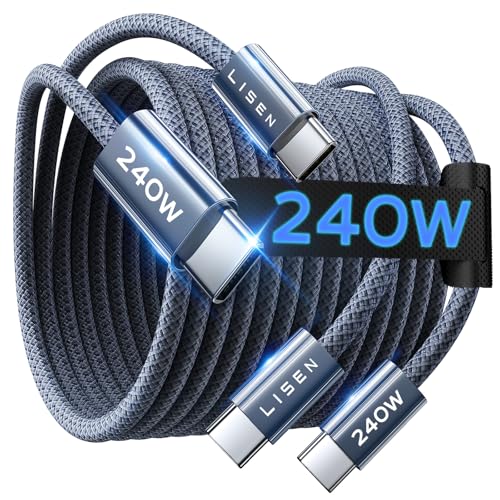
- 240W PD3.1 EPR support
- Long 6.6-foot reach
- 40,000+ flex-cycle rating
Best For: High-power USB-C laptops and flexible desk setups
Best Multi-Pack USB C Cable

- Five six-foot cables
- Up to 60W charging
- Nylon-braided construction
Best For: Multi-device households, offices, and travel kits
Best Value Multi-Pack
Teeind 6ft USB C Cables, 5-Pack

- Five 6-foot braided cables
- Up to 3A/15W charging
- 480Mbps data transfer
Best For: Multiple charging stations and everyday backup cables
Best for USB-C PD
Anker 60W USB-C to USB-C Cables, 2-Pack

- Up to 60W Power Delivery
- Reinforced nylon construction
- USB-C to USB-C connectivity
Best For: Phones, tablets, and laptops using USB-C charging
Best Long-Length Set
6ft USB-C to USB-C Cables, 3-Pack

- Three 6-foot charging cables
- Up to 60W PD charging
- Rated for 15,000+ bends
Best For: Long-reach charging for phones, tablets, and laptops
Best Overall – Anker 60W USB-C to USB-C Cable 2-Pack
For shoppers comparing usb c cables for phones, tablets, and laptops, this Anker 2-pack offers 6-foot reach, 60W Power Delivery support, and a reinforced braided build. It uses USB-C connectors on both ends, so it requires a USB-C charger and does not support media display.
Best For: USB-C device owners who want durable, long cables for charging and basic file transfers.
Pros:
- Supports up to 60W Power Delivery charging.
- Reinforced nylon design rated for up to 5,000 bends.
- Includes two 6-foot cables and a cable tie.
- Offers 480Mbps data transfer.
Cons:
- Not compatible with USB-A chargers or Lightning-port devices.
- Does not support media display.
This is a strong everyday option when you already have USB-C charging hardware and need extra length. Its data rate is suitable for routine syncing, but it is primarily a charging cable rather than a display cable.
Best Value Pack – 5-Pack 6-Foot USB-A to USB-C Cables
This five-pack is a practical choice among usb c cables when you need several charging cords for different rooms, vehicles, or travel bags. Each 6-foot USB-A to USB-C cable supports up to 3A charging and works with standard USB-A chargers, power banks, laptops, and charging stations.
Best For: Households and travelers who need multiple long cables for USB-A charging equipment.
Pros:
- Includes five 6-foot cables for convenient placement and backups.
- Works with common USB-A wall, car, and power-bank ports.
- Supports up to 3A charging and 480Mbps data transfer.
- Nylon braiding helps resist bending, pulling, and tangling.
Cons:
- Requires a USB-A charger or port.
- Not compatible with iPhone models before the listed USB-C iPhone generations.
The main appeal is quantity: these cables make it easy to keep a cord nearby without repeatedly moving one between chargers. They are suited to everyday charging and syncing, not high-wattage USB-C Power Delivery setups.
Best Short Cable – Anker USB-A to USB-C 3-Foot 2-Pack
If you prefer less slack, this Anker pair is a compact pick among usb c cables. The 3-foot USB-A to USB-C cords are nylon braided, support up to 15W charging at 3A/5V, and provide 480Mbps data transfer for compatible USB-C devices.
Best For: Desks, bedside tables, and other setups where a shorter USB-A to USB-C cable is easier to manage.
Pros:
- Compact 3-foot length helps reduce cable clutter.
- Nylon-braided construction is designed for improved durability.
- Supports up to 15W charging and 480Mbps data transfer.
- Includes two cables and a lifetime warranty.
Cons:
- Does not support Power Delivery.
- USB-A to USB-C design is limited by the available charger or port.
This pair makes sense for close-range charging and data use with existing USB-A power sources. Choose a longer or USB-C-to-USB-C model if you need greater reach or higher-wattage charging.
Best Multipack for Fast Charging – 5-Pack 60W USB-C Cables
For users building a larger USB-C setup, this five-pack combines 6-foot reach with up to 60W charging through USB-C Power Delivery. These usb c cables include an E-marker chip, braided nylon construction, and support for charging and 480Mbps data transfer across compatible devices.
Best For: Families, offices, and multi-device owners who use USB-C chargers and want several long cables.
Pros:
- Five 6-foot USB-C-to-USB-C cables provide broad coverage.
- Supports up to 60W charging with compatible USB-C PD adapters.
- E-marker chip and temperature-control features are designed for safer charging.
- Braided cables are tested for 30,000-plus bends and include cable ties.
Cons:
- Requires USB-C wall chargers; it is not a USB-C-to-USB-A cable.
- Data transfer is limited to 480Mbps.
This is a useful bulk option when multiple USB-C devices share a charging standard. The long, reinforced cables add flexibility, while the included safety features make them more suitable for regular charging than basic unbranded cords.
Best Value USB C Cable – UGREEN 100W 2-Pack
For shoppers comparing usb c cables for phones, tablets, and laptops, the UGREEN 100W USB-C to USB-C cable offers strong charging capacity in a practical two-pack. Its 3.3-foot length suits desks, nightstands, and travel, while the braided build is designed for frequent use.
Best For: Everyday charging of USB-C phones, tablets, and compatible laptops when you want two short, durable cables.
Pros:
- Supports up to 100W charging with PD3.0 and QC3.0 compatibility.
- Includes two 3.3-foot cables for convenient multi-device use.
- Nylon braiding, aluminum housing, and a 250d fiber core are rated for over 10,000 90-degree bends.
- Transfers data at up to 480Mbps.
Cons:
- The 3.3-foot length may be limiting for distant outlets or larger workspaces.
- Data transfer is limited to 480Mbps rather than higher-speed USB standards.
UGREEN’s cable is a sensible all-purpose pick if charging performance and durability matter more than long reach or high-speed data transfers. The two-pack also makes it easy to keep one cable in different rooms or bags.
Highest-Power USB C Cable – LISEN 240W 6.6ft
The LISEN USB-C to USB-C cable stands out among usb c cables for its 240W PD3.1 EPR rating and generous 6.6-foot length. It is designed to match charging protocols automatically, making it a strong option for power-hungry USB-C laptops and other compatible devices.
Best For: Users who need a long USB-C to USB-C cable for high-power laptops, tablets, and phones.
Pros:
- Supports up to 240W charging through PD3.1 EPR and QC4.0.
- Uses an E-Marker 3.0 chip for current and voltage monitoring.
- Long 6.6-foot design provides extra flexibility around desks and furniture.
- Military-grade nylon construction is rated for over 40,000 flex cycles.
Cons:
- It is USB-C to USB-C only and does not include a USB-A connector.
- Its 480Mbps data-transfer rate is modest for a cable positioned for high-power devices.
- The 240W capacity may be unnecessary for lower-power phones and accessories.
This LISEN cable makes the most sense when length and maximum charging headroom are priorities. Just confirm that both your charger and device use USB-C ports, since the cable cannot connect directly to USB-A chargers.
Best Multi-Pack USB C Cable – Anker 60W 5-Pack
If you need usb c cables for several rooms, devices, or family members, Anker’s five-pack provides broad coverage at a practical six-foot length. Each USB-C to USB-C cable supports up to 60W charging and uses a nylon-braided exterior for everyday durability.
Best For: Households, offices, and travel kits that need multiple long USB-C charging cables.
Pros:
- Five included cables make it easy to charge multiple devices at once.
- Six-foot length offers useful reach from outlets and power strips.
- Supports up to 60W charging for compatible phones, tablets, laptops, and consoles.
- PowerIQ 3.0 technology supports optimized charging and data transfer.
Cons:
- 60W is lower than the charging capacity of some high-performance USB-C laptop chargers.
- The supplied notes do not specify the exact data-transfer speed supported by PowerIQ 3.0.
Anker’s five-pack is a convenient choice when quantity and reach matter more than maximum wattage. It is particularly useful for keeping spare cables in workspaces, bedrooms, bags, or alongside gaming equipment.
Best Value Multi-Pack – Teeind 6ft USB C Cables, 5-Pack
If you need several USB C cables for different rooms, a car, or travel, the Teeind 5-pack offers useful coverage at a budget-friendly format. Each 6-foot braided cable supports up to 3A charging and 480Mbps data transfer, provided your charger and device support those speeds.
Best For: Households and workspaces that need multiple long USB C cables for everyday charging.
Pros:
- Five 6-foot cables provide convenient spares for home, office, car, or travel.
- Supports up to 3A/15W charging and 480Mbps data transfer.
- Nylon braiding, aluminum housing, and a stated 8,000+ bend test support everyday durability.
- Includes a 12-month warranty.
Cons:
- Maximum charging is limited to 15W, so it is not intended for higher-power USB-C laptop charging.
- Fast charging requires a compatible power block and device.
This is a practical choice when quantity and reach matter more than high-wattage charging. Its USB-C connector and broad phone, tablet, and Nintendo Switch compatibility make it a flexible everyday cable set.
Best for USB-C PD – Anker 60W USB-C to USB-C Cables, 2-Pack
The Anker 2-pack is a strong option among USB C cables for users who want USB-C-to-USB-C connectivity and higher-power charging. It supports USB Power Delivery up to 60W, along with 480Mbps data transfer, and is compatible with many phones, tablets, and laptops.
Best For: USB-C devices that use a USB-C charger and benefit from up to 60W Power Delivery.
Pros:
- Supports up to 60W Power Delivery with a compatible charger and device.
- Reinforced nylon exterior and robust core are rated for up to 5,000 bends.
- Works with a wide range of USB-C phones, tablets, and laptops.
- Includes two cables and a hook-and-loop cable tie.
Cons:
- USB-C to USB-C design does not work with USB-A chargers or Lightning-port devices.
- 480Mbps transfer speed is suitable for standard data transfers but not high-speed USB 3 performance.
- Does not support media display.
Choose this Anker set when your charging setup already uses USB-C ports and you want more power headroom than a basic 15W cable. Check both the charger and device specifications to make sure the 60W capability can be used.
Best Long-Length Set – 6ft USB-C to USB-C Cables, 3-Pack
For users who want extra reach, this three-pack provides 6-foot USB C cables for charging at home, in the office, in the car, or while traveling. The cables support up to 60W charging, PD 3.0 and QC 3.0, plus data transfer speeds listed up to 480Mbps.
Best For: USB-C phone, tablet, and MacBook users who need multiple long charging cables.
Pros:
- Three 6-foot cables make it easier to charge away from an outlet.
- Supports up to 60W/3A charging with compatible equipment.
- Broad compatibility includes recent iPhone, iPad, Samsung Galaxy, Google Pixel, and MacBook models.
- Flexible construction is rated for more than 15,000 bends.
Cons:
- USB-C to USB-C connectors require a compatible USB-C charger.
- The listing specifies USB 2.0, so it is not positioned as a high-speed data cable.
- Designed primarily for charging rather than display connectivity.
This set stands out for combining long 6-foot lengths with 60W charging support and a generous three-pack. It is a convenient fit for anyone standardizing several USB-C charging spots without buying separate cables for each location.
How We Picked the Best USB C Cables
We focused on practical differences that affect daily use: connector configuration, stated wattage, cable length, pack quantity, physical construction, and compatibility with common phones, tablets, laptops, power banks, and chargers. The selection includes USB-C to USB-C cables for newer charging bricks and USB-A to USB-C cables for older wall adapters, computers, and car chargers.
Power ratings are important, but a cable’s actual performance also depends on the charger, device, and charging protocol. A high-wattage cable will not make a device charge faster than its hardware allows.
Quick Comparison
- Best for most USB-C devices: A 60W USB-C to USB-C cable offers a useful balance of speed, compatibility, and price.
- Best for laptops and demanding devices: Choose a cable rated for 100W or 240W, provided your charger and device support that output.
- Best for older chargers: USB-A to USB-C cables work with legacy power adapters and computers.
- Best value: Five-packs are convenient for distributing cables around a home, office, vehicle, or travel bag.
- Best for reach: Six-foot cables provide more flexibility beside beds, desks, and sofas than shorter models.
Key Buying Factors for USB-C Cables
Connector Type
Check both ends before ordering. USB-C to USB-C cables require a USB-C charger or port, while USB-A to USB-C cables pair newer devices with older USB-A power sources.
Charging Wattage
For phones and accessories, 60W is typically more than sufficient. Laptops and other high-power devices may benefit from 100W or higher. Match the cable rating to your charging setup, and remember that wattage alone does not guarantee fast charging.
Length and Flexibility
Short cables reduce clutter and work well at desks or with power banks. Longer six-foot cables are more convenient when outlets are distant, although they can be less tidy in compact spaces.
Durability and Pack Size
Nylon braiding and reinforced connectors can help a cable withstand repeated bending. Multi-packs are useful when you need several charging locations, but buy fewer, higher-quality cables if reliability matters more than quantity.
Who Should Buy Which USB C Cables?
Choose a 60W USB-C to USB-C option for everyday phone, tablet, and accessory charging. Select a 100W or 240W model for compatible laptops or other high-demand equipment. USB-A to USB-C cables are the practical choice for older chargers and ports. If you regularly misplace cables or need charging points in several rooms, a five-pack offers the most convenience. For bedside tables, couches, and travel, six-foot lengths provide the greatest flexibility; for workstations and power banks, shorter cables are easier to manage.