The right Thunderbolt cable can determine whether your external SSD, dock, monitor, or laptop reaches its advertised performance. This roundup compares 10 options for fast data transfer, high-wattage charging, and modern USB4 or Thunderbolt setups.
We’ve included both Thunderbolt 4-compatible 40Gbps cables and newer Thunderbolt 5 or USB4 80Gbps models, along with active, long, two-pack, and right-angle designs for different workspace needs.
Best 10 Thunderbolt Cables for Data Transfer Picks for 2026
Best Compact 40Gbps Cable

- 40Gbps file transfers
- Up to 8K video support
- 240W charging capability
Best For: Compact laptop and monitor setups
Best Long Certified Cable
Cable Matters Active Thunderbolt 4

- 6.6-foot active design
- 40Gbps Thunderbolt 4 performance
- Supports dual 4K displays
Best For: Extended workstation connections
Best High-Bandwidth Cable

- Up to 80Gbps transfers
- 240W PD 3.1 charging
- Up to 16K display output
Best For: Large-file workflows and advanced displays
Best Two-Pack Value

- Two 5-foot cables
- 40Gbps transfer support
- 240W charging capability
Best For: Multi-device desks needing extra reach
Best Balanced USB4 Pick
- 40Gbps data transfer with USB-IF certification
- Supports 8K or dual 4K display configurations
- 240W charging and Thunderbolt 3/4 compatibility
Best For: Short laptop, monitor, dock, and SSD connections
Best for Next-Gen Bandwidth
Silkland Thunderbolt 5 USB4 Cable

- Up to 80Gbps bidirectional data transfer
- Up to 120Gbps display bandwidth
- 240W charging with durable shielding and braided nylon
Best For: Thunderbolt 5 workstations and multi-display workflows
Best Premium Thunderbolt 5 Option
Anker Prime Thunderbolt 5 Cable

- Up to 80Gbps data transfer
- Supports dual 8K displays at 60Hz
- 240W charging with an 18-month warranty
Best For: Premium short-cable laptop and multi-display setups
Best Overall

- 40Gbps transfers with 8K or dual 4K display support
- 240W PD 3.1 charging and E-Marker safety chip
- USB-IF certified with Thunderbolt 4/3 compatibility
Best For: Professional workstations and versatile high-speed connections
Best for Certified Versatility

- 40Gbps data transfer with 8K at 60Hz video
- Up to 240W charging with compatible equipment
- USB-IF certified and compatible with Thunderbolt 4/3
Best For: Compact laptop, monitor, dock, and SSD setups
Best Right-Angle Design
Silkland 40Gbps Right-Angle Cable
- 90-degree connector helps manage tight desk spaces
- 40Gbps transfers with 8K and dual 4K support
- 240W charging with braided, E-Marked construction
Best For: Compact workstations and tidy dock connections
Best Compact 40Gbps Cable – Anker 515 USB4 Cable
If you need dependable thunderbolt cables for data transfer without adding much bulk, the Anker 515 is a practical choice. Its 3.3-foot length supports 40Gbps transfers, high-resolution displays, and up to 240W charging when paired with compatible equipment.
Best For: Laptop users who want one short cable for fast file transfers, monitor connectivity, and high-power USB-C charging.
Pros:
- 40Gbps data transfer for moving large files quickly
- Supports up to 8K at 60Hz or 4K at 144Hz video
- Handles up to 240W charging with compatible devices
- Tested to withstand up to 5,000 bends
Cons:
- The 3.3-foot length may be limiting for larger desk setups
- Maximum charging and display performance depends on the connected devices
This cable is a well-rounded option for compact workspaces and portable setups. Choose it when you want strong USB4 performance in a short, durable cable.
Best Long Certified Cable – Cable Matters Active Thunderbolt 4
For extended desk layouts, the Cable Matters active cable offers 6.6 feet of reach while maintaining 40Gbps Thunderbolt 4 and USB4 performance. It is a strong pick among thunderbolt cables for data transfer when you also need display support and charging.
Best For: Professional or home workstations connecting laptops, docks, monitors, and eGPUs over a longer distance.
Pros:
- Intel-certified Thunderbolt 4 design with 40Gbps data transfer
- 6.6-foot active cable suits extended setups
- Supports up to 100W Power Delivery
- Can support one 8K or two 4K displays
Cons:
- Charging is limited to 100W rather than 240W
- Longer active construction may be unnecessary for compact setups
This is the most suitable option here when cable length and certified Thunderbolt compatibility matter. It also offers backward compatibility with Thunderbolt 3 and USB-C devices.
Best High-Bandwidth Cable – UGREEN USB4 Gen4 80Gbps
The UGREEN USB4 Gen4 cable is designed for demanding transfers, with claimed bandwidth up to 80Gbps and support for up to 240W charging. For users moving large files between fast storage, computers, or other compatible hardware, it is one of the most capable thunderbolt cables for data transfer in this roundup.
Best For: Photographers, developers, gamers, and workstation users handling large files or advanced multi-display setups.
Pros:
- Up to 80Gbps USB4 Gen4 data transfer
- Supports up to 240W PD 3.1 charging
- Supports DisplayPort 2.1 with up to 16K at 60Hz output
- Braided construction tested for up to 10,000 bends
Cons:
- Full 80Gbps and display performance requires compatible hardware
- The 3.3-foot length may not suit distant connections
This cable makes the most sense for a future-focused setup where high-speed storage, powerful laptops, and advanced displays share one connection. It is more capability than many everyday users need, but useful for demanding workflows.
Best Two-Pack Value – Fitee USB4 40Gbps Cables
The Fitee two-pack is a convenient way to equip multiple devices with thunderbolt cables for data transfer. Each 5-foot cable supports 40Gbps transfers, high-resolution video, and up to 240W charging, making the set useful for desks with more than one USB-C connection.
Best For: Users who need two longer cables for laptops, docks, monitors, portable SSDs, or compatible phones and tablets.
Pros:
- Two 5-foot cables provide useful reach and spares
- Supports up to 40Gbps data transfer
- Handles up to 240W PD 3.1 charging
- Braided nylon design and 2-year service support
Cons:
- Actual speeds depend on the connected devices and ports
- Not the shortest option for highly portable setups
This set offers practical flexibility for multi-device workspaces. Choose it when two cables and extra reach are more valuable than buying a single compact lead.
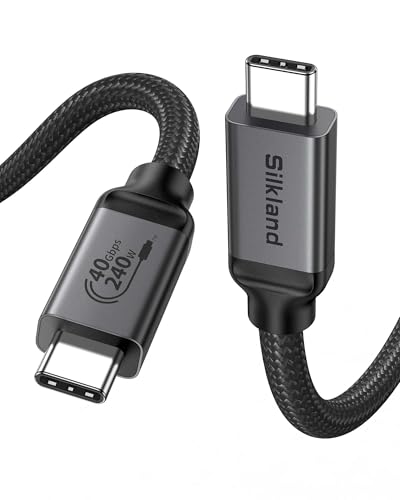
Best Balanced USB4 Pick – Silkland USB4 40Gbps Cable
If you need thunderbolt cables for data transfer in a compact desk setup, this 3.3-foot Silkland USB4 cable combines 40Gbps performance with high-wattage charging and display support. It is USB-IF certified and compatible with Thunderbolt 4, Thunderbolt 3, and USB-C devices, though actual speeds depend on the connected hardware.
Best For: Laptop-to-monitor, dock, SSD, and other short-range connections requiring fast data transfer and charging.
Pros:
- Supports up to 40Gbps data transfer.
- Handles single 8K at 60Hz or dual 4K at 60Hz displays when devices support the required standards.
- Supports up to 240W charging with an E-Marker chip and USB-IF certification.
- Backward compatible with Thunderbolt 3, USB4, USB 3.2, and USB 2.0.
Cons:
- The 3.3-foot length may be limiting for floor-level devices or distant docks.
- Display and transfer performance depends on host and peripheral support.
This is a practical all-purpose option for users who want certified USB4 performance without a long cable. Choose a longer version if your setup requires more reach, and verify that your devices support USB4 or Thunderbolt display modes.
Best for Next-Gen Bandwidth – Silkland Thunderbolt 5 USB4 Cable
For demanding workstations and future-ready thunderbolt cables for data transfer, this 4-foot Silkland Thunderbolt 5-compatible cable delivers up to 80Gbps bidirectional data bandwidth. It also supports up to 120Gbps display bandwidth, 240W charging, and a reinforced braided design for regular use.
Best For: Professional multi-display setups, high-speed SSD transfers, creative workflows, and compatible Thunderbolt 5 systems.
Pros:
- Supports up to 80Gbps bidirectional data transfer.
- Provides up to 120Gbps display bandwidth for configurations including dual 8K or triple 4K at 144Hz, when supported by the devices.
- Supports 240W charging with PD 3.1 and backward compatibility with lower power levels.
- Features USB-IF certification, triple shielding, aluminum heat dissipation, and braided nylon.
Cons:
- The advanced bandwidth requires compatible Thunderbolt 5 or USB4 Version 2.0 hardware.
- Actual transfer and display performance varies by device and setup.
This cable is aimed at users who can take advantage of Thunderbolt 5-class bandwidth rather than those with basic USB-C peripherals. Its 4-foot length offers a little more flexibility while retaining a compact desktop footprint.
Best Premium Thunderbolt 5 Option – Anker Prime Thunderbolt 5 Cable
The Anker Prime Thunderbolt 5 Cable is a compact 3.3-foot choice for thunderbolt cables for data transfer, offering up to 80Gbps speeds alongside 240W USB-C charging. It is designed for high-performance laptop and multi-display setups, with support for dual 8K displays at 60Hz when the connected equipment supports it.
Best For: Users seeking a short, premium Thunderbolt 5 cable for fast file transfers, powerful laptops, and high-resolution displays.
Pros:
- Supports up to 80Gbps data transfer and up to 120Gbps display bandwidth.
- Supports dual 8K displays at 60Hz with compatible hardware.
- Provides up to 240W USB-C charging.
- Includes an 18-month warranty and a welcome guide.
Cons:
- The 3.3-foot length may not suit setups where the computer and dock are far apart.
- Thunderbolt 5 benefits require compatible devices and displays.
This is a straightforward premium pick when you want Thunderbolt 5-level transfer speeds and charging in a short cable. It makes the most sense for modern laptops, docks, and displays rather than basic USB-C charging needs.
Best Overall – Silkland 40Gbps USB4 Cable
For shoppers comparing thunderbolt cables for data transfer, the Silkland USB4 cable combines 40Gbps performance with broad Thunderbolt 4/3 compatibility. Its 4-foot length also suits desks, laptops, docks, SSDs, and monitors without taking up excessive slack.
Best For: High-speed file transfers, professional displays, and users who want 240W charging support in one certified cable.
Pros:
- Supports up to 40Gbps data transfer and single 8K or dual 4K displays.
- Offers up to 240W PD 3.1 charging with an E-Marker chip.
- USB-IF certified and backward compatible with Thunderbolt 3, USB4, and USB 3.2 devices.
- Braided construction, aluminum housing, and 24-month customer care add durability and support.
Cons:
- Actual data and display performance depends on the connected devices.
- The manufacturer recommends cables under 5 feet for stable docking-station performance.
This is a well-rounded choice for demanding workstation setups. It offers the strongest combination of speed, display support, charging capacity, certification, and compatibility in this group.
Best for Certified Versatility – Acer USB4 40Gbps Cable
The Acer USB4 cable is a practical option for thunderbolt cables for data transfer when one cable needs to handle files, displays, and charging. Its 3.3-foot length keeps nearby laptop, monitor, SSD, and dock connections relatively tidy.
Best For: Users who need a compact all-in-one cable for 40Gbps transfers, 8K video, and USB-C device charging.
Pros:
- Supports 40Gbps data transfer and up to 8K at 60Hz video output.
- Provides up to 240W charging with compatible PD chargers.
- Compatible with Thunderbolt 4/3, USB4 devices, laptops, monitors, SSDs, and docks.
- USB-IF certified, with braided materials and an aluminum alloy casing.
Cons:
- It is only 3.3 feet long, which may not suit distant or crowded setups.
- Maximum speed, resolution, and charging require compatible hardware and accessories.
Acer’s cable emphasizes broad functionality in a shorter format. It is a sensible pick for a portable workstation or a clean desktop connection where 3.3 feet is sufficient.
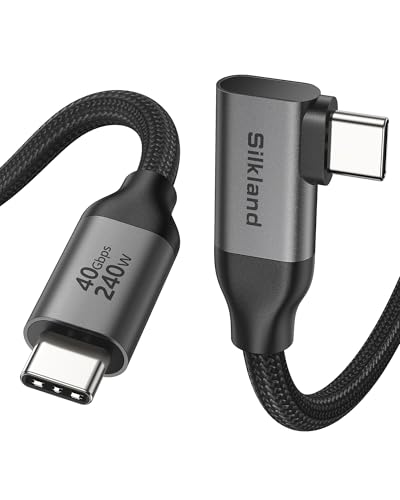
Best Right-Angle Design – Silkland 40Gbps Right-Angle Cable
For thunderbolt cables for data transfer in tight desk spaces, this Silkland model adds a 90-degree connector to its 40Gbps USB4 performance. The right-angle design helps route the cable neatly around laptops, docks, monitors, and charging setups.
Best For: Organized workstations, short connections, and devices where a side-facing connector can reduce cable strain or clutter.
Pros:
- Supports up to 40Gbps transfers and single 8K, 5K, or dual 4K displays.
- Right-angle connector and 3.3-foot length suit nearby desk connections.
- Supports up to 240W PD 3.1 charging with backward compatibility for lower power levels.
- Braided construction, aluminum housing, E-Marker chip, and 24-month support improve usability and durability.
Cons:
- Optimal speed requires devices that support 40Gbps and displays that support DP Alt Mode.
- The connector is recommended only with cases under 1.5mm thick.
- A 3.3-foot length may be limiting for larger setups.
This cable stands out when physical cable routing matters as much as bandwidth. Choose it for a compact workstation, but check device ports and case clearance before buying.
How We Picked the Best Thunderbolt Cables for Data Transfer
We focused on specifications that directly affect real-world connectivity: maximum data rate, Thunderbolt and USB4 compatibility, charging capacity, video support, cable length, certification, and connector design. The selection includes Intel-certified and USB-IF-certified options where stated, as well as cables designed for Thunderbolt 4, Thunderbolt 5, USB4, or backward-compatible Thunderbolt 3 systems.
Because cable performance depends on the connected computer, dock, storage device, and display, advertised speeds should be treated as maximum capabilities rather than guaranteed transfer rates. Active cables may be especially useful at longer lengths, while passive cables are often simpler and more flexible for short connections.
Quick Comparison
| Best For | What to Look For |
|---|---|
| Thunderbolt 4 storage and docks | 40Gbps support, reliable certification, and USB-C compatibility |
| Thunderbolt 5 systems | 80Gbps or higher USB4 bandwidth and Thunderbolt 5 support |
| High-power laptops | 240W USB Power Delivery support |
| Longer desk setups | Active construction or a length suited to the required bandwidth |
| Neat cable management | Right-angle connectors or a compact, flexible design |
Key Buying Factors for Thunderbolt Cables for Data Transfer
Speed and Protocol Compatibility
A 40Gbps cable is generally appropriate for Thunderbolt 4, fast external NVMe storage, docks, and many high-resolution display setups. Thunderbolt 5 and newer USB4 Gen 4 devices can support up to 80Gbps, with some configurations offering higher bandwidth in one direction. Make sure both connected devices support the standard you want to use.
Length and Construction
Short cables typically make it easier to maintain maximum performance. If you need 6 feet or more, check whether the cable is active and verify the manufacturer’s stated speed at that length. Avoid choosing a cable solely by appearance or charging rating; a high-wattage USB-C cable is not automatically a full-speed Thunderbolt cable.
Charging and Displays
240W support can help future-proof a cable for compatible laptops, although the charger and computer must also support that power level. For monitors, confirm the cable’s video capabilities and your system’s display requirements, including refresh rate, resolution, and daisy-chaining support.
Who Should Buy Which Thunderbolt Cables for Data Transfer?
Choose a certified 40Gbps Thunderbolt 4 or USB4 cable for most external SSDs, docks, and everyday professional setups. Pick a Thunderbolt 5 or 80Gbps USB4 model if you already own compatible hardware or want more headroom for next-generation storage and displays. A longer active cable suits setups where the computer and dock are separated, while a two-pack is convenient for multiple devices or a home-and-office arrangement. For cramped ports or a laptop on a stand, a right-angle cable can reduce strain and improve cable routing.