Choosing the best thunderbolt cable for external GPU use is about more than finding the newest speed rating. Your cable must match the enclosure, computer port, required bandwidth, and connection length while maintaining a stable link for demanding graphics workloads.
We selected 10 cables spanning Thunderbolt 4, Thunderbolt 5, and USB4 specifications, with options for high-wattage charging, 8K displays, compact desks, and systems that need dependable everyday performance.
Best 10 Thunderbolt Cable for External GPU Picks for 2026
Best High-Bandwidth Cable

- Up to 80Gbps, with up to 120Gbps Bandwidth Boost
- Supports 240W Power Delivery and 8K video
- Backward compatible with Thunderbolt 4 and USB4
Best For: High-performance external GPU and multi-display workstations
Best USB4 Value
Silkland 40Gbps USB4 Thunderbolt Cable
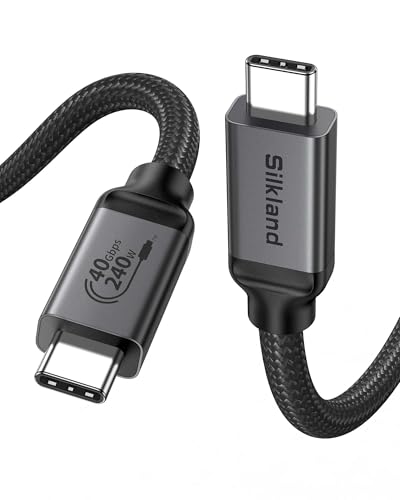
- 40Gbps USB4 and Thunderbolt 3/4 support
- 240W charging and 8K video capability
- Short 3.3-foot length for nearby devices
Best For: Compact external GPU and dock setups
Best Premium Build
CalDigit Thunderbolt 5 Pro Braided Cable

- Up to 120Gbps bandwidth and 64Gbps PCIe
- Supports 240W charging and external GPUs
- Braided, low-profile design tested for 20,000 bends
Best For: Demanding Thunderbolt 5 eGPU and storage setups
Best for Thunderbolt 5 Speed
Anker Prime Thunderbolt 5 Cable

- 80Gbps transfer speeds
- 240W charging support
- Dual 8K display capability
Best For: High-bandwidth Thunderbolt 5 eGPU setups
Best for Everyday Use

- USB4 and Thunderbolt 3/4 compatible
- 40Gbps data and 8K video
- Up to 240W PD charging
Best For: Flexible USB4 and Thunderbolt eGPU setups
Best for Tight Spaces
Plugable Right-Angle Thunderbolt 4 Cable

- 90-degree connector design
- 40Gbps Thunderbolt 4 performance
- 240W EPR charging support
Best For: Compact eGPU and docking station layouts
Best High-Bandwidth Pick
UGREEN Thunderbolt 5 USB-C Cable

- Up to 80Gbps USB4 Gen4 data transfer
- 240W PD 3.1 charging support
- Durable braided 3.3-foot design
Best For: High-performance USB-C workstations and compatible eGPU setups
Best Certified 4-Foot Option

- 40Gbps USB4 performance
- Thunderbolt 4/3 backward compatibility
- 4-foot length with 240W charging
Best For: Desk-based eGPU and docking-station connections
Best Straightforward Choice

- 40Gbps data transfer
- Up to 8K/60Hz display support
- Compact 3.3-foot length and 18-month warranty
Best For: Everyday compatible eGPU and laptop connections
Best eGPU Dock – PCIe 3.0 x16 Thunderbolt 4 eGPU Dock
If you need a thunderbolt cable for external gpu use, this OwlTree dock provides the PCIe x16 slot and includes a 23.6-inch Thunderbolt 4 cable. It supports Thunderbolt 3, Thunderbolt 4, and USB4 systems, but your laptop, console, or desktop must have compatible port functionality and an NVIDIA or AMD graphics card.
Best For: Windows or Linux users building a flexible external GPU setup for gaming, video editing, graphics work, or AI art.
Pros:
- Supports NVIDIA and AMD graphics cards with available official drivers.
- Compatible with many Thunderbolt 3, Thunderbolt 4, and USB4 devices.
- Offers four power-input options, including PD, Molex, CPU power, and DC5521.
- Includes the eGPU dock, Thunderbolt 4 cable, and power jumper cable.
Cons:
- Requires a separate compatible NVIDIA or AMD graphics card.
- Some USB4 consoles may need a BIOS update.
- Power input limits vary by connection method.
As a complete dock rather than a cable-only purchase, this is the most practical option when you need the PCIe enclosure interface and connection cable together. Check your host port and power requirements before buying.
Best High-Bandwidth Cable – Plugable Thunderbolt 5 Cable
For a future-ready thunderbolt cable for external gpu connections, the Plugable TBT5-240W1M combines Thunderbolt 5 bandwidth with 240W Power Delivery. Its one-meter length suits desk setups, and it is also backward compatible with Thunderbolt 4, USB4, and USB-C devices.
Best For: High-performance laptops, external GPUs, gaming setups, video editing, and multi-display workstations using compatible Thunderbolt or USB4 hardware.
Pros:
- Supports up to 80Gbps data transfer and Thunderbolt 5 Bandwidth Boost up to 120Gbps.
- Supports 8K video and multiple high-resolution display configurations.
- Provides up to 240W USB Power Delivery for compatible devices.
- USB-IF certified, UL tested, driverless, and backed by lifetime support.
Cons:
- Maximum Thunderbolt 5 performance requires compatible host and peripheral hardware.
- The one-meter length may not suit farther-apart setups.
This is a strong cable choice when your external GPU and computer support newer Thunderbolt standards, while its backward compatibility keeps it useful with older USB-C equipment. Actual performance remains limited by the connected devices.
Best USB4 Value – Silkland 40Gbps USB4 Thunderbolt Cable
The Silkland USB4 cable is a practical thunderbolt cable for external gpu setups that use Thunderbolt 3, Thunderbolt 4, or USB4. It offers 40Gbps transfer, 240W charging, and a compact 3.3-foot length for side-by-side laptop, dock, and peripheral connections.
Best For: Users who need a certified USB4 cable for a nearby external GPU dock, monitor, SSD, or charging setup.
Pros:
- Provides up to 40Gbps data transfer with Thunderbolt 3/4 and USB4 compatibility.
- Supports 8K at 60Hz or dual 4K at 60Hz when supported by the connected devices.
- Supports up to 240W PD 3.1 charging with an E-Marker chip.
- USB-IF certified and compatible with several USB-C and Thunderbolt peripherals.
Cons:
- Its 3.3-foot length is intended for close, side-by-side connections.
- Video and transfer performance depends on host, dock, GPU, and display support.
- The notes recommend a longer version for devices positioned on the floor.
This cable makes sense for compact desk layouts where a short connection is preferred. It offers broad compatibility and high power support, but measure the distance to your eGPU dock before choosing this length.
Best Premium Build – CalDigit Thunderbolt 5 Pro Braided Cable
The CalDigit Thunderbolt 5 Pro is a premium thunderbolt cable for external gpu use, combining up to 120Gbps Thunderbolt 5 bandwidth, 64Gbps PCIe support, and 240W Power Delivery. Its one-meter braided construction is designed for demanding desktop setups and frequent handling.
Best For: Thunderbolt 5 users connecting external GPUs, fast storage, docks, laptops, and high-resolution displays who want a durable braided cable.
Pros:
- Supports up to 120Gbps bandwidth and 64Gbps PCIe performance.
- Designed for external GPUs, storage, docks, and displays up to 8K.
- Supports up to 240W Power Delivery.
- Braided cable is tested for at least 20,000 bends and uses a low-profile connector housing.
Cons:
- Maximum performance requires a Thunderbolt 5 host device.
- The one-meter length may be limiting for floor-mounted equipment.
- Connected devices can restrict performance to their own specification.
This is the premium pick for users who want high bandwidth and a more durable physical design. It is backward compatible, but its biggest advantages are best realized with Thunderbolt 5 hardware and a demanding external GPU or storage workflow.
Best for Thunderbolt 5 Speed – Anker Prime Thunderbolt 5 Cable
If you want a high-bandwidth thunderbolt cable for external gpu setups, the Anker Prime Thunderbolt 5 Cable offers 80Gbps data transfer, 240W charging, and support for dual 8K displays. Its 3.3-foot length suits compact desktop or laptop workstations.
Best For: Thunderbolt 5 users building high-performance eGPU and multi-display setups.
Pros:
- Supports up to 80Gbps data transfer.
- Provides up to 240W USB-C charging.
- Supports dual 8K displays at 60Hz.
- Includes an 18-month warranty.
Cons:
- Thunderbolt 5 features require compatible host and eGPU hardware.
- The 3.3-foot length may be limiting for larger setups.
This is the most performance-focused option in the group, especially when your external GPU enclosure and computer support Thunderbolt 5. For older Thunderbolt systems, its extra bandwidth may not provide a practical benefit.
Best for Everyday Use – Acer USB4 40Gbps Cable
The Acer USB4 Cable is a practical thunderbolt cable for external gpu users who need broad compatibility without moving to Thunderbolt 5. It supports USB4, Thunderbolt 4 and 3 devices, 40Gbps transfers, 8K video, and up to 240W power delivery.
Best For: USB4 or Thunderbolt 3/4 eGPU users who want one cable for data, video, and charging.
Pros:
- Compatible with USB4 and Thunderbolt 4/3 devices.
- Supports 40Gbps data transfer and 8K at 60Hz video.
- Offers up to 240W PD 3.1 charging.
- Braided construction and aluminum alloy casing add durability.
Cons:
- Its 40Gbps bandwidth is lower than a Thunderbolt 5 cable.
- Only a 3.3-foot length is specified.
With eGPU compatibility explicitly listed and support for several generations of USB-C connectivity, this cable is a flexible choice for mixed-device setups. It is best matched with systems whose ports support USB4 or Thunderbolt 3/4.
Best for Tight Spaces – Plugable Right-Angle Thunderbolt 4 Cable
The Plugable Thunderbolt 4 Cable is a convenient thunderbolt cable for external gpu installations where port clearance and cable routing matter. Its 90-degree connector supports Thunderbolt 4 performance, 40Gbps transfers, 240W EPR charging, and up to 8K video.
Best For: Compact desks, docking stations, and eGPU enclosures where a right-angle connection reduces cable strain.
Pros:
- Right-angle design helps with tight spaces and docking setups.
- Supports 40Gbps data transfer and single 8K at 60Hz video.
- Supports up to 240W EPR charging.
- Thunderbolt and USB-IF certified.
Cons:
- Its 2.6-foot length may not reach distant eGPU placements.
- 40Gbps performance is below Thunderbolt 5’s stated bandwidth.
This cable stands out for physical convenience rather than maximum bandwidth. The right-angle connector can make a noticeable difference when a straight plug would bend against a laptop, dock, or external GPU enclosure.
Best High-Bandwidth Pick – UGREEN Thunderbolt 5 USB-C Cable
If you need a thunderbolt cable for external gpu setups and also want maximum bandwidth for fast storage or demanding displays, this UGREEN USB-C cable is a feature-packed option. It supports USB4 Gen4 speeds up to 80Gbps, up to 240W charging, and DisplayPort 2.1 video output, though actual performance depends on the connected devices.
Best For: Users building high-performance USB-C workstations with compatible external GPUs, SSDs, monitors, and laptops.
Pros:
- Up to 80Gbps data transfer for large files and fast external storage.
- Supports up to 240W PD 3.1 charging.
- Offers broad video capabilities, including up to 16K at 60Hz and multiple-display configurations.
- Braided construction and reinforced connectors are rated for up to 10,000 bends.
Cons:
- USB4 Gen4 and the maximum video modes require compatible hardware.
- Its advanced specifications may be more than needed for a basic eGPU setup.
For buyers who want a forward-looking cable rather than a basic connection lead, the UGREEN stands out with the highest listed data rate and substantial power capacity. Verify that your computer, enclosure, and display support the advertised standards before expecting maximum performance.
Best Certified 4-Foot Option – Silkland USB4 40Gbps Cable
This Silkland cable is a practical thunderbolt cable for external gpu connections when you want a little extra reach without moving beyond a compact desktop setup. It provides up to 40Gbps, supports Thunderbolt 4 and Thunderbolt 3 compatibility, and can deliver up to 240W with compatible equipment.
Best For: Desk-based eGPU, docking-station, SSD, and monitor connections where a 4-foot cable is useful.
Pros:
- USB-IF certified USB4 design with a listed 40Gbps transfer rate.
- Supports Thunderbolt 4/3 and backward compatibility with several USB standards.
- Provides single 8K, dual 4K, and up to 4K at 144Hz display support.
- Braided construction, aluminum housing, and a 24-month customer-care commitment.
Cons:
- The notes recommend cables under 5 feet for stable docking performance.
- Maximum speeds and display output depend on the connected devices.
The 4-foot length offers more flexibility than a short 3.3-foot cable while remaining within the maker’s recommended range for docking connections. It is a sensible middle-ground choice for an eGPU desk setup, especially if certification and broad backward compatibility matter.
Best Straightforward Choice – Anker 515 USB4 Cable
For a dependable everyday thunderbolt cable for external gpu use, the Anker 515 keeps the specification set focused: up to 40Gbps transfers, high-resolution display support, and up to 240W charging. Its 3.3-foot length is well suited to compact laptop-and-enclosure arrangements.
Best For: Users who want a short, established-brand USB4 cable for compatible eGPU, monitor, laptop, and tablet connections.
Pros:
- Supports data transfers up to 40Gbps.
- Handles up to 8K at 60Hz or 4K at 144Hz display output.
- Supports up to 240W charging with a compatible charger.
- Tested to withstand up to 5,000 bends and includes an 18-month warranty.
Cons:
- Provides less bandwidth than the UGREEN 80Gbps option.
- The 3.3-foot length may be limiting for some desk layouts.
- Maximum eGPU and display performance requires compatible USB4 or Thunderbolt hardware.
The Anker is a balanced pick when 40Gbps is sufficient and you prefer a compact cable from a familiar accessory brand. It covers the core needs of many compatible eGPU setups without adding the more specialized capabilities of newer 80Gbps cables.
How We Picked the Best Thunderbolt Cable for External GPU Use
We focused on cables that clearly state their data-transfer standards, power capabilities, and compatibility. The roundup includes Thunderbolt 4 and Thunderbolt 5 models, USB4 cables that may suit compatible eGPU setups, and products advertised for use with Thunderbolt 3 or newer ports.
We also considered practical details such as cable length, braided construction, USB-IF certification, right-angle connectors, charging support, and whether the product is positioned as driverless or broadly compatible. A higher speed rating does not automatically make a cable better for every enclosure, so compatibility and verified specifications remain central.
Quick Comparison
| What to compare | Best fit |
|---|---|
| Thunderbolt 4, 40Gbps | Most current eGPU enclosures and general-purpose setups |
| Thunderbolt 5, up to 80Gbps or higher modes | Newer computers and enclosures designed for Thunderbolt 5 |
| 240W USB-C power support | Users who also want substantial charging capability |
| 3.3-foot cable | Standard desktop and laptop layouts |
| 4-foot cable | More flexibility between a laptop and enclosure |
| Right-angle connector | Tight spaces or ports located near a laptop edge |
Key Buying Factors for a Thunderbolt Cable for External GPU
Match the Port and Enclosure Standard
Check the specifications for both the host computer and eGPU enclosure. Thunderbolt 4 cables are generally the safest choice for Thunderbolt 4 systems, while Thunderbolt 5 cables are most useful when every major component supports the newer standard. A USB-C connector alone does not guarantee Thunderbolt performance.
Verify Bandwidth Requirements
Most Thunderbolt 4 eGPU setups use a 40Gbps connection. Thunderbolt 5 and USB4 Gen 4 cables can offer higher advertised rates, but the actual link is limited by the computer, enclosure, graphics card interface, and software. Do not pay for a higher rating unless your hardware can use it.
Consider Length and Construction
Shorter cables can be easier to route and may reduce clutter. A 3.3-foot cable suits a nearby enclosure, while a 4-foot option gives more placement freedom. Braided jackets and reinforced connectors can help with frequent handling, but avoid excessive bends and sharp pulls.
Separate Charging from EGPU Performance
240W power delivery is useful for compatible USB-C devices, but it does not increase graphics bandwidth. Confirm that the cable, charger, computer, and enclosure all support the desired charging level before relying on it for power.
Who Should Buy Which Thunderbolt Cable for External GPU?
Choose a Thunderbolt 4 cable if you want the most straightforward match for a Thunderbolt 4 eGPU enclosure or a Thunderbolt 3/4 laptop. These models provide the practical bandwidth most external GPU users need.
Choose a Thunderbolt 5 cable if you already own, or plan to buy, a Thunderbolt 5 computer and enclosure. It is the better long-term option for newer systems, but it may not improve performance on older hardware.
Choose a USB4 cable when your devices explicitly support the required USB4 mode and you have confirmed eGPU compatibility. For maximum certainty, prioritize a cable with clear Thunderbolt certification and specifications.
Choose a right-angle or longer cable when desk placement and port orientation matter more than minimum size. Before buying, confirm connector direction, cable length, and the return policy in case your enclosure does not establish a stable connection.