The best smart home hubs for families make connected devices easier to manage, while also helping everyone stay organized. The right choice can combine lighting, security, routines, calendars, and household information in one accessible place.
This roundup compares 10 family-friendly options, from touchscreen organization centers to powerful multi-protocol automation hubs. Use the guide below to narrow your choice by compatibility, ease of use, subscription costs, and the way your household actually lives.
Best 10 Smart Home Hubs for Families Picks for 2026
Best Alexa Control Panel

- Customizable dashboard for household controls
- Supports Zigbee, Matter, Thread, and more
- Manages routines, cameras, and security
Best For: Alexa households wanting centralized touch control
Best Family Organization Display

- Syncs Google, Outlook, and iCloud calendars
- Combines chores, meals, and schedules
- Converts to a photo frame when idle
Best For: Busy households coordinating daily responsibilities
Best Multi-Protocol Hub

- Supports Matter, Z-Wave, Zigbee, and Wi-Fi
- Works with Alexa, Google Home, and SmartThings
- Offers custom and local automations
Best For: Mixed-brand smart homes needing broad compatibility
Best Touchscreen Security Panel

- Compact touchscreen for home controls
- Includes customizable security modes
- Displays supported camera feeds and energy data
Best For: Homes wanting compact security and device control
Best Family Display

- 15.6-inch Full HD touchscreen with family widgets
- Alexa smart-home dashboard with voice and tap controls
- Built-in Fire TV, video calling, and privacy controls
Best For: Alexa households seeking organization, entertainment, and smart-home control in one large display
Best Flexible Family Calendar

- Google Play access for calendars, planners, and smart-home apps
- Large Full HD touchscreen for shared family planning
- Wall-mount or countertop setup with no required subscription
Best For: Families wanting customizable scheduling and compatible smart-home apps on a large display
Best Advanced Automation Hub

- Home Assistant comes preinstalled for quick setup
- Centralizes compatible devices and advanced automations
- Local data storage with optional Zigbee, Z-Wave, and Thread expansion
Best For: Families building a private, expandable whole-home automation system
Best for Family-Friendly Security Monitoring
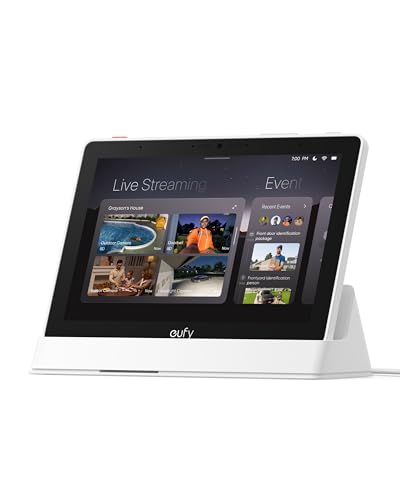
- 8-inch touchscreen for simple household use
- Four simultaneous security camera feeds
- Local event playback and daily summaries
Best For: Families focused on centralized eufy security monitoring
Best for Whole-Home Automation

- Seven built-in connectivity technologies
- Supports 50,000-plus devices from 1,000-plus brands
- Local-first automations with energy insights
Best For: Families with diverse and expanding smart-device setups
Best for Family Lighting Control

- Supports up to 75 Caseta devices
- Works with Alexa, Apple HomeKit, and Google Assistant
- Simple router-connected installation
Best For: Families centered on Caseta lighting and voice control
Best Alexa Control Panel – Echo Hub
For families comparing smart home hubs for families, the Amazon Echo Hub is a practical wall-mounted control panel for organizing compatible devices, cameras, routines, and security controls in one place. Its customizable dashboard can be arranged around the way your household uses smart-home devices.
Best For: Alexa households that want an easy-to-use, centralized touch-control panel.
Pros:
- Customizable dashboard with sections and resizable controls.
- Built-in support for Wi-Fi, Bluetooth, Zigbee, Matter, Sidewalk, and Thread devices.
- Can control routines, compatible security systems, cameras, locks, alarms, and sensors.
- Supports wall mounting and on-screen media controls.
Cons:
- Alexa+ and compatible Ring features require separate subscriptions where applicable.
- Wall cable pass-throughs, power-over-Ethernet, and tabletop stands are sold separately.
The Echo Hub is a strong family choice when quick visibility and simple shared controls matter. It is especially useful in homes already invested in Alexa-compatible devices.
Best Family Organization Display – Digital Calendar Wall Screen
Among smart home hubs for families, this 15.6-inch digital calendar focuses on household coordination rather than device automation. It combines shared calendars, meal planning, chore tracking, rewards, and photo display in a wall- or desk-mounted touchscreen.
Best For: Busy and multigenerational households that need a shared family command center.
Pros:
- Syncs in real time with Google, Outlook, iCloud, and other platforms.
- Supports simultaneous schedule editing by multiple family members.
- Includes a digital chore chart with reward points for children.
- Works as a digital photo frame with 32GB of storage and expandable capacity.
Cons:
- Batteries are not included.
- It is primarily a family planner and display, not a general-purpose smart-device hub.
- Mounting options may require choosing between wall and desk placement.
This display is a good fit for families whose biggest challenge is coordinating people, schedules, meals, and chores. Its subscription-free core calendar features add to its household value.
Best Multi-Protocol Hub – Aeotec Smart Home Hub
The Aeotec Smart Home Hub is a strong technical option for families comparing smart home hubs for families across multiple device ecosystems. It works with SmartThings and supports Matter, Z-Wave Plus, Zigbee, Wi-Fi, Alexa, and Google Home, giving households room to combine devices from different brands.
Best For: Families building a broad, mixed-brand smart home with app and voice control.
Pros:
- Supports Matter, SmartThings, Z-Wave Plus, Zigbee, and Wi-Fi devices.
- Creates custom automations for lights, sensors, switches, comfort, and energy devices.
- Some automations can run locally for improved speed and reliability.
- Offers both Wi-Fi and Ethernet setup options.
Cons:
- The Z-Wave Plus certification applies to the V3 model.
- Designed for use in North America.
- Its broader feature set may require more setup and configuration than a simple control panel.
Choose the Aeotec hub when compatibility and automation flexibility are more important than having a large touchscreen. It is well suited to households that want to grow a connected ecosystem over time.
Best Touchscreen Security Panel – SONOFF NSPanel Pro
The SONOFF NSPanel Pro is a compact control panel for families comparing smart home hubs for families who want quick access to cameras, lighting, thermostats, security modes, and energy information. Its 4.7-inch screen provides tap-based control in a small footprint.
Best For: Households wanting a compact wall control point with camera viewing and security features.
Pros:
- Controls lighting, thermostats, cameras, and other compatible functions from the touchscreen.
- Supports three customizable security modes with sensor-triggered alarms and phone notifications.
- Tracks daily energy consumption over a week for devices with energy statistics.
- Can display live views from four supported camera types.
Cons:
- The 4.7-inch display is smaller than larger family command-center screens.
- Camera viewing is limited to the four supported camera types described by the manufacturer.
- Its supplied information does not establish broad compatibility with every smart-home ecosystem.
The NSPanel Pro makes sense when a small, always-available screen is more useful than a full-size calendar display. Its security modes and camera viewer are particularly practical for quick household checks.
Best Family Display – Echo Show 15
For families comparing smart home hubs for families, the Echo Show 15 combines household organization, entertainment, video calling, and Alexa smart-home controls in a large 15.6-inch Full HD display. Its customizable widgets make shared schedules and home controls easy to view from the kitchen.
Best For: Families wanting a visible command center with Alexa controls, Fire TV, calendars, and video calling.
Pros:
- Large 15.6-inch Full HD display with customizable family calendar and to-do widgets.
- Built-in smart home dashboard supports voice and touchscreen control of compatible devices.
- Includes Fire TV, a remote, photo slideshow features, and enhanced video calling.
- Offers a camera-off button and built-in camera shutter for added privacy control.
Cons:
- Its smart-home experience is centered on Alexa-compatible devices.
- Some entertainment apps or content may require subscriptions.
- The large display may be more than needed for households seeking a compact hub.
The Echo Show 15 is a particularly versatile family hub when shared organization and entertainment matter as much as device control. It is a strong kitchen-focused choice for Alexa households that want schedules, cameras, media, and calls in one place.
Best Flexible Family Calendar – Mazera 21.5-Inch Smart Hub
The Mazera 21.5-inch Smart Hub is a flexible option for families comparing smart home hubs for families and wanting planning tools alongside home controls. Because it uses Google Play, households can choose compatible calendar, task, photo, streaming, and smart-home apps instead of relying on one proprietary calendar system.
Best For: Families wanting a large shared calendar and customizable Android dashboard without a required subscription.
Pros:
- Supports Google Calendar, Apple Calendar, Outlook, Cozi, and other compatible apps.
- Combines calendars, chores, meal plans, reminders, routines, widgets, and smart-home controls.
- Large anti-glare Full HD touchscreen includes auto brightness for all-day viewing.
- Can be wall-mounted or used on a countertop with the included metal stand.
Cons:
- Smart-home control depends on compatible apps and devices.
- Hands-free functions rely on supported Google Gemini AI features.
- Its 21.5-inch size requires a suitable wall or countertop location.
Mazera stands out for families that prioritize customization and shared planning. Its app flexibility makes it adaptable across different calendar ecosystems, while the large display and mounting options suit kitchens, offices, and other common areas.
Best Advanced Automation Hub – Home Assistant Green
Home Assistant Green | Smart Home hub with Advanced Automation | Official Home Assistant Hardware
Check Price On AmazonHome Assistant Green is a focused choice for families comparing smart home hubs for families and prioritizing whole-home automation over a built-in screen. With Home Assistant OS installed, it centralizes compatible devices and can coordinate routines such as dimming lights for a movie or adjusting heating when the household is away.
Best For: Households wanting local data storage and advanced automation across a growing mix of smart-home devices.
Pros:
- Comes with Home Assistant installed for a straightforward plug-in setup.
- Supports whole-home control and advanced device automation from one hub.
- Stores home data locally and offers options to view, share, and export it.
- Compact, fanless, silent design uses only a couple of watts and supports USB expansion.
Cons:
- Requires Ethernet rather than being a wireless-only setup.
- Z-Wave, Zigbee, and Thread connectivity requires compatible USB expansion devices.
- It does not include a built-in display for family calendars or visual controls.
Home Assistant Green is best viewed as the automation engine of a family smart home rather than a kitchen command screen. Its local data approach, quiet hardware, and expansion potential make it appealing for households ready to build more coordinated routines.
Best for Family-Friendly Security Monitoring – eufy Smart Display E10
For families comparing smart home hubs for families, the eufy Smart Display E10 stands out as a dedicated security and monitoring panel. Its 8-inch touchscreen can show up to four live feeds, surface alerts, and provide quick access to recorded events.
Best For: Families that want an easy-to-use central display for eufy security cameras, doorbells, and related monitoring.
Pros:
- Automatically displays live video and voice alerts for doorbell, door, and camera activity.
- Shows four simultaneous live feeds for at-a-glance property monitoring.
- Stores historical events locally for quick replay and provides daily event summaries.
- The touchscreen is designed to be accessible for children and seniors.
Cons:
- Its strongest features are centered on eufy security monitoring rather than broad multi-brand home automation.
- The supplied details do not establish compatibility with other smart-home ecosystems.
The E10 is a practical choice when family safety and straightforward video access matter more than controlling a wide range of lighting, climate, and appliance products.
Best for Whole-Home Automation – Homey Pro (2026)
Homey Pro (2026) is a versatile option for families seeking smart home hubs for families that can bring many devices and brands into one system. It supports seven connectivity technologies, local-first processing, and customizable automations through Homey Flow.
Best For: Households with a varied or expanding collection of smart devices that want centralized automation and broad protocol support.
Pros:
- Supports Wi-Fi, Zigbee, Z-Wave Plus, infrared, BLE, Matter, and Thread.
- Works with more than 50,000 devices from over 1,000 brands, according to the supplied product notes.
- Homey Flow and Advanced Flow enable customized routines for lighting, music, security, and more.
- Processes automation locally and can track energy use and sensor alerts.
Cons:
- Its extensive features may be more than needed for households with only a few smart devices.
- Specific compatibility should be checked before purchase because support depends on brands and Homey apps.
With broad protocol coverage and room to grow, Homey Pro is the strongest fit here for families building a multi-brand smart home and wanting flexible routines from one hub.
Best for Family Lighting Control – Lutron Caseta Smart Hub
The Lutron Caseta Smart Hub is a focused pick among smart home hubs for families, especially for households prioritizing convenient lighting control. It connects Caseta devices with Alexa, Apple HomeKit, Google Assistant, Ring, Serena shades, and Sonos through a simple router-based setup.
Best For: Families that want dependable, app- and voice-based control of Caseta lighting, with the option to connect selected home platforms and accessories.
Pros:
- Supports voice control through Alexa and works with Apple HomeKit and Google Assistant.
- Can connect with Ring, Serena shades, and Sonos for broader home management.
- Supports up to 75 Caseta devices for future expansion.
- Plugs into an outlet and connects to a Wi-Fi router for straightforward installation.
Cons:
- Caseta dimmers, switches, and coordinating accessories are sold separately.
- It is primarily suited to the Lutron Caseta ecosystem rather than broad multi-protocol automation.
Choose the Caseta Hub when lighting is the family’s main smart-home priority and you value simple voice, app, and platform integration over an all-purpose automation controller.
How We Picked the Best Smart Home Hubs for Families
We evaluated these hubs by focusing on the features that matter most in busy households: device compatibility, setup difficulty, shared access, screen visibility, automation capabilities, privacy considerations, and long-term flexibility. We also considered whether each product is best suited to simple voice and touch control, family scheduling, home security, or advanced automation.
Compatibility deserves special attention. Some hubs are designed around a particular ecosystem, while others support multiple standards such as Matter, Thread, Zigbee, Z-Wave, Wi-Fi, Bluetooth, or infrared. Broader support can make it easier to combine products from different brands, but it may also involve more configuration.
Quick Comparison
| Best for | Consider |
|---|---|
| Family calendars and chores | Large touchscreen calendar hubs |
| Alexa-centered households | Echo Hub or Echo Show models |
| Cross-brand compatibility | Aeotec Smart Home Hub or Homey Pro |
| Advanced automation | Home Assistant Green or Homey Pro |
| Smart lighting control | Lutron Caseta Smart Hub |
| Security-focused touch control | eufy Smart Display E10 |
Key Buying Factors for Smart Home Hubs for Families
Compatibility and Standards
Check whether the hub supports the devices you already own and the products you plan to buy. Matter can improve cross-platform compatibility, but not every feature is guaranteed across ecosystems. Z-Wave and Zigbee can be useful for reliable low-power devices, while Thread support may matter for newer accessories.
Ease of Use and Shared Control
A family hub should be simple enough for children, guests, and less technical household members. Look for clear touch controls, reliable voice assistants, individual profiles, and straightforward routines. A wall-mounted display may be more useful for schedules and chores than a hub hidden in a cabinet.
Screen Size, Placement, and Privacy
Large displays are easier to read from across a kitchen or hallway, but they require more wall or counter space. Consider power-cable routing, viewing angles, camera controls, microphones, and whether the device can operate without sending unnecessary information to the cloud.
Subscriptions and Expansion
Confirm which features work without a monthly fee. Also check local versus cloud processing, backup options, app quality, and whether the manufacturer has a strong record of supporting its platform.
Who Should Buy Which Smart Home Hubs for Families?
Choose a calendar-focused touchscreen if your main goal is coordinating chores, appointments, meals, and family reminders. Choose an Echo Hub or Echo Show if your household already uses Alexa and wants convenient voice control plus a familiar display experience.
For mixed-brand smart homes, Aeotec or Homey Pro offers broader protocol support. Home Assistant Green is a strong choice for technically confident users who want deep customization and advanced local automation. Lutron Caseta is especially practical when dependable lighting control is the priority, while the eufy display fits households that want a more security-oriented control point.
Before buying, list your current devices, identify the assistant your family already uses, and decide whether the hub will live on a wall, counter, or shelf. That simple check will usually narrow the field faster than comparing specifications alone.