The best smart home hubs for seniors make everyday technology easier to use, not more complicated. A well-chosen hub can bring lights, locks, cameras, thermostats, sensors, and alerts into one manageable system.
This roundup compares 10 options with different strengths, including large touchscreens, voice control, audible notifications, broad device compatibility, and advanced automation. Use the guide below to match features with comfort level, home layout, and support needs.
Best 10 Smart Home Hubs for Seniors Picks for 2026
Best Overall

- Customizable 8-inch smart-home dashboard
- Supports multiple connectivity standards
- Voice, touch, camera, security, and routine controls
Best For: Families seeking an accessible visual and voice-controlled hub
Best for Tapo Homes

- Supports up to 64 Tapo devices
- Includes built-in chime and 90 dB siren
- Uses low-power wireless connections
Best For: Tapo-based homes needing simple sensor and alert management
Best Refurbished Value
- Certified refurbished and tested to work like new
- Customizable Alexa touchscreen controls
- Broad support for connected devices and standards
Best For: Shoppers seeking Echo Hub features at a potentially lower cost
Best for Privacy and Automation

- Home Assistant comes preinstalled
- Keeps home data locally on the device
- Supports advanced automation and USB expansion
Best For: Privacy-focused homes with a technically confident setup helper
Best for Visual Security
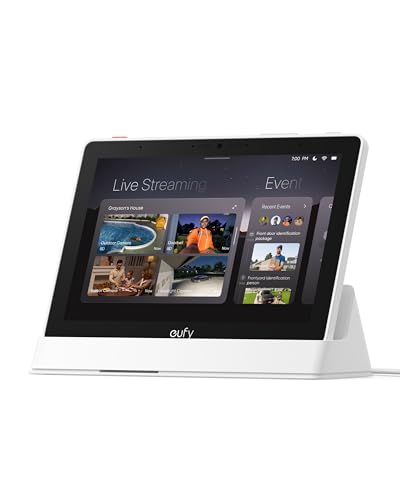
- Shows automatic live feeds and voice alerts
- Displays up to four camera views
- Senior-friendly 8-inch touchscreen
Best For: Seniors who want simple, visual security monitoring
Best for Whole-Home Automation

- Supports Matter, Zigbee, and Z-Wave
- Works with Alexa and Google Assistant
- Offers app-based routines and automation
Best For: Homes with multiple brands and device types
Best for Audible Alerts

- Announces events with tones or speech
- No microphone for added privacy
- Compact Wi-Fi alert speaker
Best For: Seniors who rely on clear audible household notifications
Best for Easy At-a-Glance Control

- Physical dial and buttons simplify everyday adjustments.
- Screen shows temperature, humidity, and available home status.
- Works with SwitchBot, Matter, infrared appliances, and major assistants.
Best For: Seniors who prefer visible information and tactile controls
Best for Sensor-Based Home Alerts

- Connects up to 128 Aqara devices through Zigbee 3.0.
- Speaker supports alarms, doorbells, and custom ringtones.
- Includes RGB lighting and major voice-assistant compatibility.
Best For: Seniors building an Aqara sensor and alert system
Best for Straightforward Whole-Home Lighting
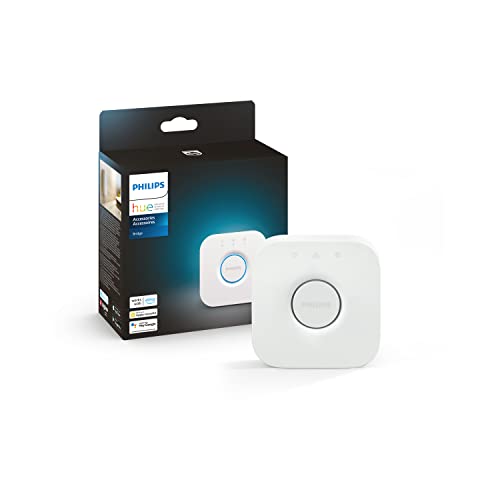
- Uses Zigbee for a stable lighting connection.
- Controls up to 50 Hue lights and accessories.
- Supports automations, remote control, zones, voice, and Matter.
Best For: Seniors wanting dependable multi-room Philips Hue lighting
Best Overall – Amazon Echo Hub
For shoppers comparing smart home hubs for seniors, the Amazon Echo Hub stands out as an easy-to-use, visual control panel. Its customizable dashboard, voice controls, and broad compatibility can make everyday device management simpler for households.
Best For: Families wanting a centralized touchscreen hub with Alexa voice control and broad smart-home compatibility.
Pros:
- Customizable dashboard for organizing devices and resizing controls.
- Built-in support for Wi-Fi, Bluetooth, Zigbee, Matter, Sidewalk, and Thread devices.
- Can control routines, compatible security systems, cameras, locks, sensors, and media.
- Can be wall mounted and includes a microphone-off privacy control.
Cons:
- Some features, including certain Ring camera capabilities, require compatible subscriptions sold separately.
- Wall-mount cable pass-throughs, power-over-Ethernet adapters, and tabletop stands are sold separately.
The Echo Hub is a practical choice when a senior or caregiver benefits from both touch controls and simple voice commands. Its large ecosystem and customizable layout offer flexibility, though the extra accessories and subscriptions may increase the overall cost.
Best for Tapo Homes – Tapo Smart Hub H100
The Tapo Smart Hub H100 is a compact option for households already using Tapo sensors, switches, and buttons. For smart home hubs for seniors, its wireless setup, built-in chime, and automated alerts may help simplify basic monitoring and notifications.
Best For: Tapo users who want a simple central hub for sensors, buttons, switches, and alerts.
Pros:
- Connects up to 64 Tapo devices through a single hub.
- Uses a low-power wireless protocol designed to extend compatible device battery life.
- Can trigger shortcuts or control Tapo devices from sensor detection or button presses.
- Built-in siren can reach up to 90 dB for potential hazard or intrusion alerts.
Cons:
- Requires a 2.4GHz Wi-Fi connection.
- It cannot directly connect to Tapo smart plugs or lighting; compatible Tapo devices must be linked through the supported setup.
- Its compatibility is centered on Tapo sensors, switches, and buttons rather than a broad multi-brand ecosystem.
The H100 is most appealing when the home is built around Tapo products and straightforward sensor-based actions. Its limited ecosystem makes it less versatile than a general-purpose hub, but that narrower focus can also keep setup manageable.
Best Refurbished Value – Like-New Amazon Echo Hub
The like-new Amazon Echo Hub offers the same style of touchscreen smart-home control at a potentially lower cost than buying new. Among smart home hubs for seniors, its combination of tap controls, Alexa voice commands, customizable widgets, and security features supports approachable daily use.
Best For: Budget-conscious households wanting a refurbished Echo Hub with touchscreen and Alexa controls.
Pros:
- Refurbished, tested, and certified to look and work like new, with the same limited warranty as a new device.
- Customizable controls and widgets help organize lights, plugs, cameras, and routines.
- Works with thousands of Alexa-compatible devices and supports Wi-Fi, Bluetooth, Zigbee, Matter, Sidewalk, and Thread.
- Supports compatible security systems, wall mounting, and external speakers for music and podcasts.
Cons:
- Certified-refurbished units may arrive in generic Amazon-branded packaging.
- Wall-mount cable pass-throughs, power-over-Ethernet adapters, and tabletop stands are sold separately.
- Some compatible security and camera features may depend on additional products or services.
This model is a sensible way to get Echo Hub functionality while considering value. The refurbished condition is worth weighing against the lower purchase price, especially for shoppers who want a large, centralized control panel without buying new.
Best for Privacy and Automation – Home Assistant Green
Home Assistant Green | Smart Home hub with Advanced Automation | Official Home Assistant Hardware
Check Price On AmazonHome Assistant Green is a compact, fanless hub for homeowners who want centralized automation and local data storage. For smart home hubs for seniors, it can reduce app clutter and coordinate devices, although its Ethernet-based setup and expandability may be better suited to a technically confident household or caregiver.
Best For: Privacy-focused users wanting advanced, whole-home automation with data kept locally.
Pros:
- Home Assistant is preinstalled; setup requires connecting the included power supply and Ethernet cable.
- Runs quietly in a small, fanless enclosure with 4GB of RAM and 32GB of storage.
- Supports centralized control and advanced automations across the home.
- Home data stays on the device, with USB expansion for Z-Wave, Zigbee, and Thread.
Cons:
- Initial setup requires Ethernet rather than a purely wireless connection.
- Z-Wave, Zigbee, and Thread connectivity requires additional USB devices.
- Advanced automation features may require more configuration than a simpler voice-focused hub.
Home Assistant Green is a strong foundation for a privacy-conscious smart home and complex automations. It is less immediately familiar than a touchscreen assistant, so seniors may benefit from setup help before relying on it for everyday control.
Best for Visual Security – eufy Smart Display E10
The eufy Smart Display E10 is a strong choice for seniors who want a visual, easy-to-use hub for monitoring compatible eufy security devices. Its 8-inch touchscreen can show live camera feeds, display alerts, and provide quick access to recorded events.
Best For: Seniors and families who prioritize hands-free security alerts and at-a-glance camera monitoring.
Pros:
- Automatically displays live video and voice alerts for doorbell, door, and camera events.
- Can show up to four live feeds simultaneously.
- Includes local storage for replaying historical events without buffering.
- Its 8-inch touchscreen is designed to be simple for seniors and other household members.
Cons:
- Its feature set is centered primarily on eufy security monitoring rather than broad smart-home device compatibility.
- Requires compatible eufy security equipment to deliver its full value.
- At 2.44 pounds, it is less lightweight than a compact speaker-style hub.
For shoppers comparing smart home hubs for seniors, the E10 stands out when clear visual feedback and security awareness matter more than controlling a wide range of third-party devices. It is especially practical for keeping camera activity visible in a common room.
Best for Whole-Home Automation – Aeotec Smart Home Hub
The Aeotec Smart Home Hub is a flexible pick for seniors whose homes use devices from several brands. It works with SmartThings and supports Matter, Z-Wave, Zigbee, Wi-Fi, Alexa, and Google Home, allowing lights, sensors, switches, comfort devices, and energy products to be managed from one system.
Best For: Households that want broad device compatibility, app control, voice control, and customizable routines.
Pros:
- Supports Matter, SmartThings, Z-Wave Plus, Zigbee, and Wi-Fi devices.
- Works with Amazon Alexa and Google Assistant for voice control.
- SmartThings automations can coordinate lights, sensors, switches, and other compatible devices.
- Offers both Wi-Fi and Ethernet setup options.
Cons:
- Its broad compatibility and automation options may require more setup than a single-purpose hub.
- Control depends on the SmartThings app or compatible voice assistants rather than a built-in display.
- The product is designed for use in North America.
Among smart home hubs for seniors, this model makes the most sense when a family member is available to help with initial configuration. Once routines are set up, local automation support and voice control can simplify everyday device management.
Best for Audible Alerts – YoLink SpeakerHub
The YoLink SpeakerHub is a compact alert hub for seniors who benefit from hearing important household notifications. It can play selected tones, custom sounds, MP3 files, and text-to-speech messages for events such as an open garage door, water leak, driveway activity, or incoming mail.
Best For: Seniors who prefer audible reminders and alerts without placing a microphone-enabled smart speaker in the home.
Pros:
- Supports customizable tones, sounds, and spoken text-to-speech messages.
- Can serve as a driveway alert, security siren, water leak alarm, door chime, or mail notification.
- Has no microphone, so it cannot listen to conversations.
- Compact, portable design can be placed freestanding or plugged in near an outlet.
Cons:
- Requires a stable Wi-Fi connection and USB power or a nearby AC outlet.
- Connects through Wi-Fi only and does not include an Ethernet port.
- Requires an Android or Apple smartphone for setup and control.
For smart home hubs for seniors, the SpeakerHub is a focused option rather than a general device controller. Its strongest advantage is making alerts hard to miss, particularly for users who may not regularly check a phone app.
Best for Easy At-a-Glance Control – SwitchBot Hub 3
For seniors who want smart home control without relying entirely on a phone, the SwitchBot Hub 3 combines a screen, physical dial, and buttons in one command center. It can control compatible infrared appliances, SwitchBot devices, and Matter-compatible products through the app, voice assistants, or tactile controls.
Best For: Seniors and families who value visible home information and straightforward physical controls.
Pros:
- Physical dial and customizable buttons make temperature, lighting, and scene adjustments easier.
- IPS screen displays temperature, humidity, weather, and other available home-status information.
- Supports SwitchBot devices, many infrared appliances, Matter devices, Alexa, Google Home, and Apple Home.
Cons:
- Requires 2.4GHz Wi-Fi for Matter setup and operation.
- Some displayed information depends on separately sold devices, such as SwitchBot Lock or Meter Pro CO2.
- Its broad feature set may take more initial setup than a lighting-only hub.
The Hub 3 is one of the more approachable smart home hubs for seniors because it offers controls that can be seen and physically operated. It is particularly useful when temperature adjustments and preset scenes need to be accessible to multiple household members.
Best for Sensor-Based Home Alerts – Aqara Hub M1S Gen 2
The Aqara Hub M1S Gen 2 is a practical choice among smart home hubs for seniors who want connected sensors, alerts, and routines. It links Aqara Zigbee devices and supports schedules, timers, scenes, voice control, and alarm functions through the Aqara Home app.
Best For: Seniors who want a coordinated Aqara sensor and alert system with smart-home platform support.
Pros:
- Can connect with up to 128 Aqara devices using Zigbee 3.0.
- Built-in speaker supports alarm and doorbell functions with customizable ringtones.
- Works with Apple HomeKit, Google Assistant, Alexa, and IFTTT.
- RGB light can serve as an alarm, accent light, or night light.
Cons:
- Supports Aqara Zigbee devices, not third-party Zigbee devices.
- Requires a 2.4GHz Wi-Fi network and does not support Wi-Fi 6.
- Full functionality depends on the Aqara ecosystem and compatible child devices.
Choose the M1S Gen 2 when alerts and sensor-triggered routines matter more than a screen or physical control dial. Its speaker, night-light capability, and broad voice-assistant compatibility can make an Aqara-based setup easier to monitor.
Best for Straightforward Whole-Home Lighting – Philips Hue Bridge
For seniors mainly interested in dependable smart lighting, the Philips Hue Bridge keeps the system focused and manageable. It uses Zigbee for a stable connection, supports control from outside the home, and enables automations, zones, and voice or Matter-based integration for compatible Hue products.
Best For: Seniors who want reliable Philips Hue lighting across multiple rooms and locations.
Pros:
- Zigbee connection does not strain Wi-Fi, and Hue lights can continue working when Wi-Fi is down.
- Supports up to 50 Hue lights and accessories, including outdoor products.
- Enables schedules, automations, zones, out-of-home control, voice control, and Matter integration.
Cons:
- Designed primarily for Philips Hue lighting and accessories rather than general smart-home devices.
- Requires a wired LAN connection to the network.
- Movie, music, and game syncing requires the separate HDMI Sync Box.
The Hue Bridge is a strong fit if the goal is to simplify lighting rather than coordinate many types of appliances. Its stable Zigbee connection and app-based remote control are useful for household members who want consistent room lighting without managing individual bulbs manually.
How We Picked the Best Smart Home Hubs for Seniors
We focused on practical usability rather than feature count alone. The products in this roundup represent several approaches to smart home control: touchscreen panels, voice-first assistants, dedicated security hubs, multi-protocol bridges, and automation-focused platforms.
Our main considerations were setup requirements, interface clarity, device compatibility, notification options, reliability, and how easily a family member or caregiver could help manage the system remotely. We also considered whether each hub requires a specific ecosystem, internet connection, wireless standard, or additional bridge.
Quick Comparison
| Best For | Look For |
|---|---|
| Simple daily control | Large display, clear controls, and voice commands |
| Security and alerts | Audible chimes, sensors, cameras, and dependable notifications |
| Mixed-brand devices | Matter, Zigbee, Z-Wave, or broad platform compatibility |
| Advanced automation | Powerful routines, local processing, and customization |
| Lighting control | Dedicated bridge support and room or zone management |
Key Buying Factors for Smart Home Hubs for Seniors
Ease of Use
A large screen can be helpful for people who prefer visual controls, while voice commands may be easier for hands-free operation. Look for simple menus, readable text, physical controls where useful, and routines that reduce the number of steps needed for common tasks.
Compatibility
Check the devices already installed in the home before choosing a hub. Some platforms work best with one brand, while others support protocols such as Matter, Zigbee, and Z-Wave. Compatibility claims can vary by device, so confirm support for specific locks, bulbs, sensors, cameras, or thermostats.
Alerts and Safety
For seniors, audible alerts and dependable notifications may matter more than entertainment features. Consider hubs that can announce doors opening, motion detection, leaks, temperature changes, or security events. Make sure alerts are noticeable without becoming confusing or excessive.
Setup and Ongoing Support
Assess whether installation requires a smartphone, account linking, wireless configuration, or technical knowledge. A hub that a trusted relative can manage remotely may be preferable, especially when troubleshooting access is important.
Who Should Buy Which Smart Home Hubs for Seniors?
Choose a touchscreen-centered hub for someone who benefits from visible controls and a central command panel. A voice-assistant hub suits users who prefer speaking commands for lights, timers, reminders, and compatible appliances. A security-focused hub is a stronger fit when door, motion, camera, or emergency-style alerts are the priority.
For homes with devices from multiple manufacturers, choose a hub with broad protocol support rather than assuming every product will work together. Homeowners who want detailed routines and extensive customization may prefer an advanced automation platform, but it can require more setup and ongoing maintenance. If the home mainly uses one lighting ecosystem, a dedicated lighting bridge may be the simplest and most reliable choice.
Before buying, list the devices you want to control, identify who will provide setup support, and prioritize the interface the primary user will actually feel comfortable using. The best Smart Home Hubs for Seniors are the ones that make useful actions obvious, alerts dependable, and daily routines easier.