The best wireless smart home hubs make connected devices easier to manage by bringing sensors, switches, lights, locks, and routines into one control system. The right choice depends on compatibility, wireless standards, app quality, and whether you want a dedicated touchscreen or a compact gateway.
We compared 10 popular hubs across major ecosystems, including Alexa, Apple Home, Google Home, Tuya, Zigbee, Bluetooth Mesh, and long-range options. Use the guide below to narrow your options by setup, household needs, and future expansion plans.
Best 10 Wireless Smart Home Hubs Picks for 2026
Best for Lutron Lighting

- Supports up to 75 Caseta devices
- Works with Alexa, HomeKit, Google Assistant, Ring, and Sonos
- Simple router and app setup
Best For: Lutron-focused lighting systems with voice control
Best for Tapo Sensors

- Connects up to 64 Tapo devices
- Uses low-power wireless connectivity
- Includes a built-in chime and 90 dB siren
Best For: Tapo sensor, switch, and button ecosystems
Best Smart Home Control Panel

- 8-inch customizable touchscreen dashboard
- Supports Alexa, Zigbee, Matter, Thread, and more
- Controls compatible devices, cameras, routines, and media
Best For: Centralized family-friendly smart-home control
Best for Long-Range Coverage

- LoRa range reaches up to 2,034 feet
- Up to eight hours of backup battery power
- Works over 2.4GHz Wi-Fi or Ethernet
Best For: YoLink devices across large or hard-to-reach properties
Most Versatile

- Zigbee, BLE, and Bluetooth Mesh support
- Up to 128 Zigbee/Bluetooth Mesh devices
- Alexa, Google Assistant, and Siri control
Best For: Tuya homes with mixed wireless protocols
Best for Local Automation
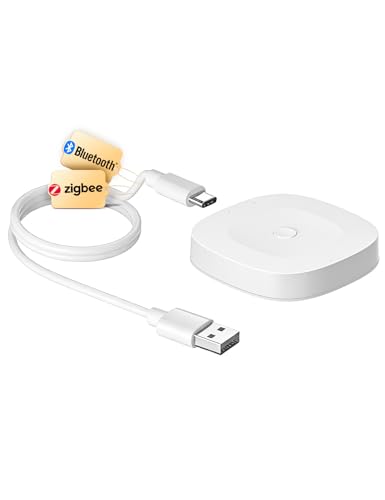
- Zigbee 3.0 and Bluetooth Mesh support
- Local scenarios and automation features
- Sound and light alarm support
Best For: Tuya users prioritizing local routines and security functions
Simple Tuya Setup
ZigBee and Bluetooth Dual-Mode Hub

- Zigbee 3.0 and Bluetooth 5.0 connectivity
- Smart Life and Tuya Smart app support
- Alexa and Google Assistant compatible
Best For: Basic Tuya setups needing Zigbee and Bluetooth control
Best Bluetooth Mesh Gateway

- Supports up to 128 Bluetooth Mesh devices
- Alexa, Google Assistant, IFTTT, and app control
- 2.4GHz Wi-Fi only; Tuya Bluetooth Mesh devices only
Best For: Tuya Bluetooth Mesh homes needing remote and voice control
Best Value Multi-Mode Hub
Tuya Zigbee and Bluetooth Gateway

- Combines Zigbee 3.0 and Bluetooth Mesh
- Supports up to 128 Tuya devices
- Remote app control plus Alexa and Google Home
Best For: Tuya households mixing Zigbee and Bluetooth Mesh devices
Best Simple Pick

- Combines Wi-Fi, Zigbee 3.0, and Bluetooth Mesh
- Supports local automations during internet outages
- Compatible with Alexa, Google Home, and Tuya Smart Life
Best For: Mixed-protocol Tuya homes prioritizing local automation
Best for Lutron Lighting – Caseta Smart Hub
The Lutron Caseta Smart Hub is a strong choice among wireless smart home hubs for households centered on Caseta lighting. It connects to your router, works with the Lutron app, and supports Alexa, Apple HomeKit, Google Assistant, Ring, Serena shades, and Sonos.
Best For: Expanding and controlling a Lutron Caseta lighting system with voice assistants and compatible smart-home products.
Pros:
- Supports up to 75 Caseta devices.
- Works with Alexa, Apple HomeKit, Google Assistant, Ring, Serena shades, and Sonos.
- Uses Clear Connect technology separately from Wi-Fi-connected devices.
- Simple setup through a router connection and the Lutron app.
Cons:
- Best suited to users already invested in Lutron Caseta devices.
- Caseta dimmers, switches, and coordinating accessories are sold separately.
Choose this hub when reliable Caseta expansion and broad platform compatibility matter more than having a general-purpose hub for unrelated device brands.
Best for Tapo Sensors – H100 Smart Hub
The Tapo H100 is one of the more focused wireless smart home hubs, designed to connect Tapo sensors, switches, and buttons over a low-power wireless protocol. It requires a 2.4GHz Wi-Fi connection and can coordinate automations, alerts, and compatible Tapo devices through the app.
Best For: Building a Tapo sensor and switch ecosystem with extended range, low-power operation, and built-in alerts.
Pros:
- Connects up to 64 Tapo devices.
- Offers a claimed range of up to 30 meters, depending on conditions.
- Low-power connectivity can extend compatible device battery life by up to 10 times compared with Wi-Fi.
- Built-in chime and siren can provide audible alerts up to 90 dB.
Cons:
- Requires a 2.4GHz Wi-Fi network.
- Cannot directly connect to Tapo smart plugs or smart lighting.
- Compatibility is centered on Tapo sensors, switches, and buttons.
The H100 makes sense for a Tapo-based setup where sensor-triggered actions and long battery life are priorities, but it is less flexible as a cross-brand hub.
Best Smart Home Control Panel – Echo Hub
The Amazon Echo Hub combines a wall-mountable 8-inch control panel with a built-in smart home hub. Among wireless smart home hubs, it stands out for its customizable dashboard, Alexa voice control, camera viewing, routines, and support for compatible Wi-Fi, Bluetooth, Zigbee, Matter, Sidewalk, and Thread devices.
Best For: Families that want a centralized touchscreen for controlling compatible smart-home devices, routines, cameras, security systems, and media.
Pros:
- Works with thousands of compatible Alexa devices.
- Supports Wi-Fi, Bluetooth, Zigbee, Matter, Sidewalk, and Thread devices.
- Customizable dashboard lets users arrange controls and resize sections.
- Can be wall mounted and supports compatible tabletop stands.
Cons:
- Some mounting, cable-management, and tabletop accessories are sold separately.
- Compatible Ring features require an Alexa+ and compatible Ring subscription.
- Advanced controls depend on device compatibility with Alexa.
Consider the Echo Hub if you want a visible, shared control center rather than a hub that operates mainly in the background.
Best for Long-Range Coverage – YoLink X3 Hub
The YoLink X3 Hub is a practical option among wireless smart home hubs for properties where standard Wi-Fi coverage is limited. Its LoRa-based system is designed for long-range, low-power communication, while Ethernet or 2.4GHz Wi-Fi connects the hub to the network.
Best For: Connecting YoLink devices across large properties, garages, sheds, patios, basements, and other hard-to-reach areas.
Pros:
- Offers a claimed receiving range of up to 2,034 feet.
- Supports low-power LoRa communication for compatible YoLink devices.
- Built-in backup battery provides up to eight hours of power during outages.
- Sends power-outage and offline alerts through the YoLink app.
Cons:
- Designed for YoLink devices rather than broad cross-brand compatibility.
- Network connection is limited to 2.4GHz Wi-Fi or Ethernet.
- Actual range varies with environmental conditions.
The X3 Hub is especially compelling for detached structures or expansive properties, provided the devices you plan to use belong to the YoLink ecosystem.
Most Versatile – Tuya Multi-Mode Smart Gateway
If you need a flexible option among wireless smart home hubs, this Tuya gateway combines Zigbee 3.0, BLE, and Bluetooth Mesh support in one unit. It connects through 2.4GHz or 5GHz Wi-Fi and works with the Smart Life app for app-based, remote, scenario, and voice control.
Best For: Tuya households combining Zigbee, BLE, and Bluetooth Mesh devices.
Pros:
- Supports three interoperable protocols: Zigbee, BLE, and Bluetooth Mesh.
- Supports up to 128 Zigbee or Bluetooth Mesh Tuya devices, plus two BLE devices concurrently.
- Works with Alexa, Google Assistant, and Siri voice control.
- Offers 2.4GHz/5GHz dual-band Wi-Fi and IFTTT support.
Cons:
- Designed for Tuya-platform devices, so compatibility should be checked before purchase.
- Requires the phone and gateway to be on the same Wi-Fi network during setup.
Its broad protocol support and large stated device capacity make it the most adaptable choice here, especially if your setup mixes several Tuya-compatible device types.
Best for Local Automation – MOES Tuya Multi-Protocol Hub
This MOES gateway is a practical pick among wireless smart home hubs for users already invested in Tuya or MOES devices. It combines Zigbee 3.0 and Bluetooth Mesh connectivity, with Smart Life or MOES app control and support for local scenarios and automation.
Best For: Tuya users who want local automation, security functions, and alarm support.
Pros:
- Combines Zigbee 3.0 and MOES/Tuya Bluetooth Mesh in one gateway.
- Supports up to 128 Tuya smart home devices.
- Supports sound and light alarms, local scenarios, and local automation.
- Offers Alexa and Google Assistant voice control with straightforward setup.
Cons:
- Only supports Tuya smart devices that work with Smart Life or the MOES app.
- Connects to a 2.4GHz network rather than offering dual-band support.
Choose this model if local routines and security-oriented features matter more than broad ecosystem compatibility or dual-band Wi-Fi.
Simple Tuya Setup – ZigBee and Bluetooth Dual-Mode Hub
This dual-mode gateway is a straightforward option among wireless smart home hubs for Tuya-only installations. It connects Zigbee 3.0 and Bluetooth 5.0 devices to 2.4GHz Wi-Fi, allowing remote control through the Smart Life or Tuya Smart app and voice control through Alexa or Google Assistant.
Best For: Tuya users seeking a basic Zigbee and Bluetooth bridge with app and voice control.
Pros:
- Supports Zigbee 3.0 and Bluetooth 5.0 devices.
- Provides remote access through the Smart Life and Tuya Smart apps.
- Works with Amazon Alexa and Google Assistant.
- Requires no network cable and is designed for quick app-based setup.
Cons:
- Only compatible with Tuya-protocol devices.
- Does not support certain listed products, including blinds, Sengled bulbs, and door locks.
- Uses 2.4GHz Wi-Fi and a Micro-USB power connection.
Its simple setup and dual-protocol design suit smaller Tuya ecosystems, but the specific compatibility exclusions make checking your devices especially important before buying.
Best Bluetooth Mesh Gateway – Compact Tuya Bluetooth Hub
If your wireless smart home hubs search centers on Bluetooth Mesh devices, this compact Tuya gateway provides a straightforward bridge to 2.4GHz Wi-Fi. It supports app, remote, group, scene, and voice control for compatible Bluetooth Mesh equipment.
Best For: Tuya or Smart Life users building a Bluetooth Mesh setup with Alexa or Google Assistant control.
Pros:
- Supports up to 128 Bluetooth Mesh sub-devices, with typical support for 50 or more.
- Enables remote control, group control, local scenes, and cross-gateway linkage.
- Works with Alexa, Google Assistant, IFTTT, and the Tuya or Smart Life app.
- Offers stated coverage of up to 35 meters indoors and 200 meters or more outdoors in line-of-sight conditions.
Cons:
- Supports Tuya Bluetooth Mesh devices only.
- Requires 2.4GHz Wi-Fi; 5GHz networks are not supported.
- USB-powered, so a suitable USB power source is required.
This is a focused choice for Bluetooth Mesh households rather than a general-purpose multi-protocol hub. Confirm device compatibility and 2.4GHz network availability before buying.
Best Value Multi-Mode Hub – Tuya Zigbee and Bluetooth Gateway
Among wireless smart home hubs, this multi-mode gateway is designed for households combining Tuya Zigbee 3.0 and Bluetooth Mesh products. It connects both protocols through a 2.4GHz network and adds app-based remote management plus Alexa and Google Home voice control.
Best For: Tuya Smart or Smart Life users who want one hub for Zigbee and Bluetooth devices.
Pros:
- Combines Zigbee 3.0 and Bluetooth Mesh communication in one gateway.
- Supports up to 128 compatible Tuya smart home devices.
- Enables remote control, device grouping, and automations through the Smart Life or Tuya app.
- Supports Alexa and Google Home voice commands for compatible connected devices.
Cons:
- Supports Tuya or Smart Life devices only.
- Uses a 2.4GHz network for connectivity.
- The supplied notes do not specify a USB cable or power adapter in the package.
This hub makes sense when your device collection spans Zigbee and Bluetooth Mesh but remains within the Tuya ecosystem. Its broad stated capacity can help reduce the need for separate protocol-specific gateways.
Best Simple Pick – 3-in-1 Tuya Smart Gateway
This 3-in-1 option stands out among wireless smart home hubs by combining Wi-Fi, Zigbee 3.0, and Bluetooth Mesh in a compact gateway. It is built for Tuya or Smart Life ecosystems and supports local scenario linkage, remote access, and hands-free control through Alexa or Google Home.
Best For: Users creating a mixed-protocol Tuya ecosystem with local automations and a compact USB-powered hub.
Pros:
- Integrates Wi-Fi, Zigbee 3.0, and Bluetooth Mesh in one control center.
- Supports local scenario linkage so compatible automations can continue if the internet goes down.
- Works with sensors, plugs, switches, bulbs, curtain motors, Alexa, Google Home, and the Tuya Smart Life app.
- Compact setup uses a standard 5V/1A USB power source.
Cons:
- Initial setup requires a 2.4GHz Wi-Fi connection; 5GHz is not supported.
- Compatibility is centered on Tuya and Smart Life devices.
- The notes do not state a maximum number of connected sub-devices.
Choose this model if local automation and three-protocol support matter more than a published device-capacity figure. It offers a flexible foundation for a Tuya-based home, provided your network has 2.4GHz availability.
How We Picked the Best Wireless Smart Home Hubs
We evaluated these Wireless Smart Home Hubs based on compatibility, supported protocols, setup requirements, automation potential, app experience, and everyday convenience. We also considered whether each hub is designed for a specific brand ecosystem or can serve as a broader bridge for devices using Zigbee, Bluetooth, Bluetooth Mesh, or Wi-Fi.
Because hub compatibility varies widely, we prioritized clear distinctions between dedicated ecosystem controllers, multi-protocol gateways, and display-based smart home command centers. Features such as local control, voice-assistant support, remote access, and expandable device capacity were also considered where applicable.
Quick Comparison
| Hub type | Best for | Important consideration |
|---|---|---|
| Dedicated ecosystem hub | Reliable control within one brand family | May limit device compatibility |
| Multi-mode gateway | Tuya, Zigbee, and Bluetooth device owners | Often requires a specific app or account |
| Display-based hub | Visible controls and household access | Needs more space and power |
| Long-range gateway | Outbuildings, large homes, and sensors | May use a proprietary device ecosystem |
Key Buying Factors for Wireless Smart Home Hubs
Compatibility and Ecosystem
Start with the devices you already own. A hub built for Lutron, Tapo, Tuya, or YoLink may offer a smoother experience than a theoretically broader controller. Check support for Alexa, Google Home, Apple Home, Smart Life, or other platforms before buying.
Wireless Protocols
Zigbee and Bluetooth Mesh can connect low-power accessories without placing every device directly on your Wi-Fi network. Dual-mode or multi-mode gateways are useful if you plan to combine Zigbee, Bluetooth, and Wi-Fi products, but compatibility is not guaranteed simply because two devices use the same protocol.
Network and Placement Requirements
Many compact gateways require 2.4GHz Wi-Fi, while some newer models also support 5GHz. Place the hub centrally and away from thick walls, metal enclosures, and crowded wireless equipment. A wired or dedicated connection can improve reliability when available.
Controls, Automation, and Privacy
Consider whether you need physical controls, a touchscreen, voice commands, schedules, scenes, or sensor-based automations. Also review cloud requirements, subscription features, account policies, and whether basic automations continue during an internet outage.
Who Should Buy Which Wireless Smart Home Hubs?
Choose a dedicated brand hub if you already use one ecosystem and want dependable, straightforward control. Choose a multi-mode Tuya-style gateway if your accessories use Zigbee, Bluetooth, or Bluetooth Mesh and you are comfortable managing them through a compatible app.
Choose a display hub if several people in your home need an easy visual dashboard rather than relying only on phones or voice commands. Choose a long-range gateway if you need dependable sensor coverage across a large property or in detached spaces.
Before ordering, confirm the exact device list, app requirements, Wi-Fi band, voice-assistant support, and regional availability. A hub that matches your current ecosystem is usually a better buy than one with more advertised protocols but limited practical compatibility.