The best KVM over IP switches for Windows let you view, control, troubleshoot, and sometimes power-cycle a computer from another room—or another location. They are useful for home labs, small offices, servers, and PCs that need remote BIOS or operating-system access.
This roundup compares 10 options across video quality, network access, port capacity, installation flexibility, and administrative features, so you can choose the right fit for a single workstation or a larger infrastructure.
Best 10 Kvm Over Ip Switches for Windows Picks for 2026
Best Overall
GL.iNet Comet GL-RM1 Remote KVM

- 4K 30Hz remote video with H.264 encoding
- BIOS access without software on the host
- File transfer, audio, and Tailscale support
Best For: Remote PC and server management
Best Open-Source Pick

- 1080p 60fps streaming with 30–60ms latency
- Open-source Linux and Golang platform
- Browser, WebRTC, and Wake-on-LAN access
Best For: Home labs and customizable remote management
Best PoE Model

- PoE and USB-C dual-power options
- 4K 30Hz video with two-way audio
- 32GB eMMC for storing system images
Best For: PoE networks and unattended systems
Best Flexible Power Options

- 1080p 60fps streaming with adjustable bitrate
- Local, cloud, and Wake-on-LAN access
- Multiple power and expansion options
Best For: Remote support and Windows recovery
Best Wireless Flexibility
- Dual-band Wi-Fi 6 and wired connectivity
- 4K passthrough with two-way audio
- Browser, app, Tailscale, and self-hosted access
Best For: Home labs and remote recovery
Best Long-Distance Extension
AV Access 4K HDMI USB KVM Extender

- Up to 390 feet over Cat5e
- 4K video and 7.1-channel audio
- Driver-free Windows, macOS, and Linux support
Best For: Remote workstations and server rooms
Best Multi-Host Rack KVM

- Four HDMI inputs for multi-host control
- PoE with 5V Type-C backup
- Rack-ready design with 4K loop-out
Best For: IT racks and home labs
Best All-Around Remote Access
- 4K at 60Hz with under-60ms latency
- Supports Windows, macOS, Linux, and Android
- Built-in ZeroTier and desktop power control
Best For: Remote access to one PC, server, camera, or streaming device
Best for Two Computers

- Remotely switches between two host PCs
- 4K at 60Hz with synchronized audio
- LCD shows the acquired IP address
Best For: Managing two desktops or compatible computers remotely
Best for Server Racks

- Controls up to 16 computers or servers
- Daisy-chains to support up to 264 devices
- Allows up to 64 secure user accounts
Best For: Rack-based server rooms and larger IT deployments
Best Overall – GL.iNet Comet GL-RM1 Remote KVM
The GL.iNet Comet GL-RM1 is a strong choice among kvm over ip switches for windows when you need BIOS-level access, remote troubleshooting, and a simple host-side setup. It connects over Ethernet and provides 4K video at 30Hz, remote audio, and file transfer without requiring software on the controlled computer.
Best For: IT professionals, remote workers, smart-home users, and server maintenance.
Pros:
- Supports BIOS access, OS installation, remote rebooting, and power-on workflows.
- Provides 3840×2160 video at 30Hz with low-latency H.264 hardware encoding.
- Works with laptops, desktops, servers, routers, and other compatible computers without host software.
- Includes file transfer, remote audio, and Tailscale support.
Cons:
- Limited to controlling one computer at a time.
- USB-C PD adapters cannot be used.
- Remote power control may require compatible external hardware or setup.
Choose this model if high-resolution remote access and broad BIOS-management capabilities matter more than multi-device switching. Its compact design and two-year guarantee add practical appeal for home labs and professional support environments.
Best Open-Source Pick – JetKVM IP KVM
The JetKVM is a compact option for shoppers comparing kvm over ip switches for windows, especially if open-source firmware and flexible remote access are priorities. It streams 1080p video at 60 frames per second and supports browser-based LAN access, optional WebRTC cloud access, and Wake-on-LAN.
Best For: Home labs, developers, server troubleshooting, and privacy-conscious remote access.
Pros:
- Offers 1080p at 60fps with stated latency of 30–60ms.
- Provides BIOS-level viewing, rebooting, safe-mode access, and OS recovery.
- Open-source Linux and Golang foundation supports SSH customization.
- Supports LAN browser access, optional cloud access, and Wake-on-LAN.
Cons:
- HDMI carries video only; audio transfer is not supported.
- The standard unit is powered by the host USB-C and cannot control a fully powered-off target.
- ATX or DC power-control modules are sold separately.
This JetKVM is well suited to technically minded buyers who want an expandable, open-source remote console. Its 1080p ceiling is less suitable than a 4K model for detailed visual work, but it is practical for maintenance and recovery.
Best PoE Model – GL.iNet Comet PoE Remote KVM
The GL.iNet Comet PoE is a useful pick among kvm over ip switches for windows when you want to simplify installation with Power over Ethernet. It combines 4K video at 30Hz, built-in Tailscale, onboard storage, and optional hardware extensions for remote power and reset control.
Best For: PoE-equipped offices, home labs, server closets, and remote system recovery.
Pros:
- Can receive power through PoE or USB-C for flexible installation.
- Provides 4K at 30Hz with H.264 encoding, low latency, and two-way audio.
- Built-in 32GB eMMC can store multiple system images.
- Tailscale and optional ATX or Fingerbot extensions support secure access and power control.
Cons:
- Remote power-on, shutdown, or hard-reset functions require separately sold extensions.
- Supports one computer.
- PoE benefits depend on having a compatible PoE switch or network infrastructure.
This is the most convenient choice when a PoE network is already available and cable reduction matters. Its integrated storage and expansion support make it especially practical for repeated reinstallations and unattended systems.
Best Flexible Power Options – JetKVM Ethernet IP KVM
The JetKVM Ethernet IP KVM is a practical contender among kvm over ip switches for windows for users who want straightforward browser access and several ways to power the unit. It provides 1080p 60fps streaming, optional cloud connectivity, Wake-on-LAN, and remote recovery features for computers that crash or fail to boot.
Best For: Everyday remote support, home labs, and recovering Windows computers from a distance.
Pros:
- Sets up through HDMI, USB-C, Ethernet, and a browser-based IP connection.
- Supports 1080p at 60fps with 30–60ms latency and adjustable bitrate.
- Offers local, cloud, and Wake-on-LAN access options.
- Can be expanded with ATX, DC, RS-232, sensor, and other hardware capabilities.
Cons:
- Video resolution is limited to 1080p.
- Cloud access is optional and depends on the selected connection method.
- Advanced power-control features require additional extensions or a separate power supply.
Pick this model if flexible powering and expansion are more important than 4K output. It delivers the core BIOS and recovery functions needed for remote Windows maintenance while leaving room for custom hardware projects.
Best Wireless Flexibility – GL-RM10 Comet Pro Remote KVM
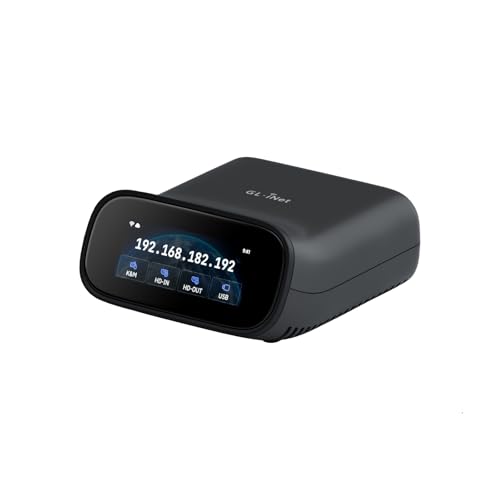
The GL.iNet GL-RM10 Comet Pro is a flexible choice among kvm over ip switches for windows, especially when wireless access and remote recovery matter. It supports Wi-Fi 6, wired networking, browser-based access without client software, and remote control from Windows, macOS, Linux, iOS, and Android.
Best For: Home labs, remote IT support, and users who need BIOS access, OS reinstallation, or other out-of-band recovery tasks.
Pros:
- Supports dual-band Wi-Fi 6 alongside wired connectivity.
- Provides 4K video passthrough at 30Hz and two-way audio.
- Includes built-in Tailscale and an optional self-hosted cloud deployment.
- Touchscreen controls simplify setup and status management.
Cons:
- Power control and hard-reset functions require separately sold ATX Board or Fingerbot accessories.
- Single-device design is less suitable for switching among several host computers.
The Comet Pro is a strong fit when secure, software-free browser access and remote disaster recovery outweigh the need for multi-host switching. Its wireless connectivity and self-hosting options also give it unusual deployment flexibility.
Best Long-Distance Extension – AV Access 4K HDMI USB KVM Extender
The AV Access 4K HDMI USB KVM Extender is a practical option for kvm over ip switches for windows when the main goal is extending one computer’s display and controls across an Ethernet network. It carries HDMI, USB, and audio over Cat5e or better cabling and works without drivers.
Best For: Server rooms, control centers, distributed workstations, classrooms, and AV installations requiring long cable runs.
Pros:
- Extends signals up to 390 feet over Cat5e, or up to 492 feet over Cat6/6A/7.
- Supports 4K at 30Hz, 1080p at 120Hz, and 7.1-channel audio.
- Receiver provides three USB 2.0 ports for peripherals.
- Up to 16 extender sets can operate on the same network using DIP-switch pairing.
Cons:
- It is an extender rather than a multi-host KVM switch.
- Video and USB performance depend on suitable Ethernet infrastructure, particularly when using a network switch.
This model makes sense for installations where the computer and operator must be separated by a substantial distance. Its plug-and-play Windows support, network-based deployment, and multiple-set pairing make it well suited to professional environments.
Best Multi-Host Rack KVM – Comet X Quad-Port Remote KVM
The GL.iNet Comet X is a rack-ready choice among kvm over ip switches for windows for users managing multiple host systems. Four HDMI inputs and four dedicated USB Type-C device ports allow remote switching through a browser, while PoE simplifies installation in a home lab or server room.
Best For: IT professionals, home-lab builders, and rack deployments that need remote access to up to four computers.
Pros:
- Controls up to four HDMI-connected hosts from a web-based interface.
- PoE supplies network and power through one Ethernet cable, with 5V Type-C backup.
- Supports 4K at 30Hz HDMI loop-out for simultaneous local and remote access.
- Includes touchscreen controls, 64GB eMMC storage, and 10-inch and 19-inch rack brackets.
Cons:
- Its 4K loop-out is limited to 30Hz.
- It is a more specialized rack and home-lab device than a basic desktop KVM.
Choose the Comet X when multi-host access, rack mounting, and simplified power delivery are priorities. The combination of browser-based HTTPS control, local switching, onboard storage, and four inputs gives it a strong fit for infrastructure management.
Best All-Around Remote Access – 4K Single-PC IP KVM
If you need kvm over ip switches for windows, this single-computer model offers a straightforward way to control a desktop or server remotely through a web interface or app. It supports 4K at 60Hz, multiple operating systems, and hardware-based access without additional software or drivers.
Best For: Remote access to one Windows PC, server, IP camera, or streaming device across networks.
Pros:
- Supports 3840×2160 at 60Hz with latency below 60 milliseconds.
- Works with Windows, macOS, Linux, and Android systems.
- Includes ZeroTier for cross-network access without conventional port forwarding or VPN configuration.
- Can remotely power on or off compatible desktop computers through the motherboard header.
Cons:
- Remote power control is not supported for laptops.
- Requires a wired Ethernet connection and separate 12V power adapter.
- Remote power wiring requires access to the desktop motherboard’s F_PANEL header.
This is a flexible choice when you need dependable remote control of one Windows-compatible system rather than a multi-host rack solution. Its 4K output and ZeroTier support make it especially practical for home labs and distributed workstations.
Best for Two Computers – 4K Dual-Host IP KVM
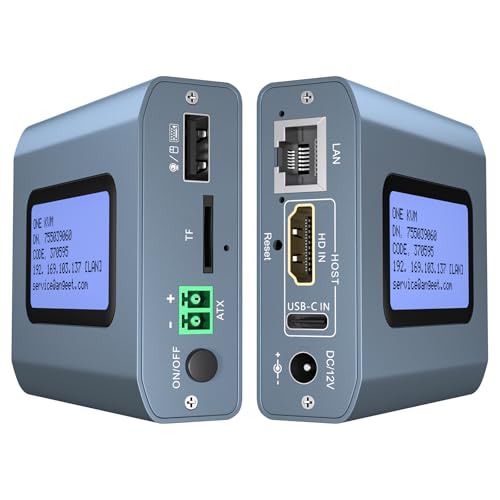
Among kvm over ip switches for windows, this two-port model is designed for users who need to access and switch between two computers remotely. It combines web or app control with local switching, an LCD for displaying the acquired IP address, and 4K video support.
Best For: Users managing two Windows desktops or other compatible computers from a remote location.
Pros:
- Provides remote access and switching between two host computers.
- Supports 3840×2160 at 60Hz, synchronized audio, and less than 60 milliseconds of delay.
- LCD screen displays the acquired IP address and other information.
- Includes ZeroTier, remote desktop power control, and local switching by button or wired remote.
Cons:
- Web access is available on LAN only; WAN access requires the ONE KVM app.
- Requires a 12V power adapter and is not PoE-powered.
- Remote power control applies to desktop PCs, not laptops.
This model is a strong fit for a two-PC workstation or small IT setup. The LCD makes network discovery easier, while the physical and remote switching options provide useful flexibility for local and off-site management.
Best for Server Racks – NetDirector 16-Port IP KVM
For larger deployments, this 16-port rack-mount unit is a practical option among kvm over ip switches for windows. It provides IP-based access to multiple computers or servers over a LAN, WAN, or the internet and is designed for organized rack installation.
Best For: Server rooms, IT departments, and businesses managing multiple PCs or servers from remote locations.
Pros:
- Controls up to 16 computers or servers directly through IP remote access.
- Supports LAN, WAN, and internet-based access.
- Can be daisy-chained to manage up to 264 devices.
- Supports up to 64 secure user accounts and both USB and PS/2 connections.
Cons:
- Its 1U rack-mount design is less suitable for casual desktop use.
- Requires compatible cabling and a more involved multi-server installation.
- The supplied notes do not specify 4K video support.
This is the most scalable choice in the group. Its high device capacity, daisy-chaining capability, and multiple user accounts make it better suited to structured IT environments than home-office setups.
How We Picked These Kvm Over Ip Switches for Windows
We evaluated the selected models by focusing on the features that matter most in real remote-management scenarios: Windows compatibility, video resolution and refresh rate, keyboard and mouse responsiveness, BIOS-level access, network connectivity, installation requirements, and power-management options. We also considered whether each unit is better suited to one computer, multiple systems, a home lab, or a rack-mounted environment.
Feature names and capabilities can vary by configuration, firmware, and connected equipment. Before ordering, confirm the required HDMI or other video standard, USB connection type, network speed, and remote-access method.
Quick Comparison
Compact devices such as the GL.iNet Comet and JetKVM models are generally aimed at individual PCs, workstations, and home servers. PoE versions can simplify installation when a compatible network switch is nearby, while Wi-Fi models offer more placement flexibility but may be less predictable than wired Ethernet for critical administration.
For longer cable runs within a building, the AV Access extender is a different kind of solution: it uses TCP/IP networking to extend KVM signals over structured cabling. Multi-port products such as the GL.iNet Comet X and Tripp Lite NetDirector are better suited to managing several systems. Check whether the listed port count refers to directly connected computers, switched channels, or expandable capacity.
Key Buying Factors for Kvm Over Ip Switches for Windows
Remote Access and Network Security
Look for browser-based access, encrypted connections, user permissions, and support for VPN or private-overlay networking such as Tailscale or ZeroTier. Avoid exposing a management interface directly to the public internet unless it is properly secured.
Video Quality and BIOS Control
4K support is useful for viewing detailed desktops, but refresh rate and compression also affect usability. If you need to change boot settings, install Windows remotely, or recover a failed system, verify true pre-boot and BIOS-level control rather than ordinary operating-system screen sharing.
Connectivity and Installation
Wired Ethernet is usually the safest choice for dependable administration. PoE can reduce cable clutter, while Wi-Fi may help with temporary setups. Confirm cable distance limits, USB compatibility, HDMI requirements, and whether a power adapter is included.
Power and Recovery Features
Remote power control, Wake-on-LAN, reset support, virtual media, webcam access, or an attached power-management accessory can make a major difference when a computer is inaccessible. These features are not universal, so match them to your recovery workflow.
Who Should Buy Which Kvm Over Ip Switches for Windows?
Choose a compact single-port model for one Windows PC, workstation, NAS, or home-lab server. Select a PoE model when centralized power and tidy cabling matter. A Wi-Fi 6 option makes sense where Ethernet is inconvenient, provided the network is stable.
For several nearby computers, consider a multi-port remote KVM. Small businesses and IT professionals should prioritize secure multi-user management, reliable wired networking, and remote recovery features. Larger server rooms may be better served by a rack-mounted, expandable IP KVM such as the Tripp Lite option, especially when many users and devices must be managed from one console.