The right DMX controller can turn a basic lighting rig into a coordinated show, but the best choice depends on fixture count, programming style, and how quickly you need to make changes during a performance.
We’ve gathered 10 DMX controllers for live performances spanning traditional consoles, software-driven systems, MIDI-enabled boards, and wireless setups. Use the guide below to match your stage, venue, and workflow with the right control approach.
Best 10 Dmx Controllers for Live Performances Picks for 2026
Pro Scene Programmer

- 384 DMX channels for up to 12 intelligent lights
- Stores 240 scenes in 30 banks
- Six chase sets with programmable fade and speed
Best For: Rack-based DJ and small-stage lighting setups
Hands-On Universe Control

- Standalone DMX lighting controller
- 37 backlit buttons and four rotary encoders
- Supports up to four universes with four outputs
Best For: Portable, tactile multi-universe performance control
LCD Console Workhorse

- Controls up to 32 fixtures across 512 channels
- Stores 48 scenes and manages four fixtures simultaneously
- Includes LCD, console lamp, and 3-pin DMX cable
Best For: Traditional stage and event lighting consoles
DJ Software Performance Hub

- Two DMX universes with input, output, and thru options
- Tactile touch strip, encoders, and RGB performance pads
- Supports Engine DJ and live audio BPM synchronization
Best For: Music-synced DJ, band, and hybrid lighting performances
Best for Structured Fixture Programming

- 192 DMX channels for up to 12 fixtures
- Stores up to 240 scenes
- Includes chases, MIDI, fog, and strobe control
Best For: DJs and live setups needing hands-on scene playback
Best for App-Based Wireless Control

- 256-channel tablet-based DMX control
- Wi-Fi and USB connectivity
- 50 presets and 21 automatic effects
Best For: Mobile performers seeking quick tablet-based lighting control
Best for Larger Manual Lighting Rigs

- 384 channels for up to 24 fixtures
- Programmable scenes and six chases
- MIDI and built-in music-triggered modes
Best For: Clubs, DJs, and stages running larger lighting rigs
Best Wireless Setup
JERRAY Wireless DMX Transmitter and Receivers

- Wireless DMX512 kit with one transmitter and two receivers
- Seven group IDs and 126-channel frequency hopping
- Power adapters included; not battery-powered
Best For: Mobile DJs and fast stage-event setups
Best for Voice-Controlled Shows
192-Channel DMX Stage Lighting Console

- Controls up to 12 fixtures with 16 channels each
- Stores up to 240 scenes with 40 steps per scene
- Adds voice control and 3-pin DMX512 output
Best For: Small shows needing programmable scenes and convenient operation
Best Traditional Programming Board
192-Channel DMX Console with Cable
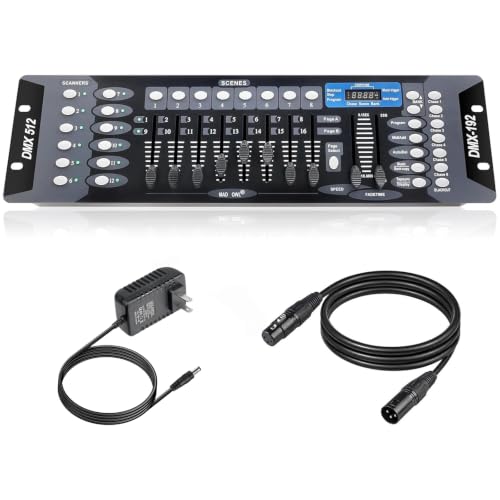
- Controls up to 12 fixtures with up to 16 channels each
- Offers 23 banks, 240-step scenes, and six chases
- Includes a 6.6-foot DMX cable
Best For: Manual stage and DJ lighting control with programmable sequences
Pro Scene Programmer – CHAUVET DJ Obey 70
The CHAUVET DJ Obey 70 is a practical choice among DMX controllers for live performances when you need programmed scenes and chases for multiple intelligent lights. It offers 384 DMX channels, 240 scene capacity, and dedicated fade and speed settings for repeatable shows.
Best For: DJs, small stages, and performers running several intelligent lights from a rack-mount controller.
Pros:
- Controls up to 12 intelligent lights with up to 32 channels each.
- Stores up to 240 scenes across 30 banks of eight.
- Supports six chase sets and per-step fade and speed programming.
Cons:
- Its 6.9-pound, 19-inch rack-mount design may be less portable than compact controllers.
- Uses a corded 230-volt power source.
The Obey 70 is a straightforward hardware option for building repeatable lighting sequences. Its scene and chase capacity makes it especially useful when your performance relies on programmed looks rather than computer-based control.
Hands-On Universe Control – ADJ WMX1 Mk2
The ADJ WMX1 Mk2 is a standalone option for performers who prefer tactile control. Its 37 backlit silicone buttons and four rotary encoders are designed for hands-on operation, while four output sockets support setups using up to four universes.
Best For: Live performers and operators who want physical controls and multi-universe output in a compact standalone unit.
Pros:
- Includes 37 backlit silicone buttons for visible tactile operation.
- Four rotary encoders provide dedicated adjustment controls.
- Supports up to four universes and has four output sockets.
Cons:
- The supplied notes do not specify scene or chase storage capacity.
- Its standalone workflow may not suit buyers seeking a computer-based controller.
With a 10 x 9.25 x 3.5-inch footprint and 2.36-pound weight, the WMX1 Mk2 balances portability with physical control. It is a focused choice when responsive buttons and encoders matter more than extensive published programming specifications.
LCD Console Workhorse – DMX512 512-Channel Controller
This DMX512 console is a capable entry in the DMX controllers for live performances category, combining 512 channels with faders, a joystick, scene controls, chase-speed adjustment, and an LCD display. It can control up to 32 fixtures and store 48 scenes for stage, event, and DJ applications.
Best For: DJs, event operators, and stage users who want a traditional console with visual feedback and included accessories.
Pros:
- Supports 512 DMX channels and up to 32 fixtures at 16 channels per fixture.
- Stores and runs up to 48 scenes and manages four fixtures simultaneously.
- Includes an LCD screen, gooseneck console lamp, power cable, manual, and 3-pin DMX cable.
Cons:
- At 17.73 pounds, it is relatively heavy for transport.
- The supplied notes do not specify rack-mount compatibility.
The metal-cased console offers a broad set of physical controls without requiring a computer in the listed configuration. Its included lamp and cable make it convenient for low-light operation and initial setup.
DJ Software Performance Hub – SoundSwitch Control One
The SoundSwitch Control One is designed for music-led lighting control, offering tactile access to SoundSwitch software, two DMX universes, and direct compatibility with Engine DJ devices. It can also sync shows to live audio BPM, making it a strong fit for DJs, bands, and hybrid live setups.
Best For: DJs and live performers who want software-linked control over color, brightness, strobes, moving heads, gobos, and other lighting effects.
Pros:
- Provides two DMX universe inputs and outputs with a thru option.
- Dual USB ports support seamless DJ transitions.
- Offers a touch strip, encoders, RGB pads, and live audio BPM detection.
Cons:
- Full SoundSwitch workflows may require compatible hardware or a computer, depending on the setup.
- Its two-universe design may be limiting for larger installations.
Control One is more than a basic DMX console: it is a compact performance interface built around SoundSwitch workflows. Its compatibility with Engine DJ and support for external audio sources make it particularly useful when lighting must follow live music.
Best for Structured Fixture Programming – CHAUVET DJ OBEY40
For performers who need hands-on control, the CHAUVET DJ OBEY40 is a practical choice among DMX controllers for live performances. It controls up to 12 fixtures with 16 channels each and provides 192 DMX channels for more involved lighting rigs.
Best For: DJs, entertainers, and small-to-mid-size live setups that need programmed scenes, chases, fog, and strobe control.
Pros:
- Controls up to 12 fixtures with up to 16 channels each.
- Stores up to 240 scenes across 30 banks.
- Includes six programmable chases, MIDI compatibility, and fog/strobe controls.
- Reversible sliders offer flexible operation.
Cons:
- Manual programming may require more preparation than an app-based controller.
- Its 6.7-pound metal construction is less portable than lighter interfaces.
The OBEY40 makes sense when reliable physical controls and organized scene playback matter more than wireless operation or automated effects.
Best for App-Based Wireless Control – ADJ MyDMX Go
The ADJ MyDMX Go takes a streamlined approach to DMX controllers for live performances, using an iPad or Android tablet for control. Its 256-channel app supports Wi-Fi and USB connections, while a fixture library of more than 15,000 options simplifies compatibility across lighting brands.
Best For: Performers who want quick setup, tablet-based control, and automatic lighting effects without extensive programming.
Pros:
- Offers 256-channel control through an iPad or Android tablet.
- Provides Wi-Fi and USB connectivity with support for two lighting universes.
- Includes 50 user presets and 21 automatic effects.
- Uses a library of more than 15,000 fixtures.
Cons:
- Operation depends on a compatible tablet.
- Advanced upgrades are available separately.
- Its plastic construction may be less rugged than a metal console.
MyDMX Go is a strong fit for mobile performers who prioritize fast, approachable control and wireless integration over traditional faders and manual programming.
Best for Larger Manual Lighting Rigs – Rockville ROCKFORCE 384
The Rockville ROCKFORCE 384 is built for performers who need more fixture capacity from DMX controllers for live performances. It controls up to 24 intelligent lights with 16 channels each and combines programmable scenes, chases, MIDI, and music-triggered operation.
Best For: DJs, clubs, and stage operators managing larger lighting systems with manual, MIDI, or music-responsive control needs.
Pros:
- Provides 384 channels for up to 24 fixtures.
- Stores 30 banks of eight scenes and six programmable chases.
- Supports MIDI control and music-triggered modes through its built-in microphone.
- Includes a metal housing, LED display, gooseneck lamp, and universal 110-240V power supply.
Cons:
- Its larger 20.71-inch chassis is less compact for small mobile rigs.
- The feature-rich manual interface may take time to configure.
- It has a one-year warranty.
Choose the ROCKFORCE 384 when fixture count and flexible show control are priorities. Its expanded channel capacity and built-in music mode suit more demanding live lighting systems.
Best Wireless Setup – JERRAY Wireless DMX Transmitter and Receivers
For live performances where fast setup and clean stage layouts matter, this JERRAY wireless kit is a practical alternative to running multiple XLR cables. It includes one transmitter, two receivers, power adapters, seven group IDs, and 2.4G frequency hopping for wireless DMX512 control.
Best For: Mobile DJs, weddings, and stage events needing quick wireless connections between lighting fixtures.
Pros:
- Wireless design can reduce cable clutter and setup time.
- Includes two receivers, three power adapters, and one transmitter.
- Seven selectable groups help separate lighting rigs in the same venue.
- Uses automatic frequency hopping across 126 channels for interference resistance.
Cons:
- Each unit requires a power adapter; it is not battery-powered.
- The kit is designed for wireless transmission rather than direct console-based scene programming.
Choose this kit when flexibility and cable reduction are more important than having a hands-on programming surface. Its powered, multi-receiver layout is especially useful for temporary live-performance setups.
Best for Voice-Controlled Shows – 192-Channel DMX Stage Lighting Console
This 192-channel console gives live-performance operators a physical control surface for managing up to 12 intelligent lights with up to 16 channels each. It also supports up to 240 scenes, programmable chases, voice control, and a 3-pin DMX512 output for compatible stage equipment.
Best For: DJs, clubs, weddings, churches, and small production setups that want scene programming plus voice-control functionality.
Pros:
- Controls up to 12 fixtures with up to 16 channels per fixture.
- Supports up to 240 scenes and 40 steps per scene.
- Offers adjustable pause and fade speeds for customized transitions.
- Includes organized controls and a 3-pin DMX512 output.
Cons:
- The corded design requires access to power during performances.
- Its 192-channel capacity may be limiting for larger, fixture-heavy productions.
This is a versatile choice among DMX controllers for live performances when you need scene storage and hands-on adjustments without moving to a larger console. Voice control adds convenience, while the faders and dedicated sections support more traditional operation.
Best Traditional Programming Board – 192-Channel DMX Console with Cable
This 192-channel DMX board is built for operators who prefer faders and buttons for real-time lighting adjustments. It controls up to 12 fixtures with up to 16 channels each, includes a 6.6-foot DMX cable, and provides banks, scenes, and chases for programming live shows.
Best For: Stage, club, and DJ lighting setups that need straightforward manual control and programmable sequences.
Pros:
- Controls up to 12 lighting fixtures with up to 16 channels each.
- Provides 23 banks of eight programmable scenes.
- Supports 240-step scenes across six programmable chases.
- Includes a 6.6-foot DMX cable for compatible equipment.
Cons:
- It is a corded controller and does not offer wireless operation.
- The 192-channel layout is better suited to modest systems than large installations.
For buyers comparing DMX controllers for live performances, this model emphasizes familiar physical controls and sequence programming rather than advanced automation. The included cable is a useful addition for getting a compatible setup connected quickly.
How We Picked the Best Dmx Controllers for Live Performances
We compared these controllers by channel capacity, fixture compatibility, programming workflow, live-access controls, portability, and expansion potential. We also considered whether each option suits standalone operation, computer or app control, wireless setups, or integration with other performance equipment.
Because lighting systems vary widely, a higher channel count does not automatically mean a better controller. A compact board may be faster for a small DJ rig, while software or a larger console can be more practical for moving heads, layered scenes, and repeatable show programming.
Quick Comparison
| Controller Type | Best For | Main Advantage | Potential Limitation |
|---|---|---|---|
| Traditional DMX console | Small and mid-size rigs | Direct, tactile control | More manual programming |
| Software or app controller | Flexible, evolving setups | Visual programming and presets | May depend on a device or network |
| Wireless DMX system | Clean stage installations | Fewer signal cables | Requires careful range and interference planning |
| MIDI-compatible controller | Musicians and hybrid shows | Can connect lighting to performance cues | Setup is more involved |
Key Buying Factors for Dmx Controllers for Live Performances
Channel and Fixture Capacity
Check the number of DMX channels your fixtures use, then allow room for expansion. A controller’s advertised channel count is not the same as the number of fixtures it supports; each light may consume several channels depending on its mode.
Programming and Live Control
Look for faders, scene buttons, chases, banks, playback controls, or touchscreen access that match your workflow. Fast-access buttons matter when you need to trigger blackouts, color changes, strobes, or transitions without navigating multiple menus.
Compatibility and Connectivity
Confirm support for DMX512 and check the available outputs, MIDI connections, USB functions, app requirements, or wireless transmitters. For wireless systems, verify receiver compatibility and expected operating range before building the rig around them.
Portability and Reliability
Mobile performers should prioritize a durable layout, manageable weight, and controls that are easy to see in low light. Also consider backup plans: a standalone console may continue working if a laptop, tablet, or wireless link fails.
Who Should Buy Which Dmx Controllers for Live Performances?
Mobile DJs and small event operators: Choose a straightforward console with scenes, chases, and enough channels for your current fixtures. A compact wireless option can help when cable runs are inconvenient.
Bands and performers: Consider MIDI support or an app-based system if lighting needs to follow songs, foot controls, or other performance cues. Prioritize quick playback access over complex menu systems.
Production teams and venues: A higher-capacity console or software-driven controller is usually the better long-term choice for multiple fixture types, saved shows, and frequent rig changes.
First-time users: Start with a controller that supports your existing lights and offers simple scene storage. Buying excessive capacity can add complexity without improving the show.