A drafting table can give artists, architects, and home-office users a more flexible alternative to a conventional desk. For dual-monitor setups, however, a tilting surface must also provide enough depth, stability, and clearance for monitor stands or arms.
We selected 10 adjustable drafting tables with different layouts, materials, storage options, and price points. The guide below explains which features matter most when combining drawing space with a two-screen workstation.
Best 10 Drafting Tables for Dual Monitors Picks for 2026
Best Overall
X-cosrack 43-Inch Adjustable Drafting Desk
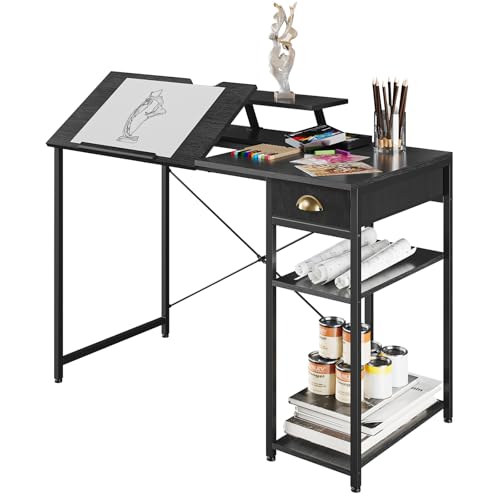
- 43-inch desktop with removable monitor riser
- Tilts from flat to 45 degrees
- Drawer and two-tier side shelving
Best For: Home offices needing storage and a raised monitor position
Best Height Range
Height-Adjustable Glass Drafting Table

- 31.5- to 49.5-inch height adjustment
- 0- to 75-degree tilting glass top
- Includes stool and multiple storage compartments
Best For: Creative work requiring seated-to-standing height flexibility
Best Mobile Option
Liftsync 28-Inch Rolling Glass Desk
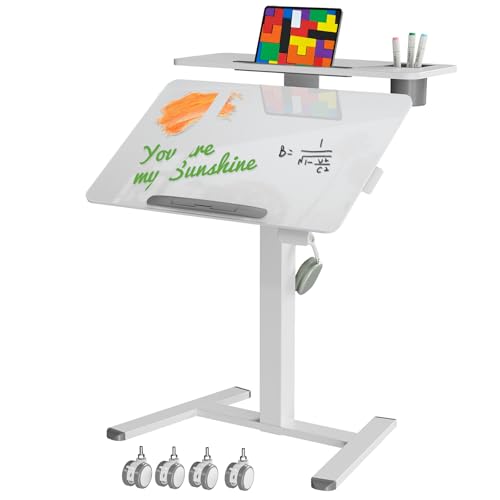
- Pneumatic height adjustment to 44 inches
- 0- to 90-degree tilting glass top
- Wheels and foldable design suit small spaces
Best For: Portable laptop workstations and compact rooms
Best With Stool
Garvee Adjustable Glass Drafting Table
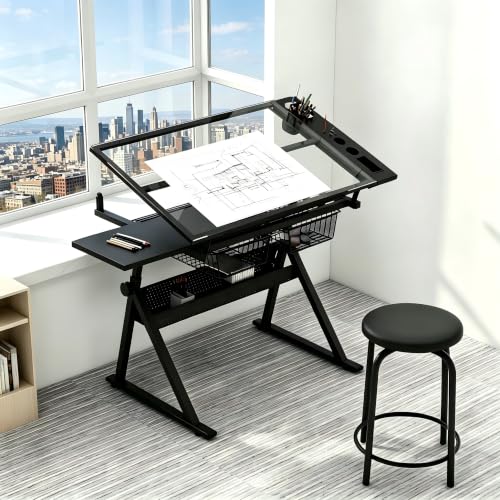
- 31.5- to 49.5-inch height range
- Includes stool and two drawers
- 0- to 75-degree tilting tempered-glass top
Best For: Artists wanting adjustable seating and organized supply storage
Best Storage Pick
Topeakmart Tilting Drafting Table

- 35.4-by-23.6-inch workspace
- 0–40° tilt with 10 positions
- Three drawers, shelf, side counter, and stool
Best For: Storage-focused art and computer workstations
Best Natural-Wood Option
Conda Adjustable Wood Drafting Table
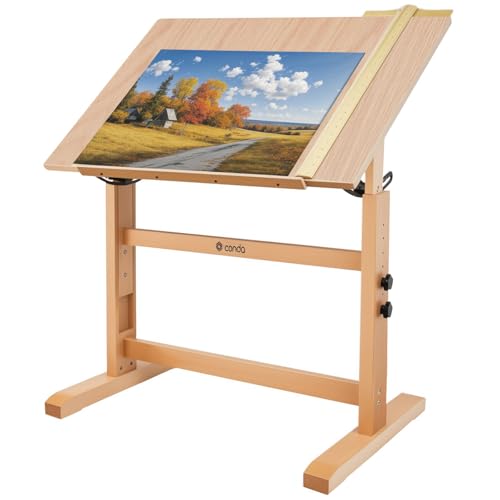
- 35.4-by-23.6-inch wood tabletop
- 0–45° tilt and 31.5–37-inch height range
- Built-in pencil ledge and ruler
Best For: Artists and hobbyists wanting a simple wood drafting surface
Best Wide-Tilt Workstation
TrailBlaze Adjustable Drafting Desk

- 50.5-inch-wide workstation
- 0–60° tilting tabletop
- Side shelf, three drawers, and bottom shelf
Best For: Multi-purpose creative and home-office workstations
Best with Extra Features
Studio Designs Graphix II Pro Line

- Split top with a 30-degree tilt range
- Height adjusts from 30.5 to 38.75 inches
- Two drawers and a pencil tray included
Best For: Large, organized drafting and office workstations
Most Adjustable
Height Adjustable Drafting Table

- Tilts from flat to 75 degrees
- Height adjusts from 27.2 to 35.8 inches
- Includes two drawers and integrated storage
Best For: Flexible art, laptop, and home-office use
Best Wooden Design
Solid Pine Wood Drafting Table

- Solid pine construction with an H-frame
- 0-to-70-degree angle adjustment
- Height adjusts from 34 to 38 inches
Best For: Compact natural-wood art and computer workspaces
Best Overall – X-cosrack 43-Inch Adjustable Drafting Desk
If you need drafting tables for dual monitors, the X-cosrack offers one of the more practical layouts in this group. Its 43-inch desktop, removable monitor riser, tilting surface, drawer, and two side shelves support computer work, writing, and drawing.
Best For: Home-office users who want a spacious workstation with built-in storage and a monitor stand.
Pros:
- Desktop tilts from flat to 45 degrees.
- Removable 4.3-inch monitor riser helps raise the viewing position.
- Includes a drawer and two-tier side shelving for supplies and equipment.
- Metal frame, MDF top, cross structure, and adjustable feet are designed for stability.
Cons:
- The desktop is about 19.7 inches deep, so dual-monitor setups may require careful arrangement.
- Assembly is required, and tools are not included.
This is the most office-friendly option here, especially if storage and a dedicated monitor riser matter. Check your monitor widths and stand depth before buying, since the surface is wide but relatively shallow.
Best Height Range – Height-Adjustable Glass Drafting Table
For shoppers comparing drafting tables for dual monitors with flexible working heights, this glass drafting table stands out for its 31.5- to 49.5-inch height range. The tabletop also tilts from 0 to 75 degrees, making it adaptable for computer work, drawing, and crafting.
Best For: Artists and designers who want a tall, highly adjustable drafting surface with organized storage.
Pros:
- Height adjusts from 31.5 to 49.5 inches.
- Tempered-glass tabletop tilts from 0 to 75 degrees.
- Multiple compartments, trays, mesh drawers, and a slide-up pencil ledge keep supplies accessible.
- Includes a stool and four anti-vibration feet.
Cons:
- The 23.62-inch width may be limiting for two large monitors.
- A glass surface may not suit users who prefer a solid wood or MDF worktop.
- At 56.9 pounds, it is relatively heavy to reposition.
This table prioritizes adjustability and art-focused storage over maximum monitor width. It can support computer work, but confirm that your monitor bases or arms fit comfortably on the available surface.
Best Mobile Option – Liftsync 28-Inch Rolling Glass Desk
If mobility is important when choosing drafting tables for dual monitors, this compact Liftsync desk has a pneumatic height adjustment system and four hidden casters. Its top tilts from 0 to 90 degrees, while the two-tier shelf adds room for smaller accessories or a laptop.
Best For: Compact rooms, flexible work areas, and users who need a portable drawing or computer workstation.
Pros:
- One-hand pneumatic adjustment from about 29.5 to 44 inches.
- Tempered-glass top tilts from 0 to 90 degrees.
- Four casters make the desk easy to move, with lockable caster options.
- Two-tier shelf includes cup holders and card slots.
Cons:
- The 27.6-inch-wide by 17.7-inch-deep work surface is compact for dual monitors.
- The desktop supports up to 17.6 pounds, limiting heavier equipment.
- The shelf has a 4.4-pound maximum load.
This is better suited to a compact laptop or lightweight monitor arrangement than a full dual-monitor workstation. Its strongest advantages are portability, quick height changes, and a foldable design for small spaces.
Best With Stool – Garvee Adjustable Glass Drafting Table
The Garvee combines a height-adjustable drafting surface with a supplied stool, making it a practical choice for drawing and computer work. For drafting tables for dual monitors, its 38.5-inch width offers more room than compact rolling models, although the glass surface and 31- to 49.5-inch height range should be considered.
Best For: Artists and hobbyists who want an adjustable glass desk, built-in supply storage, and included seating.
Pros:
- Tabletop tilts from 0 to 75 degrees and height adjusts from 31.5 to 49.5 inches.
- Includes a stool with steel legs.
- Two drawers, compartments, trays, and a 24-inch slide-up pencil ledge provide storage.
- Tempered glass and four anti-vibration feet make cleanup and positioning easier.
Cons:
- The 23.6-inch depth may require careful placement of two monitors.
- The product is listed at 56.9 pounds, so moving it may take effort.
- The glass top may be less suitable for users wanting a traditional opaque drafting surface.
Garvee is a well-rounded creative workstation when the included stool and storage are valuable. For a dual-monitor setup, verify that the monitor stands or mounts fit within the usable width and depth before committing.
Best Storage Pick – Topeakmart Tilting Drafting Table
If you need drafting tables for dual monitors, the Topeakmart offers a broad 35.4-by-23.6-inch work surface that can function as a computer desk when flat. Its adjustable tilt, side counter, drawers, and shelf also make it practical for art and studio work.
Best For: Buyers who want a storage-focused drafting desk that can double as a computer workstation.
Pros:
- Tabletop tilts from 0 to 40 degrees across 10 height positions.
- Large surface includes a removable pencil ledge for flat computer use.
- Three fabric drawers, a shelf, and side counter provide useful storage.
- Includes a foam-padded stool.
Cons:
- The 23.6-inch depth may limit side-by-side monitor placement.
- Its tabletop is engineered wood rather than solid wood.
This is a versatile choice for compact creative spaces, especially if built-in organization and an included seat matter more than maximum monitor width.
Best Natural-Wood Option – Conda Adjustable Wood Drafting Table
The Conda drafting table has a 35.4-by-23.6-inch natural wood surface and a 0-to-45-degree tilt range. For shoppers comparing drafting tables for dual monitors, its flat tabletop can support computer work, although the relatively narrow depth is better suited to a modest setup.
Best For: Artists, students, and hobbyists who prefer a simple wood drafting surface with adjustable height and angle.
Pros:
- Solid wood construction is designed for stability during creative work.
- Tabletop adjusts from 0 to 45 degrees.
- Height adjusts from 31.5 to 37 inches.
- Built-in pencil ledge and ruler support drafting tasks.
Cons:
- The 23.6-inch depth may feel tight for two monitors and accessories.
- Storage features are limited compared with drawer-equipped models.
- No manufacturer warranty is listed.
This model emphasizes a straightforward, natural-wood work surface and flexible positioning. It is most appealing when drafting and drawing take priority over extensive workstation storage.
Best Wide-Tilt Workstation – TrailBlaze Adjustable Drafting Desk
The TrailBlaze combines a large drafting surface with a 0-to-60-degree tilt range, making it adaptable for drawing, reading, writing, and computer work. Among drafting tables for dual monitors, its 50.5-inch width is promising, though the listed 24-inch depth remains important to check against your monitor setup.
Best For: Creative users who want a multi-purpose workstation with a wide tabletop and substantial tilt adjustment.
Pros:
- Tabletop tilts from flat to 60 degrees for varied tasks.
- Wide 50.5-inch workstation supports computer and art use.
- Includes a side shelf, three drawers, and a long bottom shelf.
- Modern X-shaped metal legs suit home offices and studios.
Cons:
- The 24-inch depth may constrain dual-monitor accessories.
- The tabletop is engineered wood rather than solid wood.
- A steep tilt angle may require removing or securing monitors and loose items.
With its broad width, storage, and unusually wide angle range, the TrailBlaze is the most workstation-oriented option here. Confirm monitor-arm compatibility and available depth before buying.
Best with Extra Features – Studio Designs Graphix II Pro Line
For shoppers comparing drafting tables for dual monitors, the Studio Designs Graphix II Pro Line stands out for its wide split-top layout. The 39.5-by-30-inch tilting surface pairs with a fixed 11.5-by-30-inch side shelf, providing room to separate displays, drawing materials, or office accessories. Its height adjusts from 30.5 to 38.75 inches, while two lift mechanisms and wide floor levelers support a stable setup.
Best For: Users who want a large, height-adjustable drafting table with a dedicated side shelf and built-in storage.
Pros:
- Split surface offers a 0-to-30-degree tilt area plus a fixed side shelf.
- Height adjusts from 30.5 to 38.75 inches.
- Includes two drawers and a full-width pencil tray.
- Heavy-duty 1-inch tops and steel construction support a durable workstation.
Cons:
- The main top is rated for up to 50 pounds, while the side shelf supports up to 25 pounds.
- At 80 pounds, it may require extra effort to move after assembly.
- Assembly is required.
This is the strongest all-around choice when surface organization matters as much as adjustability. The fixed shelf can help accommodate a second monitor or accessories, but buyers should confirm their monitor-mounting approach because the supplied notes do not specify built-in monitor mounting.
Most Adjustable – Height Adjustable Drafting Table
This height-adjustable drafting table is a flexible option for shoppers seeking drafting tables for dual monitors that can also support drawing and laptop work. Its desktop tilts from flat to 75 degrees, and the height adjusts from about 27.2 to 35.8 inches. Two fabric drawers, a side storage area, and a retractable document board help keep supplies close at hand.
Best For: Artists and home-office users who prioritize a broad tilt range, adjustable height, and accessible storage.
Pros:
- Desktop adjusts from 0 to 75 degrees for flat or angled work.
- Height range of approximately 27.2 to 35.8 inches accommodates different users.
- Includes two storage drawers, side storage, and a retractable document board.
- Adjustable legs are designed to improve stability on uneven surfaces.
Cons:
- Each non-woven fabric drawer holds up to 6.6 pounds.
- The listed dimensions indicate a relatively narrow 23.62-inch width.
- The notes do not specify a monitor stand or monitor-mounting system.
Its 75-degree tilt range makes it especially versatile for illustration and detailed drafting, while the flat position suits general office use. For a dual-monitor arrangement, measure your displays and accessories carefully against the listed width before purchasing.
Best Wooden Design – Solid Pine Wood Drafting Table
The solid pine wood drafting table offers a warm alternative for shoppers considering drafting tables for dual monitors alongside creative work. Its 35-by-24-inch tabletop adjusts from 34 to 38 inches in height and tilts from flat to 70 degrees. An H-frame, thickened legs, and hand-polished edges are designed to provide a stable, comfortable work surface for drafting, writing, reading, and computer use.
Best For: Buyers who prefer a compact natural-wood drafting table for art, writing, and occasional computer work.
Pros:
- Solid pine construction with an H-frame supports stability.
- Height adjusts from 34 to 38 inches.
- Work surface tilts from 0 to 70 degrees.
- Smooth oil-finished surface and polished corners simplify maintenance and handling.
Cons:
- The 24-inch width may limit space for two monitors and accessories.
- The supplied notes do not mention drawers or dedicated storage.
- Assembly is recommended for two people.
This table is a good fit when appearance, wood construction, and drafting flexibility take priority. It can serve as a computer table, but its compact surface is less suited to a full dual-monitor setup than wider split-top alternatives.
How We Picked the Best Drafting Tables for Dual Monitors
We focused on tables that can support both creative work and computer use, prioritizing adjustable height, tilting range, usable desktop area, frame stability, and practical storage. We also considered whether each design includes a monitor shelf, drawers, side shelving, stool, or other features that can simplify a compact workstation.
Because monitor weight and mounting methods vary, we treated compatibility as a key consideration rather than assuming every table is suitable for clamp-on monitor arms. Models with glass or divided tops may work better with freestanding stands, while solid wood or reinforced surfaces generally offer more mounting flexibility.
Quick Comparison
| Best For | What to Prioritize |
|---|---|
| Dual-monitor home office | Wide, stable surface and monitor clearance |
| Artists and designers | Wide tilt range and comfortable working angle |
| Small rooms | Compact footprint, shelves, or integrated drawers |
| Shared workspaces | Tool-free or easy height adjustment |
| Heavy equipment | Reinforced frame and a solid desktop |
Key Buying Factors for Drafting Tables for Dual Monitors
Desktop Width and Depth
Two monitors, a keyboard, and a mouse can consume most of a narrow drafting surface. Look for enough width to place screens side by side without crowding and enough front-to-back depth to keep the keyboard and drawing materials within reach. A separate monitor shelf can preserve usable space, but check its dimensions carefully.
Tilt, Height, and Stability
A broad tilt range is useful for sketching, drafting, and reducing wrist strain, but the table should remain steady at steeper angles. Height adjustment helps accommodate seated and standing work, while locking mechanisms should be easy to use and secure under load.
Monitor Support and Cable Management
Check the table’s weight capacity and determine whether monitor arms can clamp to the frame. Glass tops, raised lips, split surfaces, and rear shelves may limit clamp placement. If cables matter, favor designs with open rear clearance or plan to use adhesive clips and a separate cable tray.
Storage and Accessories
Drawers and shelves are valuable for pens, plans, and peripherals, but they can reduce legroom. A bundled stool may be convenient, although its height and comfort should not replace choosing the right workstation dimensions.
Who Should Buy Which Drafting Tables for Dual Monitors?
Choose a larger, solid-surface model if you need two monitors plus drawing materials on the same plane. A table with a monitor shelf is useful when desk depth is limited, while a glass-top design may suit lighter equipment and modern home-office spaces. Artists who frequently change posture should prioritize smooth height adjustment and a secure tilt lock. For occasional drafting or small rooms, a compact table with drawers or shelves can deliver better organization without taking over the workspace.