The KTC H27S5C 27-Inch Curved Gaming Monitor review comes down to one simple question: do you want a sharper, smoother gaming monitor without stepping into premium pricing territory?
This 27-inch curved display looks built for that exact buyer.
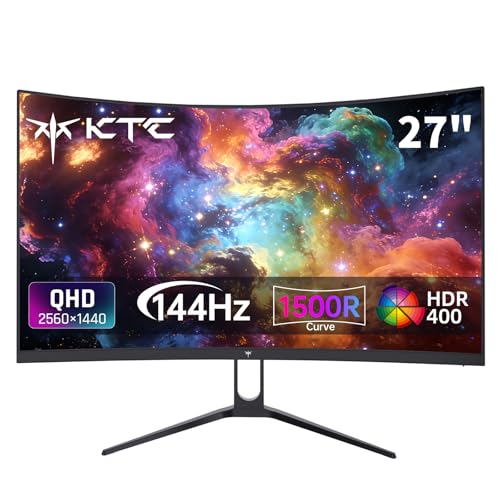
KTC H27S5C Monitor Review Summary
If you want a fast, immersive, and practical QHD monitor for gaming and everyday desktop use, the KTC H27S5C 27-Inch Curved Gaming Monitor makes a strong case.
It pairs a 2560 x 1440 resolution with a 144Hz refresh rate, Adaptive-Sync, HDR400 support, and a 1500R curve, which is exactly the feature set many buyers want when upgrading from a basic 1080p screen.
From a buyer’s perspective, this monitor looks best for PC gamers who want smoother motion, users who want more screen sharpness for work, and anyone who likes a curved panel for a more enveloping feel.
The design is straightforward, the feature mix is sensible, and the monitor’s connectivity is flexible enough for a gaming PC, console, or secondary workstation.
Its biggest strengths are easy to understand: 144Hz fluidity, 1440p clarity, wide color coverage, and a curved panel that improves immersion.
The main trade-offs are also clear: the stand only offers tilt adjustment, HDR400 is a basic HDR tier, and there is no mention of extras like built-in speakers or a USB hub.
In other words, the KTC H27S5C Monitor is focused on the essentials rather than luxury extras.
Scorecard
| Category | Score | Why it matters |
|---|---|---|
| Gaming smoothness | 9.0/10 | 144Hz refresh rate and Adaptive-Sync support help deliver fluid gameplay with less tearing. |
| Image clarity | 8.0/10 | QHD resolution on a 27-inch screen gives noticeably sharper detail than 1080p. |
| Color performance | 8.0/10 | 129% sRGB and 110% DCI-P3 suggest vivid output for games, media, and light creative work. |
| Immersion | 8.0/10 | The 1500R curve helps wrap the image around your field of view. |
| Eye comfort | 7.0/10 | Low Blue Light and Flicker Free features help, though comfort still depends on your setup. |
| Connectivity | 8.0/10 | Two HDMI 2.0 ports and one DisplayPort 1.4 cover most PC and console needs. |
| Desk setup flexibility | 7.0/10 | Tilt adjustment and VESA compatibility are useful, but the stand is not fully ergonomic. |
Bottom line: the KTC H27S5C 27-Inch Curved Gaming Monitor is a compelling midrange gaming display for buyers who value smooth play, a sharp 1440p panel, and an immersive curve more than premium extras.
Key Features and Specifications of KTC H27S5C Monitor
The spec sheet explains why this model is appealing to so many shoppers.
It focuses on the right mix of speed, resolution, and usability rather than trying to overload the monitor with gimmicks.
| Specification | Detail |
|---|---|
| Brand / Model | KTC H27S5C |
| Screen size | 27 inches |
| Panel type | HVA |
| Resolution | 2560 x 1440 QHD |
| Aspect ratio | 16:9 |
| Curvature | 1500R |
| Refresh rate | 144Hz |
| Adaptive sync | Supported |
| HDR | HDR400 |
| Color support | 16.7 million colors |
| Color gamut | 129% sRGB, 110% DCI-P3 |
| Inputs | 2 x HDMI 2.0, 1 x DisplayPort 1.4 |
| Mounting | 100 x 100 mm VESA |
| Stand adjustment | Tilt -5° to 20° |
| Screen finish | Matte |
| Eye-care features | Low Blue Light, Flicker Free |
- 27-inch curved gaming monitor with a practical size for both desktop work and play.
- 1500R curve designed to improve immersion without becoming overly aggressive.
- 1440p QHD resolution that offers a clear jump in sharpness over 1080p.
- 144Hz refresh rate for smoother scrolling and faster-motion gaming.
- Adaptive-Sync for better tear reduction in supported games and systems.
- HDR400 support for basic HDR enhancement in compatible content.
- Wide gamut coverage that helps the image look richer and more vibrant.
For buyers comparing monitors, these are the kinds of specs that matter most because they affect daily use.
The KTC H27S5C Monitor is not trying to win on flashy extras; it is trying to win on the features that improve the actual experience.
Pros and Cons of KTC H27S5C Monitor
If you are researching the KTC H27S5C 27-Inch Curved Gaming Monitor pros and cons, the list is refreshingly straightforward.
This is a monitor with several meaningful strengths and a few predictable trade-offs.
Pros
- Smooth 144Hz gaming performance feels noticeably more responsive than standard 60Hz or 75Hz panels.
- Adaptive-Sync support helps reduce tearing and stutter.
- Sharp 1440p image on a 27-inch panel is a great balance of size and detail.
- 1500R curved design improves immersion for games and movies.
- Good color coverage for gaming, streaming, and light content work.
- Eye-care features help with longer sessions.
- Flexible ports support multi-device setups.
- VESA support makes mounting easier.
Cons
- Only tilt adjustment is mentioned, so ergonomic flexibility is limited.
- HDR400 is modest and should not be confused with premium HDR performance.
- No built-in speakers or USB hub are mentioned.
- Best performance requires capable hardware to fully benefit from 1440p at high refresh.
The pros outweigh the cons for a lot of buyers, but the drawbacks matter if you want a fully adjustable stand or the most advanced HDR experience possible.
That is why this monitor fits a specific audience very well: gamers and everyday users who prioritize the panel itself over extra convenience features.
Who Should Buy KTC H27S5C Monitor?
The KTC H27S5C 27-Inch Curved Gaming Monitor is a strong fit for gamers and general users who want a sharp, fast, curved display without overcomplicating their setup.
It is especially attractive if you are moving up from an older 1080p monitor and want a visible improvement in detail and motion clarity.
- Buy it if you are a PC gamer who wants smoother frame delivery and better immersion.
- Buy it if you want a 1440p upgrade that also works well for browsing, documents, and streaming.
- Buy it if you use Adaptive-Sync and want a more consistent gaming feel.
- Buy it if you plan to use VESA mounting or already have a monitor arm.
- Buy it if you like curved screens for a more focused, cinematic look.
On the other hand, you should probably skip it if you want a completely flat panel, need a fully adjustable ergonomic stand, or depend on high-end HDR for professional media work.
The KTC H27S5C Monitor is competent for productivity and light creative tasks, but it is still first and foremost a gaming monitor.
Is the 1500R Curve Good for Gaming and Work?
The 1500R curve is one of the main reasons to consider the KTC H27S5C Monitor, and in practice it makes sense for a 27-inch screen.
At this size, the curve can help the screen feel more enveloping when you are sitting at a normal desk distance, especially in racing games, RPGs, and single-player titles where immersion matters more than absolute geometric accuracy.
For gaming, the curve can be a genuine advantage because it helps keep the sides of the screen within a more natural viewing angle.
That can make fast motion feel a bit more cohesive and makes the monitor feel larger than its footprint suggests.
For movies and streaming, it also creates a mild theater-like effect.
For work, the curve is more preference-based.
Many people will find it comfortable for spreadsheets, writing, and everyday browsing, but some users who work heavily with straight-line design layouts or pixel-precise tasks may prefer a flat monitor instead.
That is a classic curved-monitor trade-off, and it applies here as well.
In short, the curve is a real benefit for gaming and media, and a neutral-to-positive feature for general use depending on your taste.
How the 1440p 144Hz Panel Performs in Real Use
The most important performance combination on this monitor is the 2560 x 1440 resolution paired with 144Hz refresh.
That pairing is popular because it solves two common frustrations at once: low image sharpness and sluggish motion.
At 27 inches, 1440p looks like the sweet spot for many buyers.
Text is cleaner, game assets look more refined, and you get more usable desktop space than you would on a 1080p monitor.
The difference is especially noticeable in open-world games, strategy titles, editing timelines, and multitasking layouts.
The 144Hz refresh rate is equally important.
If your system can push high frame rates, the monitor should feel more responsive in shooters, racing games, and action titles.
Even outside gaming, mouse movement and scrolling generally feel smoother than on lower-refresh displays.
Adaptive-Sync is a practical addition because it helps the monitor stay in step with the frame output of compatible hardware.
That does not magically fix poor performance, but it does help make variable frame rates feel cleaner.
For buyers who care about stable-feeling gameplay, this is a real advantage.
Decision factor: this monitor makes the most sense if your PC or console can actually take advantage of 1440p and high refresh.
If you are running older hardware, you may still like the panel, but you will not fully unlock what it is designed to do.
Ports, Console Compatibility, and PC Setup
The KTC H27S5C Monitor includes 2 x HDMI 2.0 ports and 1 x DisplayPort 1.4, which is a solid mix for a gaming display in this class.
That gives you room for a PC plus another device, or a console plus a desktop, without constantly swapping cables.
For PC users, DisplayPort is the most straightforward path for high-refresh QHD gaming.
HDMI 2.0 is also useful for many setups and can work well for console or backup inputs.
The key point is that this monitor provides enough ports to support a flexible desk setup rather than locking you into a single-device arrangement.
Console buyers should check their device’s output capabilities carefully.
The monitor supports up to 1440p at 144Hz, but the real-world experience depends on whether your system can send the right signal through the available port.
That matters especially if you want to get the most from a modern console or a gaming laptop dock.
Best setup advice: if you are buying this for a gaming PC, plan on using DisplayPort.
If you are using it as a mixed-use monitor with a console, the dual HDMI inputs make the setup easier than many budget gaming displays.
Stand, VESA Mounting, and Desk Fit
The included stand is functional and visually clean, with a V-shaped metal base that should provide a stable footprint on most desks.
The tilt range from -5° to 20° gives you some control over viewing angle, which is helpful when matching the monitor to your seating position.
That said, the stand is not described as height-adjustable or swivel-capable, so ergonomic flexibility appears limited.
Buyers who care about exact posture alignment may want to use a monitor arm or VESA mount instead.
Fortunately, the 100 x 100 mm VESA compatibility makes that an easy upgrade path.
The slim bezels and matte finish also help the monitor fit neatly into a modern desk setup.
The matte surface is especially useful in brighter rooms because it reduces distracting reflections more effectively than glossy finishes.
That can improve the sense of contrast and reduce fatigue during long sessions.
If your desk space is tight, the 27-inch footprint is still manageable, but the curve and stand shape mean you should measure your space before buying.
This is the kind of monitor that works best when the desk layout has been considered rather than rushed.
Comparable Alternatives to Consider
If you are comparing the KTC H27S5C 27-Inch Curved Gaming Monitor against other options, it helps to think in categories rather than only models.
The monitor sits in a very competitive segment, and several alternatives may fit better depending on your priorities.
- 27-inch flat 1440p 144Hz gaming monitor if you prefer a non-curved screen for productivity or general use.
- AOC curved 1440p gaming monitor if you want to compare a well-known curved-monitor brand line.
- MSI curved 1440p gaming monitor if you want another mainstream gaming option with similar positioning.
- Higher-end HDR gaming monitor with full ergonomic stand if HDR and ergonomics matter more than value.
- Budget 1080p 144Hz gaming monitor if you want to spend less and do not need QHD sharpness.
Compared with those alternatives, the KTC H27S5C Monitor stands out as a balanced middle ground: sharper than budget 1080p models, more immersive than flat panels for some users, and simpler than premium monitors that cost more because of their premium stand or HDR hardware.
Who Should Buy KTC H27S5C Monitor?
If you are still deciding, here is the simplest way to think about it.
The KTC H27S5C 27-Inch Curved Gaming Monitor is for buyers who want a sensible feature set that genuinely improves day-to-day use and gaming.
- Ideal for: gamers who value 144Hz smoothness, QHD clarity, and a curved display.
- Also good for: mixed-use users who split time between work, media, and gaming.
- Less ideal for: users needing premium HDR, highly adjustable ergonomics, or a flat panel for precision work.
If your priority is fast, clean, and immersive gaming without paying for features you may never use, this monitor is easy to recommend.
Is KTC H27S5C Monitor Worth It?
Yes, for the right buyer, the KTC H27S5C Monitor is worth it. It offers the core ingredients most gaming-monitor shoppers actually care about: 1440p sharpness, 144Hz smoothness, Adaptive-Sync support, and a 1500R curve for immersion.
That combination makes it a compelling choice for anyone upgrading from an older 1080p screen or building a balanced gaming and productivity setup.
The biggest reason to buy it is that it stays focused on practical value.
You get strong motion performance, good color coverage, and a usable port selection without paying for a long list of extras.
The biggest reason to skip it is equally clear: if you need advanced ergonomics, strong HDR, or features like speakers and USB expansion, this is not that kind of monitor.
Final verdict: the KTC H27S5C 27-Inch Curved Gaming Monitor review points to a well-rounded, buyer-friendly display that is best for gamers who want a sharp, fast, immersive monitor at a sensible value.
If that matches your needs, it is absolutely worth a close look.