A useful gaming gift can improve how someone plays, make their setup more comfortable, or help them share gameplay. Start with the console they own and where they usually play.
Console Gaming Gifts for Every Kind of Player
1. KTC H27S5C 27-Inch Curved Gaming Monitor
A Desk-Sized Display Upgrade
KTC H27S5C 27-Inch Curved Gaming Monitor

- 27-inch curved display with QHD 2560 × 1440 resolution.
- 144Hz refresh rate, HDR400, and Adaptive-Sync support.
- Two HDMI 2.0 ports and one DisplayPort 1.4; check the console’s supported output.
Best For: Console gamers who want a dedicated desk display
2. GameSir G7 Pro Controller
A Feature-Rich Spare Controller

- Works with Xbox Series X|S and Xbox One; also supports PC and Android.
- Connects by wire on Xbox, or by 2.4G wireless and wire on PC; Bluetooth for Android.
- Includes four customizable buttons, Hall Effect triggers, and a charging station.
Best For: Xbox players who want another controller or customizable controls
3. UYTGXEN XF40V Retro Handheld Console
Portable Nostalgia for Travel
UYTGXEN XF40V Retro Handheld Console

- Handheld system with a 4-inch, 720 × 720 IPS screen and 64GB storage.
- Includes two detachable joysticks, a 64GB TF card, a storage bag, and a screen protector.
- The listing describes classic games and multiple emulators; it is not suitable for children under 12.
Best For: Players who enjoy portable, classic-style gaming
4. Quntis Curved Monitor Light Bar
A More Comfortable Gaming Desk
Quntis Curved Monitor Light Bar

- Foldable dual light bars offer adjustable brightness and color temperature.
- Includes RGB backlighting with 15 modes and an ambient light sensor.
- Designed for 34-inch-plus curved monitors or large flat screens; check fit before gifting.
Best For: Gamers with a large curved monitor and desk setup
5. FIFINE AmpliGame A6T USB Microphone Kit
A Clearer Voice for Streams
FIFINE AmpliGame A6T USB Microphone Kit

- USB microphone kit includes a boom arm, shock mount, pop filter, and 8.2-foot cable.
- Touch-mute control and a volume knob provide quick adjustments.
- Listing states compatibility with Windows, Mac, PS4, and PS5.
Best For: Players who stream, record, or chat on a compatible setup
6. Acer USB 3.0 HDMI Capture Card
A Starter Kit for Gameplay Capture
Acer USB 3.0 HDMI Capture Card

- Captures HDMI input up to 4K and lists 1080p at 60Hz output.
- Works with listed consoles including Switch, Switch 2, PS4, PS5, and Xbox.
- USB 3.0 connection, 3.5mm mic input, and support for apps such as OBS.
Best For: Console players who want to stream or record gameplay
7. FFJ Screen-Sync TV LED Backlight
Screen-Reactive Living-Room Lighting
FFJ Screen-Sync TV LED Backlight

- 14.7-foot RGB strip uses a sensor to sync lighting with screen colors.
- App control includes 24 light scenes and six music-synchronized effects.
- Designed for 55–65-inch TVs; the listing says the effect is best in a dark room.
Best For: TV gamers who play in a dim room
8. LOXP Walnut Headphone and Controller Stand
A Place for Headphones and Controllers
LOXP Walnut Headphone and Controller Stand

- Combines a curved headphone cradle with a storage tray.
- Tray can hold a headset, controllers, phone, cables, and small accessories.
- Listed as compatible with PS5, Xbox, and Switch controllers.
Best For: Gamers who want to organize a desk or gaming station
9. Valorise UG-08S Wireless Gaming Headset
Wireless Audio for Multiplayer Nights
Valorise UG-08S Wireless Gaming Headset

- Supports 2.4GHz wireless, Bluetooth, and a 3.5mm wired connection.
- Features a retractable microphone and one-touch mute.
- Listing names PS5, PS4, PC, Mac, and Switch compatibility; confirm connection needs for the recipient’s setup.
Best For: Console gamers who play online or prefer a headset
10. Redragon GS560 RGB Desktop Soundbar
Compact Sound for a Desk Setup
Redragon GS560 RGB Desktop Soundbar

- USB-powered stereo soundbar with a 3.5mm audio cable.
- Offers four backlit modes, including dynamic and static lighting.
- Listed for use with TVs, PCs, laptops, and phones.
Best For: Players who prefer speakers to wearing a headset
11. 16-Outlet Surge Protector with USB Ports
A Hub for Charging and Power
16-Outlet Surge Protector with USB Ports

- Provides 16 AC outlets and six USB ports: three USB-A and three USB-C.
- Includes 2400J surge protection, overload protection, and a flat plug.
- Rated for 1875W/15A; check the combined power draw of connected devices.
Best For: Console owners with several devices near the TV
12. 16-in-1 Performance Thumb Grips
A Small Controller Personalization Kit
16-in-1 Performance Thumb Grips

- Includes three pairs of performance grips in different heights and five pairs of colorful grips.
- Listing names PS5, PS4, Xbox Series X|S, and Xbox One controller compatibility.
- Silicone caps are intended to add grip and cover existing thumbsticks.
Best For: Players who want a simple controller accessory
13. 8BitDo Arcade Stick for Xbox
Arcade Controls for Fighting Games

- Compatible with Xbox Series X|S, Xbox One, and Windows 10 or later.
- Offers 2.4G wireless or wired USB connectivity.
- Supports button mapping and profiles through 8BitDo Ultimate Software.
Best For: Xbox players who enjoy fighting games and arcade-style play
14. GTPLAYER Fabric Gaming Chair
A More Supportive Place to Play
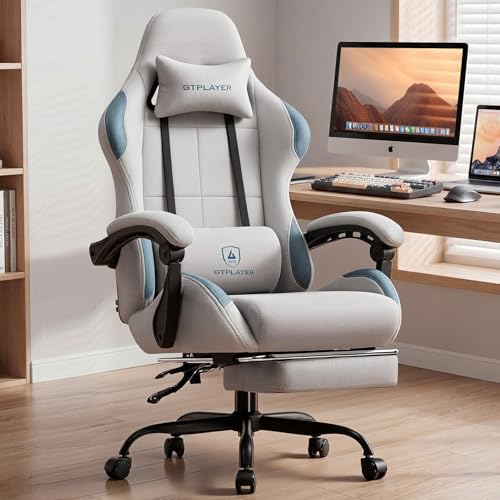
- Fabric chair includes lumbar support, a headrest, footrest, and flip-up armrests.
- Reclines up to 155 degrees and has a pocket-spring cushion.
- Listing gives a maximum supported weight of 350 pounds.
Best For: Gamers who spend long sessions seated at a desk
15. Logitech G29 Racing Wheel and Pedals
A Driving Setup for Racing Fans
Logitech G29 Racing Wheel and Pedals

- Wheel and pedals are listed for PS5, PS4, and PC.
- Features force feedback, pressure-sensitive pedals, and 900-degree rotation.
- Includes a leather-covered wheel and adjustable pedal faces.
Best For: Console players who enjoy racing and driving games
16. WD_BLACK 1TB SN850P SSD for PS5
More Room for a PS5 Game Library
WD_BLACK 1TB SN850P SSD for PS5

- 1TB NVMe M.2 SSD with a heatsink, listed for PlayStation 5 consoles.
- Manufacturer lists read speeds up to 7,300MB/s; performance may vary by conditions.
- Designed for installation in the PS5 M.2 slot; check system software compatibility.
Best For: PS5 owners who want more internal game storage
Choosing a Gift for the Console Player
Begin with how the recipient plays. Someone who spends evenings at a desk may get the most use from a monitor, chair, microphone, or headset. A living-room player might appreciate TV backlighting, speakers, a power strip, or a controller stand that keeps accessories together. For a more play-focused present, consider the arcade stick for fighting games, racing wheel for driving games, or portable retro console for trips and breaks away from the main setup.
Think about what would improve a routine rather than simply adding another device. A headset suits online play and private listening; the Redragon soundbar is aimed at players who prefer room audio. A capture card makes sense for someone interested in streaming or recording, while a thumb-grip set is a smaller way to personalize a controller. If unsure, a tidy-up accessory can be easier to fit into an established setup than a new piece of core hardware.
Set a Budget That Matches the Upgrade
Small accessories, such as thumb grips or a stand, can refresh a setup without requiring a major purchase. Mid-sized upgrades include a microphone, headset, soundbar, lighting, or capture card. A monitor, racing wheel, or chair takes more space and is a more substantial change to the player’s environment. The list spans these different kinds of gifts, so decide whether the aim is a modest addition or a centerpiece for the gaming area.
Remember that setup costs can extend beyond the item itself. A wheel needs room for the wheel and pedals; a chair needs enough space to recline and use its footrest; monitor lighting depends on screen dimensions. Consider the recipient’s available desk or living-room space before choosing a larger accessory. Avoid assuming a high price means a better match: a compact, well-targeted gift may be more useful than a dramatic upgrade that cannot be accommodated.
Check Compatibility and Personalization
Console compatibility is especially important for controllers, headsets, capture devices, racing wheels, and storage. Check the exact console generation and connection method. For example, the GameSir G7 Pro lists Xbox support alongside different connection modes for PC and Android. The 8BitDo arcade stick is listed for Xbox and Windows, while the Logitech G29 names PS5, PS4, and PC. These are not interchangeable claims, so match the product listing to the recipient’s system.
For storage, the WD_BLACK drive is an internal M.2 SSD for PS5, and the listing advises checking system software compatibility. A capture card also depends on more than the console: the recipient needs a compatible computer and streaming or recording app. For lighting and display accessories, measure first. The Quntis bar is designed for large curved monitors or large flat screens, and the FFJ TV strip is intended for 55–65-inch TVs. A useful gift can be personalized by choosing the feature that matches the player’s habits, such as wireless audio, desk organization, or a particular game style.
Timing and Last-Minute Decisions
For gifts that need a fit check, ask discreetly for the model of the console, TV, monitor, or controller. That small detail can prevent a mismatch. If there is little time to find out, choose an item whose compatibility is clearly stated for the system, or favor a broadly useful desk accessory. Check the retailer’s current delivery estimate and return terms when ordering; those details can change and are not guaranteed by a product description.
Plan extra time for gifts that require assembly or setup. A chair and a racing wheel need placement, while an SSD involves installation in a console slot. A microphone or capture card may need a computer connection and software configuration before the recipient can use it. If the gift is arriving close to Christmas, present it with a short note explaining the setup it supports, and leave the installation for a convenient day. That keeps the focus on how it will fit their gaming routine, without promising it will be ready for a particular date.