Shopping for a flight simulator fan can mean upgrading their cockpit controls, adding screen space, or finding a small aviation detail for their desk. This guide brings together 18 Christmas gifts for different setups and interests.
Before choosing, consider the recipient’s platform, available desk space, and whether they prefer a full control setup or a useful accessory.
18 Christmas Gift Ideas for Flight Simulator Fans to Consider in 2026
Hands-On Yoke Setup
Logitech G PRO Flight Yoke System
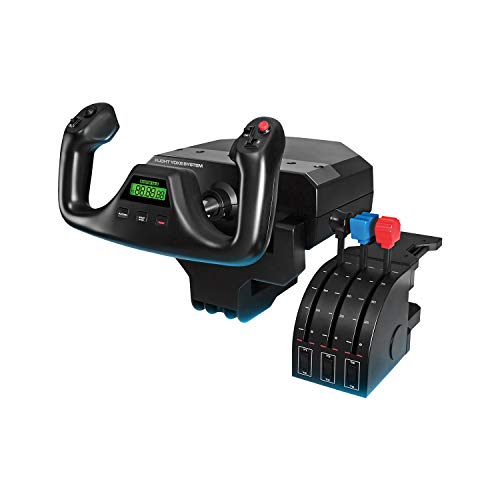
- Combines a flight yoke with a throttle quadrant for desktop flying.
- Includes a POV hat, 14 buttons, and a three-position mode switch.
- Desk clamps provide mounting options for compatible desks.
Best For: A desktop simmer who wants hands-on yoke and throttle controls.
Foot-Control Upgrade
Logitech G Pro Flight Rudder Pedals
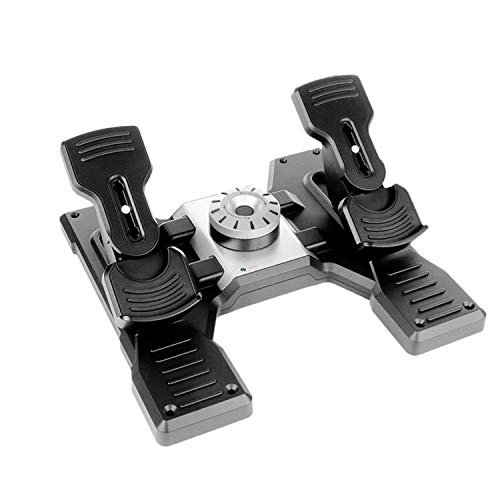
- Self-centering pedals add rudder input to a flight setup.
- An adjustable tension dial changes pedal response.
- Differential toe brakes provide additional ground control.
Best For: A Windows simmer with a yoke or stick who wants foot controls.
Screen Positioning

- Supports compatible monitors from 17 to 49 inches and 6.6 to 44 pounds.
- Offers tilt, swivel, rotation, and extension adjustments.
- Requires a compatible VESA display and wooden desk within the stated limits.
Best For: A desktop simmer who wants to reposition a compatible monitor.
Extra Screen Space
ARZOPA 16.1-Inch 144Hz Portable Monitor

- 16.1-inch 1080p display with a 144Hz refresh rate.
- Built-in stand allows tilt adjustment and horizontal or vertical use.
- USB-C and Mini HDMI connections support compatible devices.
Best For: A simmer who wants a portable secondary display for a compatible setup.
Airbus-Style Flight Stick
Thrustmaster TCA Sidestick Airbus Edition

- PC joystick modeled on the Airbus A320 sidestick.
- Features 17 action buttons and four swappable joystick head modules.
- Built-in throttle and twist rudder control keep inputs on the stick.
Best For: A PC simmer who enjoys Airbus aircraft or wants a compact stick.
Audio and Voice Chat
Philips SHP9600MB Headphones with Detachable Mic
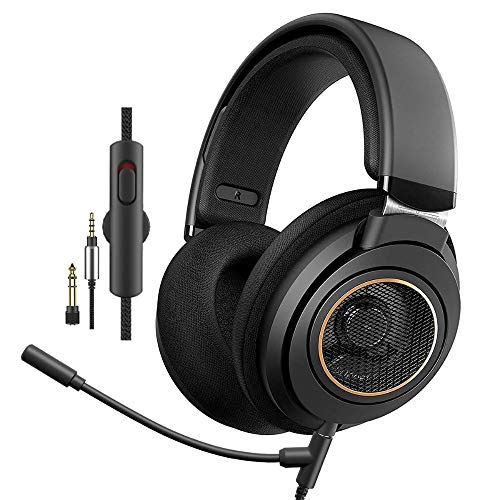
- Open-back over-ear headphones include a detachable microphone.
- 50 mm drivers and a wired 3.5 mm connection are listed.
- Includes a 3.5 mm to 6.3 mm adapter.
Best For: A simmer who wants wired headphones with a detachable mic.
Aviation Display Piece
SkyMarks Lufthansa 747-8I Model

- 1:200 scale collectible model of a Lufthansa 747-8I.
- Snap-fit assembly does not require glue, and a display stand is included.
- Measures approximately 13 inches long with a 12.5-inch wingspan.
Best For: An aviation enthusiast who enjoys displaying commercial aircraft models.
Programmable Controls

- Provides 36 customizable macro keys and six multifunction dials.
- Touch strip displays information and provides access to more action pages.
- Stream Deck app supports custom profiles on PC and Mac.
Best For: A simmer who wants programmable keys and dials for compatible workflows.
Build-It-Yourself Airliner
Zvezda Boeing 737-800 Model Kit

- 1:144 scale kit includes 109 parts.
- Assembled model measures about 11 inches long.
- Paint, glue, and tools are not included.
Best For: An aviation fan who enjoys assembling model aircraft.
Cockpit Instrument Panel
AltMot Flight Simulator Six Pack Panel

- Includes software and an integrated monitor for the instrument panel.
- Works with listed Windows PC simulators, including X-Plane 11 and 12 and Microsoft Flight Simulator 2020 and 2024.
- Requires an HDMI output and USB connection.
Best For: A Windows flight simmer who wants physical cockpit instruments.
Joystick and Throttle
Thrustmaster T.16000M FCS HOTAS

- USB flight controller is listed for Windows PC.
- Includes a joystick with a twist rudder and a separate throttle control.
- Offers multiple action buttons, a POV hat, and four independent axes.
Best For: A PC simmer who wants a joystick and separate throttle.
Multi-Platform Rudder Pedals
Thrustmaster TFRP Rudder Pedals

- Listed as compatible with PS5, Xbox Series X|S, and PC.
- Self-centering rudder axis has a long range of travel.
- Sliding rail system uses four aluminum rails.
Best For: A flight sim player on a listed platform who wants pedal controls.
Configurable Throttle Quadrant
Honeycomb Bravo Throttle Quadrant

- Configurable throttle setup accommodates listed single-engine through four-engine aircraft layouts.
- Includes autopilot controls, gear and flap levers, and a trim wheel.
- Annunciator panel has seven programmable switches and 14 warning lights.
Best For: A PC or Mac simmer who wants configurable throttle and cockpit controls.
Yoke and Switch Panel
Honeycomb Alpha Flight Controls

- Yoke rotates 180 degrees and has a self-centering mechanism.
- Integrated panel includes ignition, lighting, avionics, and alternator switches.
- Includes two clamps and a micro-suction mounting option.
Best For: A PC simmer building a civil aviation cockpit setup.
Physical Cockpit Switches
Logitech G Pro Flight Switch Panel

- Provides physical controls for landing gear and engine functions.
- LEDs indicate landing gear status in Microsoft FSX.
- Mounting brackets allow arrangement with other compatible panels.
Best For: A Windows simmer who prefers physical switches for cockpit functions.
PC Flight Sim VR
Pimax Crystal Super VR Headset

- PC VR headset lists 3840 × 3840 resolution per eye.
- Features a 140-degree field of view and inside-out tracking.
- Wired connection uses DisplayPort and USB.
Best For: A flight sim fan with a compatible Windows PC who wants VR.
Integrated Flight Controls
Turtle Beach VelocityOne Flight
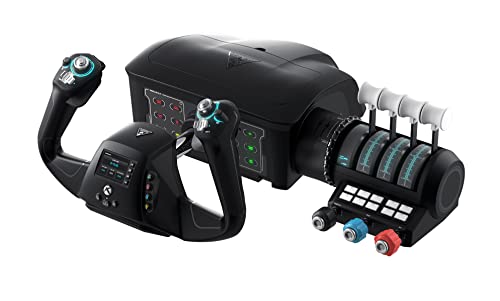
- All-in-one system includes a yoke, throttle quadrant, trim wheel, and rudder and brake controls.
- Listed for Xbox One, Xbox Series X|S, and Windows 10 and 11 PCs.
- Includes a flight management display and status indicator panel.
Best For: A simmer on a listed platform who wants an integrated control system.
Aviation-Themed Desk Upgrade
Airplane Cockpit View Large Mouse Pad

- Large 31.5-by-15.8-inch mat offers room for a keyboard, mouse, and accessories.
- Smooth surface is designed for optical and laser mice.
- Non-slip base and stitched edges are listed features.
Best For: A flight sim fan who wants an aviation-themed desk mat.
Christmas Gift Ideas for Flight Simulator Fans
Christmas gift ideas for flight simulator fans range from hands-on controls that change how someone flies to practical desk upgrades and aviation collectibles. The right choice depends on the recipient’s current setup: a PC simmer may welcome a yoke or instrument panel, while someone who flies on Xbox may need a compatible all-in-one system. Start by thinking about how they play and what they already own.
How to Choose the Right Flight Sim Gift
Match the Controls to Their Setup
Check the recipient’s platform and simulator before buying a controller. Several products in this guide are designed for Windows or PC, while the Turtle Beach VelocityOne Flight is listed for Xbox consoles and Windows PCs. The Thrustmaster TFRP pedals also list PS5, Xbox, and PC compatibility. Compatibility can vary by product, so compare the stated platform with the recipient’s console or computer and the software they use.
Then consider the kind of control that would add something new. A yoke, sidestick, or HOTAS controller gives the pilot physical inputs to work with. Rudder pedals add foot control, while throttle quadrants and switch panels put more cockpit functions within reach. If they already have dedicated controls, a monitor arm or portable display could help adjust their workspace instead of duplicating equipment.
Think About Desk Space and Connections
Flight simulation gear can take up room. Check whether the recipient has space for pedals, clamps, a second screen, or a larger control panel. A monitor arm also needs a compatible screen and desk: the listed HUANUO model requires a monitor with VESA mounting holes and a wooden desk within its stated thickness range. For a portable monitor or VR headset, confirm that the computer has the required connection and can run the recipient’s chosen simulator.
Budget Considerations for Christmas Gifts
A useful gift does not need to be a complete cockpit upgrade. The aviation-themed mouse pad offers a desk refresh, and the model airplane or kit can suit someone who enjoys aircraft away from the simulator. Headphones, a switch panel, or a portable monitor offer more functional upgrades at different levels of commitment. Higher-cost choices in this selection include the instrument panel, Stream Deck + XL, VR headset, and integrated flight control system.
Set a budget, then compare what the recipient would actually use. A specialized controller may be a more meaningful present than a broader accessory if it fills a gap in their setup. For electronics and controls, factor in whether they would need another compatible component to use the gift as intended.
Personalization Tips for Aviation Gifts
Personalize the choice around the aircraft and flying style they enjoy. The Thrustmaster Airbus sidestick is shaped around an A320-style control, while the model options depict a Lufthansa 747-8I and a Boeing 737-800. For a recipient who enjoys configuring a cockpit, consider whether physical switches, instrument controls, or programmable keys fit their habits. If you are unsure of their exact setup, an aviation display piece or desk mat can reflect their interest without requiring simulator compatibility.
Last-Minute Buying Advice
For a Christmas gift, verify compatibility and setup requirements before ordering. Look for the required platform, USB or display connections, mounting needs, and included components in the product listing. Model kits may need tools, paint, or glue that are not included; check what the recipient already has. Since delivery timing and stock can change, review the retailer’s current shipping estimate and availability before checkout. A thoughtful note explaining how the gift fits their flying setup can make even a practical accessory feel personal.