Wireless video transmitters can simplify live production by sending camera footage to an encoder, switcher, monitor, or streaming computer without a long cable run. The right system depends on your camera outputs, required resolution, range, latency, and receiver capacity.
We selected 10 options spanning affordable HDMI kits, UVC-ready transmitters, and professional 4K HDMI/SDI systems. Use the guide below to match the features that matter most to your workflow.
Best 10 Video Transmitters for Live Streaming Picks for 2026
Best for On-Set Streaming

- Dual-band transmission up to 1,200 feet
- UVC output for OBS and YouTube streaming
- Supports up to four monitoring devices
Best For: Multi-person production monitoring and direct computer streaming
Best for Multi-Screen Presentation

- Supports up to six displays with added receivers
- Dual-band range up to 165 feet
- Plug-and-play HDMI and USB-C compatibility
Best For: Presentations, venues, classrooms, and multi-screen entertainment
Best Professional HDMI Pick

- 4K30 transmission with 1080p60 support
- Range up to 1,300 feet and 60ms latency
- UVC streaming and up to four receivers
Best For: Professional productions, broadcasting, and shared crew monitoring
Best Plug-and-Play Multi-Screen Value
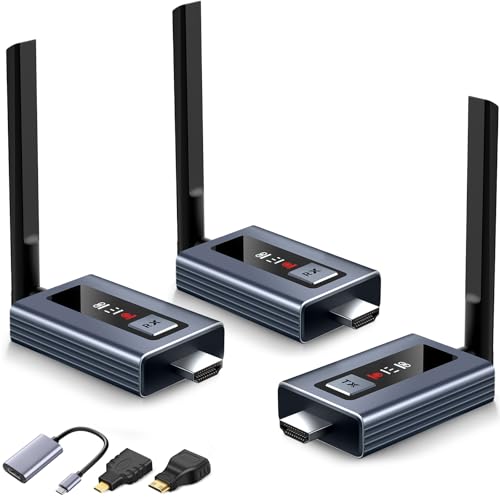
- LED status display simplifies troubleshooting
- Plug-and-play setup in about five seconds
- Supports up to six screens and 1080p60 output
Best For: Simple multi-screen presentations, events, and home entertainment
Best Direct-Streaming Pick

- RTSP output works with OBS, vMix, and VLC
- 400-foot LOS range with 0.08-second latency
- Supports receivers, app monitoring, and three power options
Best For: Creators and event teams needing flexible monitoring with direct streaming to a computer
Best Pocket 3 Companion
Wireless HDMI/UVC Creator Combo

- Direct USB-C connection for DJI Osmo Pocket 3
- HDMI and UVC outputs for streaming and monitoring
- 1,640-foot LOS range with 0.05-second latency
Best For: Pocket 3 creators wanting wireless webcam and HDMI workflows without a capture card
Best Long-Range 4K System
Hollyland Pyro Ultra 1TX & 2RX

- 4K60 HDMI with HDMI and SDI connectivity
- Up to 4,900 feet LOS and support for up to 20 receivers
- UVC, RTMP, Broadcast Mode, and Focus Mode included
Best For: Professional productions needing long-range 4K monitoring and multi-receiver streaming workflows
Best Osmo Pocket 3 Pick
20-Channel UVC Wireless HDMI Kit

- UVC output enables 1080p60 computer streaming without a capture card.
- Designed for DJI Osmo Pocket 3 with a built-in Type-C connector.
- Supports up to five receivers and HDMI loop-out.
Best For: Osmo Pocket 3 streaming and multi-screen monitoring
Best Plug-and-Play Option
1080p60 UVC Wireless HDMI Transmitter

- Streams to UVC-compatible platforms without drivers or a capture card.
- Offers 1312 feet of line-of-sight range and under 50 ms latency.
- Includes HDMI loop-out, IR control, and support for five receivers.
Best For: Fast computer streaming and event production
Best Built-In Monitor
Wireless HDMI Kit with 7-Inch Screen
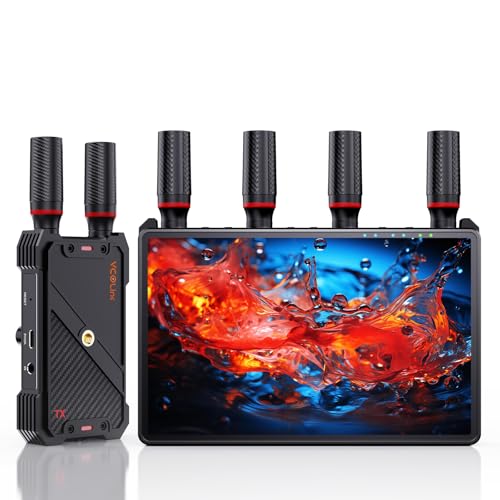
- Receiver includes a 7-inch HD screen for portable monitoring.
- Supports 1080p60 transmission up to 1312 feet with low latency.
- Offers five-receiver sharing, HDMI output, loop-out, and IR control.
Best For: On-set monitoring and collaborative live production
Best for On-Set Streaming – Accsoon CineView HE
For creators comparing video transmitters for live streaming, the Accsoon CineView HE stands out as a camera-focused system with dual-band transmission, low latency, and built-in UVC output. It can send footage to a computer for platforms such as OBS or YouTube without requiring a separate capture device.
Best For: Live productions and shoots needing long-range camera monitoring, multiple viewers, and direct computer streaming.
Pros:
- 2.4GHz and 5GHz dual-band transmission supports stable wireless video and audio over distances up to 1,200 feet.
- UVC output enables plug-and-play streaming to a computer through USB-C.
- One transmitter can connect with up to four receivers or mobile devices.
- HDMI loop-out provides zero-latency lossless output, while a compatible NP-F970 battery can run for up to 12 hours.
Cons:
- Battery and charging cables are not included.
- This is an HDMI-based system, so cameras and other sources need compatible HDMI output.
The CineView HE is a strong choice when dependable monitoring and streamlined live-streaming connectivity matter more than a basic point-to-point setup. Its receiver UVC output is particularly useful for computer-based broadcasts.
Best for Multi-Screen Presentation – Wireless HDMI 2-Receiver Kit
This wireless HDMI kit is aimed at buyers who want to distribute video and audio to multiple displays rather than build a dedicated camera-production link. For video transmitters for live streaming, its dual-band connection, plug-and-play setup, and support for up to six receivers make it useful for venues with several screens.
Best For: Conference rooms, classrooms, churches, bars, restaurants, and home theaters that need one source on multiple displays.
Pros:
- Supports up to six large screens or TVs when additional receivers are added.
- 2.4GHz and 5.8GHz transmission reaches up to 165 feet in open environments.
- Works with laptops, cameras, game consoles, set-top boxes, projectors, and other HDMI sources.
- Plug-and-play design includes HDMI, USB-C, Micro HDMI, and Mini HDMI connection options.
Cons:
- Transmission distance can fall to about 50 feet through walls.
- It cannot transmit from one TV to another TV.
- The current app version does not support controlling laptops from phones or iPads.
This kit is better suited to wireless HDMI distribution than specialized film-set monitoring. Choose it when multiple-screen playback and broad source compatibility are the main priorities.
Best Professional HDMI Pick – Hollyland Pyro H
The Hollyland Pyro H is a capable option for shoppers seeking video transmitters for live streaming alongside professional camera monitoring. It combines 4K30 input and output support, dual-band wireless transmission, smart channel scanning, UVC streaming, and connections for multiple receivers.
Best For: Film production, live broadcasting, ENG/EFP work, and crews that need shared real-time monitoring.
Pros:
- Supports video formats up to 4K at 30fps and 1080p at 60fps through HDMI.
- Transmission reaches up to 1,300 feet with approximately 60ms latency.
- Smart Channel Scan helps select an optimal frequency across the 2.4GHz and 5GHz bands.
- Can feed up to four receivers and supports UVC live streaming to a computer.
Cons:
- The listed 60ms latency may be less suitable for applications requiring nearly instantaneous response.
- The included kit contains one transmitter and one receiver; additional receivers are needed for larger monitoring teams.
- It uses HDMI connectivity, so the source must provide HDMI output.
With its long stated range, 4K support, receiver expansion, and UVC capability, the Pyro H is a well-rounded choice for demanding productions. Smart channel scanning is a useful advantage in crowded wireless environments.
Best Plug-and-Play Multi-Screen Value – Upgraded Wireless HDMI Kit
For straightforward wireless distribution, this upgraded kit offers a simple alternative among video transmitters for live streaming and presentation setups. Its LED screens show connection and signal information, while dual-band transmission supports 1080p output across multiple displays.
Best For: Users who want quick setup, clear status feedback, and wireless sharing to several TVs or projectors.
Pros:
- LED displays show connection status, signal strength, output status, and power information.
- Plug-and-play operation requires no app, Bluetooth, Wi-Fi, or complex configuration.
- Supports up to six screens with additional receivers and reaches up to 165 feet in line-of-sight conditions.
- Accepts 4K input and provides 1080p at 60Hz output, with HDMI, USB-C, Mini HDMI, and Micro HDMI accessories included.
Cons:
- Output is limited to 1080p even though the system accepts 4K input.
- Range and performance may decrease when signals pass through solid walls.
- The supplied notes describe latency under 0.1 second, which is not as low as some dedicated production transmitters.
The LED status display and five-second connection process make this kit approachable for presentations, events, and home entertainment. It is a practical fit when ease of use and multi-screen output matter more than 4K wireless output.
Best Direct-Streaming Pick – Hollyland Mars 400S Pro
For creators comparing video transmitters for live streaming, the Hollyland Mars 400S Pro stands out for its direct RTSP workflow. With a compatible Type-C-to-RJ45 connection, its receiver can send video to OBS, vMix, or VLC without a separate capture device.
Best For: Indie filmmakers, event producers, educators, and streamers who want flexible monitoring plus a straightforward wired network connection to streaming software.
Pros:
- Supports RTSP live streaming through the receiver’s network connection.
- Offers up to 400 feet of line-of-sight transmission with approximately 0.08-second latency.
- Supports up to two receivers or up to four app-monitoring connections in configured combinations.
- Accepts DC, USB-C, or L-series battery power.
Cons:
- Direct streaming requires a Type-C-to-RJ45 connector and standard RJ45 cable.
- The maximum range depends on line-of-sight conditions.
- Its 1.87-pound system may be less convenient for lightweight rigs.
The Mars 400S Pro is a practical choice when live streaming compatibility and multiple monitoring options matter more than maximum resolution. Its three power methods also make it adaptable for location work.
Best Pocket 3 Companion – Wireless HDMI/UVC Creator Combo
If you use a DJI Osmo Pocket 3, this compact system is one of the more specialized video transmitters for live streaming. Its direct USB-C connection turns the camera into a wireless webcam, while the receiver provides both UVC and HDMI outputs for computers, displays, and switchers.
Best For: DJI Osmo Pocket 3 users, mobile producers, educators, and event teams who need plug-and-play streaming or monitoring without an HDMI capture card.
Pros:
- Connects directly to the DJI Osmo Pocket 3 through USB-C without an adapter.
- Provides HDMI and UVC outputs for OBS, Zoom, Teams, TikTok Live, YouTube, displays, and switchers.
- Offers up to 1,640 feet of line-of-sight range and approximately 0.05-second latency.
- Includes HDMI input with loop-out, 20 selectable channels, and reverse charging for the Pocket 3.
Cons:
- Designed for horizontal video rather than vertical video.
- Walls, metal, brick, and glass can reduce range or cause signal loss.
- The Pocket 3-focused USB-C design may be less convenient for users primarily using other cameras, despite the standard HDMI input.
This is a strong fit for Pocket 3-centered workflows where speed and minimal cabling are priorities. Its HDMI input also gives it broader usefulness than a camera-specific accessory alone.
Best Long-Range 4K System – Hollyland Pyro Ultra 1TX & 2RX
For professional crews evaluating video transmitters for live streaming, the Hollyland Pyro Ultra combines 4K60 transmission with HDMI, SDI, UVC, and RTMP support. Its included one-transmitter, two-receiver configuration is built for demanding production environments and multi-display monitoring.
Best For: Film production, broadcast-style live events, focus-pulling teams, and crews that need long-range transmission, multiple receivers, and direct streaming options.
Pros:
- Supports true 4K60 over HDMI and includes HDMI and SDI inputs and outputs.
- Broadcast Mode can distribute video to up to 20 receivers with a stated line-of-sight range up to 4,900 feet.
- Focus Mode reduces latency to approximately 20 ms at 1080p25/30 and supports multiple enabled receivers.
- Built-in UVC and RTMP support enables direct capture and streaming workflows.
Cons:
- The listed system weighs 7.35 pounds, making it less suited to lightweight setups.
- RTMP streaming is specified up to 1080p60, rather than 4K60.
- Its professional feature set may be more than smaller streaming setups require.
The Pyro Ultra is the most production-oriented option here, especially for teams that need SDI, 4K monitoring, receiver expansion, and focus-friendly latency. It is best justified when those capabilities outweigh portability and simplicity.
Best Osmo Pocket 3 Pick – 20-Channel UVC Wireless HDMI Kit
If you need video transmitters for live streaming with a DJI Osmo Pocket 3, this kit stands out for its built-in Type-C connection and UVC receiver output. It can send video at up to 1080p60 to a computer for OBS streaming without a separate capture card, while also supporting long-range HDMI monitoring.
Best For: DJI Osmo Pocket 3 users who want direct computer streaming and flexible wireless monitoring.
Pros:
- Built-in UVC output supports up to 1080p60 streaming through a PC or Mac.
- Offers 20 adjustable channels and a status display with connection, signal, resolution, and battery information.
- Supports one transmitter with up to five receivers and includes transmitter-side HDMI loop-out.
- Works with USB-C, DC power, and optional NP-F batteries, with reverse charging for the Pocket 3.
Cons:
- NP-F batteries must be purchased separately.
- Walls, glass, brick, and metal can significantly reduce the stated open-field range.
This is the most specialized option in the group, particularly if the Osmo Pocket 3 is central to your setup. Its UVC workflow simplifies live streaming, while the multi-receiver design helps with distributed monitoring.
Best Plug-and-Play Option – 1080p60 UVC Wireless HDMI Transmitter
For straightforward video transmitters for live streaming, this wireless HDMI kit focuses on a simple UVC connection. Plug the receiver into a PC or Mac over USB-C and stream to OBS, YouTube Live, Zoom, Teams, TikTok Live, or other UVC-compatible services without installing drivers or using a capture card.
Best For: Creators and event teams needing quick computer-based streaming with low setup complexity.
Pros:
- Built-in UVC output supports plug-and-play streaming at 1080p60.
- Provides up to 1312 feet of stated line-of-sight range with under 50 ms latency.
- Includes transmitter HDMI loop-out and an IR cable for remote source control.
- Supports up to five receivers for sharing one video feed with multiple viewers.
Cons:
- Range decreases to about 330 feet when all five receivers are connected.
- NP-F batteries and power banks are not included.
This model is a practical choice when platform compatibility and rapid setup matter most. Automatic 5GHz channel selection, UVC support, and multi-receiver capability make it suitable for live productions, presentations, and event monitoring.
Best Built-In Monitor – Wireless HDMI Kit with 7-Inch Screen
Among video transmitters for live streaming, this kit is distinctive because its receiver includes a built-in 7-inch HD monitor. That gives you an immediate viewing option without adding a separate screen, while HDMI output, loop-out, low latency, and multi-receiver support keep it useful for larger filming or live-production workflows.
Best For: Camera crews and streamers who want portable on-set monitoring built into the receiver.
Pros:
- Built-in 7-inch screen provides real-time monitoring without an extra display.
- Transmits 1080p60 video up to a stated 1312 feet with under 0.05-second latency.
- One transmitter can send video to up to five receivers, each with screen and HDMI output options.
- Supports NP-F batteries, power banks, and USB-C power, with 1/4-inch mounting.
Cons:
- An HDMI cable for connecting the receiver to an external monitor is not included.
- A Type-C-to-HDMI cable is required for smartphone or tablet compatibility.
The integrated monitor makes this a convenient all-in-one choice for mobile crews and live sets. It is especially appealing when you want private receiver-side viewing while also sending the feed to a larger client or production display.
How We Picked These Video Transmitters for Live Streaming
We focused on systems that can serve real streaming workflows, not just casual screen mirroring. Key considerations included HDMI or SDI compatibility, UVC output for direct computer connections, supported resolution and frame rates, advertised transmission distance, latency, receiver expansion, and practical setup features such as loop-out, channel selection, and plug-and-play operation.
Specifications vary by environment. Range claims are typically measured with clear line of sight, while walls, wireless congestion, antenna placement, and local regulations can reduce performance. Treat latency and distance figures as useful comparisons rather than guaranteed results in every venue.
Quick Comparison
| Best For | Look For | Typical Strength |
|---|---|---|
| Direct computer streaming | UVC output | Connects to compatible streaming software without a separate capture device |
| Multi-camera production | Multiple receivers or stable channel management | Feeds monitors, switchers, or destinations around a venue |
| Professional camera rigs | HDMI and SDI support | More flexible integration with production equipment |
| 4K monitoring | 4K transmission support | Preserves higher-resolution sources where the complete chain supports it |
Key Buying Factors for Video Transmitters for Live Streaming
Connection Type and Streaming Output
Confirm the transmitter matches your camera output. HDMI is common on mirrorless cameras, action cameras, and consumer devices, while SDI is preferred on many professional cameras and longer cable runs. If you want to stream directly to a laptop, OBS computer, or switcher, a UVC output can eliminate the need for a separate HDMI capture adapter.
Resolution, Frame Rate, and Latency
1080p60 is usually sufficient for live streaming and often provides a practical balance of image quality, bandwidth, and stability. Choose a 4K-capable system when you need 4K monitoring, recording, or future flexibility. Low latency matters for presenters, camera operators, and live switching; compare the advertised figure, but also check whether it changes at higher resolutions or across longer distances.
Range, Interference, and Receiver Count
Long range is helpful for events, houses of worship, classrooms, and outdoor productions, but a reliable shorter link can be better than an overstated distance claim. Dual-band systems may offer more flexibility in crowded environments. If several displays or production stations need the feed, verify the maximum receiver count and whether additional receivers are sold separately.
Power, Mounting, and Workflow
Check battery life, USB or DC power options, mounting points, antenna design, and whether the units can operate while charging. Loop-through output is useful when you need to monitor locally while transmitting elsewhere. A simple plug-and-play kit may be ideal for occasional events, whereas professional controls and SDI support justify a more advanced system for frequent production work.
Who Should Buy Which Video Transmitters for Live Streaming?
Choose a UVC-equipped transmitter if your priority is feeding a laptop, OBS, or another USB video workflow with minimal extra hardware. Choose an HDMI multi-receiver kit for classrooms, presentations, home entertainment, or events where several screens need the same source. Choose an HDMI/SDI professional system when you use cinema or broadcast cameras, need flexible integration, or require more dependable production features. Choose a 4K long-range model when high-resolution monitoring and coverage distance matter more than the lowest purchase price.
Before ordering, verify every device in the chain supports your target resolution, frame rate, connector type, and copy-protection requirements. For the most reliable live stream, test the complete setup at the venue and keep a wired backup available for critical events.