Great gaming audio does more than get loud—it helps you hear direction, depth, and detail when the match gets intense. The right setup can make footsteps, effects, and dialogue easier to place.
In this roundup, we focus on surround sound gaming speakers that balance immersion, desk space, bass, and value so you can choose a system that fits your room and your platform.
Best 10 Surround Sound Gaming Speakers Picks for 2026
RGB Surround Desk Set
Logitech G560 PC Gaming Speaker System

- 7.1 DTS:X Ultra surround sound
- 240W peak power with subwoofer
- LIGHTSYNC RGB with game-driven effects
Best For: PC gamers who want surround audio and RGB effects
Versatile Detachable Bar
Detachable 2-in-1 Gaming Soundbar

- 80W sound from 4 drivers
- Detachable design with 4 placement options
- Bluetooth 5.0, ARC, optical, and AUX
Best For: People who want an easy-to-place gaming soundbar
Compact Virtual Surround
Edifier G2000 Pro RGB Gaming Speakers

- Virtual 7.1 surround over USB
- 64W peak power with dual bass reflex
- Bluetooth 5.4 plus USB-C and AUX
Best For: Gamers who want a compact RGB speaker pair with virtual surround
Editor’s Pick
ULTIMEA 5.1CH Dolby Atmos Sound Bar

- 5.1-channel Dolby Atmos with side-firing drivers
- 300W peak output and wired wooden subwoofer
- App control with EQ, presets, and surround tuning
Best For: Gamers and home theater buyers who want quick setup and strong bass
Budget Desk Pick
Nylavee USB PC Speakers with Lighting

- Hi-Fi stereo with dual-magnet speaker units
- Two bass-boost ports for deeper desktop sound
- USB power and 3.5mm plug-and-play setup
Best For: PC gamers and laptop users who want a compact, affordable desk speaker setup
Most Immersive
ULTIMEA 7.1ch Sound Bar with 4 Surround Speakers

- 7.1-channel setup with 4 surround speakers
- VocalMatrix and VoiceMX for clearer dialogue
- BassMX subwoofer tuned for deeper low end
Best For: Gamers who want the most immersive surround setup and stronger positional audio
Immersive 2.1 Pick

- 2.1-channel setup with dedicated subwoofer
- 18 RGB modes, including audio-sync lighting
- OTG, optical, AUX, and Bluetooth inputs
Best For: Desk gamers who want bass-heavy sound and RGB styling
Compact TV-Style Pick
Saiyin Sound Bar with Subwoofer

- Soundbar plus dedicated subwoofer for fuller bass
- Bluetooth 5.3, optical, and AUX connections
- Three EQ modes for movie, music, and general use
Best For: Users who want a simple soundbar system for TV or PC gaming
Desktop Stereo Pick
Sanyun SW208 Bookshelf Speakers
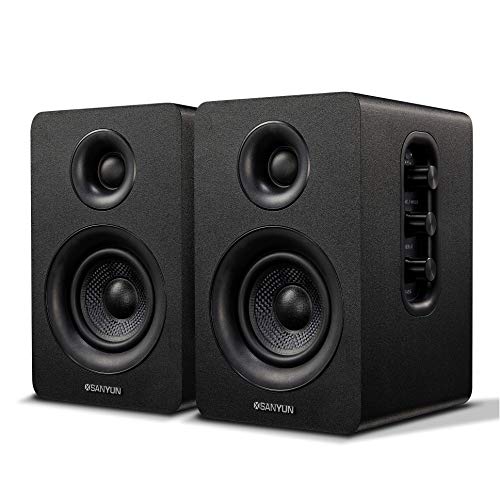
- Dynamic 3D surround sound mode for gaming
- Built-in 24-bit DAC over USB
- Volume, bass, and treble controls on speaker
Best For: PC gamers who want compact adjustable bookshelf speakers
RGB Surround Desk Set – Logitech G560 PC Gaming Speaker System
If you want surround sound gaming speakers with a more immersive desk setup, the Logitech G560 blends 7.1 DTS:X Ultra processing, a dedicated subwoofer, and LIGHTSYNC RGB effects for a more dramatic play experience. It’s built for Windows PCs and also works over Bluetooth, so it can double as a general-use desktop speaker system.
Best For: PC gamers who want virtual surround sound plus reactive RGB lighting.
Pros:
- Integrated DTS:X Ultra surround sound for 3D positional audio.
- 240W peak power and a subwoofer for a bigger soundscape.
- LIGHTSYNC RGB with four lighting zones and front/rear projection.
- Works with Windows PCs and Bluetooth-enabled devices.
Cons:
- DTS:X is not supported on Mac OS X.
- Large 2.1 desktop setup takes more room than compact speakers.
- Lighting and surround features are most relevant for PC gaming.
Overall, this is a strong pick if your priority is a lively gaming setup with spatial audio and visual flair. It’s less about simplicity and more about a full-featured PC gaming experience.
Versatile Detachable Bar – Detachable 2-in-1 Gaming Soundbar
For shoppers comparing surround sound gaming speakers in a simpler bar format, this detachable soundbar focuses on easier setup, boosted volume, and room-filling placement flexibility. It uses 4 drivers and 80W output to add more body to game audio, while Bluetooth 5.0 plus ARC, OPT, and AUX make it easy to connect to a TV, PC, projector, or console area.
Best For: Buyers who want a versatile soundbar for gaming and TV audio without a separate subwoofer.
Pros:
- 4-driver design with 80W output for fuller sound.
- Detachable 2-in-1 design supports multiple placements.
- Bluetooth 5.0 plus ARC, optical, and AUX connections.
- 3 EQ modes for movie, music, and news playback.
Cons:
- No dedicated subwoofer included.
- Surround effect is more soundbar-based than true multi-speaker separation.
- Best results depend on the placement mode you choose.
This is a practical option if you want a cleaner setup than a full speaker system. It’s aimed at everyday versatility, with enough power and connection options to cover gaming and general media.
Simple Budget 2.1 – Logitech Z313 Multimedia Speaker System
The Logitech Z313 is a straightforward 2.1 desktop system for buyers who want affordable surround sound gaming speakers without extra complexity. It pairs compact satellite speakers with a small subwoofer and a wired control pod, giving you a simple way to add bass and clearer game audio to a desktop or TV setup.
Best For: Budget shoppers who want a basic 2.1 speaker system for casual gaming and everyday use.
Pros:
- 25W RMS output with a compact subwoofer.
- Convenient wired control pod for quick volume control.
- Simple tabletop setup for desktops and other small spaces.
- Works with desktops, MP3 players, and televisions.
Cons:
- Only stereo/2.1 audio, not virtual surround.
- No advanced gaming features like RGB or software tuning.
- Wired design is less flexible than Bluetooth options.
In practical terms, this is a no-frills choice that focuses on price and simplicity. If you mainly want a small speaker system with bass support, it gets the job done without extra setup.
Compact Virtual Surround – Edifier G2000 Pro RGB Gaming Speakers
If you want surround sound gaming speakers in a compact desktop format, the Edifier G2000 Pro leans hard into virtual 7.1 audio, strong RGB presentation, and broad device compatibility. It uses USB-C for low-latency PC and PS5 use, Bluetooth 5.4 for wireless playback, and AUX for consoles like Xbox and Switch.
Best For: Gamers who want a small RGB speaker set with virtual surround sound and modern connectivity.
Pros:
- Virtual 7.1 surround sound over USB with PC software support.
- 64W peak power and dual bass reflex design for fuller gaming audio.
- Bluetooth 5.4, USB-C, and AUX support for multiple devices.
- Game, movie, and music modes for quick sound changes.
Cons:
- Virtual surround depends on USB connection and PC software.
- 2.0 design does not include a separate subwoofer.
- Best lighting and surround features are more desktop-focused than room-filling.
This model makes sense if you want a compact setup with modern features instead of a bulky speaker system. It combines gaming-friendly audio tuning with flexible input options and strong visual styling.
Editor’s Pick – ULTIMEA 5.1CH Dolby Atmos Sound Bar
If you want surround sound gaming speakers that are easy to live with, this ULTIMEA 5.1ch system is built for fast setup and immersive TV or console audio. It combines Dolby Atmos, five built-in speakers, and a wired subwoofer for a broad soundstage without needing rear speakers.
Best For: Gamers and home theater buyers who want quick setup, clear dialogue, and strong bass in one soundbar system.
Pros:
- Real Dolby Atmos with 5.1-channel audio and two side-firing drivers for wide surround sound
- VoiceMX technology helps keep dialogue clear during busy scenes and gameplay
- 300W peak output with a dedicated wired wooden subwoofer for deeper bass
- App control adds EQ, presets, and adjustable surround levels for room tuning
Cons:
- Uses a soundbar-based layout rather than discrete rear speakers
- Best performance depends on having a compatible HDMI eARC setup
- Many adjustment options may take a little time to dial in
This is a practical pick if you want fuller gaming audio without a complicated speaker setup. Its mix of Atmos support, app tuning, and bass-focused hardware makes it a flexible all-rounder for a living room gaming setup.
Budget Desk Pick – Nylavee USB PC Speakers with Lighting
These Nylavee desktop speakers are a simple choice if you want surround sound gaming speakers for a PC desk without a big footprint. They focus on clear stereo sound, boosted bass through dual ports, and easy USB plus 3.5mm plug-and-play connectivity.
Best For: PC gamers and laptop users who want an affordable, compact desk speaker setup with some visual flair.
Pros:
- Hi-Fi stereo sound from dual-magnet speaker units
- Two bass-boost ports add stronger vibration energy and richer low end
- Six touch-controlled lighting modes for desktop customization
- USB power and 3.5mm audio make setup straightforward
Cons:
- No Bluetooth support
- Not a true multi-speaker surround system
- USB cable is for power only, so audio still depends on the 3.5mm connection
This model makes sense if you mainly want an easy desktop upgrade for gaming, videos, and music. It is more about compact stereo performance than room-filling surround, but that keeps it simple and budget-friendly.
Most Immersive – ULTIMEA 7.1ch Sound Bar with 4 Surround Speakers
If you are shopping for surround sound gaming speakers with a more expansive setup, this ULTIMEA 7.1ch system is the most feature-rich option here. It adds four surround speakers, Dolby-style app tuning, and a subwoofer designed for deeper bass and a larger soundstage.
Best For: Gamers who want a more immersive surround setup with discrete rear channels and strong bass impact.
Pros:
- 7.1-channel layout with 4 surround speakers for a wider, more detailed sound field
- VocalMatrix and VoiceMX help keep vocals and dialogue clear
- BassMX subwoofer is tuned for extended low-end response down to 45 Hz
- App control includes EQ, 121 presets, and adjustable surround levels
Cons:
- More speakers mean a more involved setup than a basic soundbar
- Rear speaker connection design may require some cable management
- Best suited to users who have room for a larger surround system
For buyers who want the biggest step up in immersion, this system goes beyond a simple bar-and-subwoofer arrangement. The extra surround channels and tuning options make it a strong fit for gaming rooms where positional audio matters.
Immersive 2.1 Pick – FIFINE A22 Gaming Speakers
If you want surround sound gaming speakers for a desk setup, the FIFINE AmpliGame A22 is built around a 2.1 layout with a dedicated subwoofer and dual satellite speakers. That gives games a more layered feel, with bass for explosions and clear placement for footsteps, while also working well for movies, music, and everyday PC use.
Best For: Gamers who want an affordable 2.1 speaker setup with RGB flair, flexible connections, and easy onboard controls.
Pros:
- 2.1-channel design with a dedicated subwoofer for deeper bass and a more immersive soundscape
- AC-powered drivers aim for clear treble and rumbling low end without distortion at higher volume
- 18 RGB lighting modes, including audio-sync effects, add a strong gaming aesthetic
- Multiple inputs: OTG, optical, AUX, and Bluetooth for PC, TV, and mobile devices
Cons:
- Best suited to desktop setups rather than a minimalist no-lighting workspace
- Top-mounted controls are practical, but they are still manual instead of app-based
- Subwoofer-based systems take up more room than simple stereo speakers
This is a solid choice if you want a straightforward 2.1 speaker system that prioritizes bass, easy connectivity, and gaming-friendly effects. The EQ presets for Game, Movie, and Music make it easy to tune the sound without digging through menus.
Compact TV-Style Pick – Saiyin Sound Bar with Subwoofer
For surround sound gaming speakers in a compact TV-friendly format, the Saiyin sound bar pairs a soundbar with a dedicated subwoofer to create a wider, more room-filling presentation. It supports optical, AUX, and Bluetooth 5.3 connections, so it can work for a PC, TV, or phone without much setup hassle.
Best For: Buyers who want a compact soundbar-and-subwoofer combo for TV or PC gaming with simple switching between inputs.
Pros:
- Dedicated subwoofer adds punchy bass for games, movies, and music
- Three EQ modes let you tailor sound for news, movie, or music listening
- Bluetooth 5.3 plus optical and AUX make it flexible for different devices
- LED indicators clearly show the active input, with soft lighting for less distraction
Cons:
- Soundbar format is less traditional for desktop stereo placement than separate speakers
- Remote compatibility is limited, and it is not compatible with universal or TV remotes
- Not every Dolby or DTS format is supported, per the product notes
If you want a cleaner all-in-one profile than a multi-speaker desktop system, this Saiyin setup makes sense. Its wide sound dispersion angle and included cables help it fit easily into a simple gaming or living-room audio setup.
Desktop Stereo Pick – Sanyun SW208 Bookshelf Speakers
The Sanyun SW208 is a compact pair of bookshelf speakers that can still deliver a surround sound gaming speakers feel thanks to its dynamic 3D surround sound mode and rich stereo output. With a built-in 24-bit DAC, USB, Bluetooth 5.0, and 3.5mm AUX, it is designed for straightforward desktop use while still giving you tuning control over volume, bass, and treble.
Best For: PC gamers and desk listeners who want compact speakers with adjustable tone and a cleaner stereo setup.
Pros:
- Dynamic 3D surround sound adds a more spacious feel for gaming and media
- Built-in 24-bit DAC helps preserve digital audio quality over USB
- Side-mounted controls let you adjust volume, bass, and treble directly on the speaker
- Bluetooth 5.0, USB, and AUX support a range of desktop and mobile sources
Cons:
- It is a 2.0 speaker pair, so there is no dedicated subwoofer for deeper bass
- Compact size may not satisfy users looking for a big-room cinematic system
- Sound shaping depends on manual on-speaker controls rather than presets
This is a practical pick if you want a tidy desktop setup with more depth than basic computer speakers. Its adjustable tuning and small footprint make it easy to tailor for gaming, music, or everyday PC listening.
How We Picked the Best Surround Sound Gaming Speakers
We compared each option for surround performance, bass output, connectivity, ease of setup, and how well it suits common gaming spaces. We also looked at whether a model is better for desktop play, living-room gaming, or hybrid use with TV and PC.
Quick Comparison
Some picks lean toward true multi-speaker immersion, while others use virtual surround processing in a compact format. Sound bars are often better for clean TV setups and easy placement, while 2.1 desktop systems usually offer better near-field impact and bass control. If you want the most convincing positional audio, look closely at channel count and speaker placement; if you want simplicity, a smaller system may be the better fit.
Key Buying Factors for Surround Sound Gaming Speakers
Channel Design
True 5.1 or 7.1 systems can create a wider sound field than stereo setups with virtual processing. For competitive gaming, more discrete channels may improve direction cues, while stereo or 2.1 systems can still sound excellent for casual play and single-player immersion.
Bass and Low-End Control
A dedicated subwoofer helps explosions, engine sounds, and music feel fuller. If you play action-heavy games or want movie-like punch, prioritize systems with adjustable bass rather than relying on default settings.
Connectivity
USB, 3.5mm, Bluetooth, ARC, and optical inputs each serve different setups. PC gamers often benefit from USB or AUX, while console and TV users should pay attention to optical and HDMI ARC support for fewer cables and easier switching.
Size, Placement, and Desk Fit
Surround Sound Gaming Speakers need room to breathe. Measure your desk, monitor stand, and side-space before buying, especially if the system includes satellite speakers or a larger subwoofer.
Lighting and Extra Features
RGB lighting, app controls, and EQ presets are nice additions, but they should support the sound rather than drive the purchase. Focus first on audio tuning and placement flexibility.
Who Should Buy Which Surround Sound Gaming Speakers?
If you want the most immersive experience, choose a multi-channel surround system with dedicated speakers. If you game at a desk and want stronger bass without a complicated setup, a 2.1 speaker system is often the sweet spot. If your priority is a clean TV or console setup, a soundbar-based option may be the easiest and most space-efficient choice. For budget-conscious buyers, compact desktop speakers can still deliver a noticeable upgrade over built-in monitor audio.
Overall, the best Surround Sound Gaming Speakers are the ones that match your room size, connection needs, and how you actually play. Start with your setup first, then narrow by sound style and features.