Choosing studio monitors with subwoofer output can make a big difference in how accurately you hear low-end detail, especially for mixing, editing, and home production.
This roundup focuses on practical options that pair well with a sub, whether you need compact desktop speakers or a more serious nearfield setup.
Best 10 Studio Monitors with Subwoofer Output Picks for 2026
Studio-Grade Low End
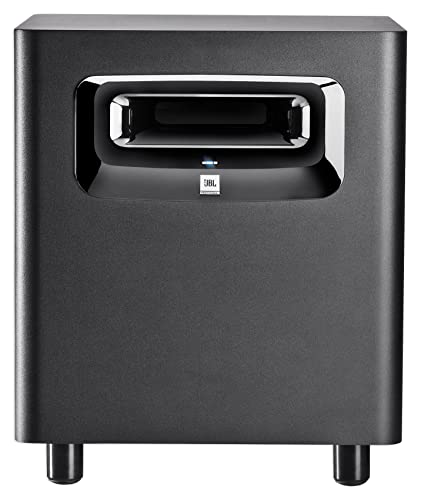
- 10-inch subwoofer with deep bass into the 20 Hz range
- XLF tuning adds club-style low-end response
- Balanced XLR and 1/4-inch connections for studio use
Best For: Producers needing deep, controlled bass extension
Compact Wireless Bass

- 8-inch front-firing sub reaches down to 30 Hz
- Bluetooth 5.0 plus TRS, RCA, and aux inputs
- Crossover controls help match your main monitors
Best For: Home studios and flexible mixed-use setups
Desk-Friendly Monitors

- Compact 3.5-inch pair for desks and small studios
- Tone Knob adjusts voicing without menus
- Location Switch helps manage bass placement
Best For: Desktop creators building a small monitoring setup
Flexible Studio Bass

- 8-inch woofer with bass extension to 30 Hz
- Front-firing port improves placement flexibility
- Footswitch control can bypass sub and crossover
Best For: Music producers needing a compact studio sub
Compact Wireless Subwoofer

- 8-inch front-firing sub with 100W power
- Crossovers and room tuning help match small monitors
- Bluetooth 5.0, TRS, RCA, and aux inputs
Best For: Small studios needing an accurate subwoofer with wireless convenience
Budget Nearfield Monitors

- Compact powered pair with 3.5-inch woofer
- Room control and high trim for desktop tuning
- XLR/TRS, RCA, and stereo mini inputs
Best For: Small desktop studios that need flexible wired monitors
Desktop Subwoofer with Remote

- Built for CR Series monitors with TRS or RCA
- Adjustable crossover and desktop sub bypass
- Bluetooth input plus desktop remote control
Best For: Mackie CR monitor users wanting an easy desktop subwoofer
Yamaha HS8S
8-inch Powered Studio Bass Extension

- 8-inch powered subwoofer with 150W output
- 22Hz–150Hz response for low-end extension
- Low-cut, high-cut, and phase controls for tuning
Best For: Mixing rooms and recording setups needing adjustable bass support
Audiosavings Mackie 2.1 Bundle
2.1 Desktop Monitors with 8-inch Sub

- Bundle includes CR3.5 monitors and CR8SBT subwoofer
- Bluetooth, RCA, and TRS inputs for flexible hookup
- Desktop remote and 40Hz–180Hz crossover control
Best For: Desktop users wanting an easy all-in-one monitor and sub bundle
PreSonus Eris 3.5 Pair
Compact Desktop Studio Monitors

- 50W stereo pair with 3.5-inch woofers
- High- and low-frequency tuning controls
- TRS, RCA, and front aux inputs with headphone jack
Best For: Small desks and entry-level studio setups needing compact monitors
Studio-Grade Low End – JBL LSR310S 10-Inch Subwoofer
If you need studio monitors with subwoofer output support to extend the bottom end, the JBL LSR310S is built for that role. Its 10-inch design, patented porting, and XLF tuning aim at deep, dynamic bass response, while the balanced XLR and 1/4-inch connections make it easy to integrate into a monitor setup or use as the LFE channel in a surround system.
Best For: Producers and studio owners who want a serious low-frequency extension for mix checks, dance music, or surround LFE duties.
Pros:
- Delivers low-frequency response into the 20 Hz region.
- XLF mode adds club-style bass tuning for dance-focused work.
- Balanced XLR and 1/4-inch I/O support flexible studio integration.
- 113 dB peak output gives plenty of headroom at rated power.
Cons:
- Requires a wired, balanced setup to get the most from it.
- Its floor-standing sub design is less compact than desktop-friendly options.
This is a purpose-built studio subwoofer, not a general-purpose speaker, and its strength is giving monitors a deeper, more accurate foundation. If your room and workflow call for controlled bass extension rather than casual listening, the LSR310S is a strong fit.
Compact Wireless Bass – PreSonus Eris Sub 8BT
For studio monitors with subwoofer output setups that also need wireless convenience, the PreSonus Eris Sub 8BT is a practical choice. This 8-inch front-firing sub reaches down to 30 Hz, includes Bluetooth 5.0, and offers crossover controls plus multiple wired inputs so it can slot into a compact production or listening system without much hassle.
Best For: Home studios, multimedia setups, and music listeners who want accurate low end with Bluetooth and flexible connections.
Pros:
- Compact 8-inch front-firing design with accurate bass to 30 Hz.
- Bluetooth 5.0 adds wireless pairing convenience.
- Highpass and lowpass filters help align the sub with main monitors.
- TRS, RCA, and front-panel aux inputs cover pro and consumer gear.
Cons:
- Best suited to smaller monitoring systems rather than large rooms.
- Wireless features are useful, but serious monitoring will still rely on wired connections.
The Eris Sub 8BT stands out by blending studio-oriented controls with everyday flexibility. If you want a sub that can support mix work, hi-fi listening, and casual playback in one compact unit, it covers a lot of ground.
Desk-Friendly Monitors – Mackie CR3.5 Pair
If you’re looking at studio monitors with subwoofer output needs but want compact speakers first, the Mackie CR3.5 pair is a desk-sized starting point. These 3.5-inch monitors are made for small studios and multimedia setups, and the Tone Knob plus Location Switch help you adjust voicing and bass balance without digging through menus.
Best For: Desktop users, small home studios, and casual creators who need compact monitors with simple tonal adjustment.
Pros:
- Sold as a pair and sized for desks and small studios.
- Tone Knob offers quick voicing changes from the desk.
- Location Switch helps correct bass near a wall or in free space.
- Includes isolation pads and cables to start using them right away.
Cons:
- Small 3.5-inch woofers are not designed to replace a subwoofer.
- Best for close-range listening rather than full-range low-end monitoring.
The CR3.5 is a straightforward, compact monitor pair that prioritizes usability and placement flexibility. If your setup is small and you plan to add a subwoofer later, these are easy to live with and easy to place.
Flexible Studio Bass – KRK S8.4 Powered Subwoofer
For studio monitors with subwoofer output workflows, the KRK S8.4 is a compact powered sub designed to extend low end in a controlled way. It uses an 8-inch glass aramid composite woofer, a front-firing bass port for placement flexibility, and bass extension down to 30 Hz with a listed max SPL of 112 dB, making it a strong option for music production and recording studios.
Best For: Producers and engineers who want a compact, flexible subwoofer for music production and studio monitoring.
Pros:
- 8-inch woofer with bass extension to 30 Hz.
- Front-firing port supports more flexible placement.
- Footswitch control can disable the sub and crossover filter.
- Class D amplification keeps it powerful and lightweight.
Cons:
- Footswitch is not included.
- XLR wired connectivity keeps it firmly in studio-oriented setups.
The S8.4 is built for users who want subwoofer integration without giving up a compact footprint. Its combination of extension, output, and placement-friendly design makes it a practical studio addition when low end matters.
Compact Wireless Subwoofer – PreSonus Eris Sub 8 BT White
PreSonus Eris Sub 8 BT White 8-inch Front-Firing Studio Subwoofer with Bluetooth Wireless Technology
Check Price On AmazonIf you’re building studio monitors with subwoofer output for a compact room, the PreSonus Eris Sub 8 BT adds a controlled low end without overwhelming the rest of the mix. This 8-inch front-firing sub is aimed at accurate monitoring, with crossover controls, flexible wired inputs, and Bluetooth 5.0 for convenient playback and reference use.
Best For: Producers and home studio users who want an accurate, compact subwoofer with Bluetooth and easy integration into small monitor setups.
Pros:
- 8-inch front-firing design with a 100W amp and response down to 30 Hz
- Highpass and lowpass crossover controls help match the sub to your monitors
- Bluetooth 5.0 plus TRS, RCA, and front aux input for flexible connections
- Built-in headphone output and tuning controls add useful desktop convenience
Cons:
- Designed to complement compact Eris monitors most closely
- Best results depend on taking time to tune crossover and room controls
Overall, the Eris Sub 8 BT is a practical pick when you want a musical, adjustable sub that supports precise low-end monitoring rather than just extra bass. Its connectivity and tuning features make it especially useful in small production spaces.
Budget Nearfield Monitors – Yamaha HS3 Pair
The Yamaha HS3 pair is a straightforward option if you want studio monitors with subwoofer output-ready flexibility in a small workspace. These powered 2-way monitors use a 3.5-inch woofer, include room control and high trim, and offer XLR/TRS combo, RCA, and stereo mini inputs for easy integration with a desktop sub setup.
Best For: Home studios and desktop producers who want compact monitors with simple wired connectivity and room-shaping controls.
Pros:
- Compact powered pair with 3.5-inch woofer and 70 Hz to 22 kHz response
- Room control and high trim help adapt the monitors to your space
- XLR/TRS combo, RCA, and stereo mini inputs support flexible wired setups
- Includes speaker cable, mini-to-RCA cable, and anti-slip pads
Cons:
- Low-frequency extension is limited compared with systems that include a dedicated sub
- No wireless connectivity
For users building a compact monitoring chain, the HS3 offers practical connectivity and basic tuning controls in a small footprint. It’s a sensible starter monitor pair when you plan to add or route through a subwoofer later.
Desktop Subwoofer with Remote – Mackie CR8SBT 8-Inch
For studio monitors with subwoofer output in a desktop-friendly 2.1 setup, the Mackie CR8SBT adds bass support and simple control where you need it. It’s made for CR Series monitors, connects through TRS or RCA, and includes a desktop remote for volume and sub bypass, plus built-in Bluetooth input.
Best For: Desktop creators using Mackie CR monitors who want an easy-to-control subwoofer with Bluetooth and crossover adjustment.
Pros:
- Made for CR Series monitors with TRS or RCA connectivity
- Adjustable crossover helps blend the sub with your mains
- Desktop remote provides volume control and sub bypass
- Bluetooth input adds convenience for casual playback
Cons:
- Designed specifically around the CR monitor ecosystem
- Bulkier than a typical desktop speaker accessory
The CR8SBT is a focused solution if you want a subwoofer that fits neatly into a Mackie desktop monitor setup. Its remote and adjustable crossover make it practical for switching between critical listening and everyday use.
Yamaha HS8S – 8-inch Powered Studio Bass Extension
If you need studio monitors with subwoofer output support for a more complete low-end picture, the Yamaha HS8S is built to add controlled bass to a desktop or recording setup. Its 8-inch powered design, 22Hz–150Hz response, and adjustable low-cut, high-cut, and phase controls make it practical for tuning a sub to your room and monitors.
Best For: Mixing rooms, home studios, and recording setups that need adjustable low-frequency extension.
Pros:
- 8-inch powered subwoofer with up to 150W output.
- Wide 22Hz–150Hz frequency response for deeper low-end coverage.
- Low-cut, high-cut, and phase controls help integrate with monitors.
- Wired XLR connectivity suits studio-style setups.
Cons:
- Single subwoofer only, so you still need separate monitors.
- Heavier floor-standing unit at 33.6 pounds.
The HS8S makes sense when you want a dedicated sub that can be dialed in rather than just added on. It is geared toward users who want straightforward, adjustable bass support in a more serious monitoring chain.
Audiosavings Mackie 2.1 Bundle – 2.1 Desktop Monitors with 8-inch Sub
This bundle is a simple way to get studio monitors with subwoofer output in one package, pairing Mackie CR3.5 powered monitors with a CR8SBT 8-inch powered subwoofer. It is aimed at desktop users who want clearer top-end detail from small monitors plus added bass for music production, gaming, or casual listening.
Best For: Desktop setups that want an all-in-one 2.1 monitor and subwoofer bundle.
Pros:
- Includes a pair of CR3.5 monitors and an 8-inch powered subwoofer.
- Bluetooth plus RCA and TRS inputs add flexible connection options.
- Desktop remote lets you adjust system output and subwoofer levels.
- Crossover adjustment from 40Hz to 180Hz supports sub integration.
Cons:
- Bulky bundle with a combined 45-pound weight.
- Powered monitors are only 3.5 inches, so they are desktop-focused.
If you want a ready-made 2.1 setup instead of building a system piece by piece, this bundle is the most convenient option here. It trades portability for easier setup and dedicated bass control.
PreSonus Eris 3.5 Pair – Compact Desktop Studio Monitors
The PreSonus Eris 3.5 pair is a compact choice for buyers looking at studio monitors with subwoofer output in a smaller desktop or bookshelf system. While it does not include a subwoofer, it offers balanced TRS, RCA, and front aux inputs plus high- and low-frequency tuning controls, making it easy to pair with a sub later or tailor the sound on its own.
Best For: Small desks, gaming setups, and entry-level studio work where compact monitors matter most.
Pros:
- Complete stereo pair with 50 watts of built-in amplification.
- High- and low-frequency acoustic tuning controls help match your room.
- TRS, RCA, and front aux inputs support many devices.
- Front headphone jack adds convenient private listening.
Cons:
- No included subwoofer, so deep bass depends on an added unit.
- 3.5-inch drivers are best for near-field, desktop use.
This set is a sensible pick if your priority is compact monitor quality first and subwoofer expansion second. It gives you flexible connections and room tuning in a small footprint.
How We Picked the Best Studio Monitors with Subwoofer Output
We looked for monitor and subwoofer combinations that make setup simple, sound balanced at close range, and fit common home studio budgets. Priority went to clean integration, usable output levels, flexible inputs, and models that make sense for music production, content work, and multimedia use.
Quick Comparison
In general, smaller monitors are best when you already plan to use a subwoofer, while larger models can stand alone more effectively. If you want the easiest path to fuller bass, powered subs with line-level connectivity are usually the most straightforward choice. For tighter desks and casual production, compact speakers plus a capable sub can be the most practical setup.
Key Buying Factors for Studio Monitors with Subwoofer Output
Low-End Extension and Crossover Control
Check how low the monitors play on their own and whether the subwoofer offers adjustable crossover settings. A good crossover helps keep bass from sounding boomy or disconnected.
Connectivity and Signal Routing
For Studio Monitors with Subwoofer Output, look for balanced inputs and outputs, plus easy routing from interface to monitors and sub. Bluetooth may be convenient for casual listening, but wired connections are still better for critical work.
Room Size and Placement
Small rooms often benefit from smaller monitors and a well-placed sub rather than oversized speakers. Front-firing subs can be easier to position in tighter spaces, while rear-ported designs may need more clearance.
Power, Headroom, and Listening Goals
If you mix at moderate levels, prioritize clarity and even response over raw wattage. More power helps with headroom, but matching the system to your room matters more than chasing specs alone.
Who Should Buy Which Studio Monitors with Subwoofer Output?
Beginners and casual creators should look for compact, easy-to-set-up systems that improve bass without overwhelming a small room. Producers and mixers who need more accurate low-end translation should lean toward balanced, wired subwoofer integration and monitors known for consistency. If you want flexible desktop use and occasional production, a smaller monitor pair with a compatible sub is often the sweet spot. If your workspace is larger or you mix bass-heavy material, choose a subwoofer-centric setup that gives you more control over low frequencies and placement.
Overall, the best setup depends on your room, your interface, and how much low-end detail you need to hear. Focus on integration first, then choose the size and feature set that fits your workflow.