The best smart remote controls with touchscreen can replace a pile of remotes while making streaming, TV, and home theater commands easier to find. The right choice depends on your devices, connection types, setup preferences, and accessibility needs.
We compared universal controllers, hub-based systems, app-assisted remotes, and straightforward TV replacements to help you choose a model that fits your room and routine.
Best 10 Smart Remote Controls with Touchscreen Picks for 2026
Best Overall

- 2.4-inch touchscreen with customizable activities
- Supports IR, Bluetooth, RF, and Wi-Fi
- Works with Home Assistant and Alexa
Best For: Advanced home theaters and smart-home control
Best for Simplicity

- Large, fully backlit buttons
- Preset for five major TV brands and Roku
- Controls up to two devices
Best For: Seniors and users who prefer simple physical controls
Best App-Connected Option
One for All Smart Control Pro Touch

- App control with infrared and Bluetooth
- Custom activities and screens
- Supports up to 12 devices
Best For: Multi-device entertainment setups needing app customization
Best Classic Touchscreen
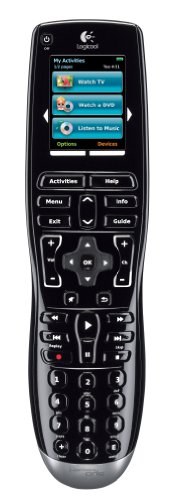
- Color LCD touchscreen and activity buttons
- Backlit contoured physical controls
- Learns IR codes from existing remotes
Best For: Simple entertainment setups wanting a color touchscreen
Best Rechargeable Samsung Remote

- Works with Samsung Smart TVs from 2019–2026
- USB-C and solar rechargeable design
- Voice control with a two-year warranty
Best For: Samsung TV owners wanting a rechargeable voice remote
Best Touchscreen Universal Remote

- 2.4-inch HD touchscreen with activity controls
- Supports up to 49 devices across multiple connection types
- Charging dock and app-based customization included
Best For: Complex home theater and smart-home systems
Best Backlit TCL Remote

- Voice control for compatible TCL Google, Android, and Fire TVs
- Motion-activated backlit keypad
- Dual infrared and Bluetooth operation
Best For: TCL TV owners wanting voice control and illuminated buttons
Best Connected Pick
SofaBaton X2 Touchscreen Universal Remote

- 2.4-inch HD touchscreen with customizable macros
- Supports 500,000+ devices across 6,000+ brands
- Hub provides 360-degree IR coverage up to 40 feet
Best For: Complex home theaters and Home Assistant setups
Best Simple Replacement
UltraPro OneTouch Backlit TV Remote

- Preprogrammed for several major TV brands
- Backlit keypad improves visibility in dark rooms
- Dedicated buttons for four popular streaming apps
Best For: Simple single-TV replacement control
Best Programmable Value

- Supports IR, Bluetooth, and RF devices
- Macros combine multiple commands with one press
- Cloud library covers 500,000+ devices
Best For: Multi-device setups preferring physical buttons
Best Overall – SofaBaton X2
The SofaBaton X2 is a strong pick among smart remote controls with touchscreen capability for anyone managing a mixed home-entertainment and smart-home setup. Its 2.4-inch display works alongside IR, Bluetooth, RF, and Wi-Fi connectivity, while customizable activities can combine multiple commands.
Best For: Advanced home theaters and users who want smart-home integration, macros, and broad device compatibility.
Pros:
- Supports more than 500,000 devices from over 6,000 brands.
- Touchscreen, rechargeable design, and customizable layouts.
- Works with Home Assistant and supports Alexa; included R1 repeater helps reach enclosed equipment.
- One-touch activities can coordinate entertainment devices and compatible smart-home commands.
Cons:
- Its extensive features may be more than needed for a basic TV setup.
- Smart-home and macro customization require additional setup through the app.
Choose the X2 when flexibility matters more than simplicity. The touchscreen, hub, repeater support, and multiple connection methods make it the most capable option here for a connected entertainment system.
Best for Simplicity – Philips BigEZ OneTouch
The Philips BigEZ OneTouch is a straightforward alternative to more complex smart remote controls with touchscreen features. It uses large, fully backlit buttons and preset TV support to make everyday control easier, especially for users who prefer physical controls.
Best For: Seniors, visually impaired users, and anyone seeking a simple replacement remote for a TV and one additional device.
Pros:
- Large backlit keypad with color-coded volume and channel buttons.
- Preset support for Samsung, LG, Sony, Vizio, and Roku TVs.
- Can control a TV plus a set-top box, streaming player, soundbar, or similar device.
- OneTouch setup and U.S.-based technical support simplify programming.
Cons:
- Uses infrared only, with a listed range of up to 30 feet.
- Does not offer a touchscreen or advanced smart-home activities.
This remote is best viewed as an accessibility-focused, button-based choice rather than a feature-rich touchscreen controller. Its limited two-device capacity is balanced by clear controls and simple setup.
Best App-Connected Option – One for All Smart Control Pro Touch
The One for All URC7985 Smart Control Pro Touch combines app control with a touch-oriented interface, making it a middle ground between basic universal remotes and more advanced smart remote controls with touchscreen functions. It supports infrared and Bluetooth and can manage up to 12 devices.
Best For: Users who want app-assisted customization, backlit keys, and control of several entertainment devices without a larger hub system.
Pros:
- Combines app control, infrared, and Bluetooth connectivity.
- Supports custom activities and screens.
- Can control up to 12 devices and includes backlit keys.
Cons:
- Its listed maximum range is 20 feet.
- Requires four AAA batteries rather than a rechargeable battery.
- Supplied information provides limited detail about supported device types beyond televisions.
The URC7985 suits shoppers who want a customizable, app-connected remote without the broader smart-home ecosystem of the SofaBaton. Confirm device compatibility if your setup includes several device categories.
Best Classic Touchscreen – Logitech Harmony One
The Logitech Harmony One is a classic choice for shoppers specifically seeking a universal remote with a color touchscreen. Its activity buttons, on-screen controls, backlit physical keys, and internet-based setup are designed to consolidate compatible entertainment remotes.
Best For: Users who want a traditional universal remote experience with a color LCD touchscreen and guided setup.
Pros:
- Includes a color LCD touchscreen with dedicated on-screen activity buttons.
- Contoured backlit buttons support use in dim rooms.
- Can learn infrared codes from existing remotes.
- Offers internet-based setup and live customer support.
Cons:
- The supplied details list support for only one device.
- Connectivity and compatibility information is less extensive than the newer multi-protocol options here.
- Uses a lithium-ion battery, but charging details are not provided.
The Harmony One remains appealing for its focused color-touchscreen design and activity-based control. It is a better fit for a simpler setup than for users seeking broad smart-home integration or extensive device capacity.
Best Rechargeable Samsung Remote – Voice-Control Replacement
For Samsung owners seeking smart remote controls with touchscreen alternatives, this rechargeable replacement focuses on voice control and lower battery waste rather than an on-device display. It is designed for Samsung Smart TVs from 2019 through 2026 and supports USB-C fast charging plus solar charging.
Best For: Samsung TV owners who want a rechargeable remote with voice search and broad model compatibility.
Pros:
- Compatible with Samsung Smart TVs from 2019–2026.
- Supports both USB-C fast charging and solar charging.
- Bluetooth voice control works from up to 40 feet after pairing.
- Includes a two-year full warranty.
Cons:
- It is designed for Samsung TVs rather than universal multi-device control.
- Voice control requires pairing according to the manual.
- No touchscreen is listed among the features.
This is a practical pick if your priority is avoiding disposable batteries while retaining voice commands on a compatible Samsung TV. Shoppers specifically requiring a touchscreen interface should consider a different model.
Best Touchscreen Universal Remote – SofaBaton X2
The SofaBaton X2 is the strongest match here for smart remote controls with touchscreen functionality. Its 2.4-inch HD touchscreen, charging dock, app customization, and support for up to 49 devices make it suited to complex home entertainment and smart-home setups.
Best For: Users consolidating TVs, streaming devices, audio equipment, lighting, and other compatible smart-home products into one programmable remote.
Pros:
- 2.4-inch HD touchscreen supports navigation, number keys, and macros.
- Controls up to 49 IR, Bluetooth, RF, and 2.4G Wi-Fi devices.
- Supports custom activities, button remapping, and cloud-saved preferences.
- Includes a Type-C charging dock and built-in IR hub with 40-foot range.
Cons:
- Some advanced smart-home features require setup through the app or Home Assistant.
- The optional repeater for control in other rooms is sold separately.
- Its one-year warranty is shorter than some competing options.
Choose the X2 when touchscreen navigation and multi-device automation matter more than a simple TV replacement. Its broad connectivity and activity-based controls can reduce remote clutter, though setup may take more effort than a dedicated TV remote.
Best Backlit TCL Remote – Voice-Enabled Replacement
This TCL replacement is a straightforward alternative to more advanced smart remote controls with touchscreen displays. It adds voice functionality for compatible TCL Google TV, Android TV, and Fire TV models, while backlit buttons make nighttime operation easier.
Best For: TCL TV owners who want voice commands, illuminated buttons, and a familiar physical keypad.
Pros:
- Supports voice control on compatible TCL Google, Android, and Fire OS TVs.
- Backlit keys activate when buttons are pressed and shut off after three seconds.
- Uses infrared and Bluetooth hardware for responsive operation up to 30 feet.
- Covered by a one-year warranty.
Cons:
- Requires two AAA batteries rather than rechargeable power.
- Compatibility depends on the specific TCL model and Bluetooth support.
- No touchscreen is included.
This model makes sense for TCL households that prefer physical buttons with added voice search and nighttime visibility. Check your TV series carefully before buying, since the listed compatibility is model-specific.
Best Connected Pick – SofaBaton X2 Touchscreen Universal Remote
For shoppers seeking smart remote controls with touchscreen functionality, the SofaBaton X2 combines a 2.4-inch HD display with broad device compatibility, customizable activities, and a hub for controlling equipment that may be hidden or out of direct line of sight.
Best For: Home theater setups and smart homes that need touchscreen control, macros, hub-based IR coverage, and advanced customization.
Pros:
- 2.4-inch HD touchscreen provides quick access to keypads and macros.
- Supports more than 500,000 devices across over 6,000 brands.
- Hub offers 360-degree IR transmission with a stated range of up to 40 feet.
- Supports customizable activities, app-based layouts, and Home Assistant integration through MQTT.
Cons:
- Its extensive customization and smart-home features may be more than basic TV users need.
- Optional IR extension accessories may be needed for especially distant or obstructed devices.
The X2 is the most capable choice here for a complex entertainment system. Its touchscreen, charging dock, hub, and automation support make it particularly appealing when a standard button remote is not enough.
Best Simple Replacement – UltraPro OneTouch Backlit TV Remote
The UltraPro OneTouch is a straightforward alternative to more advanced smart remote controls with touchscreen displays. It uses a fully backlit keypad, dedicated streaming hotkeys, and preprogrammed support for several popular TV brands.
Best For: Viewers who want an easy replacement remote for one compatible Samsung, LG, Sony, Vizio, Fire TV, or Roku TV.
Pros:
- No programming is required for supported Samsung, LG, Sony, Vizio, Fire TV, and Roku TVs.
- Fully backlit buttons are useful in dark rooms and bedrooms.
- Dedicated Netflix, Prime Video, Disney+, and YouTube buttons provide quick access when supported by the TV.
- Lightweight design and a stated range of up to 30 feet.
Cons:
- Controls only one device.
- Requires two AAA batteries, which are not included.
- Some Sharp and Insignia Roku TVs may require programming, and app hotkey support can vary.
This is the practical choice for replacing a lost or damaged TV remote without dealing with an app, hub, or touchscreen. It is less versatile than a universal multi-device model but easier to set up for supported televisions.
Best Programmable Value – SofaBaton U3 Universal Remote
The SofaBaton U3 is a flexible option for shoppers comparing smart remote controls with touchscreen models but who prefer a physical-button layout. It combines IR, Bluetooth, and RF support with macros, app setup, voice control through Google Assistant, and an air-mouse mode.
Best For: Multi-device entertainment systems that need programmable control without a touchscreen.
Pros:
- Works with IR, Bluetooth, and RF devices, including TVs, soundbars, and streaming devices.
- Macros can combine several actions into one button press.
- Maintains simultaneous Bluetooth connections with up to three devices.
- Cloud library covers more than 500,000 devices from over 6,000 brands.
Cons:
- Google Assistant voice control is not compatible with Apple TV Siri, Fire TV Alexa, or standard IR-only devices.
- R1 repeater support is available separately rather than included.
- It uses physical buttons instead of a touchscreen interface.
The U3 offers much of the flexibility expected from a smart universal remote while keeping a conventional button layout. It is a strong middle ground for users who want macros and broad compatibility but do not need the X2’s touchscreen and hub package.
How We Picked the Best Smart Remote Controls with Touchscreen
We focused on practical control rather than touchscreen features alone. Our selection covers universal remotes, hub-based systems, app-configured models, dedicated Samsung and TCL replacements, and simplified big-button designs. We considered device compatibility, connection methods, activity control, setup requirements, ergonomics, charging, button layout, and likely everyday reliability.
Because the products differ substantially, the best option is not necessarily the most advanced one. A home theater with several components may benefit from a hub and activity shortcuts, while a single television may be easier to manage with a dedicated replacement remote.
Quick Comparison
| Best For | Look For | Typical Advantage |
|---|---|---|
| Complex home theater | Hub, Wi-Fi, IR, Bluetooth, or RF | Controls hidden devices and multi-step activities |
| Streaming-focused setups | Touchscreen, app setup, activity buttons | Faster access to favorite services and inputs |
| One-brand TV replacement | Model-specific compatibility | Simple setup and familiar controls |
| Older adults or accessibility needs | Large buttons, backlighting, clear labels | Easier viewing and fewer accidental presses |
| Minimalist users | Rechargeable battery and streamlined layout | Less clutter and convenient daily charging |
Key Buying Factors for Smart Remote Controls with Touchscreen
Compatibility and Connectivity
Check every device you intend to control, including televisions, soundbars, streaming boxes, receivers, game consoles, and cable boxes. IR handles many traditional components, while Bluetooth is common for smart TVs and streaming devices. Wi-Fi or a dedicated hub can extend control to equipment inside cabinets or across the room.
Setup and Customization
App-based setup can simplify device discovery and let you create activities such as “Watch TV” or “Play Music.” However, it may require a phone, account, wireless network, and occasional troubleshooting. If you prefer a quick replacement, choose a model designed for your exact TV brand.
Touchscreen, Physical Buttons, and Visibility
A touchscreen can show context-sensitive commands and reduce clutter, but physical buttons remain useful for volume, navigation, and use without looking down. Backlighting, readable labels, tactile feedback, and a comfortable grip matter as much as screen size.
Power and Reliability
Rechargeable models reduce battery waste and are convenient when paired with a charging dock. Confirm charging-port placement, expected runtime, and whether the remote remains usable while charging. Also check return coverage in case a particular device or command is not supported.
Who Should Buy Which Smart Remote Controls with Touchscreen?
Choose a hub-based universal remote if you have several components, concealed equipment, or want one button to start a complete activity. Choose an app-assisted touchscreen model if you are comfortable configuring devices and want deeper customization. Choose a dedicated Samsung or TCL replacement for the simplest route to controlling one compatible television. Choose a big-button or backlit remote when readability and straightforward operation matter more than advanced automation. Choose a simpler universal remote if you want broad compatibility without the cost or complexity of a full smart-home setup.