A good universal remote can replace a cluttered coffee table full of controllers, while a connected hub adds hands-free voice commands, app control, and reliable device coordination.
We compare 10 smart remote controls with hub and related options—from advanced touchscreen systems to simple IR blasters and replacement remotes—so you can match features to your setup and budget.
Best 10 Smart Remote Controls with Hub Picks for 2026
Most Versatile
SwitchBot Universal Remote with Hub 3

- Controls up to 25 devices and 10 scenes
- Includes IR learning and Apple Home/Matter support
- Rechargeable battery lasts up to 150 days
Best For: Mixed IR appliances and SwitchBot Bluetooth devices
Best Smart Button

- Tap, double-tap, and rotate controls
- Controls and dims Tapo lights
- Also works as a hub-connected doorbell button
Best For: Tapo lighting and simple smart-home actions
Best for Home Theater

- Supports over 500,000 entertainment devices
- Creates one-touch Activities and macros
- Hub controls devices up to 40 feet away
Best For: Multi-device TV and home-theater systems
Established All-in-One
Logitech Harmony Smart Control
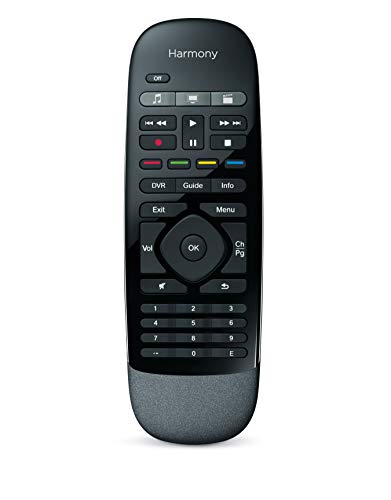
- Controls up to eight entertainment devices
- Works with a smartphone app or included remote
- Hub reaches devices behind doors or walls
Best For: Smaller TV and streaming setups
Best Compact IR Hub

- Learns existing IR remotes in about five seconds
- Controls up to 18 compatible appliances
- Works with major voice assistants
Best For: Simple app and voice control for infrared home appliances
Best Home Theater Hub Remote
SofaBaton X1S Universal Remote

- Works with over 500,000 entertainment devices
- Runs multi-device activities with one press
- Offers app customization, macros, and hub signaling
Best For: Complex home theater setups with multiple components
Best Samsung Replacement
MYHGRC Backlit Samsung TV Remote

- Requires no programming or setup
- Includes backlight and Smart Hub button
- Designed for Samsung LED smart TVs
Best For: Straightforward replacement control for a compatible Samsung TV
Best Customizable Pick

- Supports 500,000+ devices from 6,000+ brands
- Touchscreen, dock, macros, and app customization
- 360-degree hub control and smart-home integration
Best For: Advanced home theaters and Home Assistant users
Most Versatile – SwitchBot Universal Remote with Hub 3
The SwitchBot Universal Remote with Hub 3 is a flexible pick among smart remote controls with hub, combining IR appliance control with support for SwitchBot Bluetooth devices. It can manage up to 25 devices and create up to 10 custom scenes, though compatibility should be confirmed before purchase.
Best For: Households that want one rechargeable remote for TVs, appliances, SwitchBot devices, and select Bluetooth streaming boxes.
Pros:
- Controls up to 25 devices and supports 10 custom scenes.
- Includes Hub 3 for IR learning, code matching, Matter, and Apple Home integration.
- Rechargeable battery can last up to 150 days per charge.
- Simple 19-button layout and touch wheel suit family use.
Cons:
- Supports 2.4GHz Wi-Fi only.
- Does not support RF remotes or most third-party Bluetooth devices.
- Matter control through this remote is currently supported in Apple Home, not necessarily Google Home or Alexa.
With its broad IR coverage and SwitchBot-focused Bluetooth support, this is a strong all-around option when its compatibility limits match your setup. Verify individual devices first, especially if you rely on RF or third-party Bluetooth equipment.
Best Smart Button – Tapo S200D Wireless Dimmer
The Tapo S200D is a compact choice among smart remote controls with hub for managing Tapo lighting and smart-home actions. Its tap, double-tap, and rotate controls offer several ways to trigger actions, but the Tapo H100 hub and a secured 2.4GHz Wi-Fi network are required.
Best For: Tapo users who want convenient lighting control, dimming, scenes, or a secondary doorbell-style button.
Pros:
- Supports single tap, double tap, and rotation actions.
- Provides wireless on/off and dimming control for Tapo lights.
- Sub-1G communication helps provide extended battery life and wider coverage than Wi-Fi.
- Can function as a doorbell with the Tapo Hub H100 and 19 ringtone options.
Cons:
- Tapo Hub H100 is required and sold separately.
- Designed for Tapo lights and Tapo hub functions rather than universal device control.
- Requires a secured 2.4GHz Wi-Fi network for the hub.
This is less a traditional entertainment remote than a customizable smart-home button. It makes sense if you already use Tapo equipment and want quick, physical control without reaching for an app.
Best for Home Theater – SofaBaton X1S with Hub
The SofaBaton X1S is a capable option among smart remote controls with hub for consolidating home-theater equipment. Its hub-based setup, customizable buttons, and one-touch Activities can coordinate TVs, soundbars, receivers, projectors, and streaming devices without requiring direct line-of-sight.
Best For: Home-theater setups that need activity macros, broad device compatibility, and control of equipment inside cabinets.
Pros:
- Supports more than 500,000 entertainment devices across IR, Bluetooth, and Wi-Fi.
- One-touch Activities can power devices on and switch inputs together.
- Hub provides signal coverage up to 40 feet and supports wired IR transmitters for cabinets.
- Offers remappable buttons, macros, and a remote-finder beep feature.
Cons:
- Alexa and Google Assistant voice control applies to Activities, not individual devices.
- The remote itself has no microphone.
- Requires app setup for device configuration and customization.
The X1S is particularly useful when several entertainment components need to work together. Its activity-based approach reduces the friction of switching inputs and powering multiple devices individually.
Established All-in-One – Logitech Harmony Smart Control
Logitech Harmony Smart Control with Smartphone App and Simple All In One Remote - Black
Check Price On AmazonThe Logitech Harmony Smart Control remains a straightforward option among smart remote controls with hub for managing entertainment systems through either the included remote or a smartphone app. Its hub can reach devices behind cabinet doors or walls and supports up to eight devices.
Best For: Users seeking a familiar smartphone-and-remote setup for a modest entertainment system.
Pros:
- Controls devices with the included remote or Harmony smartphone app.
- Supports more than 270,000 devices, including streaming players, consoles, and TVs.
- Hub enables control of hidden devices behind cabinet doors or walls.
- App provides swipe and tap controls plus up to 50 favorite channel icons.
Cons:
- Supports up to eight devices, fewer than some newer universal remotes.
- Listed maximum range is 10 feet.
- Smartphone app compatibility is specified for older iOS and Android versions.
This model is best suited to smaller entertainment setups where app control and hidden-device access matter more than extensive smart-home integration. Its eight-device limit is worth checking against your equipment list.
Best Compact IR Hub – SwitchBot Hub Mini
The SwitchBot Hub Mini is a practical entry point for smart remote controls with hub functionality. It learns existing infrared remotes in about five seconds, then brings compatible TVs, air conditioners, fans, set-top boxes, and other IR appliances into one app.
Best For: Shoppers who want a compact, USB-powered IR hub with app control and voice-assistant compatibility.
Pros:
- Smart Learning mode can mimic an existing remote quickly.
- Controls multiple infrared appliances from one app, with support for up to 18 devices.
- Works with Alexa, Google Assistant, Siri, and IFTTT.
- Portable USB-powered design includes adhesive mounting.
Cons:
- Supports 2.4GHz Wi-Fi only, not 5GHz.
- Requires a reasonably clear line of sight between the hub and IR devices.
The Hub Mini is a strong choice for straightforward smart-home upgrades, especially if you primarily need app and voice control for infrared appliances. Placement matters, so avoid obstructions and metal objects that could interrupt Wi-Fi or IR signals.
Best Home Theater Hub Remote – SofaBaton X1S Universal Remote
The SofaBaton X1S is designed for shoppers who want smart remote controls with hub support for a larger entertainment setup. Its cloud database covers more than 500,000 IR, Bluetooth, and Wi-Fi devices, while activities can coordinate several components with one button press.
Best For: Home theater users who want customizable control over TVs, soundbars, streaming devices, projectors, and other entertainment equipment.
Pros:
- Supports a broad device database covering more than 500,000 devices.
- One-touch activities can power devices on and select the appropriate input.
- App customization includes button reassignment, favorite channels, macros, and a remote tracker.
- Hub provides 360-degree signaling and includes wired IR transmitters for enclosed cabinets.
Cons:
- Its feature-rich setup may take more customization than a basic replacement remote.
- The listed maximum range is 40 feet.
The X1S is the most capable option here for consolidating a multi-device entertainment system. Its backlit buttons, lift-to-wake feature, activities, and customizable controls make it especially useful when several components must work together.
Best Samsung Replacement – MYHGRC Backlit Samsung TV Remote
The MYHGRC replacement is a simple alternative to smart remote controls with hub features, focusing instead on direct infrared control for Samsung LED smart TVs. It requires no programming: insert two AA batteries and use the dedicated Smart Hub button and backlight.
Best For: Samsung TV owners who need an uncomplicated replacement remote with illuminated buttons.
Pros:
- No setup or programming is required after inserting batteries.
- Backlight helps make buttons easier to see in dark rooms.
- Designed for Samsung LED smart TVs and includes a Smart Hub button.
- Manufacturer states a fast 0.2-second transmission response time.
Cons:
- Supports one compatible device type: Samsung television.
- Does not provide a Wi-Fi hub, app control, or voice-assistant integration.
- Two AA batteries are required and are not supplied.
This remote makes sense when the goal is replacing a lost or faulty Samsung TV handset rather than building a connected entertainment system. Confirm TV compatibility before buying, since it is not a multi-device universal hub.
Best Customizable Pick – SofaBaton X2 Universal Remote
For shoppers seeking smart remote controls with hub functionality, the SofaBaton X2 combines a touchscreen remote, broad device support, customizable activities, and a dedicated hub. It is designed for complex entertainment setups involving TVs, soundbars, streaming devices, and smart-home integrations.
Best For: Users who want a highly customizable remote for multi-device entertainment and Home Assistant setups.
Pros:
- Supports more than 500,000 devices across over 6,000 brands.
- Includes a 2.4-inch touchscreen, rechargeable design, and charging dock.
- Hub provides 360-degree IR transmission with a stated range of up to 40 feet.
- Supports one-touch activities, app-based customization, Alexa, Google Home, and Home Assistant integration.
Cons:
- The extensive customization and smart-home features may be more than needed for a simple TV setup.
- The optional IR extension cable may be necessary for obstructed or farther-away devices.
The X2 is the most feature-rich option here for buyers who want a central control system rather than a basic replacement remote. Its touchscreen, hub, macros, and automation support make it particularly suitable for advanced home theater arrangements.
Best Direct Replacement – Samsung HUB TV Remote Replacement
This replacement remote is a focused choice among smart remote controls with hub compatibility, but it is intended specifically for listed Samsung HUB 4K curved TVs. It requires no pairing or programming, making it a straightforward solution when the original remote is lost or damaged.
Best For: Owners of compatible Samsung HUB 4K curved TV models who need a simple replacement controller.
Pros:
- Compatible with a broad list of Samsung HUB 4K curved TV models and related remote numbers.
- No pairing or programming is required; install two batteries and use it.
- Offers a stated 32-foot transmission distance and 0.2-second response time.
- Uses soft buttons and an ABS construction for everyday operation.
Cons:
- Supports only one device category and is not a universal multi-device remote.
- Batteries are not included.
- It does not include voice or touchpad functions.
This is the practical pick when compatibility is the priority. Verify that the TV model and original remote match the supplied compatibility list before ordering, since this controller is not designed for general-purpose home theater control.
Best Hub-Based Universal Value – SofaBaton X1S Smart Remote
The SofaBaton X1S is one of the more approachable smart remote controls with hub support for managing multiple entertainment devices. Its IR, Bluetooth, and Wi-Fi connectivity, combined with one-click activities and customizable keys, helps simplify a multi-device setup.
Best For: Households that want hub-based control of a TV, sound system, streaming devices, and set-top boxes.
Pros:
- Supports more than 500,000 device models from over 6,000 brands.
- Controls devices through IR, Bluetooth, and Wi-Fi with a stated range of up to 40 feet.
- Creates one-click activities for operating multiple devices together.
- Includes backlit buttons, a raise-to-wake LCD screen, and a find-my-remote feature.
Cons:
- Its feature set may require setup time for users seeking only basic remote control.
- The listed battery information is inconsistent, so buyers should confirm the required battery setup.
The X1S balances universal compatibility and hub-based convenience without the X2’s touchscreen-focused design. It is a solid fit for viewers who want reliable room-wide control, customizable activities, and smart-home flexibility in one system.
How We Picked the Best Smart Remote Controls with Hub
We evaluated these products by looking at compatibility, connection methods, setup requirements, automation features, control options, and everyday usability. The selection includes complete remote-and-hub systems, standalone hubs, smart buttons, and replacement remotes because “smart remote” setups vary widely. We also considered whether each option supports common home-theater equipment such as televisions, streaming devices, receivers, air conditioners, and Bluetooth accessories.
Products that require a separate hub were assessed as part of the total setup rather than as complete out-of-the-box solutions. We also paid attention to practical details including customizable buttons, activity macros, touchscreen controls, charging docks, backlighting, mobile apps, and voice-assistant compatibility.
Quick Comparison
| Type | Best For | What to Expect |
|---|---|---|
| Universal remote with hub | Multi-device home theaters | Centralized control, activities, and app or voice access |
| IR hub or blaster | Controlling devices from a phone or smart speaker | Compact setup; usually limited to infrared devices |
| Smart button or dimmer | Simple scenes and shortcuts | Convenient triggers, but not a full remote replacement |
| Replacement TV remote | Replacing a lost or damaged controller | Focused compatibility rather than broad automation |
Key Buying Factors for Smart Remote Controls with Hub
Compatibility
Check whether the system supports your exact devices and connection types. IR handles many televisions, soundbars, receivers, and appliances, while Bluetooth and Wi-Fi are important for streaming boxes and newer equipment. A product may advertise broad compatibility but still lack support for a specific model or function.
Hub Placement and Network Requirements
A hub needs to communicate with your devices, so placement matters. Confirm whether it requires 2.4GHz Wi-Fi, a constant power connection, or line-of-sight to infrared equipment. Multiple rooms may require additional hubs or careful positioning.
Activities, Macros, and Customization
Look for one-touch activities such as “Watch TV” or “Movie Night” if you want several devices to turn on and switch inputs together. Custom buttons and app-based editing are useful when your setup includes less-common commands.
Remote Design and Daily Use
Physical buttons are often faster for volume and playback, while a touchscreen can offer more flexibility. Backlighting, button spacing, charging methods, and battery life matter when the remote is used in a dark room. Voice and smartphone control are helpful backups, not always replacements for a tactile remote.
Who Should Buy Which Smart Remote Controls with Hub?
Choose a full universal remote with hub if you want to consolidate a complex home theater and automate multi-step routines. A touchscreen model with a charging dock is best for households that value premium control and frequent customization.
An IR hub is a better fit if you already use Alexa, Google Home, or a phone and mainly need remote access for televisions, air conditioners, or other infrared appliances. Choose a smart button when you want quick scene triggers rather than complete device control.
Finally, select a replacement Samsung remote when your priority is restoring basic TV operation at low cost. Confirm the television model and required buttons before buying, especially if you need Smart Hub, voice, or streaming functions.